

Key Takeaways
- Content creators spend significant time each week manually moving video files between TikTok and X.
- Most users rely on the basic share button which only posts a link rather than a native video.
- You can set up automated posting using AmpiFire, Repurpose.io, or IFTTT to ensure your content reaches both audiences.
- Automated scheduling allows creators to publish content to multiple platforms in 20 minutes instead of hours.
- AmpiFire’s AmpCast AI generates 8 content formats from a single topic for distribution to 300+ sites including Google News and YouTube.
Four Ways to Cross-Post Between TikTok and X/Twitter
Cross-posting between TikTok and X/Twitter takes just a few minutes to set up with the right tool. AmpiFire’s AmpCast AI handles this at scale, turning one topic into 8 content formats (news articles, blog posts, interview podcasts, longer informational videos, reels/shorts, infographics, flipbooks/slideshows, and social posts) and distributing them across 300+ high-authority sites. Simpler tools like Hootsuite or Buffer also let you schedule and publish to both platforms from a single dashboard.
Both approaches cut the manual grind of reformatting and re-uploading content across platforms. Here are four ways to do it, from fully automated to manual, with AmpCast AI at the top.

How AmpiFire Works:
- Research & Target: Find high-demand topics your buyers search for.
- Create & Repurpose: AmpiFire’s AmpCast AI generates news articles, blog posts, interview podcasts, longer informational videos, reels/shorts, infographics, flipbooks/slideshows, and social posts.
- Distribute & Amplify: Auto-publish to 300+ sites, including Google News, YouTube, Spotify, and major news networks.
Get more traffic from people who want to buy your stuff, and powerful “As Seen On” trust badges for your site.
Do It Yourself (with AI), Done For You Content, & 100% Managed Organic Growth options available.
Grow Your Free Traffic From Everywhere
Best Ways to Auto-Post from TikTok to X/Twitter
1. Use AmpCast AI to Create and Distribute Multi-Format Content
Most auto-posting tools solve one problem: getting the same video from TikTok onto X/Twitter without doing it manually. AmpiFire’s AmpCast AI handles that and takes it further. Instead of copying a single video between two platforms, AmpCast AI generates eight original content formats from one topic (news articles, blog posts, interview podcasts, longer informational videos, reels/shorts, infographics, flipbooks/slideshows, and social posts) and automatically publishes to TikTok, X/Twitter, and 300+ other high-authority sites including YouTube, Spotify, and Google News.
The entire process takes around 20 minutes from topic input to full distribution, with no special technical skills required. So rather than auto-posting one piece of content to two platforms, you’re auto-distributing platform-optimized content everywhere your audience already spends time.
2. Set Up Trigger-Based Cross-Posting Automation
Trigger-based tools monitor your TikTok account and automatically publish to X whenever you post a new video. Platforms like Repurpose.io and IFTTT both support this workflow. Repurpose.io downloads your TikTok video, removes the watermark, and uploads it natively to X, while IFTTT’s pre-built applets share a post with your video’s link and cover image.
One thing to watch: trigger-based tools depend on active API connections between platforms. If TikTok or X updates its API, your automation can break without warning. Check your connections quarterly and after any major platform update to make sure posts are still going through.
3. Schedule to Both Platforms from a Single Dashboard
Social media management dashboards like Hootsuite and Buffer let you upload your video once and publish it to both TikTok and X/Twitter simultaneously. You select your accounts, write your caption, and schedule or post immediately. The platform handles formatting for each network automatically.
Unlike trigger-based automation, scheduling requires you to plan posts in advance rather than react to new TikTok uploads. That said, most dashboards include content calendars that make batch-scheduling a full week of posts straightforward. This upfront planning often leads to more consistent posting habits than publishing on the fly.
4. Use TikTok’s Built-In Share Menu
TikTok includes a native share button on every video that lets you share a link to X/Twitter in a few taps. Here’s how it works:
- Open any TikTok video.
- Tap the share arrow.
- Select the X/Twitter icon.
- Edit your caption if needed, then post.
The app composes a post with your caption and a link back to the TikTok video.
The tradeoff is that this method shares a link rather than the video itself. Your X audience has to tap through TikTok to watch. It’s also fully manual, so it won’t scale if you’re posting multiple times a day.
What Content Actually Works on Both TikTok and X?

Optimal Video Dimensions for Cross-Posting
X supports various formats: landscape (16:9), square (1:1), and vertical (9:16). The platform has increasingly favored vertical video since launching a dedicated vertical video feed in January 2025.
For a smooth cross-posting experience, consider shooting in full 9:16 vertical, framing your key action in the center of the frame. This ensures your content looks intentional on both platforms rather than awkwardly cropped or letterboxed.
Caption & Hashtag Strategies
X and TikTok both have caption character limits, though they differ significantly. X allows 280 characters for free users (up to 25,000 for Premium subscribers), while TikTok supports up to 4,000 characters natively. This means your automation tool needs to handle caption adaptation intelligently.
The best practice is to front-load your most important message and call to action in the first 280 characters of your TikTok caption. This ensures the essential content carries over cleanly to X for free-tier users. Note that many third-party scheduling tools enforce a 2,200-character API cap on TikTok captions regardless of the native 4,000-character limit, so check your tool’s actual cutoff before writing longer captions.
For hashtags, the two platforms now call for different approaches. On TikTok, use 3–5 tightly relevant hashtags. TikTok enforces a hard limit of 5 hashtags per post as of August 2025, so choose each one deliberately.
On X, keep it to 1–2 hashtags at most; X’s algorithm now categorizes content using AI rather than hashtag signals, and data shows posts with more than two hashtags see a measurable drop in engagement. On both platforms, keyword-rich natural language in the caption itself now does more for discoverability than hashtags alone.
When to Customize vs. When to Auto-Post
While automation is powerful, not every post deserves identical treatment across platforms. High-value content, such as product launches, special announcements, or videos with viral potential, may warrant customized posting strategies for each platform.
For these critical posts, consider using automation as a starting point but then manually optimizing the Twitter version with platform-specific enhancements.
What Auto-Posting Mistakes Should You Avoid?
Posting the Same Content Too Frequently
Automation makes it easy to cross-post everything, but that doesn’t mean you should. Bombarding your Twitter audience with every TikTok you create can lead to follower fatigue and unfollows, especially if you’re a prolific TikTok creator.
Instead, use selective sharing by implementing hashtag filters that cross-post only your highest-quality or most broadly relevant content. This curation approach ensures your Twitter audience sees your best work without feeling overwhelmed by the volume of content.
Ignoring Platform-Specific Features
Each platform has unique features that can enhance your content’s performance when properly utilized. Auto-posting can sometimes strip away these platform-specific optimizations if not configured correctly.
For example, X allows for Community Notes, polls, and specific text formatting features that have no direct equivalent on TikTok. Note that TikTok launched its own community fact-checking feature called Footnotes in the US in July 2025, which functions similarly to Community Notes.
Similarly, TikTok offers duets, stitches, and effect features that don’t translate directly to Twitter. Be mindful of these differences and occasionally supplement your automated posts with platform-native content that makes the most of each environment’s unique strengths.
Forgetting to Update Linked Accounts
One of the most common automation failures happens when creators set up their cross-posting workflow and then forget about it entirely. Social platforms regularly update their APIs, security protocols, and connection requirements.
Without periodic maintenance, your automation can silently fail, leading you to believe your content is being shared when it’s not. Set a quarterly reminder to verify all your automation connections are working correctly.
How To Auto Post Between X and TikTok: Comparison Table
| Method | Tools | Automation Level | Content Format | Best For |
| Use AmpCast AI | AmpiFire’s AmpCast AI | Fully automated (manual input) | 8 formats across 300+ sites | Creators who want multi-platform distribution from a single topic |
| Trigger-Based Automation | Repurpose.io, IFTTT | Fully automated | Video repost (native or link) | Creators who post frequently on TikTok and want every video (or filtered videos) on X |
| Dashboard Scheduling | Hootsuite, Buffer | Semi-automated (manual scheduling) | Video with adapted captions | Teams or creators who batch-plan content on a weekly calendar |
| TikTok Share Menu | TikTok (built-in) | Manual | Link post (not native video) | Occasional cross-posters who only share select videos to X |
Scale Past Two Platforms With AmpiFire’s AmpCast AI
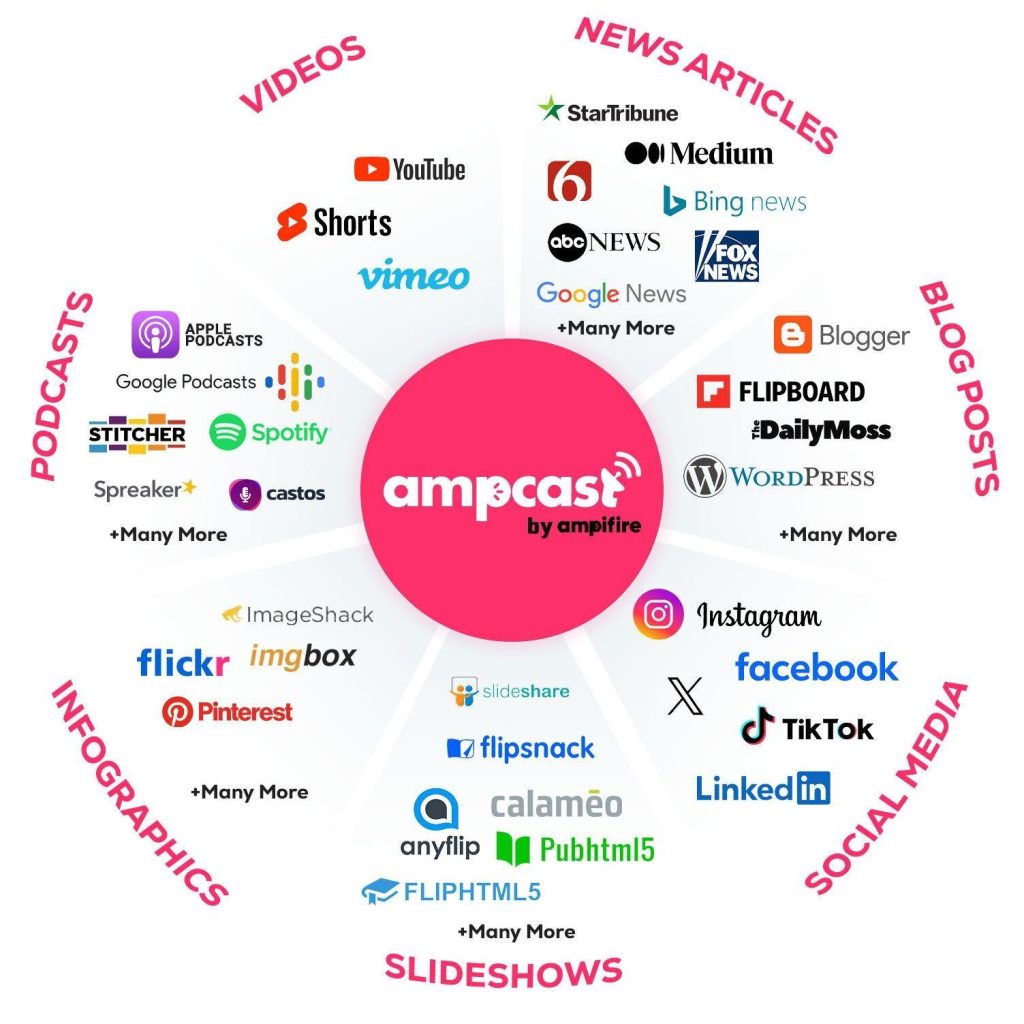
Auto-posting between TikTok and X/Twitter keeps your content consistent across two channels. But your audience isn’t limited to two platforms. AmpCast AI turns one topic into 8 content formats (news articles, blog posts, interview podcasts, longer informational videos, reels/shorts, infographics, flipbooks/slideshows, and social posts) and distributes them to 300+ high-authority sites automatically.
AmpCast AI handles all the formatting, publishing, and distribution. Set up your first campaign today and put your content to work across 300+ sites.
Frequently Asked Questions (FAQs)
Is auto-posting between TikTok and X/Twitter actually free?
Basic cross-posting features are often free, but comprehensive automation tools charge for advanced features. Most tools offer tiered pricing with free options for casual users. The time savings usually make even paid solutions worthwhile for regular content creators. Compare a few platforms side by side before committing so you pick the plan that matches your posting frequency and budget.
Will my auto-posted videos look good on both platforms?
Quality automation tools automatically adapt your content to each platform’s specifications. Videos get properly formatted, captions adjust to character limits, and media displays correctly. The key is choosing tools that understand platform differences. Run a test post before going live to confirm your video, thumbnail, and caption all render the way you expect on both TikTok and X.
How often should I verify my automation is working?
Check your connections at least every three months and after any platform updates. Social networks regularly update their systems, which can silently break automation. A quick verification prevents weeks of missed cross-posts. Set a recurring calendar reminder so this check becomes part of your regular workflow rather than something you forget until content stops appearing.
Can I control which TikTok posts go to X?
Yes, though the method depends on the tool. Repurpose.io lets you selectively choose which videos get published rather than auto-sharing everything. IFTTT’s standard TikTok trigger fires on every new video, but Pro+ users can add filter code to check captions for a specific keyword before triggering a post. Most dashboard schedulers like Hootsuite give you full control by default, since you manually select which content to publish to each platform.
How does AmpiFire’s AmpCast AI differ from basic cross-posting tools?
AmpiFire’s AmpCast AI creates eight content formats (news articles, blog posts, interview podcasts, longer informational videos, reels/shorts, infographics, flipbooks/slideshows, and social posts) from a single topic and publishes them to 300+ sites, including YouTube, Spotify, Google News, and Pinterest. Unlike basic tools that copy content between two platforms, AmpCast automatically transforms and distributes your message across the entire web. This makes it a full distribution engine rather than a simple copy-paste shortcut.
*Disclaimer: Results may vary based on individual circumstances, business type, and content strategy. The time savings and outcomes mentioned are based on typical user experiences and are not guaranteed. For specific pricing and service details, please visit AmpiFire.
Author
Related Posts


How to Auto Post between Instagram & TikTok
Learn how to automatically post content between Instagram and TikTok. Find out tools, strategies, and best practices for seamless cross-platform…

How to Auto Post Vimeo Videos to Twitter/X
Learn how to automatically post Vimeo videos to Twitter/X. Step-by-step guide with tools, best practices, and automation strategies to grow…

How to Auto Post between Facebook & TikTok
Learn how to auto-post between Facebook and TikTok. Find out about tools and methods to streamline your social media content…

How to Auto Post between Facebook & X/Twitter
Learn how to auto post between Facebook and X/Twitter. Find out tools and methods to streamline your social media content…


How to Auto Post between X/Twitter & Instagram
Learn how to auto post between X (formerly Twitter) and Instagram to save time, streamline content sharing, and keep your…

How to Auto Post between X/Twitter & LinkedIn
Learn how to auto post between X/Twitter and LinkedIn. Find out tools and methods to streamline your social media content…








