


Key Takeaways
- Lumen5 turns text into video by dividing a blog post, script, or prompt into short scenes, matching each with stock footage, and producing a draft in minutes.
- Paid plans include artificial intelligence (AI) script writing, over 1,000 voices, automated captions, and voice cloning, but voiceover, animation, and translation are metered as annual allowances rather than unlimited.
- Free covers five 720p videos monthly; Basic costs $29, Starter $79, and Pro $199, with annual billing cutting those to $19, $59, and $149 a month.
- Lumen5 is worth it for solo creators publishing steady short-form video, since 1080p export and Shutterstock access start on Starter and only Team supports more than one user.
- AmpiFire’s AmpCast AI builds eight assets from one topic, including videos, podcasts, and news articles, so a single idea reaches buyers in more formats than one video can.
Is Lumen5 Worth Paying For?
Lumen5 is worth it when you publish video from written content regularly and work on your own. After the free tier, no plan limits how many videos you make, so the real ceiling is the annual credit allowance for voiceover, animation, and translation. Most buyers compare tiers on video count and miss that.
Seats are the bigger constraint. Free through Pro are all single-user accounts, and Pro’s three workspaces just separate clients under one login rather than adding a colleague. Permissions, approval workflows, and single sign-on only arrive on Team, which is quoted on request.
AmpiFire’s AmpCast AI offers a fuller option, especially once a team is involved. Instead of one video at a time behind single-seat limits, it takes a single message and creates videos, reels, podcasts, news articles, and slideshows, then publishes them across the platforms buyers use while researching.

How AmpiFire Works:
- Research & Target: Find high-demand topics your buyers search for.
- Create & Repurpose: AmpiFire’s AmpCast AI generates news articles, blog posts, interview podcasts, longer informational videos, reels/shorts, infographics, flipbooks/slideshows, and social posts.
- Distribute & Amplify: Auto-publish to 300+ sites, including Google News, YouTube, Spotify, and major news networks.
Get more traffic from people who want to buy your stuff, and powerful “As Seen On” trust badges for your site.
Do It Yourself (with AI), Done For You Content, & 100% Managed Organic Growth options available.
Grow Your Free Traffic From Everywhere
What Lumen5 Does
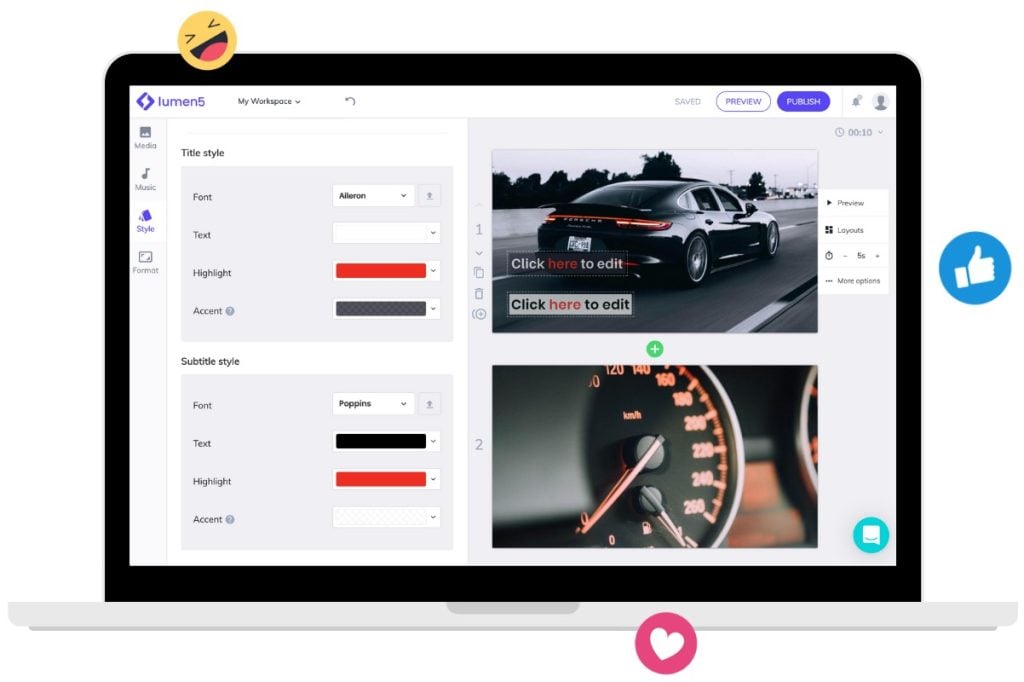
Lumen5 starts from text. You supply a blog post URL, a script, an uploaded document, or a short prompt, and the software splits that text into scenes of one or two lines each. It then selects a stock photo or video clip for each scene and produces a draft video within a few minutes.
Editing happens in a scene-based workspace rather than a frame-based timeline. You replace clips, rewrite lines, apply your logo and colors, add music, and either record a voiceover or generate one. The workflow requires no prior video editing knowledge.
Lumen5 Features
AI script, voiceover, & translation
All paid plans include AI script writing, automated captions, premium AI image generation, and more than 1,000 AI voices. Voiceover time is metered annually at 24 minutes on Free, 240 on Basic, 720 on Starter, and 2,160 on Pro. Voice cloning records a sample of your own voice and applies it as narration, with one clone on Basic and Starter and three on Pro.
Animation minutes are metered at 12 minutes a year on Basic, 24 on Starter, and 60 on Pro. Translation credits produce localized versions of a finished video, allowing 12 a year on Basic and Starter, 60 on Pro, and unlimited versions on Team. These annual allowances, rather than video count, set the ceiling on narrated and translated output.
Media library & branding
All plans include a licensed library of stock photos and video, an icon library, media and music uploads, and talking head overlays. Starter and above reach the Shutterstock library. Pro adds 300 Shutterstock editorial downloads a year, which covers footage tied to real events and public figures, and Team receives a custom allowance.
Custom colors and the font library are included on every plan, including Free, and Basic adds the first brand kit. Pro raises that to three brand kits and permits uploads of custom fonts and watermarks. Bespoke branded templates, custom transitions, bespoke scene designs, and work from Lumen5 creative services are restricted to Team.
Collaboration & admin controls
Free, Basic, Starter, and Pro are single-user accounts. Pro includes three workspaces, which separate projects or clients under that one login without adding a second seat.
Team is the only plan with multiple users, and it carries the controls that follow from shared access: granular user permissions, workspace and brand management, a video approval workflow, single sign-on, and an audit log. It also adds DAM integration, invoiced billing, procurement support, security and compliance review, training workshops, and a customer success manager.
Lumen5 Pricing: Monthly & Annual Plans
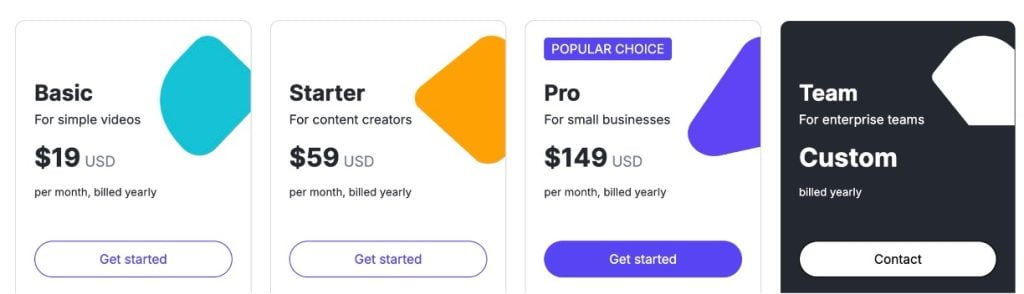
Lumen5 lists five plans. Four carry published prices, and Team is quoted on request.
- Free requires no card details. It allows five videos a month, capped at two minutes and 720p, with a Lumen5 branded outro on every export.
- Basic costs $29 monthly, or $19 a month billed yearly. It removes the branded outro and the five-video monthly cap, raises the length limit from two minutes to ten, and opens premium AI images, the first brand kit, and chat support.
- Starter costs $79 monthly, or $59 a month billed yearly. It is the first tier exporting at 1080p and the first reaching the Shutterstock library.
- Pro costs $199 monthly, or $149 a month billed yearly. It triples brand kits, adds three workspaces, permits custom font and watermark uploads, and carries the largest published AI credit allowances.
Team is quoted on request and billed annually. It is the only plan supporting more than one user.
What annual billing actually saves
Lumen5 advertises 25% off annual billing. The figure is accurate on the upper tiers and understates the discount on the cheapest one.
Paid month by month across a year, Basic totals $348, Starter $948, and Pro $2,388. Billed annually, the same plans total $228, $708, and $1,788, a saving of $120, $240, and $600. That works out to roughly 34% on Basic and 25% on Starter and Pro.
Lumen5 Plans Compared
| Feature | Free | Basic | Starter | Pro | Team |
| Monthly price | $0 | $29 | $79 | $199 | On request |
| Billed yearly | $0 | $19/mo | $59/mo | $149/mo | On request |
| Videos per month | 5 | Unlimited | Unlimited | Unlimited | Unlimited |
| Resolution | 720p | 720p | 1080p | 1080p | 1080p |
| Max video length | 2 min | 10 min | 10 min | 10 min | 10 min |
| Lumen5 branding removed | No | Yes | Yes | Yes | Yes |
| AI voiceover minutes | 24/yr | 240/yr | 720/yr | 2,160/yr | Custom |
| Voice clones | None | 1 | 1 | 3 | Custom |
| Brand kits | None | 1 | 1 | 3 | Custom |
| Shutterstock library | No | No | Yes | Yes | Yes |
| Users | 1 | 1 | 1 | 1 | Multiple |
| Approval workflow and SSO | No | No | No | No | Yes |
Lumen5 Builds the Video, AmpiFire Builds the Whole Campaign
Lumen5 is a sound buy if your bottleneck is production speed, you work solo, and your output fits inside the monthly voiceover and translation credits. Once you need seats, approvals, or shared permissions, the decision shifts to Team pricing, which you have to request.
We built AmpCast AI to do more than make one video at a time. It turns a single topic/idea into eight finished formats, including news articles, blog posts, interview podcasts, long-form videos, reels and shorts, infographics, slideshows, and social posts, then publishes them across 300+ sites, including YouTube, Spotify, Pinterest, Google News, and FOX affiliate sites. That means one idea reaches buyers wherever they search, scroll, or listen, without producing each piece by hand. Try AmpCast AI today.
Frequently Asked Questions (FAQs)
Do I need a credit card to try Lumen5?
No. The free plan needs no payment details and has no expiry date, so it works as an ongoing account rather than a trial. A card is required only to upgrade, and paid subscriptions can be canceled from account settings at any time, with access running to the end of the billing period.
Do I keep my videos if I cancel Lumen5?
Yes. Videos already rendered stay available to view and download after a cancellation or downgrade. Duplicating or editing one of those videos afterward creates a new draft, and free plan restrictions such as Lumen5 branding are applied to that new draft.
Can I use Lumen5 videos commercially?
Most of the stock photos, video clips, music, and icons in the Lumen5 library are commercially licensed for videos made on the platform, which covers marketing, advertising, and client work. A subset is flagged as editorial-only and cannot be used commercially, so check the label on any clip before export. Media you upload yourself remains your own responsibility, so check the terms on any third-party footage or music you add.
Can I record my own footage inside Lumen5?
Yes. Lumen5 includes in-app camera recording and screen recording, so a piece-to-camera or a product walkthrough can be captured without leaving the editor. Those recordings sit alongside library media and uploaded files inside the same project.
How is AmpiFire different from a video tool like Lumen5?
Lumen5 produces one video at a time from text you provide. AmpiFire takes one topic and produces 8 content formats from it, including news articles, blog posts, podcasts, long videos, short-form video, infographics, slideshows, and social posts, then publishes them across 300+ sites such as YouTube, Spotify, Pinterest, Google News, and FOX affiliate sites.
*Disclaimer: Results may vary based on individual circumstances, business type, and content strategy. The time savings and outcomes mentioned are based on typical user experiences and are not guaranteed. For specific pricing and service details, please visit AmpiFire.
Author
Related Posts

Lumen5 Features & Pricing Plans: Can This AI Tool Repurpose Text into Quality Videos?
Learn how Lumen5 turns blogs and documents into videos with AI. Find out its features, pricing, and how it fits…


Pictory Features & Pricing: Is It the Best AI Video Creation Tool?
Discover why Pictory AI is one of the best AI video creation tools. Explore features, pricing plans, and capabilities that…


Synthesia AI Features, Pricing & Alternatives: Is This Text-to-Video Tool Worth It?
Learn Synthesia AI's core features, pricing tiers, and how it compares to alternatives like AmpCast AI, HeyGen, and Pictory so…


Klap Pricing & Features: Is This AI Video Repurposing Tool Worth It?
Compare Klap pricing, features, and plan limits for this AI video repurposing tool, and find out whether it is worth…

GravityWrite Pricing & Reviews: Is This AI Content Creation Tool Worth It?
Get honest GravityWrite reviews and pricing details. Learn if this AI content creation tool is worth your investment for writing…


Tagshop AI Reviews, Features & Pricing: Is This Video Ad Generator Worth It?
Learn honest Tagshop AI reviews, top features like URL-to-Video and 1,000+ AI avatars, plus pricing from free to $99/mo. See…