

Key Takeaways
- SEOTesting is a tool designed to measure the real impact of SEO changes. It connects to Google Search Console and compares search performance before and after updates like title changes, content edits, or URL restructuring.
- Its main features focus on controlled SEO experiments. These include time-based testing, SEO split testing, and LLM testing to track how changes affect rankings, clicks, impressions, and AI-driven traffic.
- The platform also includes reporting and content insights. Tools like CTR optimization reports, content decay tracking, and keyword cannibalization detection help identify opportunities to improve traffic.
- Pricing starts at $50/month for one site with a 14-day free trial. While users praise its data-driven insights and reporting, many recommend pairing it with broader SEO tools for competitor or backlink analysis.
*This article is an independent review of SEOTesting. The author is not affiliated with SEOTesting, and SEOTesting does not endorse or partner with any other products mentioned in this article.
What Does SEOTesting Actually Do?
SEOTesting is a SaaS tool built specifically for running controlled SEO experiments. It connects to your Google Search Console account and measures how changes to your pages (like updating title tags, rewriting content, or restructuring URLs) affect clicks, impressions, and rankings. The tool is used by over 4,500 websites, including brands like Shopify, Canva, and Intuit.
The core idea is simple: instead of guessing whether your SEO work is paying off, SEOTesting gives you a before-and-after comparison backed by real search data. It also functions as a reporting tool, making it easier to show clients or stakeholders exactly what your optimization work achieved. For SEO professionals and agencies who regularly test and report on page changes, it delivers solid value.

How AmpiFire Works:
- Research & Target: Find high-demand topics your buyers search for.
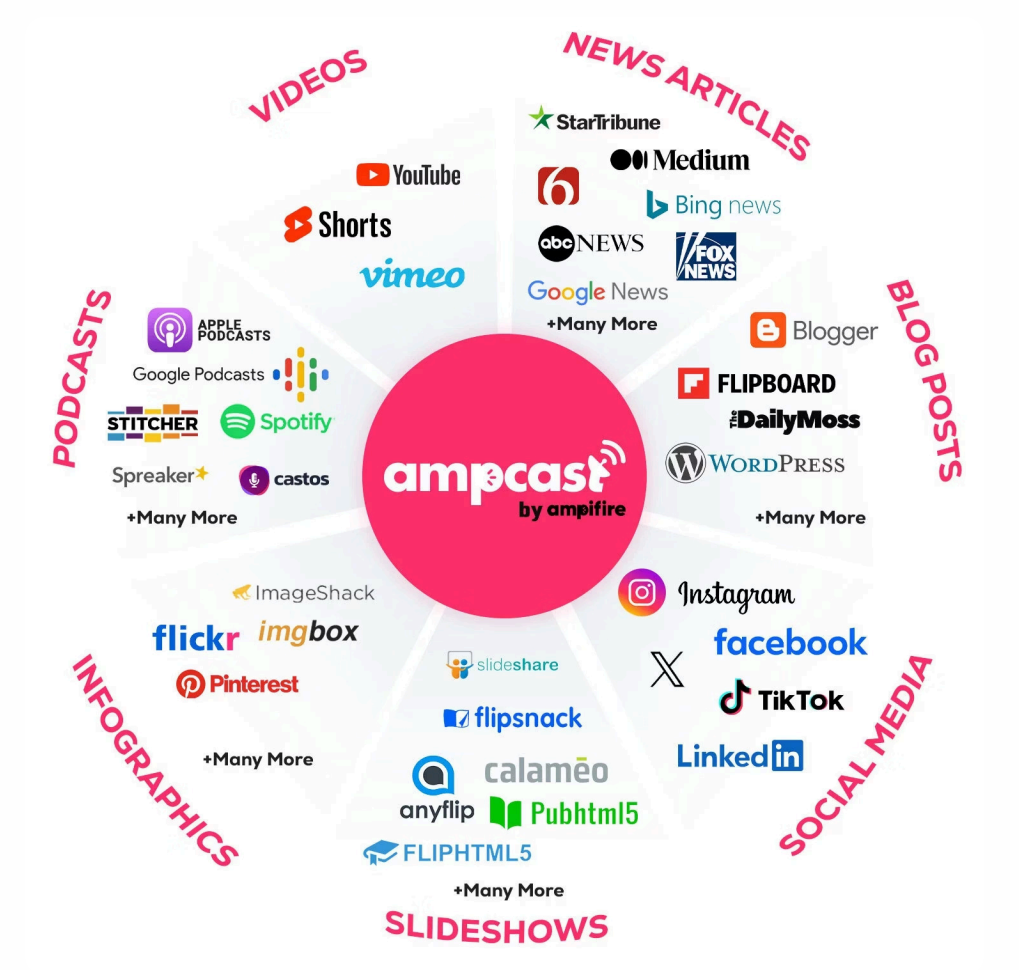
- Create & Repurpose: AmpiFire’s AmpCast AI generates news articles, blog posts, interview podcasts, longer informational videos, reels/shorts, infographics, flipbooks/slideshows, and social posts.
- Distribute & Amplify: Auto-publish to 300+ sites, including Google News, YouTube, Spotify, and major news networks.
Get more traffic from people who want to buy your stuff, and powerful “As Seen On” trust badges for your site.
Do It Yourself (with AI), Done For You Content, & 100% Managed Organic Growth options available.
Grow Your Free Traffic From Everywhere
Core Features of SEOTesting
Time-Based SEO Testing
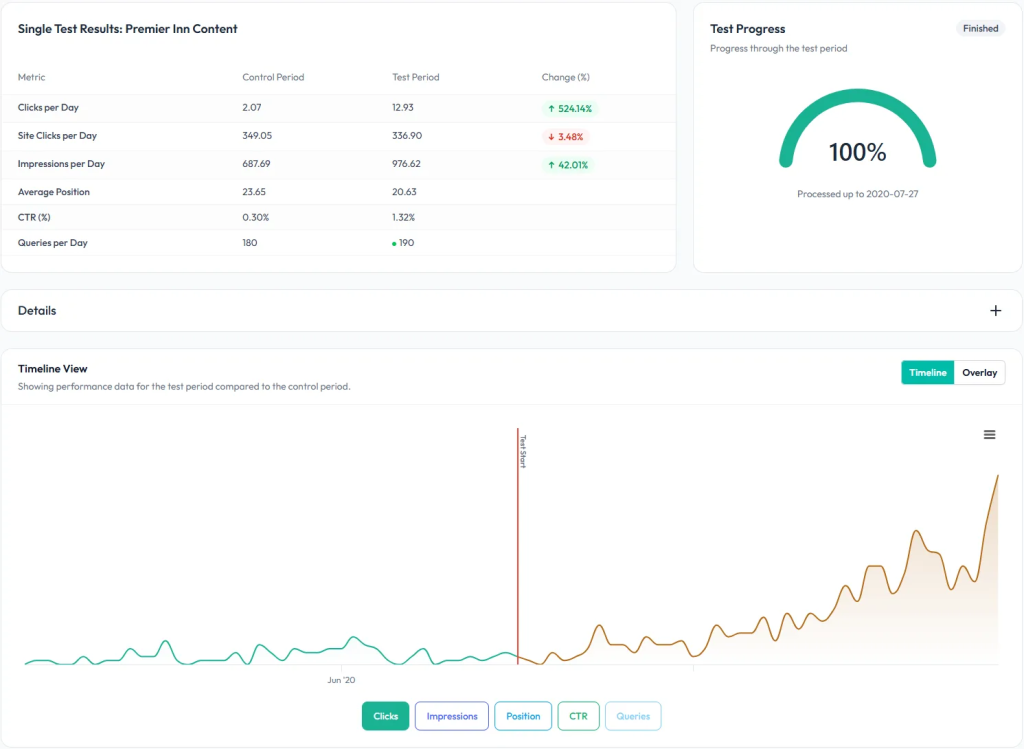
Time-based SEO testing is one of SEOTesting’s core features. It compares the organic search performance during a specific period before a change to that after the change. You can run three types of time-based tests:
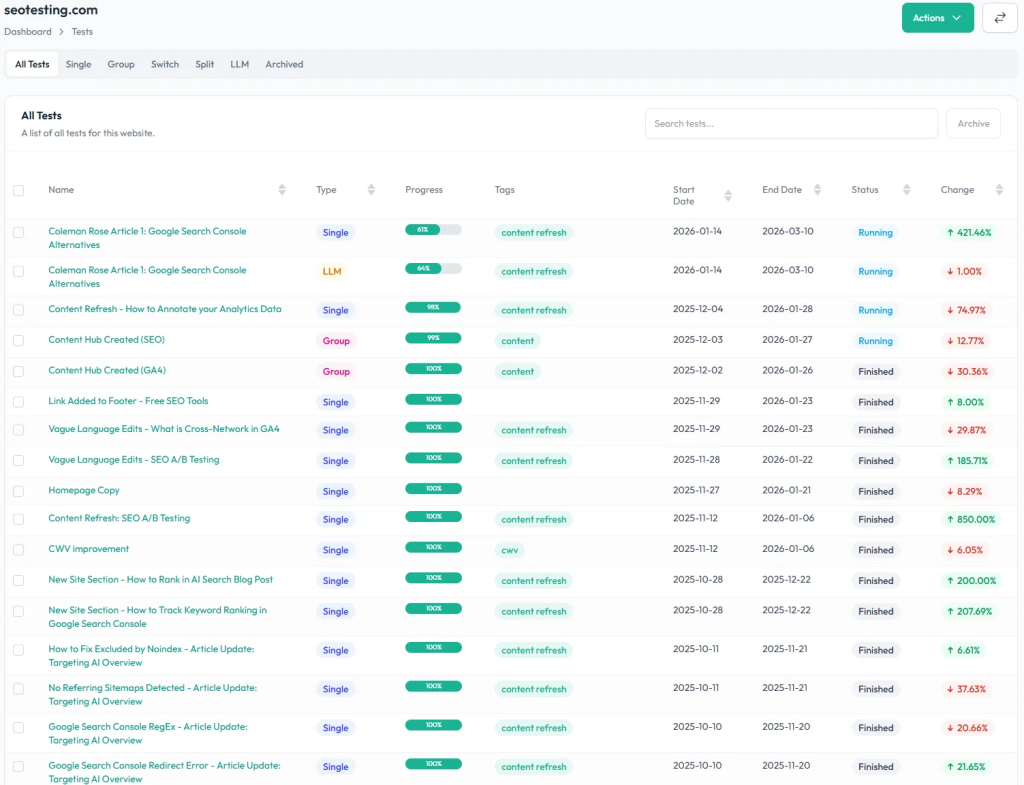
- Single Page SEO Tests measure the impact of individual changes, such as title tag updates or content optimizations.
- Group SEO Tests analyze changes across multiple pages to understand the impact at scale.
- URL Switch Tests validate performance when implementing URL redirects, building topic clusters, or resolving keyword cannibalization.
Each test integrates directly with Google Search Console; no code installation required, so you are working with actual clicks and impressions rather than third-party estimates.
SEO Split Testing
SEO Split Testing lets you compare the performance of the test and control groups to uncover the true impact of your changes. You set up two groups of similar pages: a test group where changes are made and a control group that remains unchanged, and track the performance of both over the same time period.
This helps you validate your SEO efforts, minimize risks by testing changes on a subset of pages before rolling them out site-wide, and deliver data-backed insights to stakeholders.
LLM Testing
LLM Testing lets you track sessions from ChatGPT, Claude, Perplexity, and other LLMs before and after page changes, backing your AI optimization work with real click and session data.
An LLM Test is a time-based test that measures user sessions generated from LLMs before and after you make a page change. You choose which page or group of pages to monitor, what changes you’re making, such as content updates, schema tweaks, adding FAQs, or improving internal links, and how long to track before and after. SEOTesting then pulls the data from GA4.
This matters because AI chatbots and search assistants have quickly become a major source of answers and recommendations, and even small changes to your page could affect your chances of being cited, recommended, or missed entirely.
Reporting and Content Insights
Beyond testing, SEOTesting provides a set of reports built on Google Search Console data.
The CTR optimization reports help you turn impressions into traffic by uncovering opportunities to improve your titles, meta descriptions, and keyword targeting, including identifying queries with high impressions but low CTR.
The Content Decay Report identifies which pages have lost the most clicks over a given period, so you can take action to refresh and improve them.
The keyword cannibalization report identifies pages competing for the same keyword and shows which content is losing clicks and rankings as a result.
Together, these reports help you save time by automating tedious reporting tasks, so you can focus on strategy.
Site Changelog and Content Groups
SEOTesting lets you add custom graph annotations to your Google Search Console data at the site, page, or query level. All tests and annotations are rolled up into the Site Changelog report, which helps you remember what was changed and when, and is useful for monthly client reporting.
The Content Groups feature lets you monitor organic clicks, impressions, CTR, and average position for any collection of pages or queries over time. You can define groups using URL patterns, RegEx filters, or keyword-based queries, for example, by content type, by category, by search intent, or by site section, such as /blog/ or /products/.
Integrations
SEOTesting connects to Google Search Console as its primary data source, with setup requiring no code installation and a two-click integration. GA4 is used as the data source for LLM testing. There is also a Google Data Studio connector that lets you display SEO tests in an existing or new Google Data Studio dashboard.
The Google Chrome extension lets you access Google Search Console data while you browse your site, displaying the queries a page ranks for and whether those queries are used on the page, alongside on-page SEO assistance.
SEOTesting Reviews: What Users Think
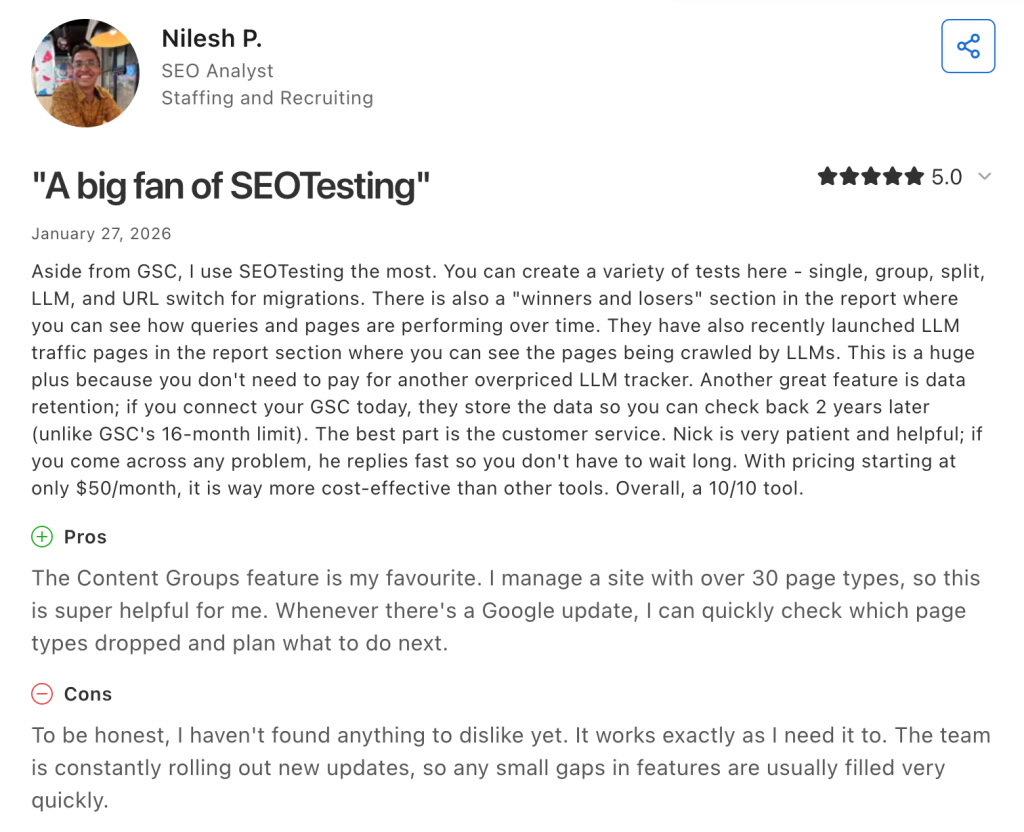
SEOTesting generally receives positive user feedback on third-party review platforms like G2 and Capterra. Users frequently praise the tool for making Google Search Console data more accessible and actionable. The ability to measure the real impact of SEO changes and present those results to stakeholders is a common highlight, especially when working with a professional SEO Agentur to ensure data-driven performance and reporting. Many reviewers also note the responsive and helpful support team.
On the flip side, some users point out that SEOTesting is heavily focused on Google Search Console data, which means it cannot handle competitor analysis or backlink tracking. Several reviewers recommend using it alongside a broader SEO suite like Ahrefs or Semrush rather than as a standalone tool. A few users have mentioned that the UI could be improved, though the team has indicated updates are in progress.
SEOTesting Pricing
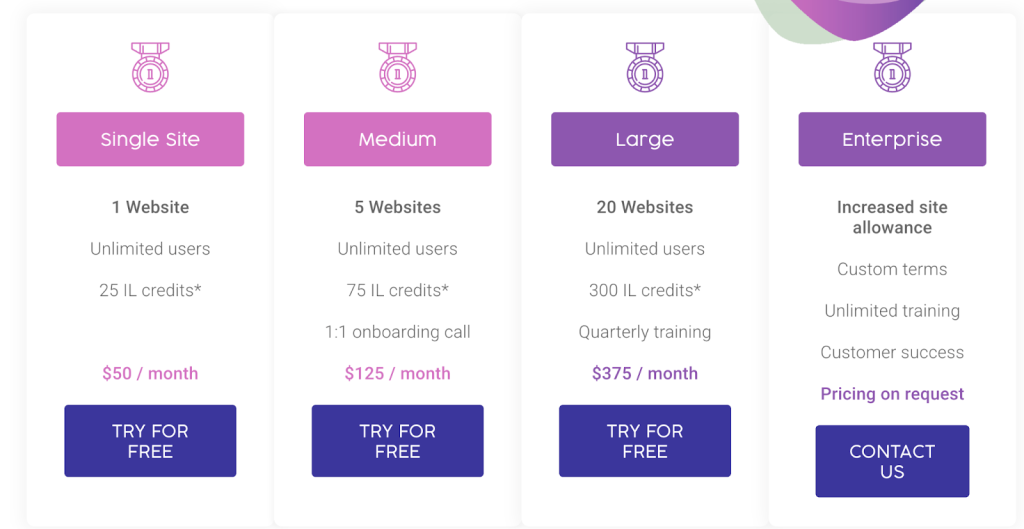
SEOTesting uses a tiered pricing model based on the number of websites you want to track. All plans include unlimited users, with no extra fees per user.
The Single Site plan costs $50/month and covers 1 website with 25 InternalLinking.com credits. The Medium plan at $125/month supports up to 5 websites, includes 75 InternalLinking.com credits, and adds a 1:1 onboarding call. The Large plan costs $375/month for up to 20 websites, includes 300 InternalLinking.com credits, and provides quarterly training. An Enterprise plan is also available with an increased site allowance, custom terms, unlimited training, and customer success support; pricing is available on request.
The free trial runs for 14 days, is fully functional, and requires no credit card. Plans run on a month-to-month basis and can be canceled at any time. For annual billing, you can contact the team directly.
Who Is SEOTesting Best For?
SEOTesting is built for people who need to prove the value of their SEO work with real data. In-house SEOs will find it useful for getting stakeholder buy-in and clearly demonstrating the impact of their optimizations.
Digital agencies can use it to show clients exactly what their work achieved through data-backed reports, building trust and securing buy-in for future projects.
The tool is used by agencies, in-house SEOs, consultants, and publishers, anyone who relies on Google Search Console as their primary data source and wants a structured, measurable way to run SEO experiments and report on results.
Final Verdict: Is SEOTesting Worth It?
SEOTesting is a SaaS tool built to help SEOs run controlled SEO experiments backed by real search data, giving you a clear way to validate your work and report results to clients or stakeholders.
Its features include time-based SEO testing, SEO split testing, and LLM testing, covering the core use cases for measuring the impact of on-page changes.
All plans include unlimited users with no per-seat charges, and the 14-day free trial is fully functional and requires no credit card. The tool is used by in-house SEOs, agencies, consultants, and publishers.
How AmpiFire Drives Traffic That SEOTesting Alone Cannot
SEOTesting gives SEOs a structured way to measure the impact of on-page changes, with time-based testing, split testing, and LLM testing all powered by real Google Search Console and GA4 data. For teams who already have content live and want to prove what’s working, it’s a solid, focused choice; though most users pair it with a broader SEO suite for competitor and backlink coverage.
At AmpiFire, we take it further by turning a single topic into 8 formats with AmpCast AI (news articles, social posts, reels/shorts, infographics, interview podcasts, flipbooks/slideshows, blog posts, and longer informational videos), then publishing them across 300+ platforms to drive organic traffic from search, social, video, and audio. If you want to see how multichannel distribution can grow your traffic, try AmpCast AI today.
Frequently Asked Questions (FAQs)
What types of SEO tests can you run with SEOTesting?
SEOTesting supports three types of time-based tests: Single Page SEO Tests, which measure the impact of individual changes such as title tag updates or content optimizations; Group SEO Tests, which analyze changes across multiple pages at scale; and URL Switch Tests, which validate performance when implementing redirects, building topic clusters, or resolving cannibalization.
Does SEOTesting work without Google Search Console?
No additional code or site installation is needed; SEOTesting integrates with Google Search Console in just 2 clicks. For LLM testing, GA4 must also be connected.
Is SEOTesting a good fit for small businesses?
It depends on your needs. SEOTesting is designed for SEO professionals, agencies, and in-house teams who regularly optimize pages and need to measure results. Small businesses without dedicated SEO resources may find it too specialized.
Can SEOTesting track traffic from AI chatbots like ChatGPT?
Yes. SEOTesting’s LLM testing feature tracks sessions from ChatGPT, Claude, Perplexity, and other LLMs before and after page changes, pulling data directly from GA4.
How does AmpiFire help businesses grow organic traffic across multiple channels?
AmpiFire uses AmpCast AI to turn one idea into 8 formats (news articles, social posts, reels/shorts, infographics, interview podcasts, flipbooks/slideshows, blog posts, and longer informational videos) and publish across 300+ sites, including Google News, YouTube, Spotify, and Pinterest. This brings in traffic from search, social media, video, and podcasts, reducing reliance on any single channel.
*Disclaimer: Results may vary based on individual circumstances, business type, and content strategy. The time savings and outcomes mentioned are based on typical user experiences and are not guaranteed. For specific pricing and service details, please visit AmpiFire.
Author
Related Posts


Warmy.io Pricing, Reviews & Features: Is This Email Deliverability Test Tool Worth It?
Discover Warmy.io's email warm-up features, pricing plans, and user reviews. Learn how this AI-powered tool can boost your email deliverability…


Semrush Reviews, Pricing Plans & Features: Is This Keyword Research Tool Worth It?
Get honest Semrush reviews. Learn pricing plans, features, and if this SEO and keyword research tool is worth your investment…

Social Champ Reviews, Pricing & Features: Is This Social Media Management Tool Worth It?
Get honest Social Champ reviews. Learn pricing, features, and if this social media management tool is worth your investment for…


Tagshop AI Reviews, Features & Pricing: Is This Video Ad Generator Worth It?
Learn honest Tagshop AI reviews, top features like URL-to-Video and 1,000+ AI avatars, plus pricing from free to $99/mo. See…

PR.co Pricing, Features & Reviews: Is This All-in-One PR Software Worth It?
Discover PR.co's features, pricing, and benefits in our comprehensive review. Learn if this all-in-one PR platform is right for your…


SendX Pricing, Features & Reviews: Is This AI-Powered Email Marketing Software Worth the Cost?
See real SendX reviews covering pricing, AI-powered features, and deliverability tools. Learn if this email marketing software is worth it.








