


Key Takeaways
- Stripo is a dedicated email template builder with a powerful drag-and-drop editor that lets you create professional-looking emails without coding knowledge.
- With over 1,600 ready-made templates and integration capabilities with 90+ email service providers, Stripo streamlines the email creation process for businesses of all sizes.
- The platform offers both free and premium paid plans, with pricing starting at $20/month for features such as removing Stripo branding and access to team collaboration tools.
- Stripo stands out by supporting AMP for Email, a Google-backed framework that lets you add interactive elements directly in the email.
What is Stripo?
Stripo is a specialized email template builder that bridges the gap between complex HTML coding and simple drag-and-drop functionality. Unlike general-purpose design tools, Stripo was created specifically for email marketing, with built-in features that address the unique challenges of email design, such as cross-client compatibility and responsive layouts.
Founded in 2017, Stripo has quickly established itself as a leading solution in email design. The platform focuses exclusively on email creation, enabling marketers to design high-fidelity, responsive emails that can be exported to almost any email marketing platform.
This specialization has enabled Stripo to develop deep expertise in email design best practices and technical requirements.

How AmpiFire Works:
- Research & Target: Find high-demand topics your buyers search for.
- Create & Repurpose: AmpiFire’s AmpCast AI generates news articles, blog posts, interview podcasts, longer informational videos, reels/shorts, infographics, flipbooks/slideshows, and social posts.
- Distribute & Amplify: Auto-publish to 300+ sites, including Google News, YouTube, Spotify, and major news networks.
Get more traffic from people who want to buy your stuff, and powerful “As Seen On” trust badges for your site.
Do It Yourself (with AI), Done For You Content, & 100% Managed Organic Growth options available.
Grow Your Free Traffic From Everywhere
Core Features of Stripo
Drag-and-Drop Editor: No Coding Required

Stripo editor features a clean interface with clearly labeled customization blocks. These blocks contain the basics to create email elements: image, text, button, spacer, social networks, menu, HTML, banner, video, timer, and three AMP-powered elements. Users can simply drag content blocks onto their canvas and arrange them as desired.
The visual nature of the editor lets you see how your email will look immediately, eliminating the guesswork of coding emails from scratch.
1,600+ Ready-to-Use Email Templates
One of Stripo’s most valuable assets is its extensive library of over 1,600 pre-designed templates. These templates cover virtually every industry and use case, from e-commerce promotions and product announcements to newsletters and transactional emails.
Each template is fully responsive and professionally designed with conversion in mind. This vast selection gives users a significant head start in their email creation process, allowing them to begin with a polished foundation rather than a blank canvas.
HTML Email Coding Options for Professionals
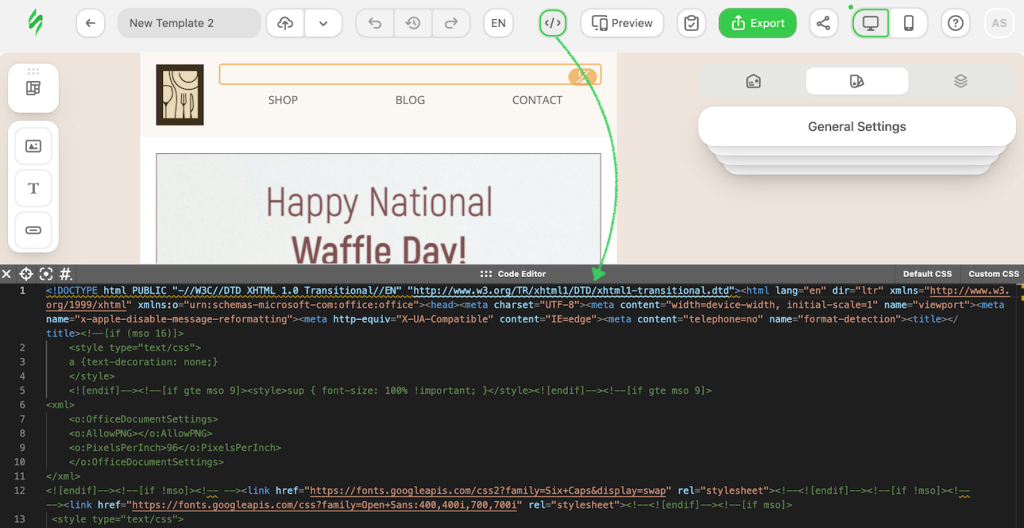
Stripo offers a robust HTML editor that provides complete access to the email’s underlying code. This dual-editor approach gives technical users the freedom to implement custom functionalities or make precise adjustments that might not be possible through the visual editor alone.
The HTML editor includes helpful features like syntax highlighting, code completion, and error checking to streamline the coding process. Additionally, the platform automatically handles many of the complex aspects of email HTML, such as creating table-based layouts and adding the necessary code for responsive behavior.
This balance of manual control and automated assistance makes Stripo appealing to developers who want to code efficiently without sacrificing control.
AMP for Email Support
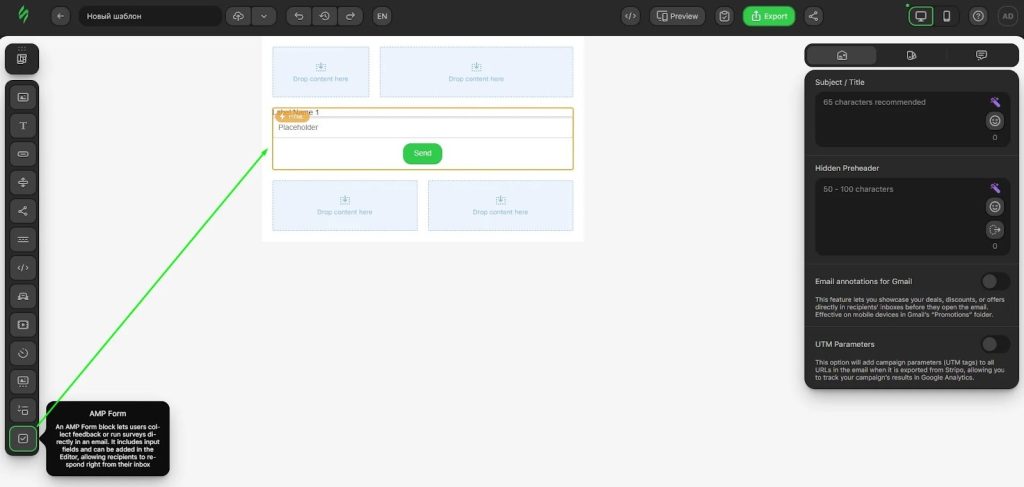
One of Stripo’s standout features is its robust support for AMP for Email technology, which transforms static messages into interactive experiences.
This cutting-edge capability allows recipients to complete actions directly within the email itself, such as filling out forms, responding to surveys, or browsing product catalogs, all without leaving their inbox.
By eliminating the need to click through to a website, AMP emails significantly reduce friction in the customer journey.
Integration with 90+ ESPs & Marketing Platforms
Stripo’s extensive integration ecosystem is arguably one of its greatest strengths, offering seamless connections with more than 90 email service providers and marketing platforms.
This impressive compatibility list includes major players like Mailchimp, HubSpot, Campaign Monitor, and Salesforce Marketing Cloud. The integration process is remarkably straightforward. Once an email template is finalized in Stripo, users can export it directly to their preferred ESP with just a few clicks.
Stripo Reviews: What Users Are Saying
Stripo maintains a strong 4.6 out of 5 rating on Trustpilot, with users consistently praising its intuitive design capabilities and responsive support team.
The most common praise centers on Stripo’s drag-and-drop editor, which users describe as a “game-changer” that eliminates the need for HTML knowledge. Nonprofit organizations particularly appreciate the platform, with multiple reviewers highlighting Stripo’s support program for educational institutions and charities.
Support quality emerges as another recurring theme. Users report receiving fast, detailed assistance, with some noting the team even creates custom video tutorials to solve specific issues.
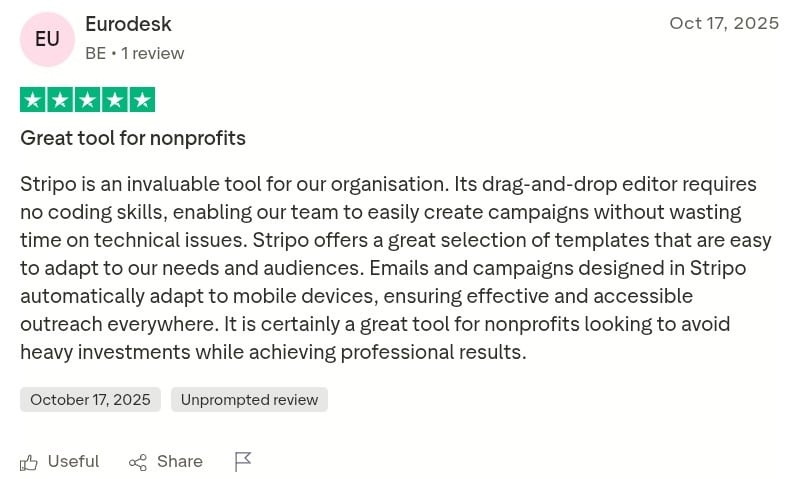
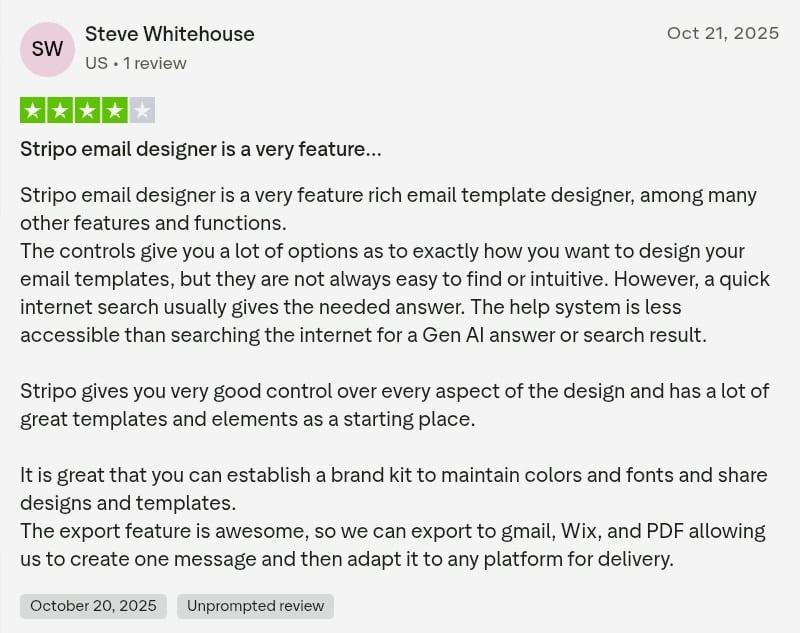
However, some users report a slight learning curve. One reviewer noted that while the platform is feature-rich, certain controls aren’t immediately intuitive. Another mentioned that a recent editor update felt less user-friendly than the previous version. Still, these issues can improve with familiarity and regular use.
Stripo Pricing
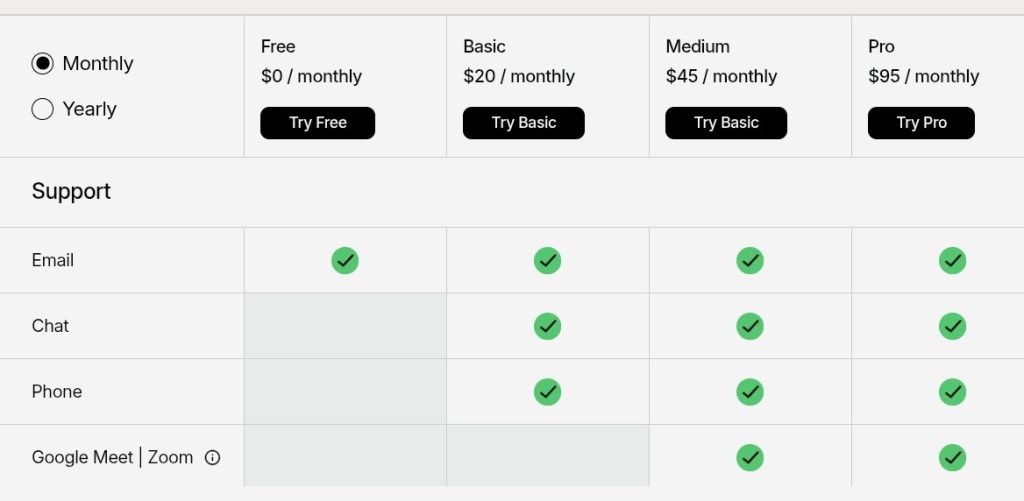
Stripo offers a tiered pricing structure that accommodates users from individual freelancers to large enterprises. The platform starts with a free plan that provides basic functionality, making it accessible for small businesses or those just getting started with email design.
- For serious email marketers, the Basic plan ($20/month) removes Stripo branding, increases export limits, and adds features like HTML imports and additional storage.
- The Medium plan ($45/month) introduces team collaboration tools, additional user seats, and expanded template access, making it suitable for small marketing teams or agencies.
- The Pro plan ($95/month) unlocks enterprise-grade features like roles and permissions, priority support, and white-labeling options.
Stripo also offers a Prime subscription with custom pricing that lets you invite up to 100 teammates and gives you unlimited projects, email testing credits, and countdown timer opens. You can also pay yearly and save 20%.
Who is Stripo for?
Small Business Owners Looking for Professional Emails
For small business owners juggling multiple responsibilities, Stripo offers a practical solution to create professional-looking emails without investing in a dedicated designer. The platform’s intuitive interface and extensive template library enable entrepreneurs to quickly produce polished campaigns that rival those of larger competitors.
Marketing Teams Managing Multiple Campaigns
Marketing departments handling numerous concurrent email campaigns will find Stripo’s efficiency features particularly valuable. The platform’s modular design enables teams to create reusable content blocks and templates that maintain brand consistency while accelerating production.
Email Developers Who Need to Speed Up Production
Professional email developers often face tight deadlines and demanding clients who request last-minute changes. Stripo offers these technical specialists a hybrid approach that combines the speed of visual editing with the precision of direct HTML access.
Agencies Creating Email Templates for Clients
Marketing and design agencies that handle email creation for multiple clients value Stripo’s efficiency and versatility. The platform’s modular approach enables agencies to create customizable master templates that can be quickly adapted for different clients while maintaining consistent quality and responsiveness.
Final Verdict: Is Stripo The Best Email Template Builder?
Stripo has earned a reputation as one of the best dedicated email template builders. Its combination of an intuitive drag-and-drop editor, 1,600+ templates, and robust AMP support delivers exceptional value, particularly for teams without coding expertise.
The platform excels for nonprofits, marketing teams, and agencies needing efficient email production with professional results. While some users report a learning curve with advanced features, Stripo’s responsive support team helps bridge that gap.
For organizations focused purely on email design quality, Stripo represents an excellent choice. However, those seeking broader marketing reach should consider multi-channel distribution strategies.
How AmpiFire Complements Email Tools Like Stripo Through Multi-Channel Content Distribution
Email tools like Stripo help you communicate with people already on your list, but they don’t create new audiences. That’s where AmpiFire fits in. AmpiFire’s AI-powered AmpCast platform turns one topic into 8 different content formats (news articles, blog posts, interview podcasts, longer informational videos, reels/shorts, infographics, flipbooks/slideshows, and social posts) and publishes it across 300+ sites, giving your brand visibility on Google News, YouTube, Spotify, Pinterest, and more.
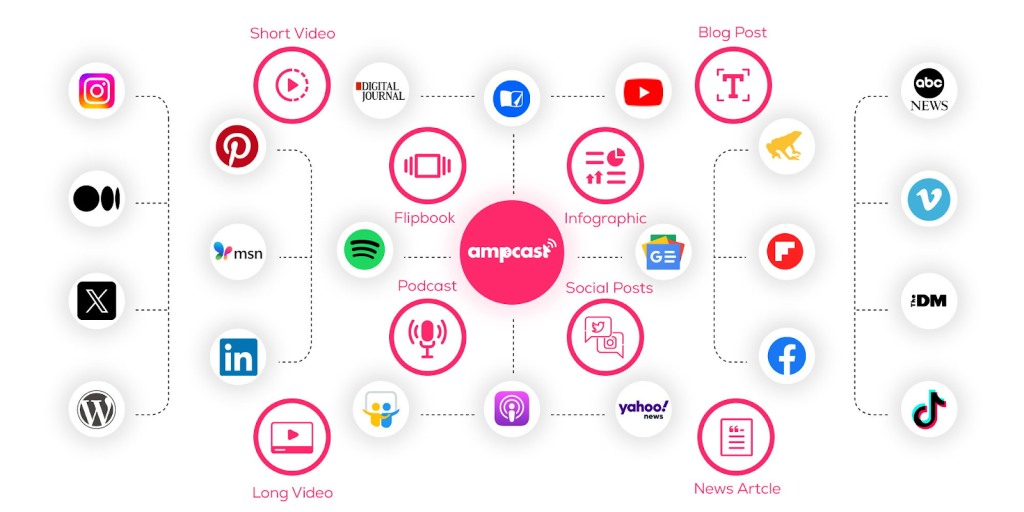
Both tools work best together. AmpiFire drives fresh organic traffic, and that content can be linked within your email campaigns or imported directly into your email platform via RSS or Zapier. The result is a simple, scalable way to grow your audience and keep them engaged across every channel.
Frequently Asked Questions (FAQs)
What does Stripo do?
Stripo is an email design platform that helps users quickly and easily create professional, responsive email templates. It offers drag-and-drop editing, HTML editing, pre-built templates, and integrated testing tools, making it useful for marketers, designers, and teams who need to build and export emails to their preferred ESP or marketing automation platform.
Can Stripo send emails directly to subscribers?
No, Stripo is exclusively an email template builder, not an email service provider. You must export your completed templates to a separate ESP, such as Mailchimp, Campaign Monitor, or HubSpot, to actually send emails. Stripo integrates with over 90 platforms to make this export process seamless and quick.
Is there a free version of Stripo?
Yes, Stripo offers a free plan with basic functionality, including access to the drag-and-drop editor and limited templates. However, the free tier includes Stripo branding and restricts you to 4 exports per month. Paid plans starting at $20/month remove branding and unlock additional features, such as increased exports and HTML imports.
How can AmpiFire integrate with email marketing tools like Stripo?
AmpiFire isn’t an email builder, but the content it produces can support email campaigns in two ways. You can link AmpiFire articles, videos, and slides to your email broadcasts to drive readers to fresh, authoritative content. You can also automate this by sending new AmpiFire content directly to your email tool via RSS feeds or Zapier integrations, making it easy to keep subscribers updated without manual uploads.
*Disclaimer: Results may vary based on individual circumstances, business type, and content strategy. The time savings and outcomes mentioned are based on typical user experiences and are not guaranteed. For specific pricing and service details, please visit AmpiFire.
Author
Related Posts


Moosend Features, Reviews & Pricing: Is This Email Marketing & Automation Platform Worth It?
Get honest Moosend reviews. Learn features, pricing, and whether this email marketing and automation platform is worth it for your…


Hunter.io Reviews, Pricing & Features: Is this Email Finder and Verifier Legit?
Get honest Hunter.io reviews. Learn pricing, features, and if this email finder and verifier is legitimate for your lead generation…

SendX Pricing, Features & Reviews: Is This AI-Powered Email Marketing Software Worth the Cost?
See real SendX reviews covering pricing, AI-powered features, and deliverability tools. Learn if this email marketing software is worth it.


Warmy.io Pricing, Reviews & Features: Is This Email Deliverability Test Tool Worth It?
Discover Warmy.io's email warm-up features, pricing plans, and user reviews. Learn how this AI-powered tool can boost your email deliverability…

OptiMonk Pricing & Reviews: Is This Popup Builder Worth It?
Discover OptiMonk pricing, features, and user reviews in our detailed analysis. Learn how this popup builder stacks up against other…

iContact Reviews, Cost & Features: Is This Email Marketing Software Worth It?
Discover if iContact is right for your business. Learn about pricing from $9/month, key features, and user reviews for this…








