

Key Takeaways
- Repurposing content between YouTube Shorts and TikTok can double your reach while cutting creation time in half.
- Platform-specific optimization is crucial. What works on YouTube Shorts won’t necessarily translate to success on TikTok.
- You can manually repost content between YouTube Shorts and TikTok, or use AmpiFire’s AI-powered technology, AmpCast, to automate the workflow and amplify your reach.
- AmpCast removes the hassle of reposting by transforming a single topic into 8 distinct content formats and distributing them to 300+ sites, including TikTok, YouTube, Google News, and Spotify.
How to Repost YouTube Shorts to TikTok & Vice Versa with AmpCast: Step-by-Step Guide
AmpCast AI is a straightforward ways to cross-post short-form videos across both platforms. Our AI-powered technology automatically creates, optimizes, and publishes videos to both YouTube Shorts and TikTok simultaneously, eliminating the need to resize files, rewrite captions, or upload content separately for each platform.
- Start a new Amp campaign: Log in to your AmpiFire dashboard and click “Amp” to start a new multi-format content campaign. Each Amp serves as a central hub that powers all content creation and distribution, including Reels/Shorts.
- Select your category and brand details: Choose the category that best fits your business or content goal. Add your company name for consistent branding across all generated assets, then click “Generate Amp” to continue.
- Add your source content and background info: Provide the topic, key points, and any source material you want AmpCast to reference. Think of this step as your creative brief; the clearer and more specific your inputs, the better the short-form videos will perform on both YouTube Shorts and TikTok.
- Generate platform-optimized reels/shorts: AmpCast AI automatically creates portrait-format videos (9:16) for short-form platforms like YouTube Shorts and TikTok. It also generates landscape-format videos, each with a strong hook to capture attention quickly and a clear closing call to action.
- Review and finalize your videos: Before publishing, review the generated videos to confirm messaging, visuals, and voice tone, and to ensure the video elements remain consistent with your brand.
- Publish to YouTube Shorts and TikTok: Once approved, directly publish your videos to YouTube Shorts and TikTok at the same time. The platform automatically handles optimization and delivery, so you don’t need to upload files, rewrite captions, or manage each platform separately.
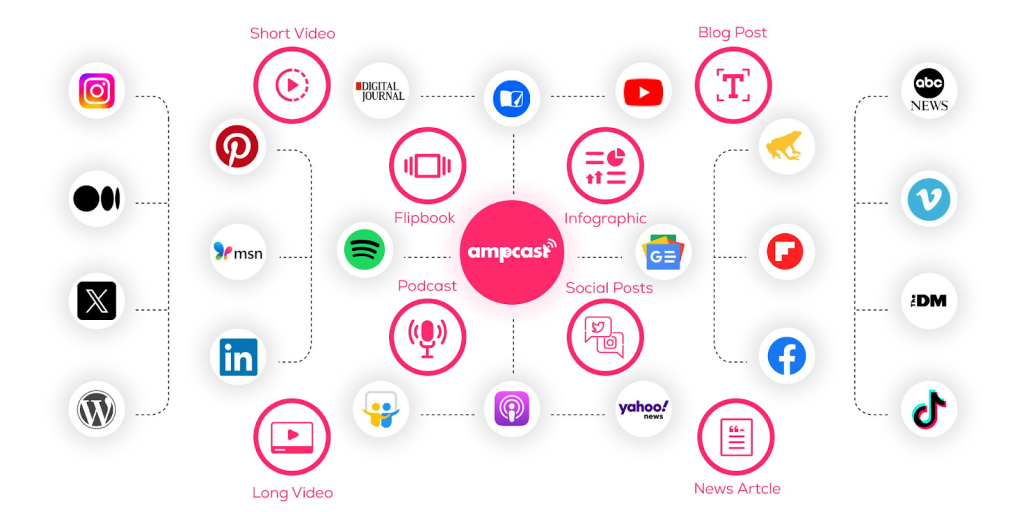
Beyond YouTube and TikTok, AmpCast AI turns a single topic into a complete content ecosystem. The platform generates 8 content formats (news articles, blog posts, interview podcasts, longer informational videos, reels/shorts, infographics, flipbooks/slideshows, and social posts) and distributes them across 300+ sites like Google News, YouTube, Spotify, and more, turning your videos into part of a larger visibility engine.
Each format is tailored to the platform it’s published on, ensuring consistency without copy-pasting or manual adjustments.

How AmpiFire Works:
- Research & Target: Find high-demand topics your buyers search for.
- Create & Repurpose: AmpiFire’s AmpCast AI generates news articles, blog posts, interview podcasts, longer informational videos, reels/shorts, infographics, flipbooks/slideshows, and social posts.
- Distribute & Amplify: Auto-publish to 300+ sites, including Google News, YouTube, Spotify, and major news networks.
Get more traffic from people who want to buy your stuff, and powerful “As Seen On” trust badges for your site.
Do It Yourself (with AI), Done For You Content, & 100% Managed Organic Growth options available.
Grow Your Free Traffic From Everywhere
How to Manually Repost YouTube Shorts to TikTok & Vice Versa

Reposting YouTube Shorts to TikTok
- Download Your YouTube Shorts Without the Watermark: If you’ve lost your original video file, use YouTube Studio to download your content directly or use third-party tools such as YTMP3, SaveFrom, or ClipGrab to download it from YouTube.
- Optimize Video Format for TikTok Success: For optimal performance, convert your video to MP4 format with H.264 encoding before uploading to TikTok. Trim any slow intros and jump straight to the hook when repurposing for TikTok.
- Upload Your Optimized Video to TikTok: You can upload your video to TikTok using two primary methods:
- Use the direct upload method by opening TikTok, tapping the “+” button, and selecting “Upload.”
- Use TikTok on Desktop by uploading via TikTok’s desktop website or TikTok Studio. This method allows you to schedule posts, add captions and hashtags in advance.
- Fix Common Quality Upload Issues: To avoid quality degradation, always upload the highest quality version available, ideally your pre-YouTube original. Tap “More options” before posting on TikTok, then select “Upload HD” to preserve clarity.
Reposting TikTok to YouTube Shorts
- Save TikTok Videos Without the Watermark: If you don’t have a copy of your original video before uploading it to TikTok use SnapTik, SaveTok, or TikMate, to remove watermarks.
- Prepare Your TikTok for YouTube’s Algorithm: To ensure YouTube recognizes your video as a Short, verify that it maintains the vertical format (9:16 aspect ratio) and stays under 3 minutes.
- Upload to YouTube Shorts via YouTube Studio: Upload through YouTube Studio and select appropriate category tags that match your content theme. Use more descriptive titles (up to 100 characters) and detailed descriptions that incorporate relevant keywords.
Platform-Specific Optimization Tips
TikTok Caption & Hashtag Strategy
Make every word count by placing your most important information and keywords at the beginning of your text. Users often see only the first line before needing to click “more,” so front-load your message with the hook. When crafting TikTok captions, conversational, emotion-driven language outperforms technical descriptions every time.
Hashtags work differently on TikTok than on YouTube. The optimal TikTok hashtag strategy combines 2–3 trending broader tags with 1–2 niche-specific tags that directly relate to your content.
This balanced approach helps you tap into trending topics while still reaching your specific target audience. Avoid overusing hashtags, as this can dilute the algorithmic focus of your content.
YouTube Shorts Title & Description Tactics
YouTube Shorts titles work differently from TikTok captions. While TikTok emphasizes brevity, YouTube Shorts titles can be up to 100 characters, giving you more room to incorporate searchable keywords.
Craft titles that include both high-volume search terms and specific niche phrases that match user intent.
Unlike TikTok’s limited caption space, YouTube Shorts benefit from the platform’s robust description field (up to 5000 characters). Use this space strategically by including relevant keywords in the first 2–3 sentences, then adding context, links to related content, and timestamps if applicable. This comprehensive approach improves both algorithm visibility and viewer navigation.
Music & Sound Considerations
Audio licensing is one of the most challenging aspects of cross-platform posting. TikTok’s extensive commercial music library doesn’t transfer usage rights to YouTube, and vice versa.
When repurposing content, you’ll need to replace licensed music tracks with either platform-appropriate licensed music or royalty-free alternatives to avoid copyright strikes and demonetization.
Beyond licensing, each platform’s algorithm responds differently to audio elements. TikTok’s algorithm heavily favors videos that use trending sounds, often boosting content with popular audio regardless of visual quality.
YouTube Shorts, however, places greater emphasis on audio clarity and relevance to the content theme than on trending sounds. For maximum cross-platform success, consider creating two audio versions of your content: one optimized for each platform’s specific requirements.
Scale Your YouTube-TikTok Video Strategy with AmpiFire’s AmpCast
Posting consistently on YouTube and TikTok is essential; however, manually cross-posting across multiple platforms can be time-consuming. AmpCast simplifies this by letting you cross-publish content to YouTube and TikTok simultaneously, and then extend it to other major platforms. Instead of manually resizing, reuploading, and rewriting for each channel, our AI-powered technology helps you get more reach from the same video with far less effort.
More importantly, AmpCast doesn’t stop at YouTube and TikTok. It automatically transforms a single topic into 8 content formats, including news articles, blog posts, interview podcasts, longer informational videos, reels/shorts, infographics, flipbooks/slideshows, and social posts. Plus, the platform distributes your content across a robust network of 300+ authoritative sites like Google News, YouTube, Spotify, and FOX affiliate sites. This turns short-lived social posts into long-term, discoverable assets.
For creators and brands looking to scale visibility without multiplying their workload, AmpCast remains one of the most efficient ways to repurpose and repost video content across YouTube, TikTok, and beyond.
Frequently Asked Questions (FAQs)
Can you post the same content on TikTok and YouTube Shorts?
Yes, you can post the same content on TikTok and YouTube Shorts, as long as you follow each platform’s rules. TikTok allows reposted content, but discourages videos with visible watermarks from competing platforms. YouTube Shorts also permits cross-posted content as long as you own the rights to the video or have permission from the copyright holder.
Will reposting YouTube Shorts to TikTok affect my original video’s performance?
No, reposting YouTube Shorts on TikTok will not negatively affect your original video’s performance metrics or algorithm ranking. Each platform’s algorithm operates independently, evaluating content based on its own set of performance indicators.
How can I avoid the TikTok or YouTube watermark when reposting?
The most reliable method to avoid watermarks is to maintain your original video files before uploading them to either platform. If that’s not possible, both platforms allow creators to download their content: YouTube via YouTube Studio and TikTok via the save function, though TikTok will still include its watermark.
How does AmpCast help create engaging content for YouTube or TikTok?
AmpiFire’s AmpCast AI eliminates the need to manually create and repost content across platforms by generating content in multiple formats and automatically distributing it to 300+ high-traffic sites, including YouTube and TikTok.
*Disclaimer: Results may vary based on individual circumstances, business type, and content strategy. The time savings and outcomes mentioned are based on typical user experiences and are not guaranteed. For specific pricing and service details, please visit AmpiFire.
Author
Related Posts

Where to Share YouTube Videos & Shorts to Get More Views
Discover the best places to share YouTube videos and shorts for more views. Learn effective promotion strategies to grow your…

How to Repurpose YouTube Videos for TikTok
Learn how to repurpose YouTube videos for TikTok using AmpiFire's AmpCast AI and other tools, so you reach more people…
5 Best YouTube to TikTok Converter Apps [Free & Paid]
Compare the 5 best YouTube to TikTok converter apps, free and paid. AmpiFire's AmpCast AI automates the full process, from…

How to Auto Post between Instagram & TikTok
Learn how to automatically post content between Instagram and TikTok. Find out tools, strategies, and best practices for seamless cross-platform…
How to Auto Post between Facebook & TikTok
Learn how to auto-post between Facebook and TikTok. Find out about tools and methods to streamline your social media content…
How to Auto Post YouTube Videos to Facebook
Learn simple ways to automatically post YouTube videos to Facebook. Save time with automation tools that share your content instantly.








