

Key Takeaways
- iContact offers an intuitive email marketing platform, with pricing starting at $9/month for 500 contacts, including unlimited sends and marketing automation.
- The software stands out for its user-friendly interface and robust customer support, making it particularly well-suited for small to medium-sized businesses without technical expertise.
- With 35+ professionally designed templates and a drag-and-drop editor, iContact enables quick creation of professional-looking email campaigns without design skills.
- The platform provides essential automation features for creating triggered emails and drip campaigns that respond to subscriber behavior, improving engagement rates.
- While iContact may lack some advanced features found in premium alternatives, its straightforward approach and comprehensive core functionality make it a strong contender for businesses prioritizing simplicity and reliability.
iContact: A Straightforward Email Marketing Tool for Growing Businesses
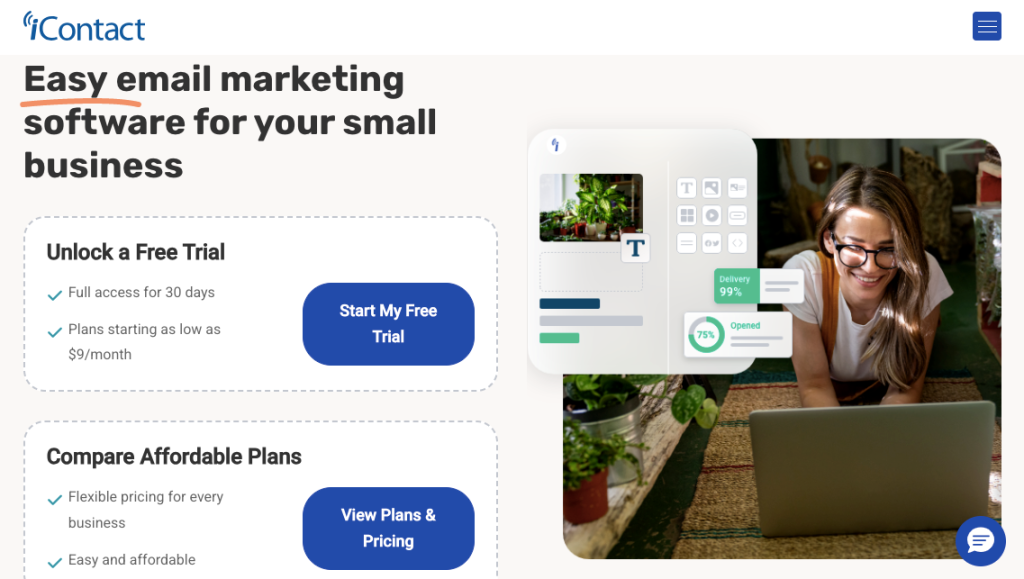
iContact (formerly IntelliContact) has established itself as a reliable email marketing solution, particularly well-suited for small to medium-sized businesses. With over a decade in the industry, this platform delivers core email marketing functionality without overwhelming users with excessive features or complexity.
iContact emphasizes creating and distributing professional email campaigns, managing contact lists effectively, and providing actionable analytics to improve marketing performance. The platform’s approach centers on making sophisticated email marketing tactics available to businesses without requiring specialized technical knowledge or dedicated marketing teams.
What makes iContact particularly appealing for growing businesses is its balanced approach to functionality. Rather than trying to be everything to everyone, it concentrates on delivering high-quality core services while maintaining an intuitive user experience. This focus results in shorter learning curves and faster implementation of email marketing campaigns that can actually drive business results.

How AmpiFire Works:
- Research & Target: Find high-demand topics your buyers search for.
- Create & Repurpose: AmpiFire’s AmpCast AI generates news articles, blog posts, interview podcasts, longer informational videos, reels/shorts, infographics, flipbooks/slideshows, and social posts.
- Distribute & Amplify: Auto-publish to 300+ sites, including Google News, YouTube, Spotify, and major news networks.
Get more traffic from people who want to buy your stuff, and powerful “As Seen On” trust badges for your site.
Do It Yourself (with AI), Done For You Content, & 100% Managed Organic Growth options available.
Grow Your Free Traffic From Everywhere
iContact’s Standout Features
Smart Email Automation Workflows
iContact’s automation system balances power with accessibility through an intuitive visual builder that makes it straightforward to create sophisticated email sequences.
Unlike platforms requiring technical expertise, iContact uses a logical flowchart approach where marketers simply connect triggers, conditions, and actions to build responsive customer journeys.
The system supports both time-based sequences (such as welcome series or scheduled follow-ups) and behavior-triggered flows that respond to specific user actions. For example, you can automatically send personalized product recommendations when subscribers click specific links, or implement re-engagement sequences for contacts showing decreased activity.
A/B Testing for Optimized Campaigns
The platform’s testing functionality allows systematic optimization through controlled experimentation with different email elements. You can test subject lines, sender names, content variations, call-to-action designs, or sending times to identify which options generate better engagement.
This data-driven approach removes guesswork from email marketing decisions and continuously improves campaign performance.
iContact’s A/B testing implementation emphasizes practical application and provides clear statistical feedback. The system automatically distributes test variants to sample audience segments, measures performance differences, and presents results with actionable insights rather than overwhelming users with raw data.
Successful elements can be immediately incorporated into templates and automation workflows, creating a continuous improvement cycle that compounds over time.
Advanced List Management & Segmentation
iContact’s contact management system goes beyond basic list building to enable sophisticated audience segmentation based on multiple data points. The platform supports both static lists (manually created groupings) and dynamic segments (automatically updated based on criteria) to ensure messages reach the most relevant audience segments.
This targeting capability is essential for maintaining high engagement rates and avoiding list fatigue through excessive or irrelevant messaging.
The segmentation engine can filter contacts based on standard fields like demographics and subscription date, as well as behavioral factors such as email engagement, purchase history, and ecommerce website interactions (when integrated with tracking tools).
Detailed Analytics & Reporting Dashboard
iContact’s analytics suite transforms raw campaign data into actionable marketing intelligence through intuitive visualization and contextual insights. The reporting dashboard provides immediate visibility into essential metrics like open rates, click-through rates, conversion tracking, and list growth, with the ability to drill down into specific campaigns or time periods for detailed analysis.
Beyond standard email metrics, the platform offers comparison reporting that contextualizes your performance against industry benchmarks and your historical averages. The system also highlights engagement trends over time, helping marketers identify seasonal patterns or respond to changing audience behaviors before they impact bottom-line results.
Landing Page Builder with Conversion Tools
Expanding beyond email creation, iContact offers a complementary landing page builder that helps create cohesive marketing experiences. This tool uses the same intuitive drag-and-drop interface as the email editor, allowing the creation of professional landing pages without coding or design skills.
The landing page system includes conversion-focused elements, such as customizable forms, countdown timers, social proof widgets, and call-to-action buttons designed to maximize response rates. Each page automatically adapts to different screen sizes, ensuring functionality across desktop and mobile devices.
Landing pages can be directly incorporated into email campaigns and automation workflows, with form submissions automatically updating contact records and triggering appropriate follow-up sequences. This connected approach eliminates the technical complexity of managing separate email and landing-page systems, streamlining the marketing-campaign workflow.
User-Friendly Interface for Quick Campaign Creation
One of iContact’s strongest selling points is its exceptionally intuitive interface. The platform is deliberately designed to flatten the learning curve for new users, with clearly labeled navigation, contextual help resources, and workflow-based organization. This thoughtful design enables even marketing beginners to navigate the platform confidently without feeling overwhelmed.
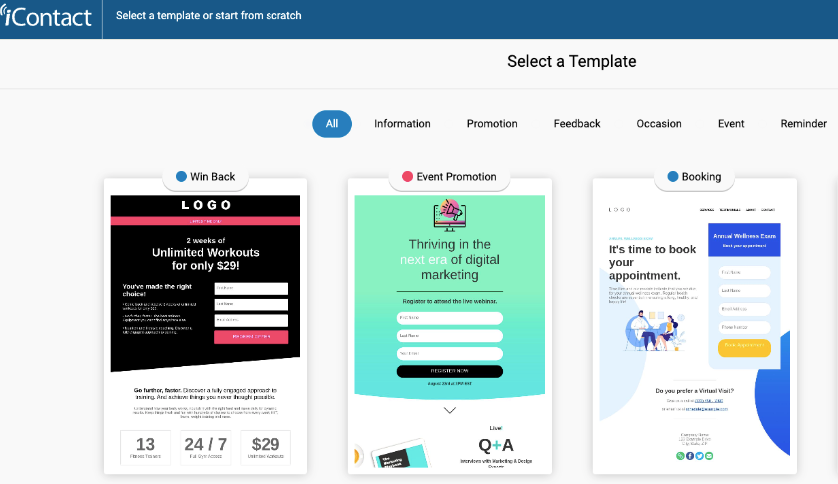
Content creation is streamlined with iContact’s visual editor, eliminating the need for HTML knowledge or design expertise. With 35+ professionally designed email templates covering various industries and purposes, you’re never starting from a blank page. Each template can be fully customized to align with your brand identity while maintaining the structural elements that drive engagement.
Who is iContact For?
iContact is well-suited for users who prioritize simplicity and reliability over advanced customization.
- Small Business Owners: Entrepreneurs who need to send professional email campaigns without a steep learning curve or dedicated marketing staff. It’s also valuable for those new to email marketing who want an intuitive platform with ready-made templates to get started quickly.
- Service-Based Businesses: Consultants, agencies, and local service providers looking to nurture client relationships through regular newsletters and updates.
- Teams Without Designers: Marketers who lack design resources but still want polished, professional-looking emails using pre-built templates.
- Budget-Conscious Marketers: Users seeking a cost-effective email solution with solid core features and dependable customer support.
iContact Pricing Plans
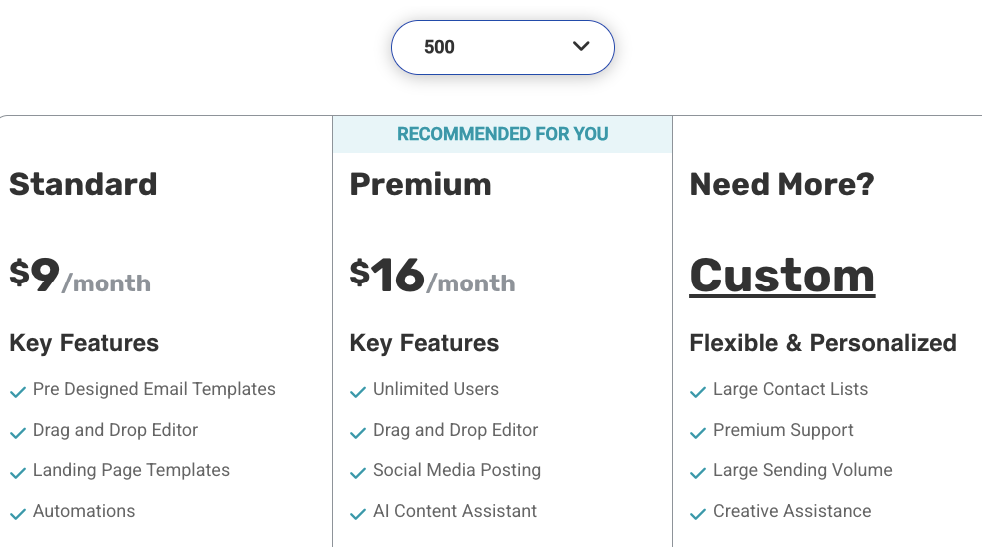
iContact employs a subscriber-based pricing model that scales with your contact list size, making it suitable for businesses at various growth stages. It also offers a 30-day free trial and the option to pay yearly, which saves you 15% compared to monthly payments.
Here’s pricing for 500 contacts (paid monthly):
- Standard: $9/month
- Premium: $16/month
- Custom: Personalized
iContact User Reviews
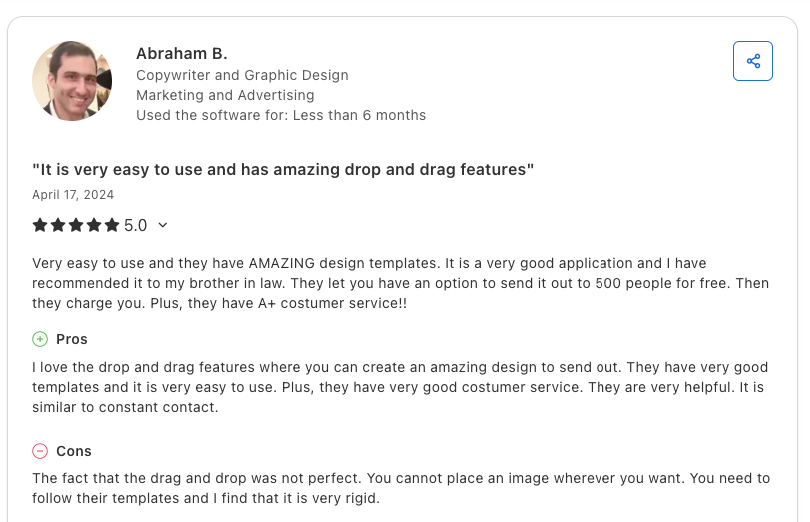
iContact earns a solid 4.5 out of 5 rating on Capterra, reflecting generally positive sentiment from its user base. Users consistently highlight the platform’s ease of use, making it accessible even for those new to email marketing.
The pre-built templates receive particular praise for their professional appearance and variety, allowing users to create polished campaigns without starting from scratch. Customer service also stands out as a strong point, with many users appreciating the responsive and helpful support team when questions arise.
However, some users note limitations with the drag-and-drop editor. While the feature simplifies the design process, it can feel restrictive for those seeking greater creative control.
Is iContact Right for Your Business? Final Verdict
iContact delivers on its promise of making email marketing accessible and straightforward. With an intuitive interface, professionally designed templates, and responsive customer support, the platform removes many of the barriers that intimidate newcomers to email marketing.
The platform is best suited for users who prioritize reliability and ease of use over cutting-edge features. Its template library and drag-and-drop editor enable quick campaign creation, while its reliable deliverability ensures your messages reach subscribers’ inboxes.
However, enterprise-level businesses with complex integration requirements or those needing sophisticated multi-channel marketing capabilities may find the platform somewhat limiting compared to higher-end alternatives. The decision ultimately depends on aligning your specific marketing requirements, technical resources, and growth trajectory with iContact’s strengths in simplicity, reliability, and accessible automation.
How AmpiFire Complements Email Platforms Like iContact
iContact makes it easy to create polished email campaigns and nurture your subscriber list, while AmpiFire focuses on helping you reach people beyond your list. AmpiFire’s AI-powered AmpCast turns a single topic into multi-format content and publishes it across hundreds of platforms, building brand authority and driving new visitors who can later become email subscribers.
Used together, they strengthen both acquisition and engagement. AmpiFire generates high-authority content you can link in your iContact emails or automatically send via RSS and Zapier, giving your subscribers fresh, credible resources while expanding your visibility across search, social, video, and news channels.
Frequently Asked Questions (FAQ)
How long does it take to set up an email campaign in iContact?
For users familiar with the platform, creating and launching a standard email campaign typically takes 30–60 minutes from start to finish. First-time users may need additional time to familiarize themselves with the interface, but iContact’s intuitive design and helpful onboarding resources significantly reduce the learning curve.
Can iContact integrate with my e-commerce platform?
iContact offers direct integrations with major e-commerce platforms, including Shopify, WooCommerce, Magento, and BigCommerce, primarily via third-party tools such as Zapier rather than native integrations.
Does iContact comply with email marketing regulations like GDPR and CAN-SPAM?
Yes, iContact maintains full compliance with major email marketing regulations, including CAN-SPAM, GDPR, CASL, and other regional requirements. The platform automatically includes mandatory unsubscribe mechanisms in all emails and maintains proper subscription records to demonstrate consent when required.
For GDPR compliance specifically, iContact provides tools for explicit consent capture, data management, and subscriber data access/deletion upon request.
Can I easily migrate my existing email list to iContact?
Yes. Transitioning your existing subscriber lists to iContact is straightforward using the platform’s import tools, which support a variety of file formats, including CSV, TXT, and Excel spreadsheets. The import wizard guides you through mapping your existing data fields to iContact’s system and allows you to add custom fields to preserve all subscriber information.
How can I use AmpiFire and iContact together?
The high-authority content AmpiFire’s AmpCast creates (news articles, blog posts, interview podcasts, etc.) can be linked directly from your email campaigns. This drives subscribers to credible third-party placements that reinforce your brand authority and build trust.
It can also be automatically fed into your email campaigns via RSS feeds or Zapier integrations, ensuring your subscribers receive fresh, relevant content without manual effort. This creates a seamless ecosystem where your content amplification fuels your email engagement.
*Disclaimer: Results may vary based on individual circumstances, business type, and content strategy. The time savings and outcomes mentioned are based on typical user experiences and are not guaranteed. For specific pricing and service details, please visit AmpiFire.
Author
Related Posts


Moosend Features, Reviews & Pricing: Is This Email Marketing & Automation Platform Worth It?
Get honest Moosend reviews. Learn features, pricing, and whether this email marketing and automation platform is worth it for your…


Warmy.io Pricing, Reviews & Features: Is This Email Deliverability Test Tool Worth It?
Discover Warmy.io's email warm-up features, pricing plans, and user reviews. Learn how this AI-powered tool can boost your email deliverability…


PR.co Pricing, Features & Reviews: Is This All-in-One PR Software Worth It?
Discover PR.co's features, pricing, and benefits in our comprehensive review. Learn if this all-in-one PR platform is right for your…

VideoCreator Reviews, Features & Price: Is This Social Media Video Software Worth It?
Discover if VideoCreator social media video software is worth it with our review covering features, pricing, templates, and motion tracking…

Influno Reviews & Pricing: Is This Link Building Software Worth It?
Discover if Influno link building software is worth $99+ monthly with our complete review covering AI features, pricing, and value…

Birdeye Reputation Management Software Pricing & Reviews: Is This AI Tool Worth It?
Is Birdeye worth it? Comprehensive review of pricing plans, AI capabilities, and user experiences with this reputation management platform.








