


Key Takeaways
- forms.app offers a generous free plan with 5 forms and up to 100 responses per month, making it genuinely accessible to individuals and small businesses.
- Based on verified user reviews, forms.app scores 4.6/5 on Capterra and 4.5/5 on G2, and an excellent 4.6/5 on Trustpilot, with particular praise for ease of use and value for money.
- Users particularly praise forms.app for its user-friendly interface, mobile responsiveness, and exceptional customer support.
- The platform integrates natively with Google Sheets, Slack, HubSpot, Mailchimp, Stripe, PayPal, and more (plus thousands of additional apps via Zapier).
- forms.app stands out for features like AI form generation, PDF generation from responses, conditional logic, and a smooth form-filling experience that many competitors reserve for higher tiers
- Paid plans start at $29/month and scale up to $79/month for 100,000 responses. It is significantly more affordable than most alternatives at that volume.
What is forms.app?
forms.app is an online form builder designed to help businesses and individuals create beautiful, functional forms without any coding. forms.app is an all-rounder, meaning unlike many form builders that hide key features behind steep pricing or cluttered interfaces, forms.app delivers a smooth experience for both form creators and respondents, right out of the box, offers advanced features, and affordable prices.
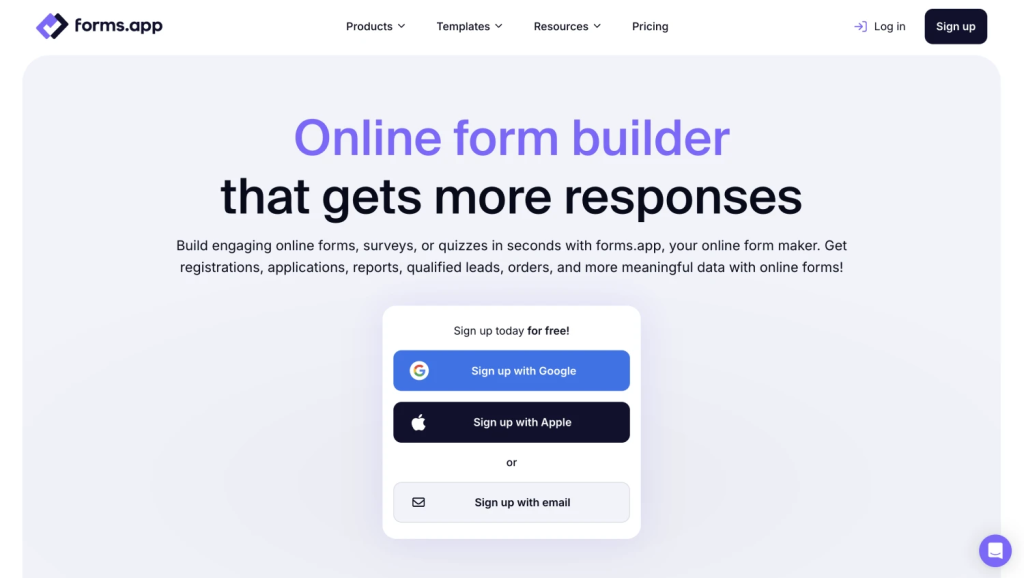
forms.app covers a wide range of use cases: lead generation, customer feedback, appointment booking, payment collection, product orders, event registrations, surveys, quizzes, and more. With over 5,000 ready-made templates, an AI form generator, and a clean drag-and-drop editor, getting started takes minutes rather than hours.
forms.app is built for marketers, researchers, small and medium businesses, agencies, educators, and enterprise teams alike.
For businesses looking to test before committing financially, forms.app is a legit platform that offers a risk-free entry point while still providing access to core features that many competitors reserve for paid tiers.

How AmpiFire Works:
- Research & Target: Find high-demand topics your buyers search for.
- Create & Repurpose: AmpiFire’s AmpCast AI generates news articles, blog posts, interview podcasts, longer informational videos, reels/shorts, infographics, flipbooks/slideshows, and social posts.
- Distribute & Amplify: Auto-publish to 300+ sites, including Google News, YouTube, Spotify, and major news networks.
Get more traffic from people who want to buy your stuff, and powerful “As Seen On” trust badges for your site.
Do It Yourself (with AI), Done For You Content, & 100% Managed Organic Growth options available.
Grow Your Free Traffic From Everywhere
Features of forms.app: What This Form Builder Can Actually Do
This form builder comes packed with features designed to create professional-looking forms and surveys while making data collection efficient and insightful.
Now, let’s take a closer look at its key features.
Drag-and-Drop Form Builder
The platform provides intuitive form design tools that don’t require technical expertise. Users can choose from numerous templates or start from scratch, with drag-and-drop functionality making it easy to arrange form elements exactly as desired.
The design section provides extensive customization options, including branded color schemes, custom fonts, and the ability to add your logo for a professional appearance. The editor supports both list view (classic multi-question layout) and step view (one question at a time, similar to a conversational form), giving you full control over the form-filling experience depending on your goals. It also delivers advanced design capabilities, such as Custom CSS for professionals, without overwhelming normal users with unnecessary complexity.
Beyond basic design capabilities, forms.app includes advanced features, such as conditional logic, that allow forms to adapt based on user responses. The platform also supports file uploads, e-signatures, and CAPTCHA verification to prevent spam submissions.
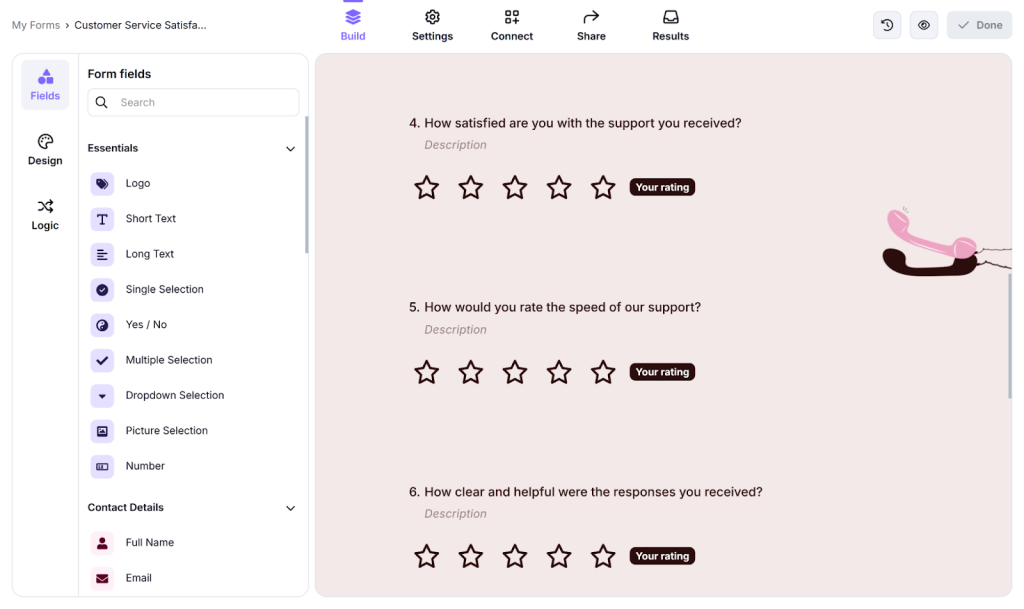
30+ form fields
For gathering insights, forms.app provides robust form and survey capabilities that extend past simple question-and-answer formats. The platform supports various question types, including multiple-choice, rating scales, ranking, and open-text responses.
In fact, forms.app offers more than 30 field types, including multiple choice, rating scales, ranking, file uploads, e-signatures, payment fields, product listings, date pickers, and open text, covering virtually every data collection need.
PDF Generation from Responses
One of forms.app’s more distinctive features is automated PDF generation. You can create custom PDF templates that are populated automatically with each respondent’s answers. This is especially useful for contracts, applications, quotes, and reports. It removes manual document work entirely.
Integrations & Automations
forms.app connects natively with a strong set of popular business tools. Here are a few examples:
- Productivity & CRM: Google Sheets, Microsoft Excel, HubSpot, Notion
- Communication: Slack, Discord, Mailchimp
- Payments: Stripe, PayPal
Also, the platform connects with thousands of apps via Zapier.
Payment Processing Options
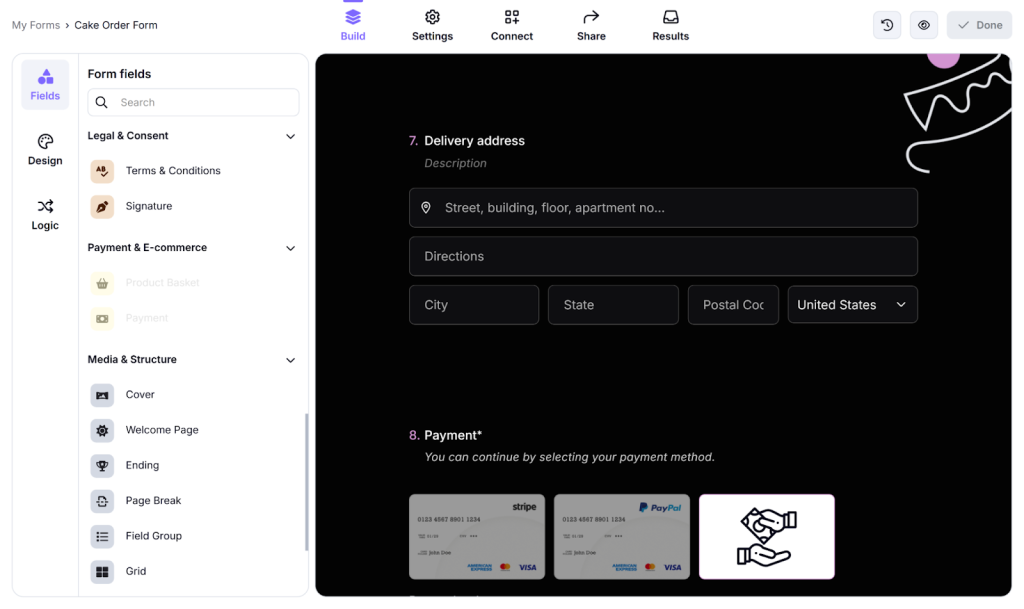
For businesses looking to sell products and collect payments through forms, forms.app offers seamless payment collection. It integrates with popular payment processors, including PayPal and Stripe, so you can collect payments directly through your forms without redirecting users to external sites.
The payment forms can also include a product listing field, called “Product basket”, where users can list products with images, descriptions, stock information, variants, and more. This field lets respondents choose the products they want to buy and make a payment afterward.
Mobile Responsiveness & Device Compatibility
forms.app features a responsive design that automatically adjusts to screen sizes from desktop monitors to smartphones.
Beyond basic responsiveness, forms.app optimizes the mobile submission experience with touch-friendly elements, simplified navigation, and faster load times. Also, forms.app is available on both the Google Play Store and the App Store, so you can manage forms, monitor responses, and stay on top of submissions from your mobile device.
Built-in Analytics & Response Management
The platform includes a built-in statistics dashboard with visual summaries of submission data, completion rates, and response trends. You can filter and explore individual responses, export data, and act on insights without needing a separate analytics tool.
forms.app Pricing: Free vs. Paid Plans
One of forms.app’s most appealing aspect is its pricing structure, which starts with a genuinely useful free tier and scales up through affordable paid plans.
forms.app’s Free Plan, Its Capabilities & Limitations
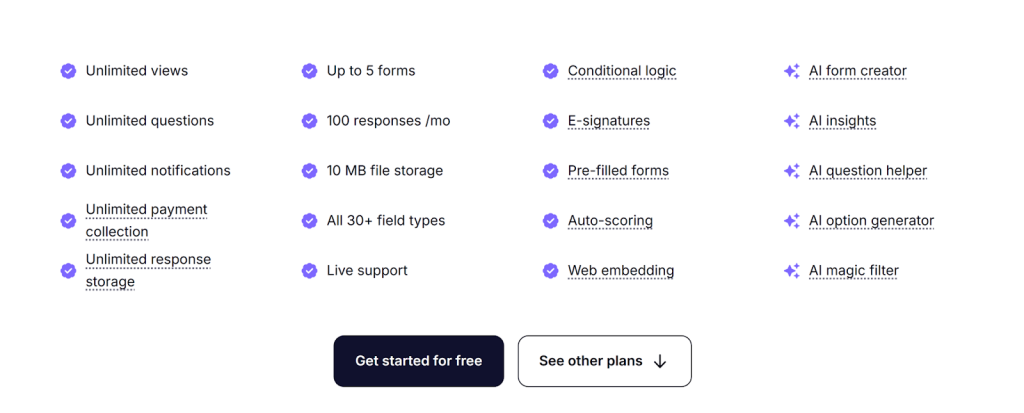
The free plan of forms.app is remarkably generous compared to industry standards. Users can create up to 5 forms, with a monthly response limit of 100. Free users get access to the full form builder, conditional logic, payment processing, all 30+ form fields, and basic analytics, features often reserved for paid tiers on competing platforms.
The free plan also has some limitations worth considering. Forms created on the free tier display forms.app branding, which may not be ideal for businesses seeking a fully professional appearance.
Premium Plans & Their Added Features
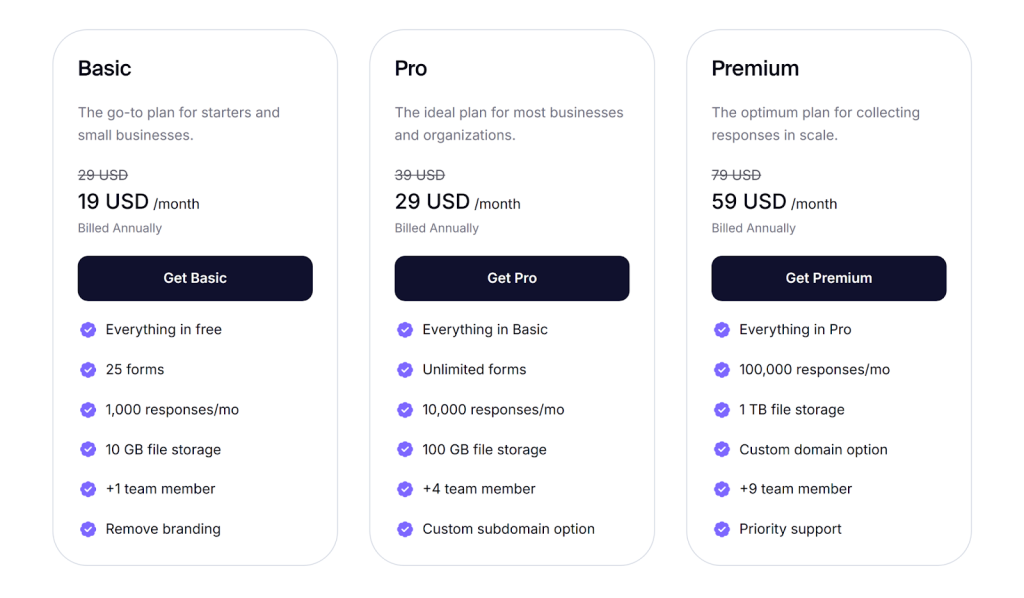
When users outgrow the free tier, forms.app includes several higher plans with progressively expanding capabilities. These paid plans increase response limitations and remove forms.app branding, and unlock additional advanced features.
- Basic: $29/month when paid monthly and $19/month when paid annually (25 forms, 1,000 responses, 10 GB file storage).
- Pro: $39/month when paid monthly and $29/month when paid annually (unlimited forms, 10,000 responses, 100 GB storage, custom subdomain).
- Premium: $79/month paid monthly and $59/month paid annually (100,000 responses, 1TB file storage, custom domain, priority support).
- Enterprise: Custom pricing for businesses with greater needs.
Customer Reviews: What Real People Say About forms.app
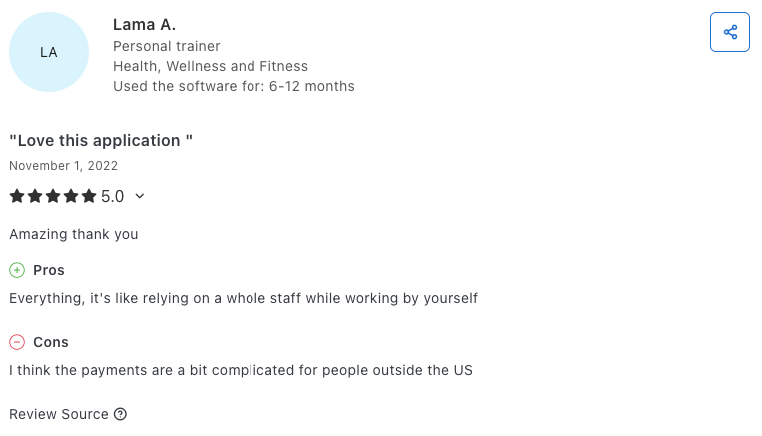
Rated 4.6/5 on Capterra, forms.app receives positive feedback from the majority of users, with many placing particular emphasis on ease of use, feature richness, and value for money.
Some reviewers mention switching from more expensive competitors and finding forms.app more affordable and intuitive. Plus, the platform scores especially well with non-technical users who appreciate the ability to create professional-looking forms without coding knowledge.
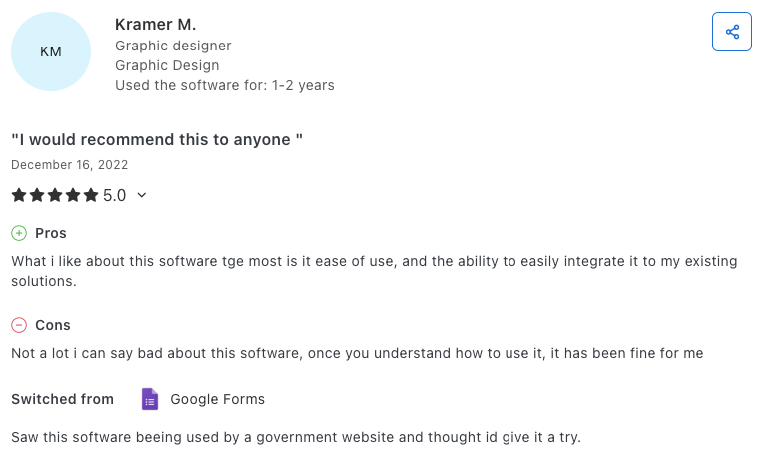
That said, some users are requesting a wider variety of templates and backgrounds for designing forms. Others note a need for broader payment options for users outside the U.S., as payment channels can be limited in some cases.
Final Verdict: Is forms.app a Legit Online Form Builder?
The verdict is clear: forms.app is a well-rounded, reliable form builder that delivers on its promises.
The platform stands out by offering exceptional value. It combines a polished form-filling experience, a comprehensive feature set, and pricing that remains fair as you scale.
The free plan is genuinely useful, the AI tools save real time, and features like PDF generation and save-as-draft set it apart from most competitors in its price range. For businesses that want powerful online forms without the complexity or cost of enterprise tools, forms.app is one of the strongest options available in 2026.
forms.app is particularly trustworthy due to its transparent pricing model and consistent performance across various use cases. The platform’s intuitive interface makes it accessible to beginners while providing advanced features to meet professional needs.
With high ratings for user experience, customer support, and value for money, forms.app has established itself as a reliable solution for everything from simple contact forms to complex payment collection systems.
How AmpiFire’s AmpCast Works Alongside forms.app
While forms.app helps you create and manage online forms, pairing it with AmpiFire’s AmpCast AI platform increases the number of people who see and respond to them. AmpCast AI turns one topic into multiple content formats (news articles, blog posts, interview podcasts, longer informational videos, reels/shorts, infographics, flipbooks/slideshows, and social posts) and distributes them across 300+ high-traffic platforms, giving your forms a much wider audience.
By embedding your forms.app links inside the amp campaigns, you attract more qualified visitors, boost submission rates, and solve the biggest challenge in form marketing: getting your forms in front of the right people. Together, the two tools expand reach and improve conversions in a unified workflow.
Frequently Asked Questions (FAQs)
Can I use forms.app completely free forever?
Yes, forms.app has a genuine free-forever plan that doesn’t expire or automatically convert to a paid subscription. The free tier allows you to create up to 5 forms and collect 100 responses per month indefinitely.
All core features, including payment collection, conditional logic, and basic analytics, are available on the free plan, making it genuinely useful for small-scale use cases without artificial limitations designed to force upgrades.
Does forms.app include conditional logic for complex forms?
Yes, forms.app includes robust conditional logic that lets you create dynamic forms that adapt based on user responses.
This feature, often called “skip logic” or “branching,” enables you to show or hide questions, sections, or entire pages based on respondents’ previous answers.
Can I integrate forms.app with other tools, such as CRMs?
Yes, forms.app provides extensive integration capabilities through native integrations and through Zapier, including popular CRMs, email marketing platforms, project management tools, and more.
Is there a limit on how many forms I can create?
The free plan allows up to 5 active forms. The Basic plan increases this to 25, while Pro and Premium offer unlimited forms.
Does forms.app work on mobile?
Yes. forms.app is fully mobile-responsive and has dedicated apps for iOS (App Store) and Android (Google Play). Note that offline form submission is not currently supported.
What’s the refund policy?
forms.app offers a 90-day money-back guarantee. If you’re not satisfied within the first 90 days of a paid plan, you can request a full refund.
How can I use AmpiFire’s AmpCast AI and forms.app?
AmpiFire’s AmpCast AI amplifies the reach of your forms across multiple platforms and formats. For businesses seeking to leverage both platforms, the workflow is straightforward. Create and optimize your forms using forms.app’s intuitive builder, then incorporate these forms into your Amp campaigns for widespread distribution.
*Disclaimer: Results may vary based on individual circumstances, business type, and content strategy. The time savings and outcomes mentioned are based on typical user experiences and are not guaranteed. For specific pricing and service details, please visit AmpiFire.
Author
Related Posts


The Wholesale Formula Features & Prices: Is This Amazon FBA Training Worth It?
Learn how The Wholesale Formula can contribute to the success of your Amazon FBA business in this detailed review and…


BigCommerce vs WooCommerce | eCom Platforms Pricing & Features Comparison
Dive into this comparison guide to learn the key features, integrations, and pricing between the two platforms BigCommerce and WooCommerce.

BigCommerce vs Shopify | eCom Platforms Pricing & Features Comparison
Learn the differences between BigCommerce vs. Shopify features and understand which E-commerce platform offers better value for your money.

Rytr Features & Pricing: Is It the Best AI Writing Tool? [2026 Review]
Discover Rytr’s features, pricing, and performance to see if it’s the ultimate AI writing tool in 2026.

Average Social Media Cost Per Lead 2026 Compared | Ads vs. Content
Key Takeaways: In 2026, paid social media advertising averages $65 per lead while organic content marketing costs $95 per lead,…

Average Real Estate Cost Per Lead Prices & Rates 2026 | Ads vs. Content
Key Takeaways The average cost per lead (CPL) in real estate typically ranges from $416–$480, but varies significantly by platform,…








