


Key Takeaways
- FlexClip is one of the best AI video makers for beginners, producing short-form social content, marketing reels, and slideshow explainers, but projects with multi-track layering or color grading still need a desktop editor like Premiere Pro.
- FlexClip’s main features include 6,000+ templates, 4 million+ stock assets, drag-and-drop editing, and AI tools like text-to-video, auto-subtitles, voice cloning, and AI scriptwriting, powered by models including Sora 2, Veo 3, Kling, and Hailuo.
- FlexClip offers a free tier with 720p watermarked exports, a Plus plan at $11.99/month for 1080p exports and 3,600 yearly AI credits, and a Business plan at $19.99/month with unlimited stock media and 9,600 yearly AI credits, all billed annually.
- Real user reviews on G2, Capterra, and Trustpilot rate FlexClip between 4.4 and 4.7 stars, praising the simple interface, fast templates, and AI auto-subtitles, while criticizing slow high-resolution exports, a single-track timeline, and watermarks on the free plan.
Is FlexClip AI The Best AI Video Maker & Editor?
For beginners and small businesses making videos fast in 2026, FlexClip is one of the strongest browser-based AI video makers available, though professional post-production projects still demand a desktop tool. The drag-and-drop builder pairs with text-to-video AI to deliver social-ready clips in minutes, with no prior editing skills required.
Paid plans start at $11.99/month for Plus and $19.99/month for Business, both unlocking 1080p exports and removing the watermark that limits the free tier. Heavier color grading and multi-track layering remain out of reach, but for marketing reels and slideshow explainers, the value lands.

How AmpiFire Works:
- Research & Target: Find high-demand topics your buyers search for.
- Create & Repurpose: AmpiFire’s AmpCast AI generates news articles, blog posts, interview podcasts, longer informational videos, reels/shorts, infographics, flipbooks/slideshows, and social posts.
- Distribute & Amplify: Auto-publish to 300+ sites, including Google News, YouTube, Spotify, and major news networks.
Get more traffic from people who want to buy your stuff, and powerful “As Seen On” trust badges for your site.
Do It Yourself (with AI), Done For You Content, & 100% Managed Organic Growth options available.
Grow Your Free Traffic From Everywhere
What Is FlexClip AI?
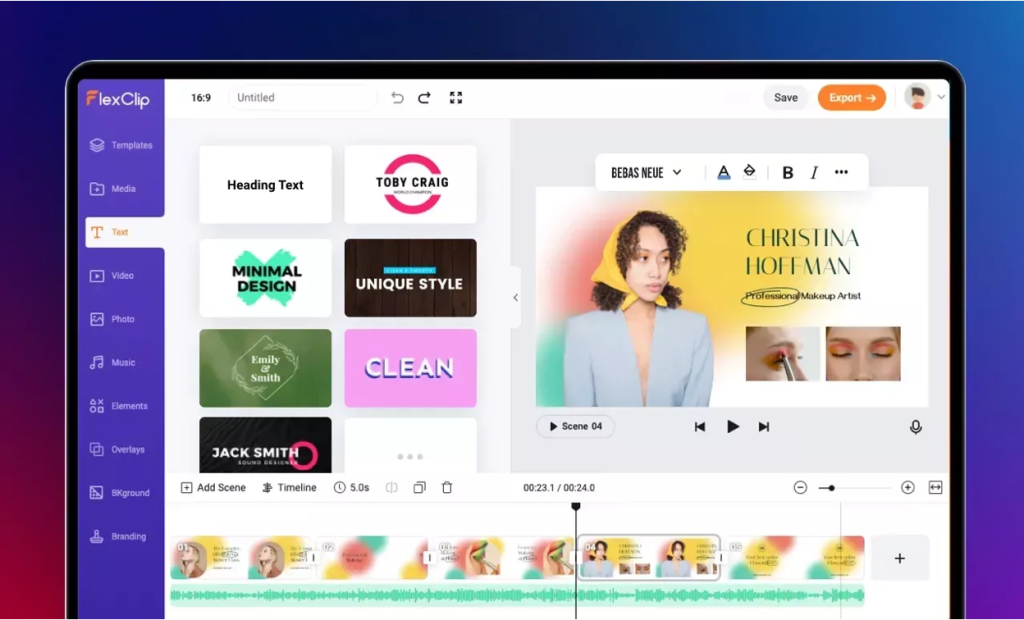
FlexClip is an online video editor built by PearlMountain Limited, a Hong Kong-based software company. It runs entirely in the browser, so there is no software to install on Windows, Mac, Chromebook, or Linux. Projects save to the cloud, letting you switch devices and pick up where you stopped editing.
The platform pairs traditional editing tools (cut, split, merge, add text, and music) with AI features that speed up video content creation. Users can generate video scenes from text prompts, write scripts, auto-generate subtitles, clone voices, and remove backgrounds.
It is best suited for short-form social content, marketing reels, and slideshow-style explainers. Heavier projects with complex layering or color grading still need desktop tools like Premiere Pro or Final Cut.
FlexClip AI Features
FlexClip’s strength lies in three areas: AI-powered generation, a deep template library, and easy editing tools. Here is a closer look at each.
AI Video Generation Tools
FlexClip’s AI suite is the headline feature in 2026. The AI Video Generator turns text prompts into video scenes using models from Hailuo, Kling, Google Veo 3, ByteDance Seedance 2.0, and OpenAI Sora 2. You type what you want, pick an aspect ratio, and the platform builds the clip.
Other AI tools include:
- AI Text-to-Speech with 2,000+ voices
- AI Auto Subtitles in multiple languages
- AI Background Remover for video and images
- AI Voice Cloning and AI Sound Effects
- AI Image Generator powered by Nano Banana, GPT-4o, Flux, Qwen, and Imagen 4
- AI Long to Short Video Converter
- AI PPT-to-Video and Product URL-to-Video tools
- Auto Edit and AI Recreate features
These tools work well for users who want to cut production time.
Templates & Stock Media Library
FlexClip provides over 6,000 templates and 4 million+ stock media assets. Categories cover promos, real estate, news clips, corporate intros, social posts, birthday and wedding videos, tutorials, and product demos.
You pick a template, swap the text and footage, and export. This drag-and-drop approach removes most of the friction beginners face with traditional editors. Templates support 16:9 for YouTube, 9:16 for TikTok and Reels, and 1:1 for feed posts.
Editing & Audio Tools
Standard editing is straightforward. You can trim, split, merge, layer text, apply filters, adjust speed, and add transitions.
The Text-Based Editor (added in late 2025) lets you cut scenes by editing the transcript, helping long-form creators and voice-over-heavy projects. The AI Long to Short Video Converter transforms long-form videos into short, social-ready clips and automatically publishes them across platforms like YouTube Shorts, TikTok, Instagram Reels, and more with just one click.
Audio options include AI Music Generator, royalty-free background tracks, voice cloning, sound effects, and audio-to-text transcription. Other tools cover screen recording, chroma key, video collage, GIF and meme creation, and a YouTube thumbnail maker.
FlexClip Pricing & Plans
FlexClip uses a freemium model with two paid tiers plus a standalone AI Credits plan. All prices below reflect annual billing for 2026, per the official FlexClip pricing page.
Free Plan
The free plan exports videos at 720p with a FlexClip watermark, limits projects to 12, allows videos up to 10 minutes long, and gives 1 stock video and 1 stock audio per project. It works for testing or quick personal clips, but is too restrictive for serious work.
Plus Plan: $11.99/month (Billed Annually)
The Plus plan removes the watermark, unlocks 1080p Full HD exports with no length limit, allows 5 stock assets per project, includes 30GB cloud storage and 100GB export storage, and gives 3,600 AI credits per year (300 per month). This is the most popular tier for solo creators and small businesses.
Business Plan: $19.99/month (Billed Annually)
The Business plan adds unlimited stock media per project, 100GB cloud storage, 1TB export storage, and 9,600 AI credits per year (600 per month). It targets marketing teams, agencies, and content-heavy workflows. Both paid tiers support 1080p Full HD exports without watermarks.
AI Credits Plan
A standalone AI Credits plan starts at $9.99 for 300 credits, with options to top up further. This fits occasional users who mainly want AI generation tools without a monthly subscription. A 7-day money-back guarantee applies to new subscriptions.
FlexClip Reviews: What Real Users Say
Customer feedback across G2, Capterra, Trustpilot, AppSumo, and Software Advice is mostly positive, with FlexClip holding ratings of 4.4–4.7 out of 5 stars in early 2026. Users praise the simple interface, the template library, fast onboarding, and the value of AI tools for beginners.
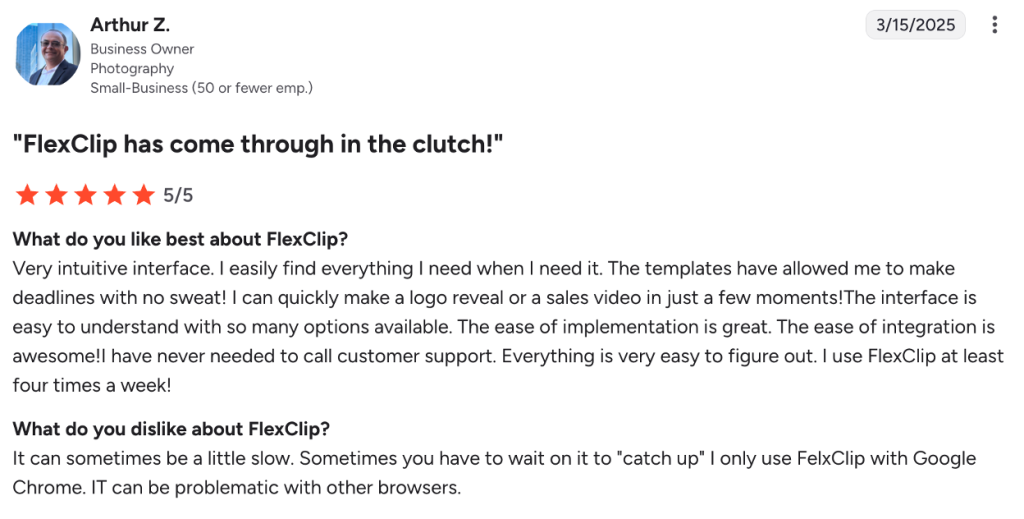
Many reviewers say the platform lets them produce social-ready clips in 10 to 15 minutes without prior editing experience. AI auto-subtitle and text-to-video features are repeatedly mentioned as standout time-savers.
Criticism focuses on export speeds for high-resolution clips, the single-track timeline, occasional bugs in animations or audio sync, and limited mobile optimization. Some users on Capterra and Trustpilot also reported issues with subscription auto-renewal and refund policies, so saving cancellation confirmations is wise.
So, Is FlexClip The Best AI Video Maker?
Yes, FlexClip earns its spot among the top AI video makers for beginners, with templates and AI tools that speed up browser-based production. Complex multi-track editing still needs a desktop tool, but for social videos and marketing reels, FlexClip is hard to beat.
Frequently Asked Questions (FAQs)
Is FlexClip really free to use?
Yes, FlexClip has a free plan that allows up to 12 projects, exports at 720p with a watermark, and caps videos at 10 minutes long. It is enough for testing the platform or making short personal clips, but most business users upgrade to remove the watermark and unlock 1080p exports.
Can FlexClip replace professional video editors like Premiere Pro?
No, FlexClip is built for fast, simple video creation, not heavy post-production. It works well for social media clips, marketing videos, and slideshows, but its single-track timeline and slower export speeds make it unsuitable for complex multi-layer projects or feature-length production work.
What AI models does FlexClip use?
FlexClip integrates several AI models for video and image generation. These include OpenAI’s Sora 2, Google Veo 3, Kling AI, Hailuo AI, ByteDance Seedance 2.0, and Nano Banana, plus GPT-4o, Flux, and Imagen 4 for image creation. The selection updates regularly as new models are released.
Does FlexClip allow commercial use of its templates and stock media?
Yes, paid plan subscribers can use FlexClip templates, stock videos, music, and images for commercial work, including client projects and ads. Some music tracks may still trigger copyright matches on YouTube in monetized contexts, so reviewing usage rights for each asset before publishing is a good idea.
*Disclaimer: Results may vary based on individual circumstances, business type, and content strategy. The time savings and outcomes mentioned are based on typical user experiences and are not guaranteed. For specific pricing and service details, please visit AmpiFire.
Author
Related Posts

Movavi Reviews, Features & Pricing Plans: Is This the Best Video Editor in 2026?
Learn why Movavi Video Editor is ideal for beginners and pros alike, with AI tools, flexible plans, and AmpiFire to…


Storydoc Reviews, Pricing & Features: Is This the Best AI Presentation Maker?
Learn Storydoc's key features and pricing plans, and read real user reviews to find out if this AI presentation maker…


Peech AI Features & Pricing: How Does this AI Video Editor Work?
Learn Peech AI's video editing features, pricing plans, and how this AI tool transforms long videos into engaging social media…


Tagshop AI Reviews, Features & Pricing: Is This Video Ad Generator Worth It?
Learn honest Tagshop AI reviews, top features like URL-to-Video and 1,000+ AI avatars, plus pricing from free to $99/mo. See…

Phedra AI Reviews, Features & OTO: Is This AI Image Editor Legit?
Phedra AI review: Is this AI image editor legit? Explore features, pricing & text/voice editing capabilities in our detailed analysis.

VEED.IO Pricing & Reviews: Is This AI Text-to-Video Generator Worth It?
Get honest VEED.IO reviews and pricing details. Learn if this AI text-to-video generator is worth your investment for creating video…








