

Key Takeaways
- TikTok’s algorithm keeps evaluating your content after you post, which means a video that starts slow can still gain traction days or weeks later if you take the right steps.
- Most creators move on after a video underperforms, leaving views on the table by skipping actions like hashtag updates, Duets, and active comment engagement in the first hour.
- AmpiFire’s AmpCast AI handles the distribution side automatically, turning one TikTok topic into 8 content formats published across 300+ sites while you stay focused on creating.
- Videos posted between 21 and 34 seconds consistently achieve the highest completion rates on TikTok, and completion rate is the strongest ranking signal the algorithm uses for wider distribution.
- Timing your posts, engaging comments within the first hour, and using AmpCast AI for cross-platform reach work together to extend the life of every video you publish.
TikTok Views Dropping? Here’s How to Revive Your Posts
To get more views on TikTok after posting, the most effective moves are engaging your comments within the first hour, updating your hashtags, creating a Duet with your own content, and using a tool like AmpiFire’s AmpCast AI to push your topic across 300+ platforms automatically. AmpCast AI converts one TikTok topic into 8 content formats and distributes them to high-authority sites including Google News, YouTube, and Spotify. That kind of reach keeps driving traffic back to your original video long after the initial posting window closes.
TikTok’s algorithm prioritizes completion rate, engagement, and relevance over follower count. That’s why accounts with just a few hundred followers can suddenly go viral while established creators see their views plateau. The playing field is more level than most platforms once you understand how to work with the algorithm rather than against it.

How AmpiFire Works:
- Research & Target: Find high-demand topics your buyers search for.
- Create & Repurpose: AmpiFire’s AmpCast AI generates news articles, blog posts, interview podcasts, longer informational videos, reels/shorts, infographics, flipbooks/slideshows, and social posts.
- Distribute & Amplify: Auto-publish to 300+ sites, including Google News, YouTube, Spotify, and major news networks.
Get more traffic from people who want to buy your stuff, and powerful “As Seen On” trust badges for your site.
Do It Yourself (with AI), Done For You Content, & 100% Managed Organic Growth options available.
Grow Your Free Traffic From Everywhere
What Actually Works to Boost TikTok Views After Posting?

1. Share Your Video Across Multiple Platforms
Cross-promotion is one of the most underutilized strategies for boosting TikTok views. The moment you publish a new TikTok, share it to your Instagram Stories, X (formerly Twitter), Facebook groups, and even relevant Reddit communities. Each platform brings different audiences back to your original content, creating multiple traffic sources.
For maximum impact, customize your messaging for each platform rather than using the same generic “Check out my new TikTok!” approach.
On Instagram, use story stickers to encourage clicks. On X, extract a thought-provoking quote or statistic from your video. On Facebook, frame your content as a solution to a common problem discussed in groups you’re part of.
Use the “Share” button within TikTok rather than downloading and reuploading your video elsewhere. This ensures all traffic is directed back to your original TikTok post, boosting those all-important view counts that signal quality to the algorithm.
2. Engage With Comments Within the First Hour
The comment section is a powerful lever for increasing your video’s reach. TikTok’s algorithm views high comment activity as a strong signal that your content is engaging, which can trigger wider distribution in both followers’ and non-followers’ feeds.
Set an alarm for 30–60 minutes after posting and dedicate that time specifically to responding to every single comment. Don’t just reply with generic “thanks” responses; ask questions, add value, or use humor to encourage further interaction. This creates comment threads that increase the time users spend engaging with your content.
If your video isn’t naturally generating comments, don’t hesitate to kickstart the conversation yourself. Add a comment asking a thought-provoking question related to your content or share a behind-the-scenes insight that wasn’t included in the video. You might be surprised how quickly this can jump-start engagement.
3. Add Relevant Hashtags to Your Caption
Within seven days of publishing, you can still edit your caption to add trending or niche-specific hashtags. TikTok currently allows one caption edit per day during that window, and limits posts to a maximum of five hashtags. This simple update can expose your content to viewers browsing those hashtag feeds or searching for related topics.
Aim for three to five carefully chosen tags rather than padding your caption with generic ones. Focus on relevance over volume. A video about makeup techniques will perform better with #makeuptutorial (specific and relevant) than #fyp (generic and oversaturated).
4. Create a Duet or Stitch With Your Own Content
One of TikTok’s most powerful features for boosting visibility is the ability to Duet or Stitch with existing content, including your own videos. If your original post isn’t gaining traction, create a Duet with it that adds new context, answers questions, or shows reactions to your own content. This gives your original video a second chance at reaching the algorithm’s favor.
When creating a Duet with your own content, add a hook that wasn’t in the original video. For example, “The part I didn’t show in my original video…” or “What happened after I posted this…” This creates curiosity that drives viewers to check out both videos, effectively doubling your content’s reach while requiring minimal additional creative effort.
5. Pin Your Best-Performing Video to Your Profile
Pinning videos to your profile is a tactical move to extend the lifespan of high-performing content. When you pin a video, it becomes the first content visitors see when they land on your profile, regardless of when it was posted. This prominent placement can generate a steady stream of views long after the video’s initial publication.
Choose to pin videos that best represent your content style or ones that have already demonstrated strong engagement metrics. The additional views from profile visitors send positive signals to the algorithm, potentially triggering wider distribution in the For You Page weeks or even months after the original posting date.
How Do Technical Tweaks Help Increase Your TikTok View Count?
Optimize Video Quality & Sound
The technical quality of your content directly impacts how TikTok’s algorithm ranks and distributes it. Videos with clear visuals and crisp audio consistently outperform blurry or muffled content, even when the subject matter is identical.
If you’ve already posted content with suboptimal quality, consider recreating and republishing the video with better lighting, stabilization, and audio clarity.
Test Different Video Lengths
TikTok has expanded the maximum video length several times, but longer isn’t always better. Videos between 21 and 34 seconds tend to balance strong completion rates with meaningful watch time, though shorter videos (under 15 seconds) often achieve even higher completion rates on their own.
If your longer videos aren’t performing well, consider creating a condensed version that delivers the same value in a tighter package.
Use TikTok’s Analytics to Track Performance Patterns
TikTok’s built-in analytics show when your audience is most active and which content types they respond to best. In the Analytics tab inside TikTok Studio, you can view detailed metrics including view count trajectories over time, average watch time, and traffic source breakdowns.
Pay special attention to which videos experienced a “second wind” of views days after posting. This pattern often indicates that the algorithm has positively reassessed your content based on continued engagement. Identifying these patterns can help you replicate success in future posts and understand which videos might benefit from renewed promotion.
The Fastest Way to Get More TikTok Views After Posting
Cross-promoting, engaging with comments, updating hashtags, and using Duets are all proven ways to revive a video after it posts. Each one helps signal to TikTok’s algorithm that your content deserves wider distribution, and the first hour after posting is the highest-leverage window to put them into action.
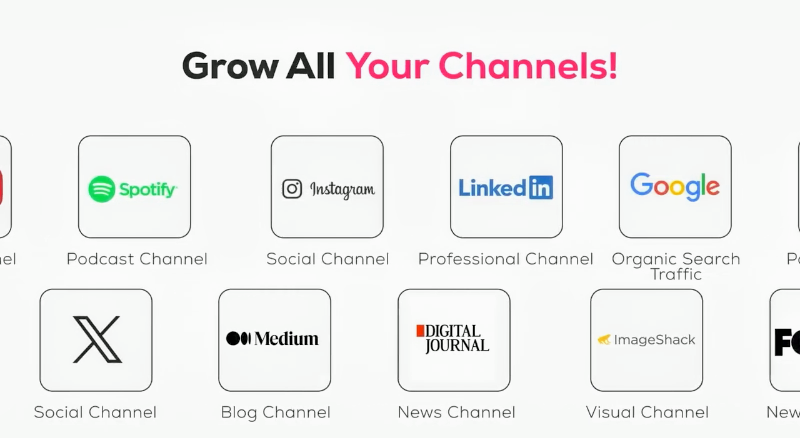
AmpiFire’s AmpCast AI handles the distribution layer for you, turning one TikTok topic into 8 content formats and publishing them across 300+ sites including Google News, YouTube, and Spotify. More cross-platform exposure means more traffic back to your original video without extra hours spent promoting. If you’re serious about extending the reach of every video you post, try AmpCast AI body and let it run the promotion while you make the next one.
Frequently Asked Questions (FAQs)
How long does TikTok keep promoting a video after posting?
TikTok doesn’t limit promotion to a specific timeframe. While early performance (especially in the first 24–48 hours) strongly influences distribution, videos can experience surges weeks or months later if they receive renewed engagement or become relevant to trending topics based on ongoing performance.
Should I delete and repost TikTok videos that aren’t performing well?
Deleting and reposting is risky because TikTok’s algorithm deprioritizes duplicated and reused content in the For You feed, and you lose all the engagement signals you’ve accumulated. Instead, revive existing videos through strategic promotion, hashtag updates, or creating Duets with your own content for better results.
Does paying for TikTok promotion improve organic reach?
TikTok’s paid promotion increases views but organic video performance is unrelated to promotion performance. Paid views are unlikely to trigger the algorithm’s organic snowball effect unless promoted viewers genuinely engage. Focus on organic engagement strategies to drive sustainable, long-term growth and improve algorithm performance.
What’s considered a good view count for TikTok videos?
Good view counts depend on your follower size and niche. As a general benchmark, many creators consider 1,000+ views per video a strong milestone for newer accounts, while established accounts often target reaching around 10–20% of their followers. That said, engagement rates and watch time tend to be more meaningful indicators of performance than raw view numbers.
How does AmpiFire help me get more TikTok views after posting?
AmpiFire uses AmpCast AI to automatically transform your TikTok video topic into 8 different content formats: news articles, blog posts, interview podcasts, long-form videos, short-form videos, infographics, flipbooks, and social media posts.
These are then distributed to over 300 high-authority sites, including Google News, YouTube, Spotify, Pinterest, FOX affiliate sites, and major social platforms. This cross-platform exposure drives traffic back to your TikTok content while building your credibility as a creator.
*Disclaimer: Results may vary based on individual circumstances, business type, and content strategy. The time savings and outcomes mentioned are based on typical user experiences and are not guaranteed. For specific pricing and service details, please visit AmpiFire.
Author
Related Posts


Instagram Reels vs TikTok: Views, Reach & Content Tips
Instagram Reels vs TikTok: TikTok wins cold reach; Reels nurtures your followers. Get views, reach tips, and grow on both…


How to Get More Views on Instagram Reels After Posting: 6 Tips
Boost Instagram Reels views after posting with proven engagement tactics, Story strategies, and analytics insights to maximize reach and grow…

How to Get More Views on YouTube Shorts After Posting: 8 Tips
Learn how to get more views on YouTube Shorts after posting with 8 tips that keep working weeks later, plus…

YouTube Shorts vs TikTok: Views, Monetization & Content Strategy
YouTube Shorts vs TikTok: see which platform truly wins on views, reach, and virality, plus how AmpiFire publishes your content…


How to Promote Your Blog on TikTok: Tips & Examples
Learn how to promote your blog on TikTok with proven strategies that boost traffic. Includes content tips, examples & a…
How to Get More Views on LinkedIn Posts: 7 Tips
Want more views on LinkedIn posts? These 7 tips cover timing, comments, and native video, plus how AmpiFire turns one…








