
Key Takeaways
- Most LinkedIn posts stall because the algorithm shows them to a small first wave and only expands reach if that group engages quickly.
- External links, company-page posting, and poor timing all shrink how far your post travels before it ever gains momentum.
- Publishing midweek afternoons and sparking real comments in the first 90 minutes is the fastest way to trigger wider distribution.
- Natively uploaded 30-to-90-second video, correctly sized images, and occasional personal posts, all consistently outperform external links and company pages.
- AmpiFire AmpCast AI takes one winning post and turns it into eight content formats published across 300+ sites, so your best idea reaches far beyond LinkedIn.
How LinkedIn Decides Which Posts Get Seen
Getting more views on LinkedIn posts starts with understanding how the feed distributes them. Your post reaches a small group of your network first, then goes wider only if that group engages fast. Early likes and comments tell the algorithm your post is worth showing, while a quiet first 90 minutes usually means it stalls.
What catches most people off guard is how much the time of day shapes that first push. Recent data on millions of posts found Wednesday at 4:00 PM to be the single strongest slot of the week, with the 3:00 to 5:00 PM window beating mornings on several days. So when you post can matter as much as what you post.
AmpiFire helps you get more from every idea you share. Our AmpCast AI turns one topic into eight content formats, from articles to videos to social posts, then publishes them to LinkedIn and 300+ other sites all at the same time. So a single idea works for you on LinkedIn and far beyond it, without any extra effort.

How AmpiFire Works:
- Research & Target: Find high-demand topics your buyers search for.
- Create & Repurpose: AmpiFire’s AmpCast AI generates news articles, blog posts, interview podcasts, longer informational videos, reels/shorts, infographics, flipbooks/slideshows, and social posts.
- Distribute & Amplify: Auto-publish to 300+ sites, including Google News, YouTube, Spotify, and major news networks.
Get more traffic from people who want to buy your stuff, and powerful “As Seen On” trust badges for your site.
Do It Yourself (with AI), Done For You Content, & 100% Managed Organic Growth options available.
Grow Your Free Traffic From Everywhere
7 Tips for Ramping Up Your Post Views on LinkedIn
Post at the Right Time on the Right Days
Timing matters on LinkedIn because the feed favors recent posts that get quick engagement. Getting content in front of active users during peak afternoon hours provides the vital engagement signals needed to expand your reach. To maximize impact, aim to publish midweek when professional browsing is highest.
The ideal posting days are Tuesday through Thursday, with Buffer data ranking Wednesday at 4:00 PM as the week’s highest-performing individual time slot, and the 3:00 to 5:00 PM window outperforming mornings on several days. If you can only post once a week, aim for Wednesday afternoon.
Get Comments & Discussion Going Early
The first 60 to 90 minutes after you publish are the most important window for your post. LinkedIn distributes content in waves: it shows your post to a small initial slice of your network, and if that group engages (especially through comments), the algorithm treats it as valuable and pushes it to a larger audience. If the first wave is quiet, the post stalls.
The algorithm also evaluates comment quality. High-value comments that add a different perspective, share a short experience, or ask a follow-up question carry significantly more weight than a string of one-word replies.
You can also leave a strong comment on your own post immediately after publishing: something that adds context, poses a question to readers, or shares a quick related insight. This seeds the conversation and gives early viewers something to respond to, all while keeping your post active in the feed during that critical first distribution window.
Like & Comment on Other People’s Posts
LinkedIn is a network, and the algorithm rewards people who act like it. One of the most underused tactics for growing your own post views is consistently engaging with other people’s content. When you leave a thoughtful comment on a post in your niche, your name and profile appear in front of everyone who reads that thread, including the poster’s entire audience.
The key word is thoughtful. A comment that adds a different perspective, shares a short personal experience, or asks a meaningful follow-up question will get noticed. Generic responses like “Great post!” do almost nothing.
Upload Video Directly to LinkedIn
If you want to use video, never share a YouTube or Vimeo link in your post. Always upload your video file natively to LinkedIn. LinkedIn wants to keep users on its platform, so it actively promotes natively uploaded video over external video links.
Keep your native LinkedIn videos short and punchy. Videos between 30 seconds and 90 seconds tend to perform best for B2B audiences, with videos under 60 seconds generally achieving the highest completion rates. Front-load your key insight in the first five seconds and use captions so your message lands even on mute.
Share the Occasional Personal or Humorous Post
LinkedIn has evolved well beyond suit-and-tie corporate updates. Audiences respond strongly to posts that show a human being behind the profile. Sharing an honest lesson from a failure, a behind-the-scenes moment from your work life, or even a genuinely funny observation about your industry can generate some of your highest-performing content.
The goal is simple: be personable and memorable, not robotic. Just let your real voice come through occasionally. These posts tend to attract comments from people who wouldn’t normally engage with your professional content, which broadens your reach into new corners of the network.
Optimize Your Image Sizes for LinkedIn
Using the correct image dimensions on LinkedIn matters more than most people think. Poorly sized images get cropped awkwardly in the feed, which kills click-through rates and looks unprofessional. Using platform-specific recommendations ensures your visuals always look crisp and clean.
For best results, use standard images at 1200 by 627 pixels or square images at 1080 pixels. Vertical portrait posts perform best at 1080 by 1350 pixels. Matching these specific aspect ratios keeps your content optimized so you can successfully capture your audience’s attention as they scroll.
Post on Your Personal Profile
LinkedIn’s algorithm strongly favors personal profiles over company pages for organic reach. Though fully completed company pages do receive more views than incomplete ones, even a well-optimized company page will typically reach a fraction of the audience that an active personal profile does.
If you run a business, your personal profile should be doing the heavy lifting. Post from your own account, speak in first person, and build genuine connections with your target audience.
You can still maintain a company page for credibility and SEO purposes. Make sure every section is filled out, keywords are woven into your description, and a clear banner image is in place. But for growing views and driving engagement, your personal voice on your personal profile is where the advantage lives.
Go Beyond LinkedIn with AmpiFire
These seven tips all point to one idea: LinkedIn rewards content that keeps people engaged on the platform and sparks real conversation. Smart timing, native video, and thoughtful commenting each earn you more reach. Applied consistently, they turn an ordinary profile into a steady source of views.
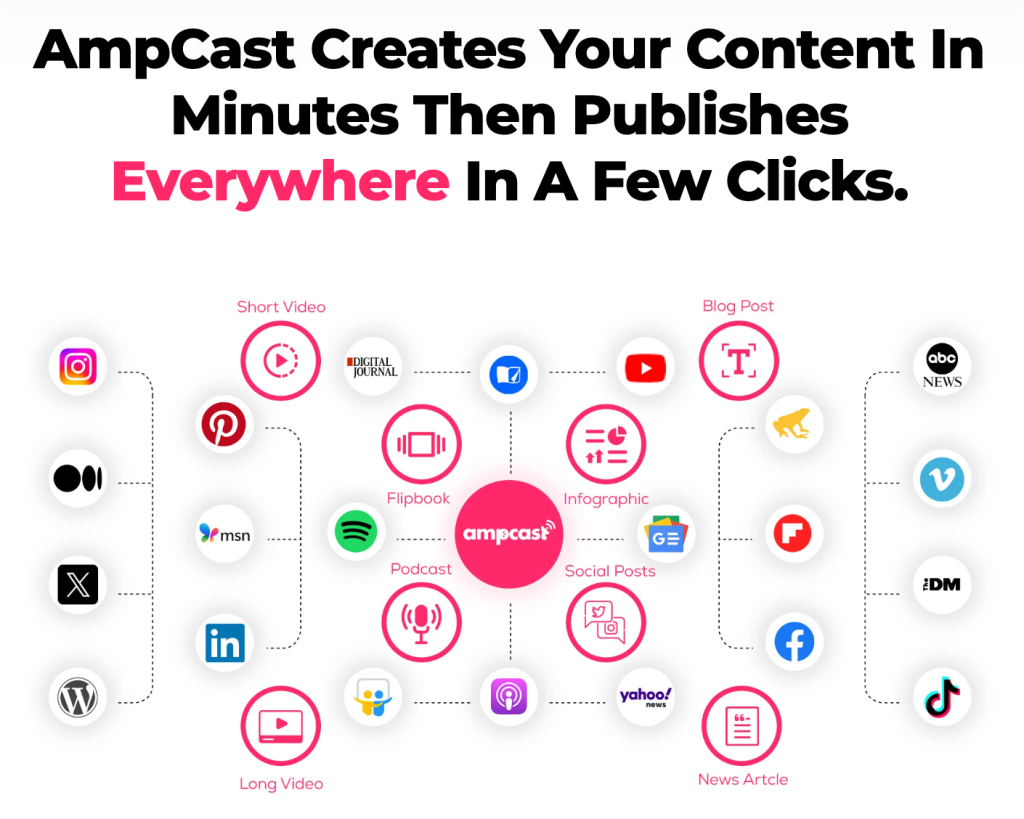
The limit is that LinkedIn is only one place your buyers spend time. At AmpiFire, we use AmpCast AI to turn a single topic into eight formats: news articles, blog posts, interview podcasts, longer informational videos, reels/shorts, infographics, flipbooks/slideshows, and social posts. We then publish them to LinkedIn and 300+ other sites like Google News, YouTube, Spotify, and Pinterest at the same time, so one idea earns reach and As Seen On trust far beyond your feed. Start growing your free traffic everywhere with AmpiFire today.
Frequently Asked Questions (FAQs)
Can you see views on LinkedIn posts?
Yes, but not all view counts work the same way. For standard LinkedIn posts, you can see the number of impressions (how many times your post appeared on someone’s screen).
However, an impression doesn’t necessarily mean that someone read your post. It just means it appeared in their feed.
How do I make my LinkedIn post reach more?
To make a LinkedIn post reach more people, post midweek during afternoon hours and reply to early comments within the first one to 1.5 hours, as strong initial engagement signals the algorithm to push your post to a wider audience. Round it out by commenting thoughtfully on other people’s posts, which puts your profile in front of their audience and pulls more views back to you.
What does Impression mean on LinkedIn?
An impression on LinkedIn means your post appeared on someone’s screen, whether they were scrolling through their feed, searching for a topic, or viewing a shared post. It does not mean they clicked on it, read it, or engaged with it in any way.
Should I post as myself or my company on LinkedIn?
Post as yourself. Personal profiles consistently outperform company pages on LinkedIn for organic reach. The algorithm is built around person-to-person connection, and it distributes personal content more broadly than branded company updates.
Nevertheless, your company page still has a role to play. Keep it fully complete for credibility, SEO value, and as a destination for anyone who wants to learn more about your business. Use it to post company milestones, job listings, and formal announcements, but for driving genuine engagement and growing your visibility as a thought leader in your industry, your personal profile is where the payoff lies.
What content formats does AmpiFire produce?
AmpiFire’s AmpCast AI turns a single topic into eight different content formats, so one input becomes a full spread of assets. These formats include news articles, blog posts, interview podcasts, longer informational videos, reels and shorts, infographics, flipbooks and slideshows, and social posts. That range lets you reach audiences across written, audio, video, and visual channels without creating each piece from scratch.
*Disclaimer: Results may vary based on individual circumstances, business type, and content strategy. The time savings and outcomes mentioned are based on typical user experiences and are not guaranteed. For specific pricing and service details, please visit AmpiFire.
Author
Related Posts

How to Get More Views on TikTok After Posting: 5 Tips
Learn 5 proven ways to get more TikTok views after posting, from hashtag updates to cross-promotion with AmpiFire's AmpCast AI.
How to Get More Views on Instagram Reels After Posting: 6 Tips
Boost Instagram Reels views after posting with proven engagement tactics, Story strategies, and analytics insights to maximize reach and grow…


How to Get More Views on YouTube Shorts After Posting: 8 Tips
Learn how to get more views on YouTube Shorts after posting with 8 tips that keep working weeks later, plus…

Instagram Reels vs TikTok: Views, Reach & Content Tips
Instagram Reels vs TikTok: TikTok wins cold reach; Reels nurtures your followers. Get views, reach tips, and grow on both…

Repurpose Video Content Into AI Blog Posts, Social Media & Multiple Formats
Learn how to repurpose long videos across LinkedIn, blogs, Twitter (X), Facebook, TikTok, Reels, and YouTube using AI to maximize…
How to Auto Post Vimeo Videos to LinkedIn
Learn how to auto-post Vimeo videos to LinkedIn with Zapier, IFTTT, and social media tools. Save 5 hours weekly with…








