
Key Takeaways
- Murf AI is a browser-based AI voice platform that creates realistic voiceovers from text and also supports AI dubbing, translation, voice cloning, and video editing for a wide range of content.
- The platform has 200+ AI voices in 35+ languages, plus controls for pitch, speed, pronunciation, pauses, and emphasis to create more natural-sounding narration.
- Murf Studio lets you write or upload scripts, edit voiceovers, sync narration with videos, and export completed projects from one cloud-based workspace without additional software.
- Murf Studio has a Free plan for testing, a Creator plan from $19/month billed annually ($29 month-to-month), a Business plan at $66/month billed annually ($99 month-to-month), and a custom Enterprise plan for larger organizations.
- AmpiFire’s AmpCast AI takes the topics behind your Murf AI content, turns them into 8 unique formats, and publishes them across 300+ high-authority sites to reach a wider audience organically.
What Does Murf AI Actually Do?
Murf AI turns a typed or uploaded script into a finished voiceover, so you can narrate videos, courses, and presentations without a microphone or a voice actor. Many people treat it as a simple text-to-speech tool, but it works more like a small production studio, because scripting, editing, and video syncing all happen in the same browser window.
That makes plan choice matter more than it first seems. The Free plan is useful for testing voices, but it blocks downloads and commercial use, so anything made for clients or paid campaigns needs a paid tier. Voice cloning also has its own rule: Murf requires written consent from the person whose voice you’re cloning.
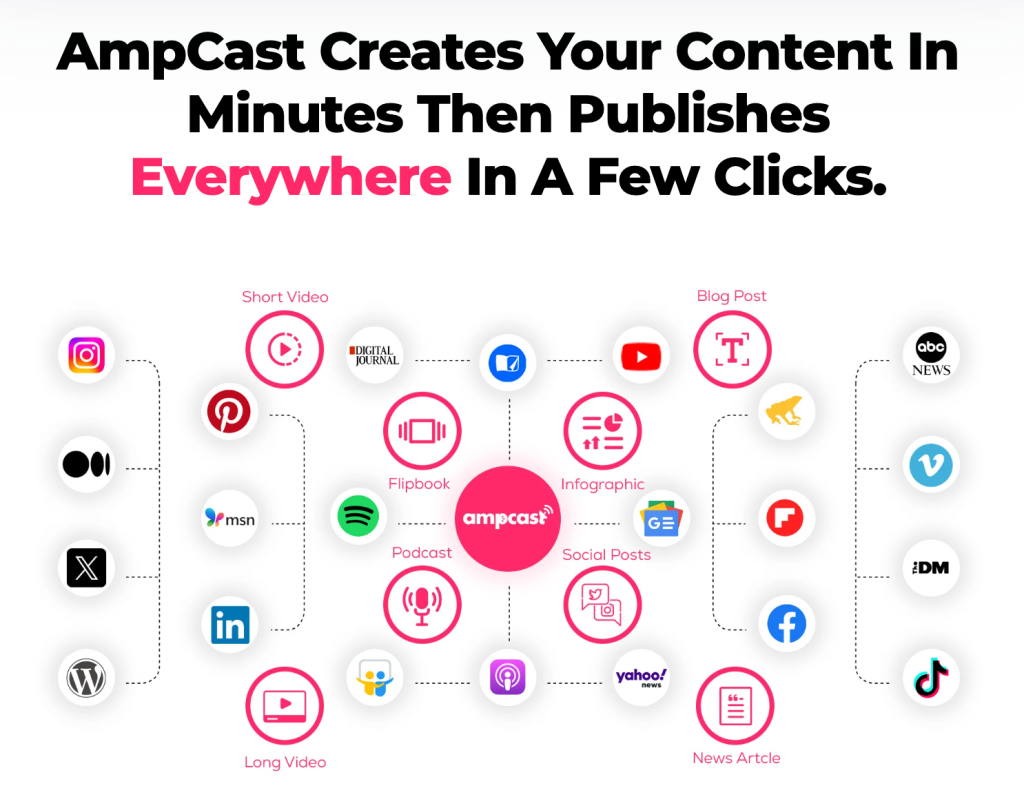
A strong voiceover still only reaches people who find that one video or episode. AmpiFire’s AmpCast AI helps close that gap. It takes the same topic and turns it into podcasts, videos, reels, infographics, blog posts, news articles, and more, then publishes them where buyers search.

How AmpiFire Works:
- Research & Target: Find high-demand topics your buyers search for.
- Create & Repurpose: AmpiFire’s AmpCast AI generates news articles, blog posts, interview podcasts, longer informational videos, reels/shorts, infographics, flipbooks/slideshows, and social posts.
- Distribute & Amplify: Auto-publish to 300+ sites, including Google News, YouTube, Spotify, and major news networks.
Get more traffic from people who want to buy your stuff, and powerful “As Seen On” trust badges for your site.
Do It Yourself (with AI), Done For You Content, & 100% Managed Organic Growth options available.
Grow Your Free Traffic From Everywhere
Murf AI’s Core Features
200+ AI Voices Across 35+ Languages
Murf offers more than 200 AI voices across 35+ languages with multiple accents and narration styles. Its MultiNative technology allows selected voices to speak multiple languages naturally, making it a strong option for global content creation and multilingual teams.
Voice Customization
Murf lets you fine-tune voiceovers with controls for pitch, speed, pronunciation, pauses, emphasis, and intonation. These tools help you create more natural, expressive narration without recording your own voice.
Built-In Studio Interface for Video & Audio Projects
Murf Studio is a browser-based editor for building a full voiceover project in one place. You can write or upload scripts, add background music, and export finished audio or video.
AI Voice Cloning & Custom Voice Creation
Murf lets businesses create secure custom AI voice clones for consistent branding across content. Voice cloning is only available on higher-tier plans, so check which plan includes it before you commit. You can use cloned voices for voiceovers, multilingual dubbing, marketing, and training, and keep them exclusive to your team.
Script-to-Video Sync Tools
Murf Studio’s timeline editor lets you line up each part of the voiceover with the right scene, image, or music cue. You can move narration blocks, adjust timing, and add pauses so the audio matches what is on screen.
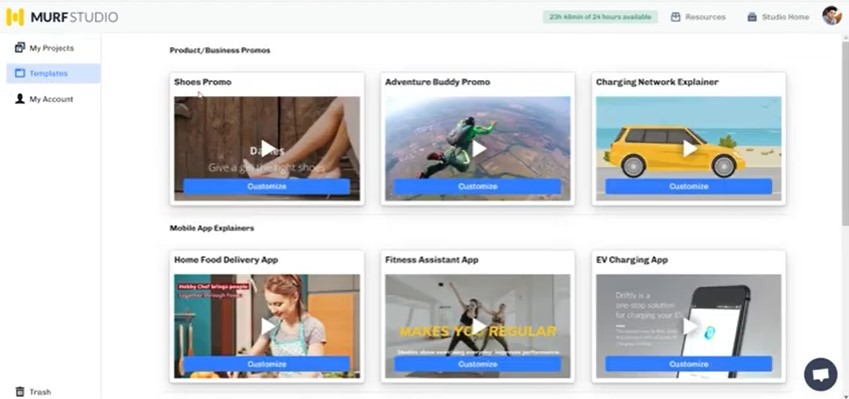
Pre-Built Templates for Faster Project Starts
Murf provides ready-to-use templates and AI-powered tools for presentations, training videos, product demos, marketing content, and social media. These templates help you create professional voiceovers faster while maintaining a consistent style across projects.
Murf AI Pricing Plans Broken Down
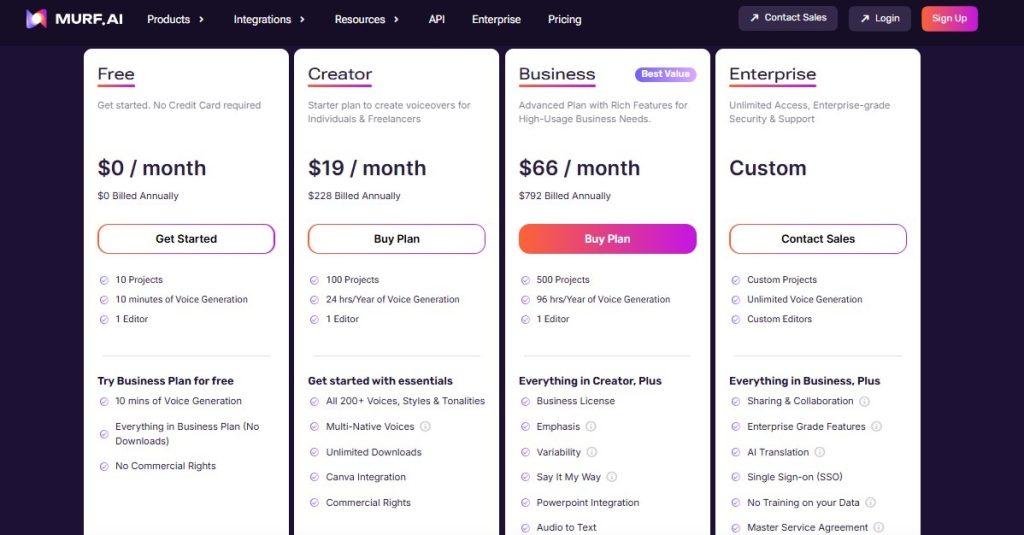
Murf offers four main voice generation plans: Free, Creator, Business, and Enterprise. The plans differ in voice generation limits, project capacity, collaboration features, and commercial rights, making them suitable for everyone from beginners to large organizations.
Free Plan
The Free plan includes 10 projects, 10 minutes of voice generation in total, and 1 editor. You can try most Business plan features, but you can’t download your files, and voiceovers made on this plan have no commercial rights.
Paid Plan Tiers
The Creator plan costs $19/month billed annually ($228/year) or $29 month-to-month. It includes 100 projects, 24 hours of voice generation per year, unlimited downloads, 200+ AI voices, MultiNative voices, Canva integration, and commercial rights.
The Business plan costs $66/month billed annually ($792/year) or $99 month-to-month. It adds 500 projects, 96 hours of voice generation per year, a business license, emphasis controls, voice variability, Say It My Way, PowerPoint integration, Audio to Text, and Murf voices for Windows apps.
The Enterprise plan has custom pricing with unlimited voice generation, voice cloning (add-o), advanced security, collaboration tools, AI translation, SSO, and dedicated support.
Murf AI Creates the Voiceover, AmpiFire’s AmpCast AI Helps More Buyers Hear It
Murf AI gives creators, educators, and businesses a fast way to produce natural narration, with enough voices, languages, and editing controls to cover most projects. The right plan depends on how much audio you need and whether the work is commercial. Once the voiceover is finished, the real question becomes how many people will find it.
We built AmpCast AI to answer that question. After researching topics your audience is searching for, AmpCast AI creates 8 content formats from one idea (news articles, blog posts, interview podcasts, longer informational videos, reels/shorts, infographics, flipbooks/slideshows, and social posts). It then distributes them across 300+ sites, including YouTube, Spotify, Pinterest, Google News, and other major sites. Get your voiceover content in front of more buyers with AmpCast AI today.
Frequently Asked Questions (FAQs)
What is Murf AI used for?
Murf AI is a browser-based AI voice platform for creating realistic voiceovers from written text. It offers 200+ AI voices in 35+ languages and includes tools for adjusting pitch, speed, pronunciation, pauses, emphasis, and intonation. Murf can also be used for AI dubbing, translation, voice cloning, video editing, presentations, e-learning, podcasts, marketing content, and other projects that need professional narration.
Is Murf AI safe to use?
Murf has several documented security and privacy measures. Its current security information says customer data is encrypted in transit with TLS 1.2, stored and processed in AWS infrastructure in the US, and protected through access controls and data-isolation measures. Murf also reports SOC 2 Type II and ISO 27001 certifications and GDPR compliance.
For voice cloning specifically, Murf’s terms require explicit written consent from the speaker whose recordings are used to create a cloned voice. So, while no online service is completely risk-free, Murf has established security controls and compliance measures, and its voice-cloning terms include consent requirements.
How much does Murf AI cost?
Murf AI has a Free plan at $0, with paid plans starting at $19/month for Creator and $66/month for Business when billed annually. Enterprise pricing is customized for larger organizations. The Free plan is intended for testing and includes 10 minutes of voice generation, while paid plans add higher usage limits and features such as commercial rights.
How does Murf AI compare to AmpiFire?
Murf AI and AmpiFire serve different purposes. Murf AI helps you create AI voiceovers, while AmpiFire’s AmpCast AI turns a single topic into multiple content formats and distributes them across major online platforms.
*Disclaimer: Results may vary based on individual circumstances, business type, and content strategy. The time savings and outcomes mentioned are based on typical user experiences and are not guaranteed. For specific pricing and service details, please visit AmpiFire.
Author
Related Posts

Fliki AI Features & Pricing: Can This Text-to-Video AI Generator Create Reels?
Learn Fliki AI's features, pricing & Reels creation capabilities. Complete guide to this text-to-video generator for social media content creators…

Invideo AI Features & Pricing: What Can This AI Text-to-Video Generator Do?
Learn Invideo AI’s features, pricing, and text-to-video capabilities and see how it turns your scripts into engaging videos in our…
Colossyan Features & Pricing: Is This a Safe Text-to-Video AI Generator?
Is Colossyan safe? Learn about the features, pricing & security of this text-to-video AI generator. Expert review covers everything you…


Uberduck: Features, Benefits & Pricing – AI Voice Technology Uncovered
Discover the Uberduck AI voice generator and text-to-speech synthesis app in this review, exploring its features, alternatives, and pricing.

VEED.IO Pricing & Reviews: Is This AI Text-to-Video Generator Worth It?
Get honest VEED.IO reviews and pricing details. Learn if this AI text-to-video generator is worth your investment for creating video…


Lumen5 Features & Pricing Plans: Can This AI Tool Repurpose Text into Quality Videos?
Learn how Lumen5 turns blogs and documents into videos with AI. Find out its features, pricing, and how it fits…








