
Key Takeaways
- The six best video-to-podcast converter tools are AmpiFire’s AmpCast AI, Descript, Riverside, Async (previously known as Podcastle), VEED.io, and CloudConvert. Pricing across all six runs from free plans to $97 a month.
- AmpCast AI is the best on this list because it creates and publishes a complete interview-style podcast instead of simply converting a video into a podcast, while also turning the same topic into seven additional content formats. Descript comes next for fast text-based editing of talking-head video.
- Riverside suits remote interviews, recording each guest locally in up to 4K, while Async bundles recording, cleanup, and hosting in one browser tab.
- VEED.io fits creators who want an audio episode and social clips from one recording, and CloudConvert is the simplest option, turning an MP4 into an MP3 with no editing.
- AmpCast AI transforms a single topic into a two-person interview podcast built for how people listen, then publishes it alongside seven other content formats across 300+ high-authority sites.
How Video-to-Podcast Converter Tools Differ
AmpCast AI, Descript, Riverside, Async, VEED.io, and CloudConvert cover the range of video-to-podcast converter tools available today, from full production platforms to a plain file converter. Most people assume “video to podcast” means one job: pulling audio off a video file. In practice, the six tools fall into three categories: simple extraction, full recording and editing, and services that also publish the finished episode.
Picking a tool based on price alone can leave a podcast stuck at the editing stage. Extraction tools like CloudConvert hand you a file, but not the noise removal, filler-word cleanup, or distribution that decide whether an episode actually gets heard.
AmpCast AI fits businesses that want to skip the recording and editing stage entirely. It turns a topic into a finished interview-style episode with natural two-host dialogue, then publishes it across podcast directories and hundreds of other sites, so the show reaches listeners without a separate production process.

How AmpiFire Works:
- Research & Target: Find high-demand topics your buyers search for.
- Create & Repurpose: AmpiFire’s AmpCast AI generates news articles, blog posts, interview podcasts, longer informational videos, reels/shorts, infographics, flipbooks/slideshows, and social posts.
- Distribute & Amplify: Auto-publish to 300+ sites, including Google News, YouTube, Spotify, and major news networks.
Get more traffic from people who want to buy your stuff, and powerful “As Seen On” trust badges for your site.
Do It Yourself (with AI), Done For You Content, & 100% Managed Organic Growth options available.
Grow Your Free Traffic From Everywhere
The 6 Best Video to Podcast Converter Tools
1. AmpCast AI
AmpCast AI is our content creation and distribution platform, and it tops this list because it is the only tool here that builds the podcast and publishes it for you. You hand it a topic or a source URL, and it produces a multi-format content campaign, called an Amp, in under 2 hours instead of the 8 to 12 days a traditional workflow takes across multiple specialists.
The podcast itself is why it belongs at the top. Our platform does not read your video’s audio track back to you. It writes an interview-style transcript as a two-person conversation, complete with natural dialogue and banter, lets you pick voices and accents that match your brand, then generates the finished episode and sends it to Apple Podcasts, Spotify, and other podcast directories.
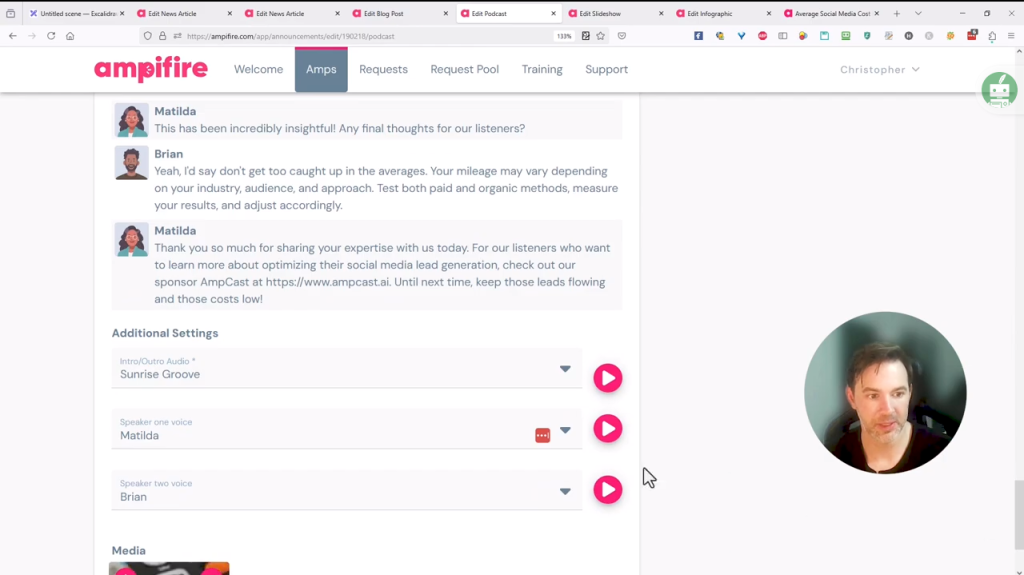
This is what we call MultiCasting. Platforms reward content that follows their own best practices, so the episodes are written to those norms rather than loosely adapted from other content formats. That same topic also becomes news articles, blog posts, long-form landscape videos, short-form portrait videos/Reels/Shorts, infographics, flipbooks/slideshows, and social posts, each restyled for where it lands, then published to 300+ sites automatically. Our step-by-step Amp walkthrough shows the full process.
AmpiFire offers two entry options: a DIY credit at $397 or an AI AmpCast credit starting at $495, each with a $27/month maintenance fee that includes unlimited AI content creation, while done-for-you and fully managed services are available for businesses that want more hands-on support.
AmpCast AI suits businesses that want a complete podcast created and published without using a video-to-podcast converter, while also turning the same topic into seven additional content formats and distributing them across hundreds of sites. Rated 4.7 out of 5 on Trustpilot, AmpCast AI is praised for creating natural-sounding interview podcasts with customizable voices, helping businesses publish professional episodes without hiring hosts or recording audio.
2. Descript
Descript is a text-based audio and video editor, which means you edit a recording by editing its transcript. Delete a sentence from the text, and Descript removes that part of the audio and video too. To turn a video into a podcast, you import the file, let Descript transcribe it, trim what you do not want, and export a clean audio file for your host.
The cleanup tools save the most time for podcasters. Studio Sound lifts the quality of rough recordings, and the filler-word tool strips out repeated “um” and “uh” for you. You also get accurate transcripts, short vertical clips for social feeds, screen recordings, and AI voice tools to fix small mistakes without re-recording.
Descript has a free plan with about 1 hour of transcription per month and a watermark on videos. Paid plans are Hobbyist at $24/mo ($16 billed annually), Creator at $35/mo ($24 annually), and Business at $65/mo ($50 annually).
It suits solo podcasters and small teams who record talking-head video or interviews and want to edit fast without a timeline. Descript holds a rating of 4.6 out of 5 on G2 across 900+ reviews, where users praise the editing speed while noting that AI credits and media hours can run low.
3. Riverside
Riverside is a remote recording studio for podcasts and video interviews. It records each guest locally in high quality, then hands you editing, transcripts, and clips. You can record the session live or upload an existing video, then export a clean, separate audio track for your feed.
Local recording is why quality holds up even when the internet drops, since each track is saved on the speaker’s own device. You also get up to 4K video, AI Magic Clips for short-form content, automatic transcription, and one-click publishing to Spotify and YouTube.
Riverside has a free plan with two hours of recording, 720p video, and a watermark. Paid plans start with Pro at $29/mo ($24 billed annually), followed by Live and Webinar tiers, with Business priced on request.
It suits interviews and multi-guest shows recorded remotely. Riverside holds a rating of 4.8 out of 5 on Capterra across 250+ reviews, where users rate the recording quality and guest links highly while noting occasional upload glitches and browser limitations.
4. Async
Async (previously known as Podcastle) is a browser platform that records, edits, and hosts podcasts in one place. You upload or record video, clean the sound with its Magic Dust tool, then download a finished episode or publish it straight to directories. The company rebranded from Podcastle in early 2026, and existing accounts, projects, and pricing tiers carried over unchanged.
It leans on AI to do the tidying. Magic Dust removes background noise and levels volume in a click, and you also get transcription, a large AI voice library, and voice cloning through the Revoice feature. One-click publishing pushes episodes to Spotify, Apple Podcasts, and other networks from the same screen.
Async has a free plan with unlimited audio recording plus limited video and transcription. Storyteller is $14.99/mo ($11.99 billed annually), Pro is $24.99/mo ($23.99 annually), and Business is $64.99/mo for teams.
It is best for beginners and solo creators who want recording, cleanup, and hosting in one affordable tool. Async holds a rating of 4.7 out of 5 on G2 across 150+ reviews, with praise for the one-click cleanup and notes that the free tier’s video cap is tight.
5. VEED.io
VEED.io is a browser-based video editor with strong subtitle and audio tools. You can edit a video, clean its audio, and export the sound for a podcast, which helps if you also want social clips from the same recording. Upload the video, tidy the audio, add a transcript or captions, then export the file.
The captions and repurposing features are why many creators choose it. Auto-subtitles are quick and cover many languages, and background noise removal cleans up spoken audio. You can also cut short clips and translate content without leaving the browser.
VEED has a free plan with a watermark, 720p exports, and a 10-minute video limit. Lite is $19/mo per editor and removes the watermark, and Pro is $49/mo for higher export quality and more subtitle time.
It is best for creators who turn a single recording into both an audio episode and a social video. VEED holds a rating of 4.6 out of 5 on G2 across 2,000+ reviews, where users praise the ease of use and captions, while a few find the AI credit pricing confusing.
6. CloudConvert
CloudConvert is a plain online file converter. It turns a video into an audio file, such as MP4 to MP3, with no editing involved. Upload the video, pick your audio format, set the bitrate if you want, and download the file for your podcast host.
Its range of formats and settings is the appeal. You get 200+ formats, control over codec and bitrate, and imports from Google Drive or Dropbox. There is nothing to learn, so it suits people who edited their video somewhere else and just need the audio.
CloudConvert is free for a limited number of conversions each day, with pay-as-you-go credit packs that do not expire and monthly subscriptions starting at about $10/month for more conversion minutes. It is best for anyone who has already finished their video and wants a fast, no-frills podcast audio file. It sits around 4.3 out of 5 on Capterra, where users praise the speed and format range while noting the free tier’s daily cap.
Top 6 Video to Podcast Converter Comparison Table
| Tool | Best for | Free Plan | Paid starts at | Best Feature |
| AmpCast AI | Businesses that want a complete podcast created and published | No | $397/mo | MultiCasting one topic to 8 content formats and auto-publishing them to 300+ sites |
| Descript | Solo podcasters and small teams editing talking-head videos into podcasts | Yes (1 hr/mo, watermark) | $24/mo ($16 annual) | Text-based editing |
| Riverside | Interviews and multi-guest shows recording remote interviews with studio-quality audio | Yes (2 hrs, 720p) | $29/mo ($24 annual) | Local 4K recording |
| Async | Beginners and solo creators who want to record, edit, host, and publish in one place | Yes (unlimited audio) | $14.99/mo ($11.99 annual) | One-click AI cleanup |
| VEED.io | Creators turning videos into podcasts and social clips | Yes (watermark) | $19/mo | Auto-subtitles |
| CloudConvert | Anyone who wants fast video-to-audio (MP4 to MP3 ) file conversion | Yes (daily limit) | $10/mo | 200+ format support |
AmpCast AI Helps Your Podcast Reach New Listeners
The right video-to-podcast converter depends on your workflow. CloudConvert handles quick file conversions on a free daily allowance; Async and VEED offer affordable in-browser editing; while Descript and Riverside provide full recording and post-production for regular podcast shows. Match the tool to how much cleanup your audio needs and how often you publish.
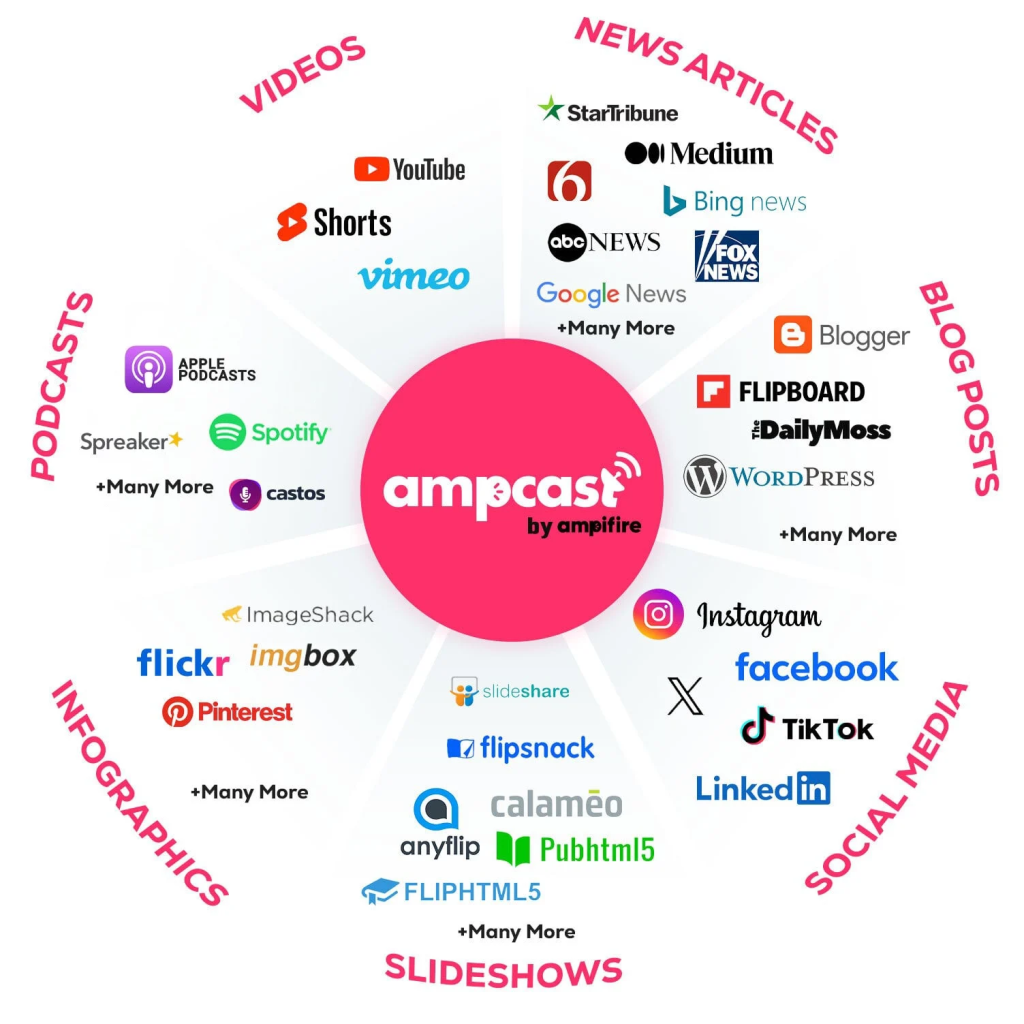
All five tools above stop once the audio file exists, and a converted episode still has to reach an audience. We built AmpCast AI to go a step further, turning one topic into a full interview-style podcast plus seven more content formats, then publishing all of it across 300+ sites. If you want your show reaching new listeners instead of sitting on a single host, start a campaign with AmpCast AI.
Frequently Asked Questions (FAQs)
Can I turn a YouTube video into a podcast?
Yes. Download the video, then use a converter or editor to pull out the audio and export it as an MP3. Tools like CloudConvert handle simple conversion, while Descript or Async also clean up the sound. After that, upload the file to a podcast host to publish it to directories.
Do I need editing skills to convert video to podcast?
No. Most tools are built for beginners. File converters need only an upload and a format choice. Editors like Async and Descript use AI to remove noise and filler words for you, so you can get a clean episode without learning a traditional audio timeline or buying extra software.
What audio format is best for a podcast?
MP3 is the standard format for podcasts because it plays on almost every device and keeps file sizes small. A bitrate near 128 kbps works well for spoken audio and balances quality with download speed. Most converters and editors let you choose MP3 and set the bitrate before you export your finished episode.
Should I do an audio or video podcast?
Both help. Video podcasts do well on YouTube and drive new discovery, while audio suits listeners on Spotify and Apple Podcasts during commutes or workouts. Many creators record once and publish both, using a converter to create the audio version from the same video file.
How can I get my podcast in front of more listeners?
Publishing to a single podcast directory limits your reach. AmpiFire turns your topic into multiple content formats, then distributes them across hundreds of sites online so new listeners find your show through the platforms they use to do their research before buying.
*Disclaimer: Results may vary based on individual circumstances, business type, and content strategy. The time savings and outcomes mentioned are based on typical user experiences and are not guaranteed. For specific pricing and service details, please visit AmpiFire.
Author
Related Posts


5 Best YouTube Video-to-Blog-Post AI Tools [Free & Paid]
Check out the 5 best YouTube-to-blog-post AI tools, both free and paid. Compare top picks like AmpiFire and GravityWrite to…

5 Best YouTube to TikTok Converter Apps [Free & Paid]
Compare the 5 best YouTube to TikTok converter apps, free and paid. AmpiFire's AmpCast AI automates the full process, from…


Best Article to Video Converter Tools [2026 Edition]
Learn the best article-to-video converters for 2026. Compare top tools like AmpCast, Synthesia, and Pictory for efficient content creation.

What are the Best Content Amplification Tools [Free & Paid]
Find the best free and paid content amplification tools to expand your reach. Learn how to choose the right platforms…

Best Article-to-Podcast AI Tools [2026 Edition]
Find out the best article-to-podcast AI tools for 2026. Convert written content into audio easily to expand your audience and…
How to Turn a Video Into a Podcast: Step-by-Step Guide
Learn how to turn a video into a podcast with our step-by-step guide. See easy tips to repurpose content and…








