

Key Takeaways
- Canva Pro is worth the upgrade for regular creators, unlocking 100GB of cloud storage, premium templates, AI design tools, and advanced features like Background Remover and Magic Resize that aren’t available on the Free plan.
- Canva Free ($0/month) suits beginners and casual users with 1.6M+ templates, 4.7M+ stock assets, and 5GB of cloud storage, though premium templates and advanced AI tools remain locked.
- Canva Pro ($15/month) and Business ($20/month per user) are built for individual creators and teams needing premium tools, collaboration features, and brand consistency across growing workflows.
- Enterprise offers custom pricing with 1TB storage per user, 1,000 Brand Kits, and enterprise-grade security, while Education and Nonprofits provide free Pro-level access to verified teachers, students, and registered charities.
- AmpiFire’s AmpCast amplifies your Canva designs by transforming your design ideas into 8 content formats and distributing them across 300+ platforms, turning static creations into real traffic, engagement, and conversions.
Why Canva Pro Is Worth Considering for Your Design Needs
Canva Pro is worth the upgrade for anyone who creates content regularly, offering 100GB of cloud storage, premium templates, AI-powered design tools, and a full Brand Kit that transforms Canva from a basic design tool into a production-ready platform for professional, high-quality content.
Beyond Pro, Canva also offers Free, Business, Enterprise, Education, and Nonprofit tiers, with pricing ranging from $0 for casual users to custom enterprise quotes for large organizations. Each plan builds on the previous one, adding more storage, stronger collaboration tools, and higher AI access, so you can match your subscription to the size of your workflow.
And once your designs are ready, AmpiFire’s AmpCast AI can repurpose them into news articles, blog posts, podcasts, videos, reels, infographics, flipbooks/slideshows, and social posts, then auto-publish the content to 300+ sites, including YouTube, Spotify, Pinterest, Google News, and Fox affiliate sites, giving your design a multichannel reach that Canva’s distribution cannot match.
In the sections below, we’ll break down every Canva plan in detail and compare monthly subscription costs side by side.

How AmpiFire Works:
- Research & Target: Find high-demand topics your buyers search for.
- Create & Repurpose: AmpiFire’s AmpCast AI generates news articles, blog posts, interview podcasts, longer informational videos, reels/shorts, infographics, flipbooks/slideshows, and social posts.
- Distribute & Amplify: Auto-publish to 300+ sites, including Google News, YouTube, Spotify, and major news networks.
Get more traffic from people who want to buy your stuff, and powerful “As Seen On” trust badges for your site.
Do It Yourself (with AI), Done For You Content, & 100% Managed Organic Growth options available.
Grow Your Free Traffic From Everywhere
Canva Plans & What They Include
Canva offers multiple plans for users of all types, from beginners and individual creators to growing teams and large organizations. Each plan builds on the previous one, adding more features, storage, AI tools, and collaboration capabilities. Choosing the right plan ensures you have the tools you need without paying for unnecessary extras.
Canva Free: Essential Tools for Beginners
The Free plan provides access to over 1.6 million templates and 4.7 million photos, videos, graphics, and audio assets. Users get 5GB of cloud storage and a basic Brand Kit with up to 3 colors. It includes Canva’s core drag-and-drop editor and limited AI features, making it suitable for casual users, students, or anyone just starting with design. Limitations include locked premium templates, advanced AI tools, Background Remover, and Magic Resize.
Canva Pro: Advanced Features for Individual Creators
The Pro plan is built for freelancers, content creators, and entrepreneurs. It unlocks over 3.6 million templates (including premium), 141 million premium photos, videos, graphics, and audio assets, 100GB of cloud storage, and 5 Brand Kits. Pro also provides full AI-powered design tools, Background Remover, Magic Resize, and the ability to plan and schedule social content. This plan is ideal for individuals who need professional-quality designs and more creative flexibility.
Creators combine these layouts with specialized software like Flipsnack to turn their multi-page marketing assets into an interactive flipbook that delivers smooth HTML5 page-turning animations directly in the browser.
Canva Business: Collaboration & Growth for Teams
Business builds on Pro and is designed for small teams and growing businesses. It offers team collaboration tools, shared folders, advanced brand controls with up to 100 Brand Kits, 500GB of cloud storage, and higher AI access for design and content creation. Business also provides team admin features such as reports, approvals, and AI controls, making it easier to maintain brand consistency and manage workflows efficiently.
Canva Enterprise: Full-Scale Organization Tools
Enterprise is built for large organizations needing security, governance, and scalable collaboration. It provides 1 TB of cloud storage per user, 1,000 Brand Kits, SSO and SCIM provisioning, multi-team management, advanced integrations, priority support, and a dedicated success manager. Enterprise also includes the highest AI access, advanced apps, and additional features.
Canva Education: Free Access for Teachers & Students
Education provides full Pro features at no cost to verified teachers and students. Users gain access to premium templates, stock assets, Brand Kits, collaboration tools, and cloud storage, making it ideal for classroom projects, group assignments, or online learning. Verification through the school system is required.
Canva Nonprofits: Free for Registered Charities
Registered nonprofit organizations can access Pro-level features for free. This includes premium templates, stock assets, Brand Kits, collaboration tools, and cloud storage. Eligibility requires verification of nonprofit status through Canva’s application portal. It’s a valuable option for organizations seeking professional design tools without paying a subscription.
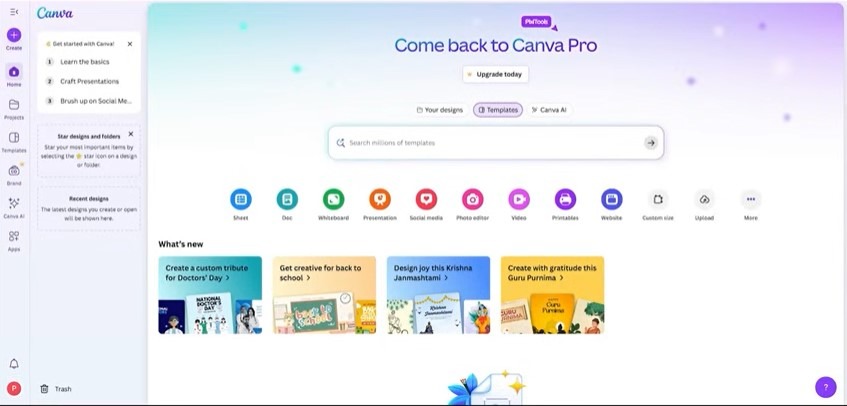
Canva Pro Plans & Their Monthly Subscription Costs
Canva paid plans offer subscription tiers for individuals, teams, and organizations. Each plan adds more features, storage, and collaboration tools to match your needs.
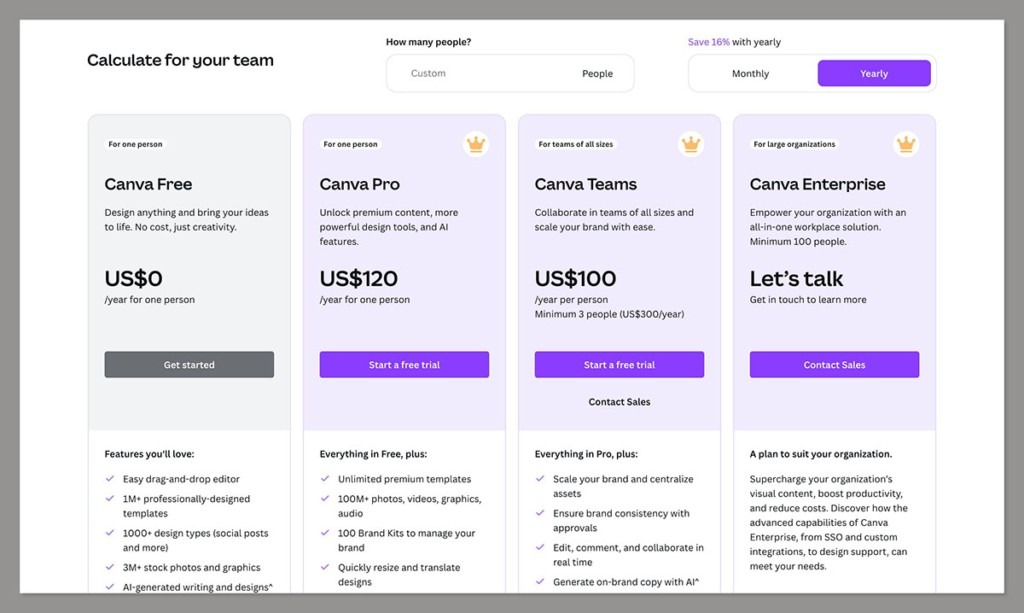
Canva Pro – $15/month
Canva Pro costs $15 per month when billed monthly, or $120 per year when billed annually (effectively $10 per month). The annual plan saves $60 compared to paying month-to-month. A 30-day free trial is available on both billing options, making it easy to test the full feature set before committing. Pro is a single-user license, so if a second regular user needs access, you’ll need to move to Business rather than adding a second Pro seat.
Canva Business – $20/month per user
Canva Business is for small teams and growing businesses. It includes all Pro features plus team collaboration tools, shared folders, advanced brand controls with up to 100 Brand Kits, and 500GB of cloud storage. Teams also get access to AI tools for faster content creation and additional marketing insights.
Canva Enterprise – Custom Pricing
Enterprise pricing is negotiated directly with Canva’s sales team and depends on seat count, storage needs, and integration requirements. The tier becomes worth considering once your organization needs SSO/SAML, SCIM provisioning, IP allowlisting, a dedicated Customer Success Manager, or the Connect API, which are features Business doesn’t include.
Canva Education – Free for Teachers & Students
Canva Education gives verified teachers and students access to Pro-level features at no cost. This includes premium templates, stock assets, collaboration tools, and cloud storage. It’s ideal for classroom projects and educational workflows.
Canva Nonprofits – Free for Registered Charities
Eligible nonprofit organizations can use the Canva Pro features for free. Access includes premium templates, stock assets, Brand Kits, collaboration tools, and cloud storage. Verification of nonprofit status is required.
Canva pricing is subject to change; verify current rates at canva.com.
When Monthly Billing Makes Sense
The monthly option works best if your design needs are short-term, seasonal, or experimental. If Canva is a central part of your workflow, creating weekly content, managing client projects, or running a business, sticking with the monthly plan means paying more than necessary, whereas annual billing provides a 16% savings and a lower effective monthly cost.
Canva Plans Comparison: Plans Includes & Pricing
| Plan | Price (Monthly) | Plans Includes | Ideal For |
| Free | $0 | 1.6M+ templates, 4.7M+ photos/videos/graphics, 5GB storage, basic Brand Kit | Beginners, casual users, students |
| Pro + Business | $15 – $20 | 3.6M+ templates, 141M+ stock assets, 100–500GB storage, Brand Kits (5&100), AI tools, collaboration, scheduling | Freelancers, creators, small teams |
| Enterprise | Custom | 1TB storage, 1000 Brand Kits, SSO & admin controls, priority support, advanced apps | Large organizations needing security & scale |
| Education | Free | Full Pro features, premium templates & assets, collaboration tools | Verified teachers & students |
| Nonprofits | Free | Full Pro features, Brand Kits, collaboration, cloud storage | Registered charities & nonprofits |
AmpiFire: Amplify Your Canva Creations with Us
Choosing the right Canva plan gives you the tools to create professional designs, but that’s only half the equation; getting them in front of the right audience is where real growth happens. That’s where AmpiFire comes in. Using our AmpCast AI technology, we transform your Canva designs into eight different content formats, including news articles, blog posts, interview podcasts, longer informational videos, reels/shorts, infographics, flipbooks/slideshows, and social posts, and distribute them across 300+ high-quality platforms for maximum exposure, engagement, and organic traffic.
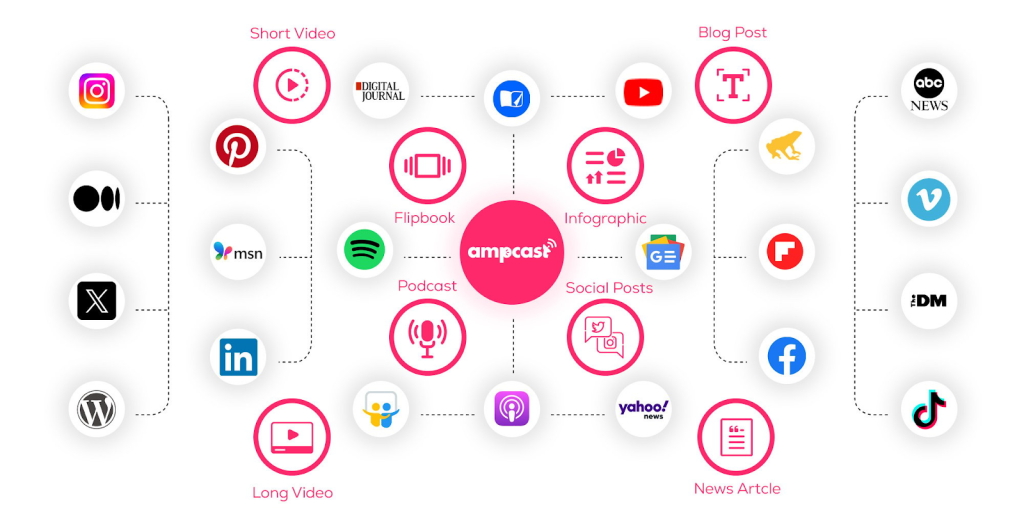
We make it simple for you to grow your brand with measurable outcomes. By combining your Canva assets with our content amplification system, AmpiFire ensures a multichannel presence that drives clicks, leads, and conversions.
Frequently Asked Questions (FAQs)
Can I try Canva Pro for free before paying?
Yes. Canva offers a free trial of Canva Pro, letting you explore all the features before subscribing. You can test premium templates, the Brand Kit, Background Remover, Magic Resize, and stock assets. It’s a great way to see if the upgrade fits your workflow without paying upfront.
Does Canva for Teams include everything in Canva Pro?
Yes. Canva for Teams has all the features of Canva Pro, plus collaboration tools. Teams can share folders, assign tasks, manage brand assets, and work together in real time. Think of it as Canva Pro with added teamwork features.
Can teachers get Canva Pro for free?
Yes. Verified teachers get Canva for Education for free, including all Pro features. Approved teachers can also provide students access within a managed classroom. Verification is handled through your school or institution.
Is Canva Pro cheaper when billed annually?
Yes. Annual billing is a more cost-effective option than monthly plans. For regular users, this reduces your effective monthly cost and is a better option for ongoing design work. Monthly billing is more flexible if your needs are short-term or seasonal.
What’s the best way to distribute Canva designs across platforms?
Once your designs are ready in Canva, getting them seen by the right audience is key. Platforms like AmpiFire make it easy to amplify your content across multiple channels, ensuring your graphics, social posts, and marketing visuals reach more people efficiently. By combining Canva’s design tools with AmpiFire’s content repurposing and automated distribution, you can save time while boosting your brand’s or business’s engagement and visibility.
*Disclaimer: Results may vary based on individual circumstances, business type, and content strategy. The time savings and outcomes mentioned are based on typical user experiences and are not guaranteed. For specific pricing and service details, please visit AmpiFire.
Author
Related Posts

Sprout Social Pricing Plans: Features & Monthly Costs Compared
Compare Sprout Social plans from Standard to Enterprise. See features, pricing, and how AmpiFire can boost your brand reach across…

Mailchimp Pricing: Pay as You Go Plan & Subscription Cost Explained
Compare Mailchimp’s free, Pay As You Go, and monthly plans. Learn how to save on email marketing and boost results…

SEMrush Subscription Cost: Pricing & Plans in 2026
SEMrush pricing explained. Compare Pro, Guru, and Business plans, review features, limits, and costs to select the best plan for…

ClickDesigns Features, Pricing, Pros & Cons: Can This AI-Powered Graphic Designer Beat Canva?
Discover ClickDesigns' features, pricing, pros, and cons to see if this AI-powered tool can truly compete with Canva for your…

Hootsuite Pricing: Plans & Free Social Media Management Alternatives
Explore Hootsuite pricing, compare plans with free alternatives like Buffer and Metricool, and learn how AmpiFire drives multi-channel organic traffic.


Sendible vs SocialPilot Social Media Management Tool: Pricing Plans, Features & Alternatives
Compare Sendible vs SocialPilot in terms of pricing plans, features, and top alternatives to find the right social media management…









