


Key Takeaways
- Publer suits agencies that need automation depth with post recycling, Spintax variations, and workspace switching, while Buffer suits solo creators and small teams that want a polished interface focused on publishing, analytics, and engagement.
- For social media scheduling, Publer covers 13 platforms, including Telegram and WordPress, with a visual calendar and auto-scheduling, while Buffer covers 11 platforms with per-network post customization and a unified posting queue.
- Publer’s standout features are post recycling, Spintax content variations, multi-client workspace switching, and AI-generated captions, while Buffer’s strengths are a community inbox across 5 networks, an AI assistant for captions, and per-platform analytics dashboards.
- Publer’s Business plan starts at $10 per month for one account with $7 per additional account, while Buffer charges per channel at $5 per month for Essentials or $10 per month for Team, so agencies running many accounts typically pay less with Publer.
- AmpiFire’s AmpCast AI extends beyond scheduling by turning one source piece into 8 content formats (news articles, blog posts, interview podcasts, longer informational videos, reels/shorts, infographics, flipbooks/slideshows, and social posts) and auto-publishing them to 300+ sites, including YouTube, Spotify, Pinterest, Google News, and FOX affiliate sites.
Which Is Better for Social Media Scheduling, Publer or Buffer?
Choosing between Publer and Buffer comes down to who you are and what you need to manage. Agencies running multiple client accounts get more value from Publer’s automation depth, post recycling, and workspace switching. Solo creators and small teams usually prefer Buffer’s cleaner interface and straightforward publishing flow.
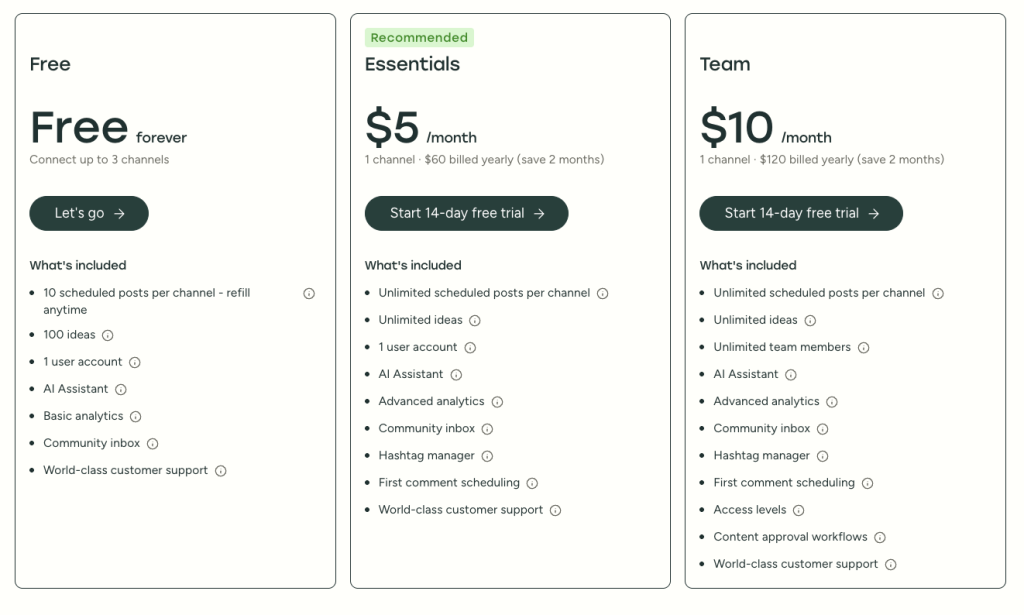
On price, the gap narrows depending on how many accounts you run. Publer’s Business plan starts at $10 per month per account, while Buffer charges $5 per channel for Essentials or $10 per channel for Team.
Neither tool reaches past the social platforms you connect to, though. AmpiFire’s AmpCast AI closes that gap by transforming one source piece into 8 formats and auto-publishing across 300+ sites, including YouTube, Spotify, Pinterest, Google News, and FOX affiliate sites. The sections below break down what Publer and Buffer each offer, how the pricing compares, and where AmpCast AI fits in.

How AmpiFire Works:
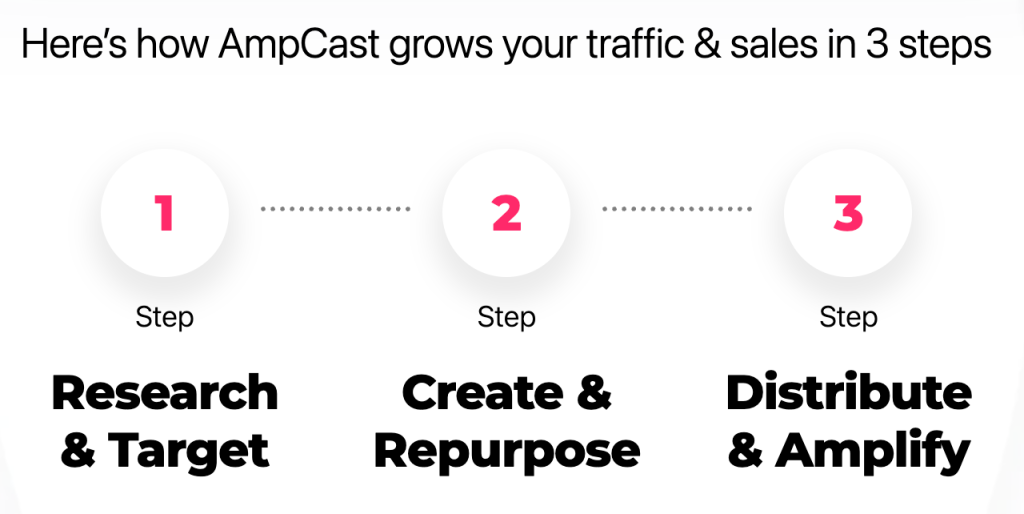
- Research & Target: Find high-demand topics your buyers search for.
- Create & Repurpose: AmpiFire’s AmpCast AI generates news articles, blog posts, interview podcasts, longer informational videos, reels/shorts, infographics, flipbooks/slideshows, and social posts.
- Distribute & Amplify: Auto-publish to 300+ sites, including Google News, YouTube, Spotify, and major news networks.
Get more traffic from people who want to buy your stuff, and powerful “As Seen On” trust badges for your site.
Do It Yourself (with AI), Done For You Content, & 100% Managed Organic Growth options available.
Grow Your Free Traffic From Everywhere
Buffer Features: What It Actually Does
Buffer is built around three core areas: Publishing, Analytics, and Engagement. Together, they cover the full lifecycle of a social post, from creation to performance review. The interface is polished and intuitive, with most users scheduling their first post within minutes. The trade-off: teams managing multiple clients or needing advanced automation will hit limits quickly.

Buffer Publishing: Schedule Posts Across 11 Platforms
Buffer schedules content across 11 platforms from one dashboard. You can build a posting queue, set custom schedules per platform, and use a drag-and-drop calendar to map your content flow. A standout feature is per-network customization in the compose window: write once, then tweak copy, hashtags, or media per platform.
Buffer Analytics: Track Performance Per Platform or Combined
Buffer’s analytics dashboard breaks down performance across all connected channels, either per platform or combined. Key metrics include:
- Impressions and reach per post and per channel
- Engagement rate (likes, comments, shares, saves)
- Follower growth over custom date ranges
- Best performing posts ranked by engagement
- Audience demographics on supported platforms
The reporting lacks the depth of dedicated analytics tools, but for most small businesses it’s enough to guide decisions.
Buffer Engagement: Monitor & Respond to Comments Across Multiple Networks
Buffer’s community inbox lets you monitor and reply to comments from the dashboard across Facebook, Instagram, LinkedIn, Threads, and Bluesky. It’s not a fully unified inbox (no DMs or X replies), but it covers the most common engagement tasks without opening the native apps. It’s a useful time-saver, but more limited than full social listening platforms.
Buffer AI Assistant: Generate & Repurpose Content
Buffer’s AI assistant generates captions, repurposes long-form content, and creates copy variations inside the compose window. For quick ideation, it gets the job done, but it isn’t a full AI content platform replacement.
Publer Features: What It Actually Does
Publer is a full-featured social media management platform built for heavier workflows than Buffer, at a lower price than comparable tools.
It covers scheduling, analytics, team collaboration, and content automation. Core features include a visual calendar, post recycling, Spintax variations, workspace switching for multi-client work, AI captions, best-time-to-post, bulk CSV scheduling, and a link in bio tool.
Publer supports 13 platforms, including Telegram and WordPress, which Buffer skips. Recycling and Spintax have no Buffer equivalent.

Visual Calendar Layout & Auto-Scheduling
Publer’s visual calendar is a key strength. You get a month-at-a-glance view across every platform, can drag and drop to reschedule, and can color-code by platform or type. The auto-scheduling engine analyzes your engagement data and suggests post times based on when your audience is actually active.
Recurring & Recycled Posts
Post recycling builds a library of evergreen content that reshares on a schedule you define: set the frequency, window, and platforms, and Publer does the rest. Spintax goes further by letting you write variations of one post in a single template, so recycled content never looks repetitive.
Workspace Switching for Multi-Client Management
For agencies and freelancers, workspace switching is a major operational advantage. Each workspace is a separate environment with its own accounts, team, permissions, and calendars, so you can switch clients in seconds.
AI-Generated Content & Best Time to Post
Publer’s AI tools sit inside the post composer and analytics dashboard. The composer generates captions, hashtags, and drafts from a topic prompt, while the “best time to post” engine surfaces slots where your audience is most responsive.
How Much Do Publer & Buffer Packages Cost?
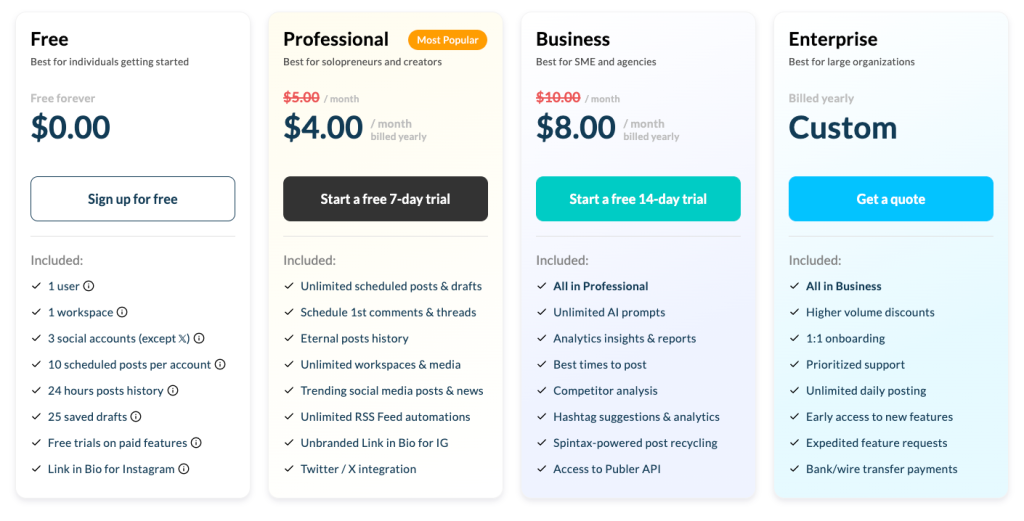
Pricing structures differ significantly between the two platforms. Buffer charges per channel, so cost scales linearly with the number of accounts you connect. Publer charges by social account count tied to a plan tier. Both offer free plans, and both discount annual billing by roughly 20%.
Free Plans: Both Allow 3 Accounts
Buffer’s free plan supports 3 channels with 10 scheduled posts per channel, 1 user, AI Assistant access, 30-day basic analytics, the community inbox, and 100 saved ideas. Publer’s free plan also caps at 3 social accounts (X is excluded on free) with 10 scheduled posts per account, 1 workspace, 24 hours of posts history, and 25 saved drafts.
The key difference is that Buffer’s free plan includes X and a longer post history, while Publer locks X behind a paid plan.
Publer Business vs Buffer Team: How the Top Tiers Compare
Buffer moved to per-channel pricing in November 2025. Essentials runs $5/channel/month on annual billing; Team runs $10/channel/month with unlimited members, approval workflows, and branded reports. Ten Team channels land at $100/month.
Publer’s Business plan starts at $10/month for 1 account ($7 each extra), with unlimited AI prompts, competitor analysis, Spintax recycling, and API access. Professional begins at $5/month ($4 each extra). For agencies running many accounts, Publer’s tier pricing often beats Buffer’s per-channel model.
AmpCast AI vs Publer vs Buffer: Comparison Table
| Feature | AmpCast AI | Publer | Buffer |
| Primary Function | Multi-format content distribution | Social media scheduling and automation | Social media scheduling |
| Content Formats | 8 types – news articles, blog posts, interview podcasts, longer informational videos, reels/shorts, infographics, flipbooks/slideshows, and social posts | Social posts only | Social posts only |
| Distribution Reach | 300+ sites, including YouTube, Spotify, Pinterest, Google News, and FOX affiliate sites | 13 social platforms | 11 social platforms |
| AI Generation | Full multi-format from one source input | Captions and post drafts | Captions and copy variations |
| Post Recycling | Built into ongoing distribution | Yes, with Spintax variations | No |
| Multi-Client Workspaces | Done-For-You and managed options | Yes, full workspace switching | Limited |
| Starting Paid Price | Choose between $397 DIY credits or AI AmpCast credits starting at $495, plus $27/month maintenance | $5/month per account | $5/channel per month |
| Best For | Brands wanting reach beyond owned social channels | Agencies needing deep scheduling automation | Solo creators wanting simple scheduling |
How Is AmpiFire Better Than Publer & Buffer?
Publer and Buffer both handle scheduling well, just for different users. Publer wins on automation depth and multi-account pricing, while Buffer wins on polish and simplicity. Either way, your reach stops at the social platforms you manually connect.
At AmpiFire, we built AmpCast AI to push past that ceiling. We turn one source piece into 8 formats and distribute across 300+ sites, including YouTube, Spotify, Pinterest, Google News, and FOX affiliates. If you want to see how we expand your reach beyond social scheduling, explore AmpCast AI today.
Frequently Asked Questions (FAQs)
Is Publer better than Buffer for small businesses?
For most small businesses, Publer offers more functionality at a lower cost. Its $10/month Business plan that covers analytics, team collaboration, workspaces, and AI tools that Buffer charges significantly more to access. Buffer fits new teams that value simplicity over depth.
Does Buffer have a free plan in 2026?
Yes. Buffer’s free plan supports 3 social channels and 10 scheduled posts per channel, with basic publishing, 30-day analytics, the community inbox, AI Assistant access, and 100 saved content ideas. It excludes team collaboration and advanced analytics, so active users hit those limits fast.
Can Publer manage multiple client accounts?
Yes, and it’s one of Publer’s clearest edges over Buffer. Workspace switching creates separate environments for each client, with their own connected accounts, team, role-based permissions, and calendars. You can flip between clients in seconds, which Buffer’s multi-account setup doesn’t replicate.
What social platforms does Buffer support?
Buffer supports 11 platforms: Instagram, Facebook, Twitter/X, LinkedIn, Pinterest, TikTok, YouTube, Google Business Profile, Threads, Bluesky, and Mastodon. It excludes Telegram and WordPress, both of which Publer supports natively. If those channels matter to your strategy, Publer’s broader coverage is the more practical choice.
How does AmpCast AI work?
AmpCast AI takes a single source piece, like a blog post or product announcement, and transforms it into 8 content formats (news articles, blog posts, interview podcasts, longer informational videos, reels/shorts, infographics, flipbooks/slideshows, and social posts) for different distribution channels.
It handles reformatting, optimization, and publishing across 300+ sites, including YouTube, Spotify, Pinterest, Google News, and FOX affiliate sites, with no manual work per channel. The result is a far wider footprint than scheduling tools deliver.
*Disclaimer: Results may vary based on individual circumstances, business type, and content strategy. The time savings and outcomes mentioned are based on typical user experiences and are not guaranteed. For specific pricing and service details, please visit AmpiFire.
Author
Related Posts


Planable vs Buffer for Social Media Management: Pricing, Features & Alternatives
In this Planable vs Buffer guide, compare pricing, features, and top alternatives to find the best social media management tool…


Hootsuite vs Buffer Social Media Management Tools: Free Plan & Pricing Comparison
See how Buffer and Hootsuite compare on pricing, free plans, and features. Learn which social media management tool has the…

ContentStudio vs Buffer: Which Social Media Management Tool is Better?
Compare ContentStudio vs Buffer to see which social media tool fits your needs, from simple scheduling to advanced content marketing…
Sprinklr vs Buffer: Which Social Media Management Tool is Better?
Compare Sprinklr vs Buffer on features, usability, and use cases to choose the right social media management tool for your…

Sprout Social vs Later: Which is Better for Social Media Scheduling?
Compare Sprout Social vs Later: features, pricing, scheduling, and ideal users. Learn which platform fits your strategy and grow with…


Social Champ Reviews, Pricing & Features: Is This Social Media Management Tool Worth It?
Get honest Social Champ reviews. Learn pricing, features, and if this social media management tool is worth your investment for…








