

Key Takeaways
- Mailtrap is one of the best email testing tools used by developers, marketers, and QA teams to safely test and validate email workflows across both startups and enterprise environments.
- Mailtrap offers three distinct products: an Email Sandbox for safe pre-production testing, an Email Sending service for reliable production delivery, and Email Marketing for campaigns, automations, and contact management.
- The free Email Testing (Sandbox) plan offers 50 test emails, 1 sandbox, and 10 emails per inbox; it’s enough for solo developers to evaluate the platform before committing.
- Pricing for the Email Testing (Sandbox) feature starts at $17/month and allows 500 test emails and 3 users.
- Real users consistently praise Mailtrap’s setup speed, and most developers report being fully integrated within minutes using SMTP or the REST API.
Is Mailtrap the Best Email Testing Tool?
For developers, marketers, and QA engineers across startups and enterprise teams, Mailtrap is one of the best email testing tools.
Mailtrap is a cloud-based email testing, sending, and marketing platform built for development and QA teams who need a safe, controlled environment to test email functionality before going live. Some of the platform’s core features include an email sandbox, spam analysis, SMTP integration options, and team collaboration. Its spam checker and HTML validator catch deliverability issues before emails ever leave your staging environment.
A free plan is available, with pricing starting at $15/month for the Email API/SMTP feature and $17/month for the Sandbox feature. Users consistently praise Mailtrap for its fast setup, intuitive interface, and reliable sandbox that prevents test emails from reaching real users.
The sections below cover everything you need to know about this email testing tool, including its core features breakdown, pricing tiers, and reviews from real users.

How AmpiFire Works:
- Research & Target: Find high-demand topics your buyers search for.
- Create & Repurpose: AmpiFire’s AmpCast AI generates news articles, blog posts, interview podcasts, longer informational videos, reels/shorts, infographics, flipbooks/slideshows, and social posts.
- Distribute & Amplify: Auto-publish to 300+ sites, including Google News, YouTube, Spotify, and major news networks.
Get more traffic from people who want to buy your stuff, and powerful “As Seen On” trust badges for your site.
Do It Yourself (with AI), Done For You Content, & 100% Managed Organic Growth options available.
Grow Your Free Traffic From Everywhere
Mailtrap’s Core Features
Mailtrap packs a focused set of features that cover the full pre-send and send lifecycle for marketers. Nothing feels bolted on, and every tool serves a clear purpose in the testing or delivery workflow.
Here’s what you’re actually working with when you set up a Mailtrap account:
Email Sandbox & Inbox Inspection
The sandbox inbox lets you inspect every element of a captured email, including HTML source, raw MIME data, text versions, and headers.
You can preview how the email renders and check for structural issues before a single real recipient sees it. It’s the core of what makes Mailtrap worth using in a dev environment.
Spam Analysis & HTML Validation
Mailtrap’s built-in Spam Checker scores your emails against common spam filter rules, giving you actionable feedback before you send.
The HTML Checker validates your email’s markup against known rendering issues across email clients, thereby catching problems that would otherwise only surface after delivery.
SMTP & API Integration Options
Mailtrap supports both SMTP and a RESTful API for integration, which covers virtually every stack. SMTP setup takes minutes. The API gives developers more programmatic control, including the ability to trigger test scenarios and retrieve results automatically.
This flexibility is a big reason why Mailtrap fits neatly into CI/CD pipelines and automated QA workflows without requiring significant engineering effort to implement.
Email Sending Infrastructure for Production
The Email Sandbox catches and inspects emails in development, while the Email Sending service actually delivers them in production.
Mailtrap’s production sending infrastructure is built around deliverability. It uses dedicated IP addresses, supports custom domain authentication (SPF, DKIM, and DMARC), and provides real-time delivery analytics to monitor open rates, bounces, and failures as they happen.
The sending service integrates with the same SMTP and API options as the sandbox, making transitioning from testing to production remarkably smooth.
Team Collaboration & Multiple Inboxes
One of Mailtrap’s most underrated features is its handling of team environments. Each Project can contain multiple isolated Sandboxes, so developers, QA engineers, and email marketers can test simultaneously without their emails bleeding into each other’s workspaces.
This separation keeps testing clean and dramatically reduces debugging time. The QA team has independent access to their own inboxes, so they don’t need to chase down developers every time they need to inspect a test email.
How Much Does Mailtrap Cost? Plans & Pricing
Mailtrap offers two pricing tiers: one for Email Sending (production delivery) and one for Email Sandbox (testing). You can use either independently or together, and both tracks include a free tier to get started.
Email Sending Plans
Email Sending plans are priced separately based on monthly email volume. Pricing scales with send volume, making it accessible for early-stage startups while remaining capable enough for businesses sending at scale.
- Free: 4,000 emails, 1 user, 3 days of email logs, 1 domain.
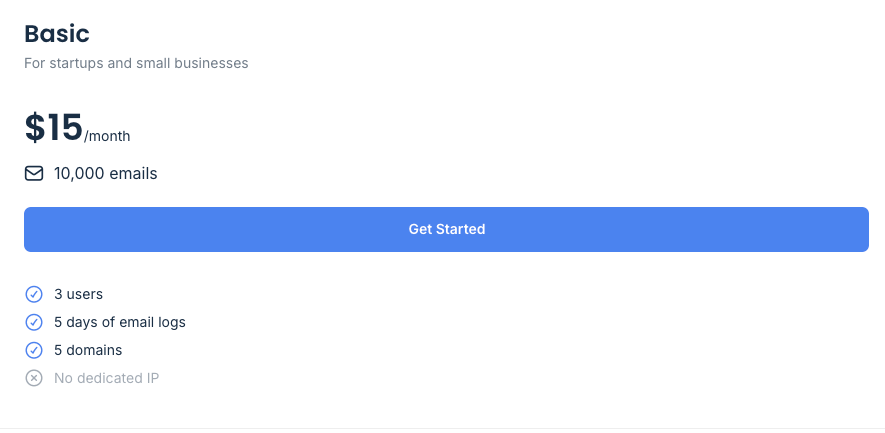
- Basic: $15/month, 10,000 emails, 3 users, 5 days of email logs, 5 domains, no dedicated IP.
- Business: $85/month, 100,000 emails, 1,000 users, 15 days of email logs, 3,000 domains, dedicated IP.
- Enterprise: $750/month, 1,500,000 emails, 30 days of email logs, priority support, custom contracts, enterprise billing.
- Mailtrap for Big Senders: Custom pricing and volume discounts.
Email Testing (Sandbox) Plans
For the Sandbox plans, higher-tier plans scale up team size, inbox count, and monthly test email limits for larger engineering teams with more complex QA needs.
- Free: 50 test emails, 1 user, 1 sandbox, 10 emails per sandbox.
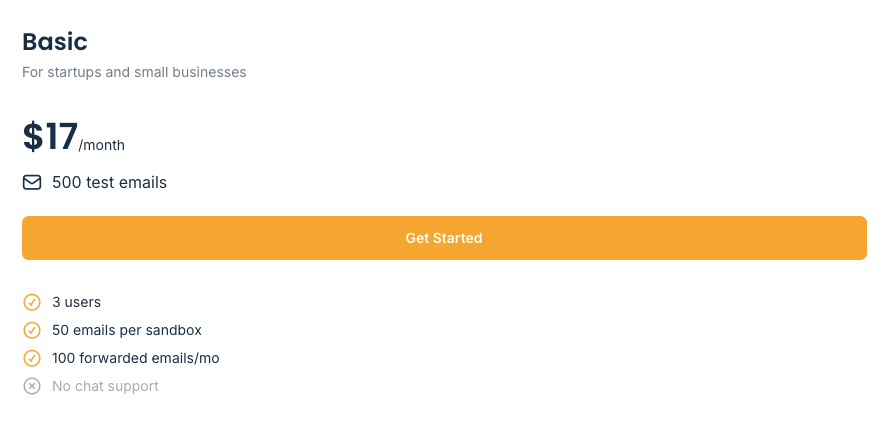
- Basic: $17/month, 500 test emails, 3 users, 50 emails per sandbox, 100 forwarded emails/month.
- Team: $42/month, 5,000 test emails, 5 users, 5 sandboxes, priority support, chat support.
- Business: $123/month, 50,000 test emails, 50 sandboxes, 2,000 forwarded emails/month.
- Enterprise: $498/month, 5,000,000 test emails, 1,000 users, 300 sandboxes, SSO, priority support.
Mailtrap Reviews: What Real Users Say
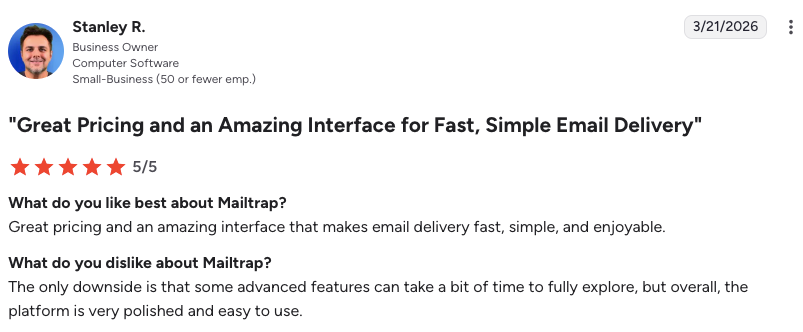
Across verified review platforms, including G2 (4.8/5), Mailtrap reviews paint a consistent picture: developers love it, QA teams rely on it, and the occasional complaint centers on edge cases in deliverability or integration gaps rather than core functionality.
The top themes in positive Mailtrap reviews align tightly with the platform’s core strengths. Setup speed is high, and most users report being fully integrated within minutes using SMTP. The dashboard is praised for being clean and intuitive without sacrificing depth. And the sandbox’s ability to eliminate accidental test emails reaching real customers is described by multiple reviewers as a non-negotiable safety net.
As one verified G2 reviewer noted: “Before Mailtrap, we had instances where test emails accidentally reached real customers, causing confusion and potential reputation damage. The sandbox environment completely eliminates this risk.”
That said, no tool is without its friction points. A small number of users noted that the separation between sandbox and sending products can feel confusing at first, particularly for users who assume the two are bundled.
Final Verdict: Is Mailtrap the Best Email Testing Tool?
Yes, Mailtrap earns its reputation as one of the best email testing tools. For developers and QA teams who need a reliable, low-friction way to test transactional emails without risking real inboxes, it’s one of the strongest options available. The sandbox is genuinely well-built, the setup is fast, and the HTML and spam checking tools add real value beyond basic inbox capture.
The free plan makes it easy to verify this for yourself without any financial commitment, and it is a strong fit for teams already managing staging environments and dealing with the headache of accidental test emails.
How Does AmpCast AI & Mailtrap Strengthen Your Marketing Strategy?
AmpCast AI by AmpiFire and Mailtrap operate at two distinct but highly complementary stages of the marketing funnel. AmpCast AI by AmpiFire handles the top of the funnel. It creates eight content formats (news articles, blog posts, interview podcasts, longer informational videos, reels/shorts, infographics, flipbooks/slideshows, and social posts) and automatically publishes them to 300+ platforms, including Google News, YouTube, Spotify, and major news networks.
This builds visibility across search, social, video, podcasts, news, and AI recommendations, generating inbound traffic, third-party media credibility, and backlinks that strengthen your domain authority over time. AmpCast AI builds inbound traffic that grows your audience and brand, while Mailtrap ensures the email infrastructure supporting your promotional campaigns is technically sound and consistently deliverable.
Frequently Asked Questions (FAQs)
Does Mailtrap work with WordPress?
Yes. Mailtrap integrates with WordPress through SMTP configuration, typically using a plugin like WP Mail SMTP. You point WordPress’s outgoing mail settings to Mailtrap’s SMTP credentials, and all emails generated by your WordPress site get routed into your Mailtrap sandbox for inspection.
Can you send real emails with Mailtrap?
Yes, but only through the Email Sending product, not the sandbox. The two products share the same platform and use the same SMTP/API integration method, but they serve completely different purposes and are billed separately. The Email Sending service supports full transactional email delivery with SPF, DKIM, and DMARC authentication, real-time delivery analytics, and dedicated sending infrastructure.
Is Mailtrap free to use?
Mailtrap offers a free plan for the Email SMTP/API product and the Email Sandbox. The free Email SMTP/API plan allows 4,000 emails and 1 user, while the free Email Sandbox allows 50 test emails, 1 user, and 1 sandbox. The free tiers are useful for solo developers running personal projects or evaluating Mailtrap before proposing it to a team.
What is the difference between Mailtrap’s Email Sending and Email Sandbox features?
The Email Sending service is the production counterpart: it delivers real emails to real inboxes using dedicated infrastructure with delivery tracking, authentication support, and real-time analytics. Meanwhile, the Email Sandbox captures and holds outgoing emails in a virtual inbox for inspection, without real delivery, with full visibility, and with zero risk of hitting actual recipients.
How does AmpCast AI complement Mailtrap?
AmpCast AI by AmpiFire creates eight content formats (news articles, blog posts, interview podcasts, longer informational videos, reels/shorts, infographics, flipbooks/slideshows, and social posts) then distributes them to 300+ platforms, including Google News, YouTube, Spotify, and major news networks, increasing traffic from search, social, video, news, podcasts, and AI recommendations. Paired with Mailtrap, both create a closed-loop marketing strategy: AmpCast AI builds inbound traffic and brand authority, while Mailtrap ensures the email infrastructure supporting your campaigns is technically sound and consistently deliverable.
*Disclaimer: Results may vary based on individual circumstances, business type, and content strategy. The time savings and outcomes mentioned are based on typical user experiences and are not guaranteed. For specific pricing and service details, please visit AmpiFire.
Author
Related Posts

Mailtrap Reviews, Pricing & Features: Is This the Best Email Deliverability Platform?
Is Mailtrap the best email deliverability platform? Full breakdown of features, pricing, integrations, and detailed user reviews for SaaS and…


Warmy.io Pricing, Reviews & Features: Is This Email Deliverability Test Tool Worth It?
Discover Warmy.io's email warm-up features, pricing plans, and user reviews. Learn how this AI-powered tool can boost your email deliverability…

Sender Reviews, Pricing & Features: Is This a Good Email Marketing Tool for Ecommerce?
Learn how Sender powers e-commerce growth with email & SMS marketing, automation, segmentation, analytics, and affordable plans for every business.

Bouncer Reviews & Pricing: Is This Email Verification Tool Legit?
Bouncer email verification checks syntax, domain, MX records, and mailboxes to keep your list clean. See pricing, real G2 reviews,…


ZeroBounce Reviews & Pricing: Is This Email Validation Tool Legit?
Looking for an email validation solution that actually delivers on its promises? Email bounces can devastate your sender reputation and…


Moosend Features, Reviews & Pricing: Is This Email Marketing & Automation Platform Worth It?
Get honest Moosend reviews. Learn features, pricing, and whether this email marketing and automation platform is worth it for your…








