
Key Takeaways
- Livestorm is a legitimate video engagement platform built for marketing, software, and customer success teams that run webinars regularly and need one tool for registration, hosting, follow-up, and reporting.
- Features cover the full event lifecycle, including branded registration pages, automated email reminders, live polls and moderated question queues, browser-based high-definition streaming for up to 25 speakers, and automatic transcripts.
- Pricing runs on attendee credits instead of host seats: $3.00 per attendee on the Pro plan, with custom Enterprise pricing that unlocks Salesforce, Marketo, and Pardot integrations.
- Reviews average 4.4 out of 5 on G2 from more than 1,700 users and 4.7 on Capterra, with praise for no-download access and fast setup, plus complaints about slide glitches.
- Livestorm runs the webinar, but AmpiFire’s AmpCast AI fills the seats by turning one demand-verified topic into 8 content formats and publishing them across 300+ high-traffic sites.
Is Livestorm a Legit Webinar Platform for Marketing Teams?
Livestorm is a legit platform for marketing teams. It fits B2B marketing teams, SaaS companies, and customer success departments that run webinars regularly and need one platform for the full event workflow. Recurring product demos, lead-gen webinars, customer onboarding, and partner events are exactly what it was built for.
It also suits teams that care about data privacy. Livestorm is GDPR-compliant and ISO 27001 certified, and an add-on lets you choose EU or US video hosting. HR teams running all-hands and internal communications get similar value from the automated email and engagement tools.
It fits less well for mid-market teams that need Salesforce, Marketo, or Pardot, since those integrations are Enterprise-only. HubSpot is the only native CRM on Pro, alongside Zapier and a range of lighter integrations.
Livestorm can run a flawless webinar, but it does nothing to fill the room. AmpiFire’s AmpCast AI builds that audience beforehand, turning one topic into multi-format content published across multiple channels so marketing teams walk into a webinar with registrants already warmed up.

How AmpiFire Works:
- Research & Target: Find high-demand topics your buyers search for.
- Create & Repurpose: AmpiFire’s AmpCast AI generates news articles, blog posts, interview podcasts, longer informational videos, reels/shorts, infographics, flipbooks/slideshows, and social posts.
- Distribute & Amplify: Auto-publish to 300+ sites, including Google News, YouTube, Spotify, and major news networks.
Get more traffic from people who want to buy your stuff, and powerful “As Seen On” trust badges for your site.
Do It Yourself (with AI), Done For You Content, & 100% Managed Organic Growth options available.
Grow Your Free Traffic From Everywhere
What Is Livestorm & What Does It Do?
Livestorm is a video engagement platform purpose-built for structured online events. It was designed around the full event lifecycle rather than the single live session, covering the work before, during, and after an event.
It supports several formats, including live webinars, on-demand webinars, and automated webinars. Live webinars run in real time with active host-attendee interaction. On-demand sessions let viewers access pre-recorded content whenever they want.
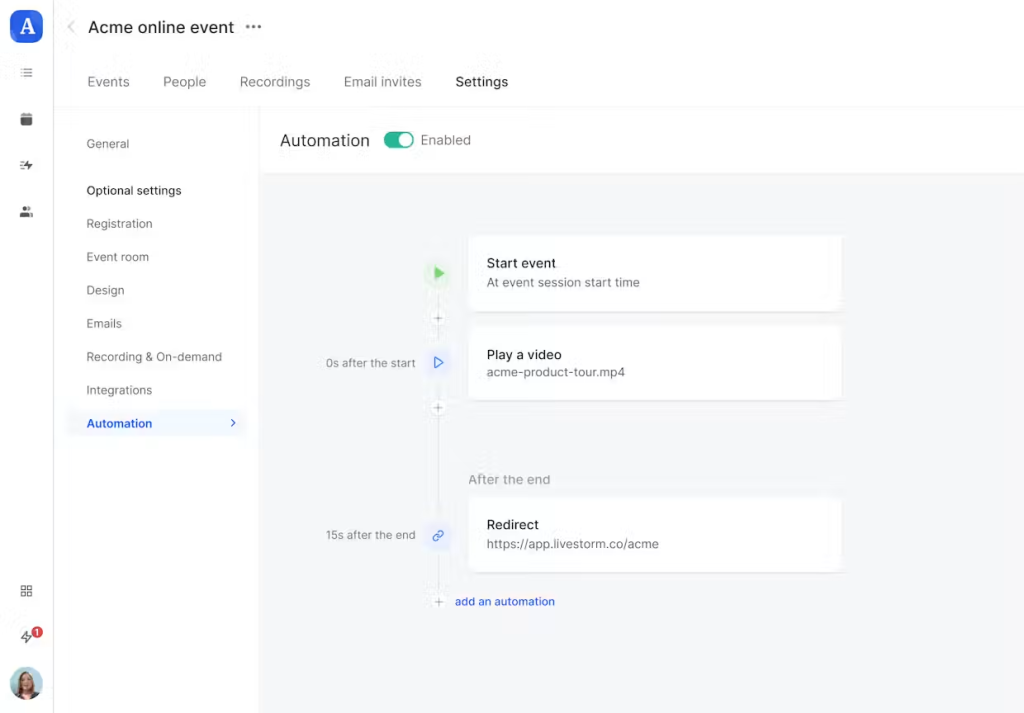
Automated webinars run on preset workflows, making them ideal for product demos or evergreen training content that needs to scale without eating up your team’s calendar.
Livestorm’s Core Features
Registration Pages & Email Automation
Every Livestorm event comes with a customizable registration page. You can add your branding, custom fields, and a registration limit.
Once someone registers, they automatically enter an email sequence (pre-event reminders, day-of notifications, and post-event follow-ups), all configurable without touching a third-party email tool. For marketing teams running recurring events, this alone saves hours in setup.
Engagement Tools
Livestorm’s in-session engagement tools go well beyond a basic chat box. Hosts can run live polls to gauge audience sentiment and open a moderated Q&A queue to manage questions at scale.
Emoji reactions give attendees a lightweight way to respond without interrupting the flow, and Raise Hand lets them signal when they want to speak.
HD Video, Screen Sharing & Multiple Live Speakers
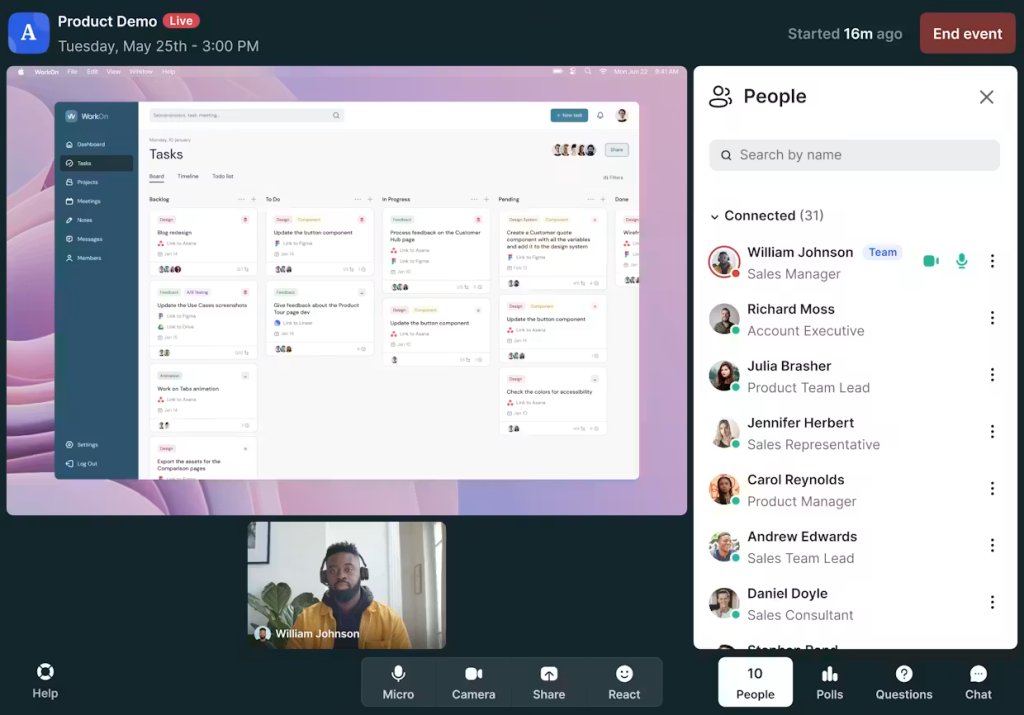
Livestorm supports HD video streaming and screen sharing with no software download required. Multiple speakers can be live on stage simultaneously, which makes it practical for panel discussions, co-hosted product demos, or customer interviews. Hosts can also invite attendees on stage, useful for live Q&A formats or audience participation segments.
The no-download experience matters more than it might seem. Every additional step in an attendee’s journey, from downloading an app to troubleshooting plugins, is a drop-off point. Livestorm removes that friction entirely, which is why its own customers cite browser-based access as a reason they chose it.
AI Captions & Transcripts
Livestorm has rolled out AI-powered captions and auto-transcription features, currently in beta. Live captions improve accessibility and keep attendees engaged even in noisy environments.
Post-session transcripts make it far easier to repurpose webinar content, from turning a 45-minute session into a blog post to pulling quotes for social media.
Livestorm AI Studio for Social-Ready Clips
The AI Studio is Livestorm’s most forward-looking feature sold as an add-on. After a webinar ends, it can automatically turn your replay into short, social-ready video clips.
That work would otherwise require a video editor and a few hours of post-production, so for marketing teams trying to get more distribution out of every event, it’s a meaningful addition.
Analytics & Post-Event Reporting
Livestorm’s analytics dashboard gives you a clear picture of what actually happened during your event. You get attendance rates, webinar conversion rates, UTM tracking, and poll response data, and you can export registrant data, chat messages, and questions.
That export matters for sales teams. Pairing a submitted question with their attendance record shows who leaned in during the session, helping you prioritize post-event follow-up based on behavior.
Livestorm Integrations: How Well Does It Play With Your Existing Stack?
Livestorm integrates natively with HubSpot on every paid plan and with Salesforce on the Enterprise plan. When someone registers, their data flows into your CRM automatically, updating contact records and triggering workflows without manual exports. No more CSV files.
For marketing automation, Livestorm connects natively with Marketo and Pardot, so registrants can enter nurture sequences or lead scoring models in your existing platform. One caveat: both integrations are limited to the Enterprise plan.
Livestorm also supports Slack for internal event notifications, Drift and Help Scout for customer-facing live chat, Google Analytics for registration page tracking, plus Pipedrive and Salesmate on the CRM side. Zapier covers everything else, connecting Livestorm to over 3,000 apps.
Livestorm Pricing Plans
Livestorm’s pricing model works differently from most webinar platforms. Instead of charging per host seat, Livestorm sells attendee credits. You buy a yearly pack, then spend one credit each time someone actually attends a session, live, on replay, or on demand.
Two details make this generous. Registrants who never show up cost nothing, and your own team members consume no credits when they join, run tests, or host.
The Pro Plan
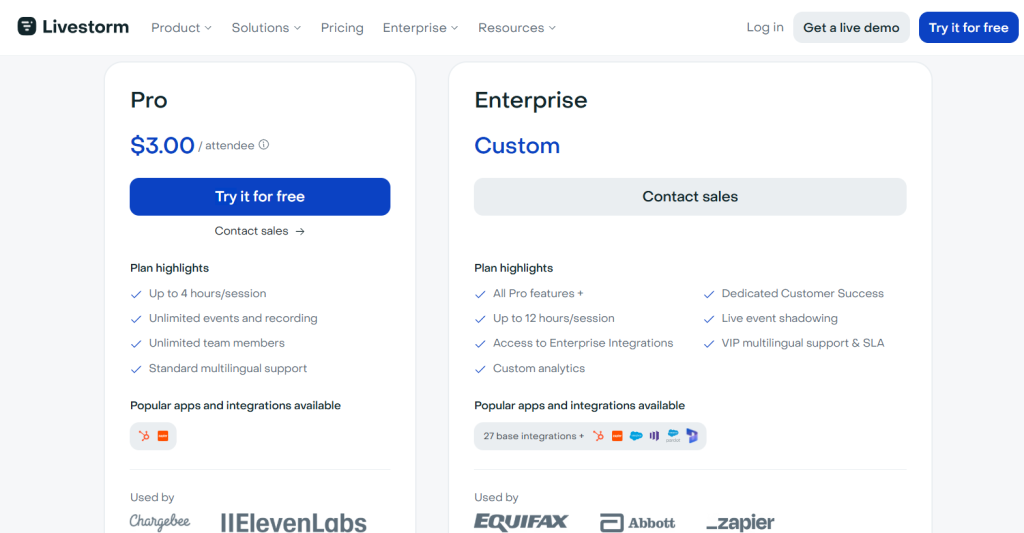
Pro costs $3.00 per attendee and covers unlimited events and recordings, unlimited team members, sessions up to 4 hours, and up to 3,000 live attendees per event. You can display 25 simultaneous speakers, and standard multilingual support is included.
The constraint is the credit quota. You get alerts as you approach it, but once credits run out, new attendees cannot join until you upgrade. Teams with fast-growing audiences should watch that balance closely.
Worth knowing that HubSpot is the only native CRM on Pro. Zapier covers everything else, along with ungated integrations like Pipedrive, Slack, Drift, Google Analytics and Help Scout.
The Enterprise Plan
Enterprise pricing is custom and built for organizations running longer, higher-volume events. It extends sessions to 12 hours, adds custom analytics, a dedicated Customer Success Manager, live event shadowing, and VIP multilingual support with an SLA.
Integrations are the bigger draw. Salesforce, Marketo, Pardot, Microsoft Dynamics and Brevo are Enterprise-only, alongside 27 base integrations. SAML SSO, AI Studio, Restreaming and Live Translations are sold separately as add-ons.
Livestorm Customer Reviews
Livestorm earns strong marks across the major review platforms. It holds 4.4 out of 5 on G2 from more than 1,700 reviews, and 4.7 out of 5 on Capterra from close to 400.
The browser-based experience dominates the praise. Reviewers repeatedly note that attendees join instantly with no downloads or plugins, removing the technical friction that derails webinars on other platforms.
Many also describe getting up to speed unusually fast, with a short learning curve and no formal onboarding. Nearly half of G2’s reviews come from mid-market companies, so this is a platform being judged by teams running events at some scale.
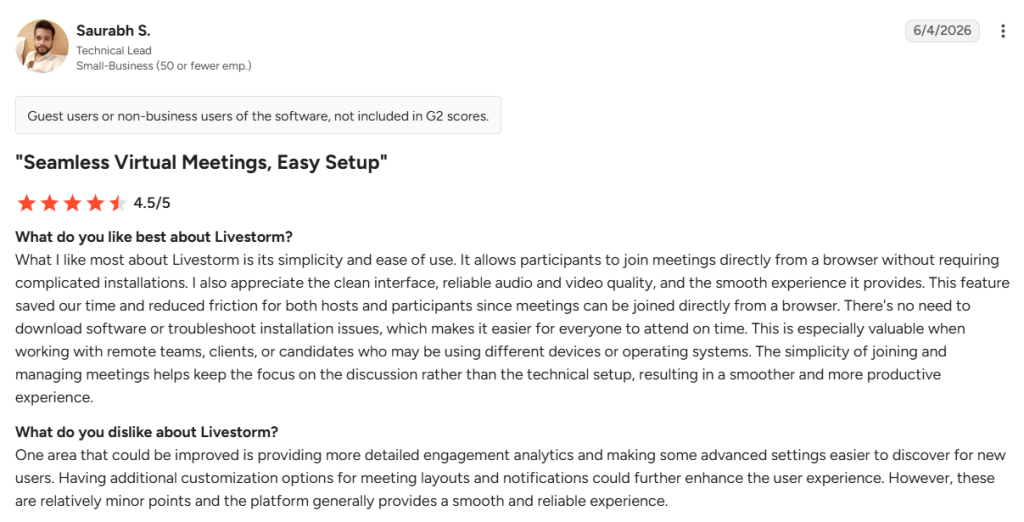
Conversely, a few reviewers report technical trouble with PowerPoint presentations. Others want more from the API, particularly bulk user provisioning instead of inviting people one at a time.
Overall, the reviews point to a platform that works well out of the box and holds up as programs get more complex. Livestorm currently carries G2 badges for Leader in Enterprise, Best Support in Enterprise, Momentum Leader and High Performer.
Livestorm Hosts the Webinar, AmpiFire Builds the Audience
Most teams piece together a landing page builder, an email platform, a video conferencing tool, and an analytics dashboard, then wonder why running webinars feels exhausting. Livestorm collapses all of that into one place, and its reviews suggest it does the job well. That said, no webinar platform can fix an empty registration page.
AmpiFire’s AmpCast AI helps brands build the audience that fills those seats. It takes one topic and turns it into 8 content formats, then publishes them across 300+ sites including YouTube, Google News, Spotify and Pinterest. Try AmpCast AI to reach the decision-makers who have not found you yet, long before your next webinar event goes live.
Frequently Asked Questions (FAQs)
What is Livestorm?
Livestorm is a browser-based video engagement platform for hosting live, on-demand, and automated webinars, virtual events, and meetings, with registration, engagement, follow-up, and analytics tools.
How much does Livestorm cost?
Livestorm offers a free plan with lifetime access. Pro costs $3.00 per attendee, while Enterprise pricing is custom. Pro supports unlimited events and recordings, sessions up to 4 hours, and unlimited team members.
Does Livestorm require attendees to download anything?
No. Livestorm is fully browser-based, so attendees join directly through a link with no app download and no plugin. This is one of Livestorm’s strongest differentiators, particularly for external events where every extra step introduces drop-off.
Can you host automated webinars on Livestorm?
Yes. Automated webinars run on preset workflows, and event automation can start and end the session or play a video for a live-like experience. This suits product demos, onboarding sequences, and evergreen training you want running without scheduling conflicts.
How do I repurpose a webinar into other content?
Livestorm gives you a recording, an on-demand replay page, and AI Content Repurposing in beta, which drafts summaries, blog posts, social posts and emails. Publishing those elsewhere is still your job. AmpCast AI automatically creates news articles, blog posts, interview podcasts, longer informational videos, reels/shorts, infographics, flipbooks/slideshows, and social posts from one topic, then publishes them across 300+ high-traffic sites. This makes content repurposing more efficient without needing to hire a separate content team to turn every webinar into multiple formats.
*Disclaimer: Results may vary based on individual circumstances, business type, and content strategy. The time savings and outcomes mentioned are based on typical user experiences and are not guaranteed. For specific pricing and service details, please visit AmpiFire.
Author
Related Posts

SalesIntel Reviews, Pricing Plans & Features: Is This B2B Sales Intelligence Platform Legit?
Dig into SalesIntel reviews, pricing plans, and features to see what users say about data accuracy, buying signals, integrations, and…

PromoRepublic Reviews & Pricing Plans: Is This Agentic Local Marketing Platform Legit?
Read PromoRepublic reviews and pricing plans. Discover if this agentic local marketing platform is legit and worth trying today.

WebinarKit Features & Pricing: Is It the Best Automated Webinar Platform?
Discover the features, benefits, and pricing of the WebinarKit automated webinar platform. Read our review for detailed insights!

Triggerbee Reviews, Features & Pricing: Is This All-in-One Onsite Marketing Platform Legit?
Read our full Triggerbee review covering features, pricing, and user feedback to decide if this all-in-one onsite marketing platform fits…
Kentico Reviews, Pricing & Features: Is This CMS, Digital Marketing and DXP Platform Legit?
Read Kentico reviews, pricing, and features. Discover if this marketing automation platform is legit and worth adding to your tools.

Discourse Reviews, Features & Pricing: Is This Community Discussion Platform Legit?
Learn if Discourse is legit, what it costs, and what real users say, then see how AmpiFire helps more people…








