


Key Takeaways
- Canny is a dedicated customer feedback management platform built for product teams that need to collect, organize, and prioritize feature requests in one place instead of digging through Jira tickets, support emails, and Slack threads.
- Most teams underestimate how fast feedback scales. Without a structured intake system, requests stay scattered and the loudest voice usually wins, even when a quieter request would generate more revenue.
- Canny solves the intake side with public voting boards, prioritization tools, and Autopilot AI that pulls feedback from Intercom, Zendesk, and Gong, while AmpiFire handles the announcement side by pushing each shipped feature out to 300+ external sites.
- Pricing starts at $0 for up to 25 tracked users and scales to Core at $24/month, Pro at $99/month, and Business with custom pricing. Autopilot AI is included on every tier, including Free.
- AmpCast AI by AmpiFire turns one shipped Canny feature into 8 content formats and publishes them to 300+ sites including Google News, YouTube, Spotify, Pinterest, and Fox affiliate sites.
Canny Reviews: Is This Customer Feedback Management Platform Worth It?
Canny is a customer feedback management platform with strong marks across G2, Capterra, and other B2B review sites. Product teams use it to collect feature requests through public or private voting boards, prioritize them with Autopilot AI, and announce shipped features through automated changelogs. Pricing starts free for up to 25 tracked users and scales to Core ($24/month), Pro ($99/month), and Business (custom). Whether it fits depends on your user volume, the integrations you need, and how much of the feedback workflow you want automated.
Customer feedback tools have moved from nice-to-have to core infrastructure for product teams shipping at speed. The companies that organize input early avoid the trap of building features nobody asked for.
If you’re evaluating Canny against other feedback tools or trying to decide which plan fits your team, this guide covers pricing, features, common reviewer feedback, and how to extend Canny so your shipped features reach an audience beyond your existing user base.

How AmpiFire Works:
- Research & Target: Find high-demand topics your buyers search for.
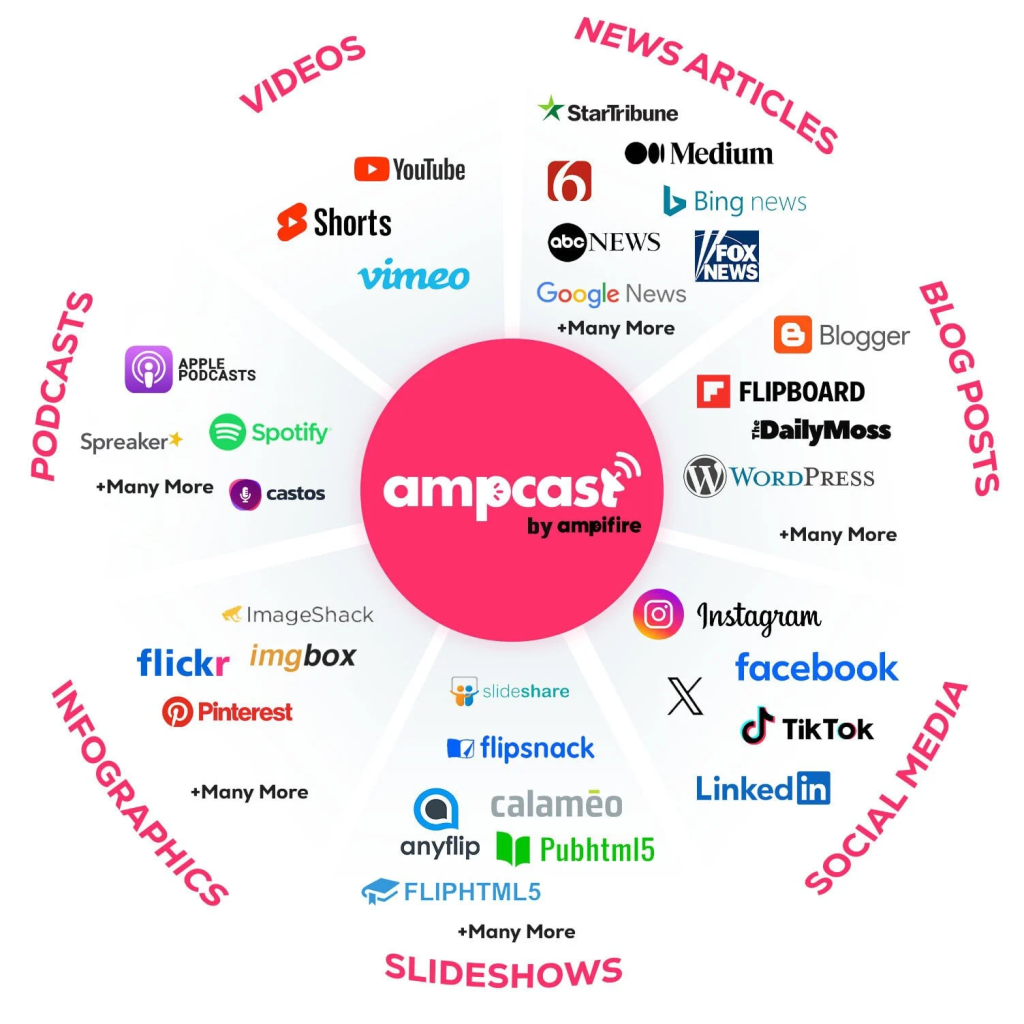
- Create & Repurpose: AmpiFire’s AmpCast AI generates news articles, blog posts, interview podcasts, longer informational videos, reels/shorts, infographics, flipbooks/slideshows, and social posts.
- Distribute & Amplify: Auto-publish to 300+ sites, including Google News, YouTube, Spotify, and major news networks.
Get more traffic from people who want to buy your stuff, and powerful “As Seen On” trust badges for your site.
Do It Yourself (with AI), Done For You Content, & 100% Managed Organic Growth options available.
Grow Your Free Traffic From Everywhere
Canny Features
Canny is built around a focused set of capabilities designed to help product teams collect feedback, prioritize what to build, and close the loop with users when features ship. Here are the core features that define the platform.
Autopilot AI
Autopilot is Canny’s AI engine for automating the messy parts of feedback management. It scans customer conversations and automatically captures feedback that would otherwise stay buried in support tickets and sales calls.
When users submit similar requests, Autopilot detects and merges duplicates so you can see how many people are actually asking for the same thing rather than treating each post as a separate idea.
It also generates smart replies that ask follow-up questions to clarify vague requests, and summarizes long comment threads into digestible main themes. This removes hours of manual triage from the workflow and ensures valuable feedback doesn’t slip through the cracks.
Feedback Portals & Voting Boards
Canny’s voting boards are the heart of the platform. Customers can submit feature requests through a public or private portal, then upvote ideas from other users.
The voting system surfaces what’s in demand instead of relying on internal guesswork or the loudest voice in the room. Boards can be public, where anyone can see and vote on requests, or private, where access is limited to specific users or internal teams.
Roadmaps & Changelog
The roadmap feature turns prioritized feedback into a public-facing view of what’s coming next. Customers can see exactly where their requests stand: under review, planned, in progress, or shipped. This transparency cuts down on the constant “where’s my feature?” conversations between customer success and product teams.
The changelog ties everything together by announcing shipped features directly to subscribers via email. When a feature moves to “complete,” every user who voted for it gets notified automatically, closing the feedback loop without manual outreach.
Prioritization & User Segmentation
Canny includes prioritization tools that help product teams rank requests based on real business impact. Custom post fields capture additional context, such as use case, customer tier, or urgency. User segmentation lets you filter feedback by groups you care about most, like enterprise customers, beta users, or specific account types.
Integrations & MCP Connectors
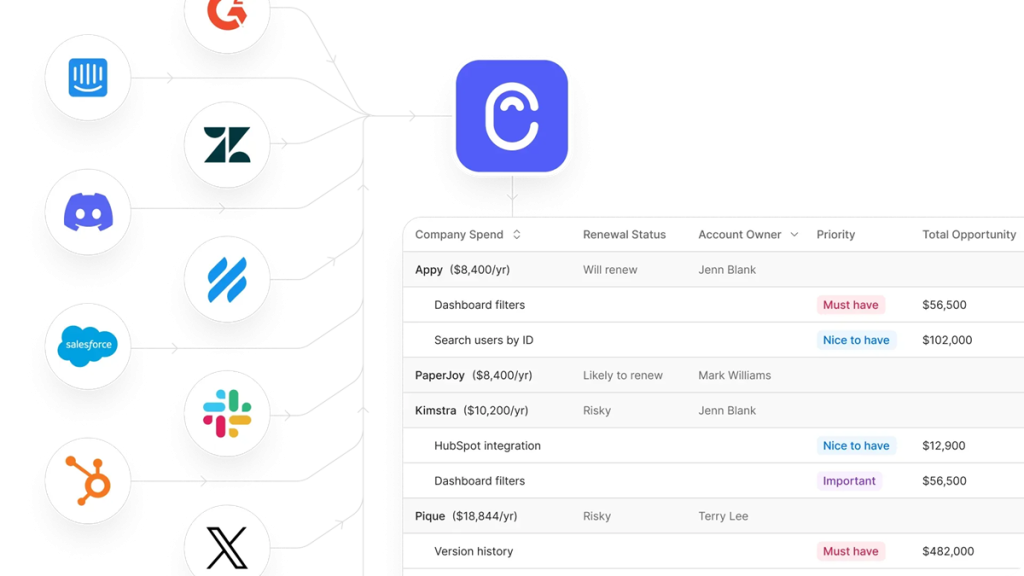
Canny connects with the tools product teams already use. Feedback capture works through Intercom, Zendesk, Slack, and the Chrome Extension. Project management integrations push prioritized requests directly to Jira, Linear, ClickUp, Asana, GitHub, and Azure DevOps so engineering teams pick up work without manual handoffs.
The newer MCP connectors (for AI tools like Claude, OpenAI, ClickUp, and Cursor) let your AI workflows pull live data directly from your Canny boards, making feedback queryable from outside the platform.
Canny Pricing: What Does Each Plan Offer?
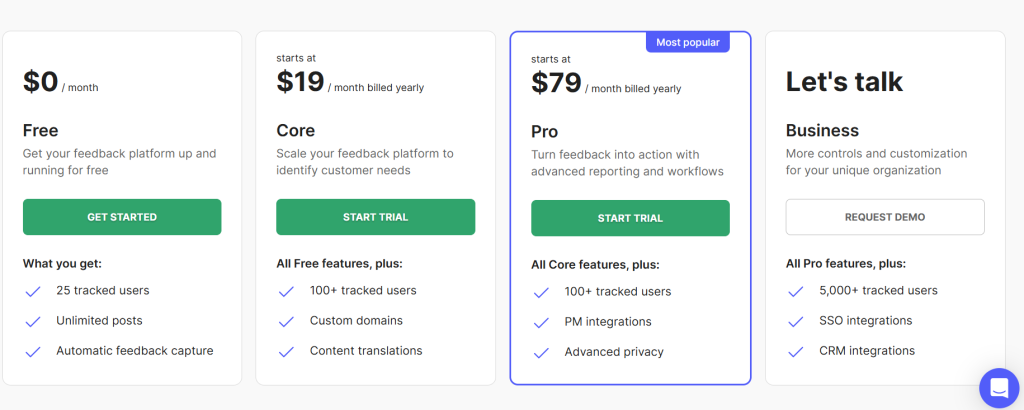
Canny offers four pricing plans designed around different stages of feedback maturity, from solo founders just starting to collect input to enterprises managing thousands of customer requests. Pricing scales based on tracked users, which Canny defines as anyone who has interacted with feedback (created a post, voted, or commented). You can set a monthly spend limit so the bill never grows unexpectedly.
Free Plan
The Free plan covers up to 25 tracked users and 5 manager seats, with unlimited posts, unlimited boards, and full access to Autopilot AI. It’s a solid starting point for solo founders or early-stage teams who want to validate demand before paying for a feedback tool.
Core Plan – starts at $24/month
The Core plan unlocks 100+ tracked users, custom domains, content translations, and a single internal roadmap. It also adds the Segment integration for syncing user data. This tier suits small teams ready to brand their feedback portal and translate it for international users.
Pro Plan – starts at $99/month
The Pro plan is Canny’s most popular tier, and it includes 10 manager seats, unlimited roadmaps, automation rules, user segmentation, and project management integrations with Jira, Linear, ClickUp, and Asana. Advanced portal privacy controls and custom admin roles also unlock here, making it the right fit for growing product teams running structured feedback workflows.
Business Plan – Custom pricing
The Business plan is for organizations with 5,000+ tracked users and includes everything in Pro plus SSO integrations (Okta, OIDC, Entra ID, OneLogin), CRM integrations with HubSpot and Salesforce, custom admin roles, and SOC 2 compliance review. Pricing is negotiated based on user volume and required add-ons like removing Canny branding or invoice billing.
Pair Canny’s Feedback Loop With AmpiFire’s Outside Reach
Canny is a strong pick if you want a single place to collect, prioritize, and ship customer feedback. The Free plan handles small teams, Core and Pro fit growing product orgs, and Business covers enterprise volume with SSO and Salesforce. The platform’s weak spot is announcement reach. Changelogs and email notifications only land with users already in your portal.
That is where AmpiFire extends what Canny does. When you ship a top-voted Canny request, AmpCast AI turns the update into news articles, blog posts, interview podcasts, longer informational videos, reels/shorts, infographics, flipbooks/slideshows, and social posts, then publishes them to 300+ sites including Google News, YouTube, Spotify, Pinterest, and Fox affiliate sites. Existing users hear it through Canny. New buyers find it through search, social, video, and audio.
Visit AmpCast AI by AmpiFire to turn your next shipped Canny feature into 8 content formats published across 300+ high-authority sites.
Frequently Asked Questions (FAQs)
What is the cheapest Canny plan available?
The cheapest Canny plan is the Free plan at $0/month. It includes 25 tracked users, 5 manager seats, unlimited posts and boards, and full access to Autopilot AI. It’s a genuinely useful starting point for solo founders or small teams who want to start collecting feedback without paying upfront. Once you exceed 25 tracked users, you’ll need to upgrade to a paid tier.
Does Canny offer a free trial?
Yes, Canny offers a 14-day free trial on the Core and Pro plans, with no credit card required to start. The trial gives you full access to those plan features, so you can build out your feedback portal, invite team members, and test integrations before deciding whether to commit. The Business plan requires a sales demo instead of a self-serve trial.
What is Canny’s Autopilot AI feature?
Autopilot is Canny’s suite of AI-powered features, and it’s included on all plans. It automatically captures feedback from customer conversations across tools like Intercom, Zendesk, and Gong. It also detects and merges duplicate requests, generates smart replies to clarify user input, and summarizes long comment threads to surface the main themes. This saves product teams hours of manual triage and prevents valuable feedback from getting lost in support tickets.
Can I keep my Canny feedback board private?
Yes, Canny supports private boards on every paid plan. Private boards are only accessible to invited users, which makes them useful for internal feedback, beta programs, or sensitive enterprise customers. Pro and Business plans add advanced portal privacy controls, including private comments, anonymized boards, and the ability to hide vote counts from public view.
How can I announce Canny-driven product updates to a wider audience?
When you ship a feature based on Canny feedback, AmpCast AI turns that single update into 8 different content formats and publishes them across 300+ sites like Google News, YouTube, Spotify, Pinterest, and Fox affiliate sites. This way, your launch announcement reaches search, social, video, and podcast audiences, not just existing users who are already subscribed to your changelog.
*Disclaimer: Results may vary based on individual circumstances, business type, and content strategy. The time savings and outcomes mentioned are based on typical user experiences and are not guaranteed. For specific pricing and service details, please visit AmpiFire.
Author
Related Posts


LoginRadius Reviews, Features & Pricing: Is This Identity and Access Management Platform Legit?
LoginRadius review: In-depth analysis of features, pricing, and legitimacy. Learn if this identity and access management solution meets your needs.


SocialBee Reviews, Features & Pricing: Is This AI Social Media Management Tool Legit?
Check out if SocialBee is worth it. Learn its AI social media management, pricing plans, and real user reviews to…

Mailtrap Reviews, Pricing & Features: Is This the Best Email Deliverability Platform?
Is Mailtrap the best email deliverability platform? Full breakdown of features, pricing, integrations, and detailed user reviews for SaaS and…
Synup Reviews, Features & Pricing: Is This a Legit Reputation Management Software?
Find out whether Synup is worth it with this full review of its key features, pricing plans, real user feedback,…


Restream Reviews, Features & Pricing: Is This a Good Multistreaming Platform?
Read our Restream review to learn about key features, pricing plans, and pros and cons, and find out if this…

Omnisend Reviews, Features & Pricing: Is It a Good Marketing Platform for E-commerce?
Get honest Omnisend reviews. Learn features, pricing, and if this marketing platform is worth it for your e-commerce business and…








