

Key Takeaways
- Auto-posting between Twitter/X and Instagram can save busy social media managers hours each week while maintaining a consistent brand presence.
- Tools like IFTTT, Buffer, and Hootsuite offer different automation capabilities, with some providing free plans for basic cross-posting needs.
- Instagram-to-Twitter auto-posting is more straightforward than the reverse direction, which often requires third-party workarounds.
- Optimising content for each platform’s specific dimensions and features yields significantly higher engagement rates than generic cross-posts.
- AmpiFire’s content distribution technology takes social media automation to the next level with AI-powered cross-platform optimisation.
Why Manual Cross-Posting Is Killing Your Productivity
The typical social media manager spends hours each week reformatting and republishing duplicate content across different platforms. This repetitive task isn’t just tedious; it’s also stealing valuable time from higher-impact activities, such as community engagement and content creation.
Each manual cross-post requires adjusting image dimensions, rewriting captions to accommodate platform-specific character limits, and reformatting hashtags, creating endless opportunities for inconsistency and error.
Beyond the time drain, manual cross-posting creates significant workflow bottlenecks. When breaking news or trending topics emerge, the lag time between posting on your primary platform and republishing elsewhere can mean missing critical engagement windows.
For time-sensitive content, this delay can be the difference between viral success and disappearing into the social media void.

How AmpiFire Works:
- Research & Target: Find high-demand topics your buyers search for
- Create & Repurpose: AmpiFire’s AmpCastAI generates news articles, blogs, videos, podcasts, infographics, slideshows, and social posts
- Distribute & Amplify: Auto-publish to 300+ sites including Google News, YouTube, Spotify, and major news networks
Get more traffic from people who want to buy your stuff, and powerful “As Seen On” trust badges for your site.
Do It Yourself (with AI), Done For You Content, & 100% Managed Organic Growth options available.
Grow Your Free Traffic From Everywhere
Best Tools to Auto-Post Between X/Twitter & Instagram
Fortunately, several powerful tools can automate the cross-posting process between Twitter and Instagram. These solutions range from free basic connectors to comprehensive social media management platforms with advanced scheduling and analytics capabilities.

1. IFTTT: The Free Automation Solution
IFTTT (If This Then That) offers one of the simplest and most affordable ways to connect your Twitter and Instagram accounts. This automation platform creates “applets” that trigger specific actions when certain conditions are met.
For social media, this means automatically posting your Instagram photos to Twitter as native images—not just links. IFTTT’s free plan allows basic connections between platforms, making it perfect for individuals or small businesses just starting with cross-posting automation.
2. Buffer: Scheduled Cross-Posting Made Simple
Buffer takes automation a step further by adding powerful scheduling capabilities to cross-platform posting. The platform allows you to create content once and distribute it across multiple networks with customized formatting for each.
What sets Buffer apart is its intuitive visual planning calendar and optimal time posting features, which automatically schedule your content for peak engagement periods. While the free plan offers limited functionality, Buffer’s paid tiers provide comprehensive cross-posting tools ideal for growing brands and content creators.
One standout feature is Buffer’s analytics dashboard, which tracks the performance of your cross-posted content on each platform. This data helps optimise your strategy by identifying which types of content work best in specific contexts, allowing you to refine your automation rules for maximum engagement.
Step-by-Step: Setting Up Auto-Posting from Instagram to Twitter
1. Connecting Your Accounts Securely
Security should be your primary concern when connecting social accounts through third-party applications. Always verify that your automation tool uses OAuth authentication—a secure protocol that grants access without sharing your actual passwords.
After selecting your preferred tool, you’ll navigate to the account connection section, where you’ll be prompted to authorise access to both your Instagram and Twitter accounts. During this process, carefully review the requested permissions to ensure they align with your needs. Most reputable tools will only request the minimum permissions required for posting functionality.
2. Configuring Post Settings for Best Results
Once your accounts are connected, you’ll need to fine-tune how your content transfers between platforms. This crucial step determines whether your cross-posted content appears polished or clearly automated. Most tools offer options to include or exclude hashtags when posting from Instagram to Twitter, automatically shorten links, and handle media attachments.
For optimal results, configure your settings to preserve Instagram hashtags while limiting their use on Twitter, where excessive tags can appear spammy. Additionally, ensure your media posting is set to “native images” rather than links, as native content typically receives higher engagement than external links.
Pay special attention to caption handling, as Instagram captions can often exceed Twitter’s character limits. Configure your tool to truncate captions while preserving your key message and call-to-action intelligently.
3. Setting Up Custom Caption Formats
The caption often makes the difference between a professional cross-post and an obvious automation. Custom caption formatting enables you to tailor the appearance of your Instagram captions when they are published on Twitter.
Most advanced tools provide variables you can use to structure captions consistently—for example, automatically including your Instagram username, preserving only specific hashtags, or appending a consistent call-to-action. For businesses managing multiple brands, these custom formats can be saved as templates, ensuring brand-specific styling remains consistent regardless of which team member schedules the post.
4. Testing Your First Automated Post
Before relying on your automation for regular posting, conduct a thorough test to ensure everything works as expected. Create a test post on Instagram with all the elements you typically include—multiple images, hashtags, mentions, and a full-length caption.
Once published, monitor how quickly it appears on Twitter and carefully evaluate how each element translates. Pay particular attention to image cropping, caption formatting, and link rendering. If the test reveals issues, most can be resolved through settings adjustments.
How to Auto-Post from Twitter to Instagram (The Tricky Direction)
Why This Direction Is More Challenging
Instagram’s platform design intentionally limits automation to maintain content quality and prevent spam. Unlike Twitter, which offers relatively open API access for posting, Instagram restricts third-party posting capabilities, particularly for personal accounts.
These restrictions primarily exist to maintain Instagram’s image as a platform for original, thoughtfully created visual content, rather than automated reposts. Additionally, the technical formats differ significantly. Twitter’s text-centric posts often struggle to translate well to Instagram’s image-centric format, adding another layer of complexity for automation tools.
Workarounds That Actually Work
Despite these challenges, several practical approaches can automate posting from Twitter to Instagram. The most reliable method involves a two-step automation in which your tweets trigger the creation of an image containing your tweet text, which is then posted to Instagram with an optional caption. Tools like IFTTT and Zapier can create these workflows by connecting Twitter to image creation services, then to Instagram publishing tools.
Another approach involves using scheduling tools that offer “reminders” for Instagram posts rather than direct automation. These services prepare your content, notify you when it’s time to post, and provide one-click transfer of the prepared content to your Instagram app. While not fully automated, this streamlined workflow significantly reduces manual effort while complying with Instagram’s posting requirements.
Creating Visual Templates for Twitter-to-Instagram Shares
The key to successful Twitter-to-Instagram automation is developing visually appealing templates that transform text-based tweets into engaging Instagram-ready images.
Start by creating several branded templates in design tools like Canva that include your logo, consistent colours, and enough space for tweet text of varying lengths. The most effective templates use readable fonts on contrasting backgrounds and maintain ample margins to ensure text remains visible in Instagram’s square or portrait formats.
Advanced automation setups can select from multiple templates based on the tweet’s content type, automatically choosing the appropriate design for quotes, announcements, questions, or statistics. For optimal results, develop 3–5 distinct templates that rotate through your automation workflow to maintain visual freshness while preserving brand consistency.
When to Use Platform-Specific Features Instead of Auto-Posting
While automation streamlines your workflow, certain platform-specific features don’t translate well between Instagram and Twitter. Stories, polls, and interactive stickers often lose their functionality when auto-posted.
For these unique content types, it’s better to create native posts on each platform. Stories, Instagram’s immersive full-screen format, have no direct equivalent on Twitter and should be made separately for each platform to maintain a high-quality user experience.
Transform Your Distribution with AmpCast, AmpiFire’s AI-Powered Automation
At AmpiFire, our content distribution platform elevates social media automation to the next level by incorporating AI-powered optimisation tailored to each platform. Unlike basic cross-posting tools that simply copy content, our AmpCast platform analyses your original post. It intelligently reformats it for optimal performance on each destination platform, including Twitter and Instagram.
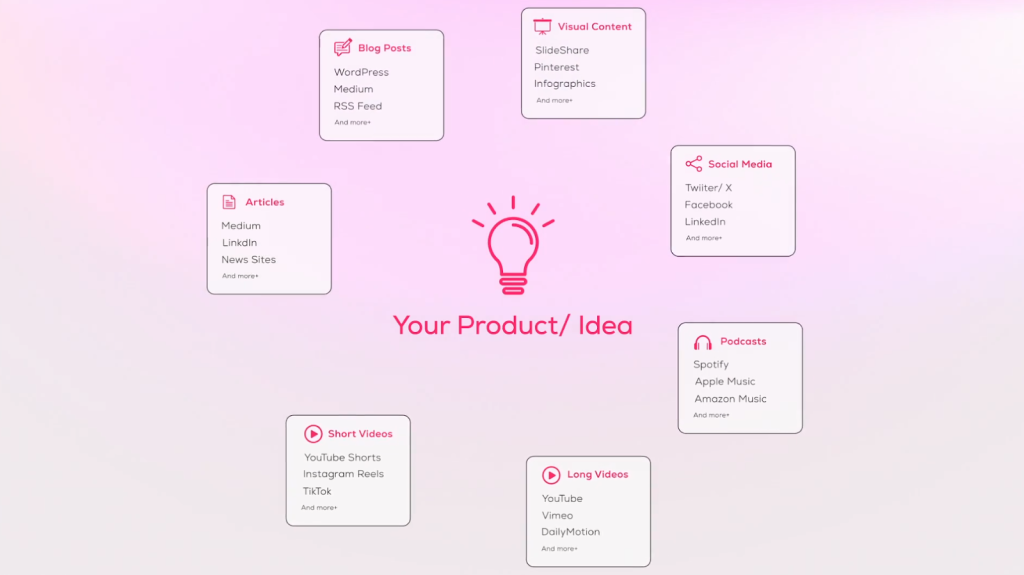
What truly sets AmpCast apart is its ability to distribute beyond just social media. It transforms your content into eight formats, including blog posts, podcasts, news articles, infographics, slide shows, social posts, long-form videos, and short-form videos. These are then distributed across 300 high-authority sites, including Google News, LinkedIn, Spotify, and Instagram.
This omnichannel approach ensures maximum visibility and engagement across the entire digital ecosystem, not just social platforms. For businesses serious about content distribution, AmpCast represents the next evolution in automation technology, saving time while enhancing content performance.
Frequently Asked Questions (FAQs)
Can I auto-post Instagram Stories to Twitter?
Currently, direct automation from Instagram Stories to Twitter isn’t supported by most tools due to fundamental format differences between the features. Instagram Stories are designed as vertical, full-screen experiences with interactive elements, while Twitter lacks a comparable format. However, you can use workarounds, such as automatically sharing a static image from your Story to Twitter with a link back to your Instagram profile.
Will my Twitter polls transfer to Instagram when auto-posting?
No, Twitter polls cannot be automatically transferred to Instagram with their interactive functionality intact. Polls are platform-specific features that rely on each platform’s unique infrastructure. When auto-posting, your Twitter poll typically appears as static text on Instagram, losing its interactivity.
Do I need a business account to use auto-posting tools?
Most advanced auto-posting functionality requires an Instagram Business or Creator account rather than a personal account, especially for scheduled posting. This requirement stems from Instagram’s API restrictions, which grant business accounts greater access to automated publishing features.
Can auto-posting hurt my engagement rates?
Auto-posting itself doesn’t inherently reduce engagement, but poorly implemented automation certainly can. The key difference lies in how thoughtfully you configure your cross-posting settings.
How does AmpiFire’s automation compare to tools like Zapier and IFTTT?
While Zapier and IFTTT connect services through simple trigger-action relationships, AmpiFire’s AmpCast offers content-aware intelligence that optimizes your posts for each destination platform. Additionally, AmpCast extends beyond just social media cross-posting to comprehensive content distribution across blogs, news sites, videos, and podcasts.
*Disclaimer: Results may vary based on individual circumstances, business type, and content strategy. The time savings and outcomes mentioned are based on typical user experiences and are not guaranteed. For specific pricing and service details, please visit AmpiFire.
Author
Related Posts


How to Auto Post between Facebook & X/Twitter
Learn how to auto post between Facebook and X/Twitter. Find out tools and methods to streamline your social media content…

How to Auto Post between Facebook & Instagram
Learn how to auto-post between Facebook and Instagram. Save 2–3 hours weekly with automated cross-posting strategies and tools.

How to Auto Post between Instagram & TikTok
Learn how to automatically post content between Instagram and TikTok. Find out tools, strategies, and best practices for seamless cross-platform…


How to Auto Post between X/Twitter & TikTok
Learn how to auto-post between TikTok and X/Twitter to save time and expand your reach. Set up seamless cross-platform automation…

How to Auto Post between X/Twitter & LinkedIn
Learn how to auto post between X/Twitter and LinkedIn. Find out tools and methods to streamline your social media content…

How to Auto Post Vimeo Videos to Instagram [Post, Story & Reel]
Learn the best ways to share Vimeo videos on Instagram Posts, Stories, and Reels. Discover semi-automated tools that simplify the…








