

Key Takeaways
- Transforming your blog content into slideshows helps you to reach visual learners and expand your content’s lifespan.
- Avoiding common pitfalls like text overload and poor visual hierarchy can prevent the doom most blog-to-slideshow conversions face.
- Follow a proven 5-step process that makes conversion efficient and produces professional results.
- Strategically sharing your slideshow on platforms where your target audience already consumes visual content can improve visibility.
- Ampifire’s AmpCast AI converts blogs into slideshows + 7 other formats, then auto-publishes to 300+ sites, freeing you from manual content work while maximizing your organic reach.
Transform Text to Visuals: Why Your Blog Should Become a Slideshow
Blog posts pack information density, but slideshows deliver impact. When you convert your blog into a slideshow, you’re essentially distilling your most valuable insights into a format optimized for visual processing, something our brains naturally prefer.
Beyond cognitive advantages, slideshows unlock new distribution channels. Platforms like SlideShare, which has over 80 million professionals, provide fresh audiences hungry for visual content. Your slideshow can also become presentation material for webinars, conferences, and team meetings, extending your content’s utility far beyond its original format.
The content marketing benefits shouldn’t be overlooked either. When properly optimized with relevant keywords and descriptions, slideshows create additional entry points to your content ecosystem. Each slide becomes a potential visual asset that could appear in image searches or social media feeds, driving traffic back to your original content.

How AmpiFire Works:
- Research & Target: Find high-demand topics your buyers search for
- Create & Repurpose: AmpiFire’s AmpCastAI generates news articles, blogs, videos, podcasts, infographics, slideshows, and social posts
- Distribute & Amplify: Auto-publish to 300+ sites including Google News, YouTube, Spotify, and major news networks
Get more traffic from people who want to buy your stuff, and powerful “As Seen On” trust badges for your site.
Do It Yourself (with AI), Done For You Content, & 100% Managed Organic Growth options available.
Grow Your Free Traffic From Everywhere
The Big Problem: Where Most Blog-to-Slideshow Conversions Fail

Text Overload: Too Many Words Per Slide
The cardinal sin of slideshow creation is cramming paragraphs onto each slide. When viewers see a wall of text, their engagement plummets instantly. The purpose of a slideshow is to visually communicate key points that stimulate interest or reinforce understanding.
Effective slides typically contain no more than 15–20 words, using concise bullet points or powerful single statements to drive messages home.
Missing Visual Hierarchy
Blogs naturally guide readers through information using headers, paragraphs, and occasional visual elements. Slideshows demand a more intentional visual hierarchy that guides the viewer’s eye to the most important elements first.
Without clear hierarchy, established through size contrasts, color emphasis, and strategic positioning, your slides become visual chaos rather than clarity.
Weak Narrative Structure
Even information-rich blog posts typically follow narrative structures that build interest and momentum. Many slideshow conversions lose this narrative flow, becoming disconnected information dumps rather than compelling visual stories.
Your slideshow must maintain a clear beginning (setting context), middle (exploring key points), and conclusion (solidifying takeaways or inspiring action).
5 Simple Steps to Convert Any Blog Post Into an Engaging Slideshow

1. Extract Your Key Points
Begin by identifying the essential messages from your blog post. Scan through your content and highlight the main arguments, supporting statistics, memorable quotes, and actionable takeaways.
These elements will become the backbone of your slideshow. For a typical 1,500-word blog post, you’ll likely extract 10–15 key points that deserve their own slides.
2. Create a Visual Storyboard
Before jumping into design, map out your slideshow structure using a simple storyboard approach. Determine how your key points will flow from one slide to the next, creating a logical progression that builds toward your conclusion.
Think of your storyboard as the architectural blueprint: it doesn’t need to be fancy, but it should clearly outline which content appears on which slide, along with notes about potential visuals or design elements.
3. Design Eye-Catching Slides
With your storyboard complete, it’s time to create slides that capture attention and communicate clearly. Start by selecting a consistent design template that matches your brand aesthetics and the content tone.
For each slide, craft a concise headline that communicates the core message at a glance. Support this with minimal text – transform paragraphs into brief bullet points that highlight only the essential information. The goal is to create slides that viewers can comprehend within 3–5 seconds, prompting them to explore further rather than overwhelming them with information.
4. Add Supporting Visuals
Visuals transform good slideshows into great ones. For each slide, identify images, icons, charts, or diagrams that reinforce your message. Avoid generic stock photos, instead, choose visuals that add genuine value by explaining concepts, highlighting relationships, or evoking specific emotions related to your content.
When creating data visualizations, prioritize clarity over complexity. A simple chart that clearly communicates one insight is far more effective than a complex visualization that requires extensive study to understand. Remember, your slideshow may be viewed at various speeds and on different devices, so visual simplicity ensures your message remains accessible.
5. Review and Refine
Before sharing your slideshow, review it critically from your audience’s perspective. Test the flow by presenting it to a colleague unfamiliar with the original blog content. Can they understand the key messages without additional explanation?
Look for opportunities to further simplify text, enhance visual clarity, or strengthen transitions between concepts. The most effective slideshows often result from several refinement cycles that progressively distill complex ideas into their clearest visual expression.
How to Share Your Slideshow for Maximum Impact
Best Platforms for Different Audiences
SlideShare remains the powerhouse platform for professional slideshow content, with over 80 million users actively seeking knowledge in presentation format.
For business-focused content, this should be your primary distribution channel, complete with keyword-optimized titles, descriptions, and tags. Upload your slideshow with a compelling cover slide that functions as a thumbnail, enticing viewers to click and explore.
Social platforms like LinkedIn, Twitter, and Facebook also offer excellent distribution for slideshows when combined with platform-specific strategies.
Embedding Options for Your Website
Your own website provides the perfect home base for your slideshow content, with several embedding options depending on your goals.
The simplest approach uses SlideShare or Google Slides embed codes to display your presentation directly within blog posts or dedicated pages, providing interactive viewing without sending visitors elsewhere.
Promotion Strategies That Work
The most successful slideshow promotion strategies combine targeted outreach with strategic timing. Share your slideshow when your target audience is most active online, typically weekday mornings for professional content and evenings for consumer topics.
Accompany your share with a compelling hook that highlights the primary value proposition of your content rather than simply announcing “New Slideshow Available!”
Don’t overlook the power of strategic partnerships with industry influencers or complementary brands. Offering your slideshow as a resource they can share with their audience creates win-win scenarios where both parties provide value to their followers.
Let AmpiFire’s AmpCast AI Handle Your Blog-to-Slideshow Conversions
Converting your blog into slideshows manually takes hours of design work, platform uploads, and distribution effort. AmpiFire removes this time-consuming process by using AI to automatically transform your content into professional slideshows, along with seven other formats, then publishing them across hundreds of platforms.
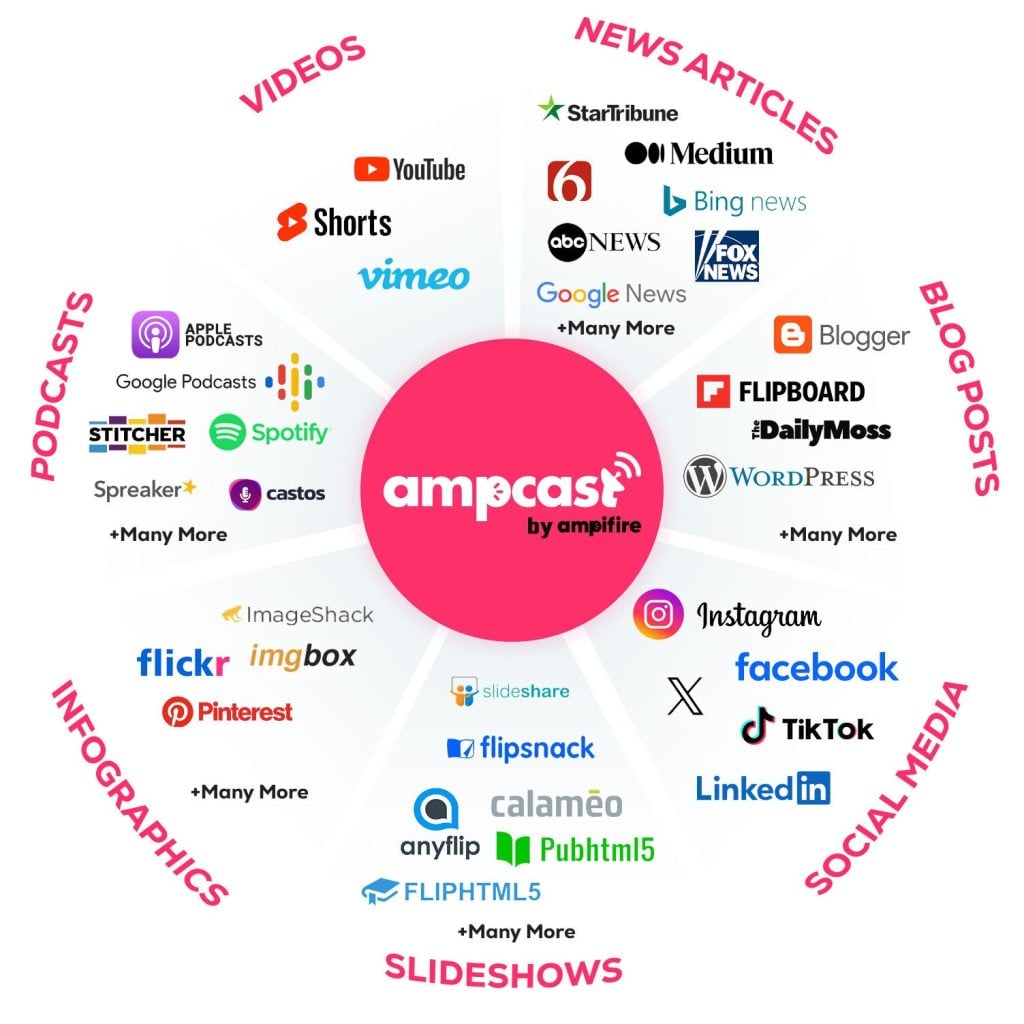
AmpiFire’s AmpCast AI platform takes any topic and converts it into eight different formats: news articles, blog posts, interview podcasts, long-form videos, short-form videos, infographics, slideshows, and social posts. These formats are then automatically distributed to 300+ high-authority sites including SlideShare, YouTube, Spotify, Pinterest, Google News, FOX affiliate sites, and many more.
This multi-platform presence means your slideshow content appears wherever your potential customers are researching, whether they’re browsing LinkedIn, watching YouTube, or searching Google. When prospects see your brand consistently across multiple channels, it builds immediate credibility and trust that single-platform marketing simply can’t achieve.

The ROI is clear: clients typically see increased returns on their investment because they’re capturing attention at every stage of the buyer journey without the ongoing costs of needing to pay for various content creation platforms, or the time burden of manual content creation.
Frequently Asked Questions
How long should my slideshow be compared to my original blog post?
For a 1,500-word blog post, aim for 15–25 slides maximum. Focus on distilling your most valuable insights rather than including everything from the original post. Your slideshow should serve as a visual complement to your blog, not a complete replacement.
Can I convert any type of blog post into a slideshow?
While virtually any blog post can be transformed into slideshow format, some content types convert more naturally. List-based articles, how-to guides, and posts with distinct sections translate seamlessly into slide format. Narrative-heavy content or philosophical pieces may require more creative restructuring. The key is identifying clear, standalone points that can be extracted and supported with visual elements.
Do I need design skills to create professional-looking slideshows?
Basic design principles help, but specialized skills aren’t necessary thanks to modern tools and templates. Focus on fundamental principles: consistent visual hierarchy, limited color palettes (3–4 colors), ample white space, and text brevity. When in doubt, simplify, one slide, one idea works best.
Should I create a slideshow first or write the blog post first?
While traditional workflow starts with blog creation, creating the slideshow first can be more effective. This forces disciplined thinking about core messages and key points, building a visual outline. Visual thinkers may prefer starting with slideshows, while verbal processors might find blog-first development more natural. Experiment with both workflows to discover which produces better results for your content.
Can AmpiFire automatically convert my existing blog posts into slideshows?
Yes, AmpiFire’s AmpCast AI technology transforms blog content into professional slideshows as part of its eight-format content creation system. Simply provide your blog post or topic, and AmpCast automatically generates visually appealing slides optimized for SlideShare and social media. The AI extracts key points and creates visual hierarchy without requiring design skills, then distributes it alongside other formats to 300+ sites.
Author
Related Posts


How to Repurpose Blog Content: Tips & Examples
Learn how to repurpose blog content with tips and examples. Discover strategies to triple your content output and reach new…

How to Turn a Blog Into an Infographic: Step-by-Step Guide
Learn how to turn a blog into an infographic with our step-by-step guide. Repurpose content into engaging visuals that boost…

How to Make Long Google Slide Decks in Claude (Save as Powerpoint Option)
Learn how to create long slide decks effortlessly in Claude Sonnet with tips and tools to enhance your presentations!


Blog Post Traffic & Volume Calculator & Graph
Use this calculator to see exactly when you’ll hit your content goals and outpace competitors. What This Calculator Shows You:…

How to Turn Your Podcast Into a Blog Post: 7 Easy Steps
Learn how to turn your podcast into a blog post with 7 easy steps. Repurpose audio content to reach more…

How to Promote Your Blog on Instagram: Tips & Examples
Promote your blog on Instagram with proven strategies. Learn how to use carousel posts, Stories, Reels, Viral Shorts, and how…







