
Key Takeaways
- Submagic is a legit browser-based AI video editing tool designed to turn raw footage into polished short-form content for TikTok, Instagram Reels, and YouTube Shorts.
- Its feature set covers the full short-form production workflow: AI captioning in 118 languages, automated silence removal, B-roll generation, zoom effects, a social media scheduler, and AI avatar video creation.
- Paid plans range from $19 to $69 per member per month, and you can create an account and try the editor without a credit card before paying. Annual billing cuts costs by up to 41%.
- The tool works best for creators focused on short-form video, but per-video time limits and monthly upload caps on lower plans may not suit high-volume or long-form workflows.
- AmpCast AI does more by turning a single idea into eight content formats and publishing them across hundreds of high-traffic sites, helping you reach your audience through search, social, video, podcasts, and news outlets simultaneously.
Submagic Overview: Is This AI Tool Legit?
Yes, Submagic is a legitimate video editing tool rated over 4 stars on Trustpilot. It is an AI-powered caption and video editing tool built specifically for short-form content on TikTok, Instagram Reels, or YouTube Shorts.
You upload your footage, and the AI takes over the heavy lifting, from generating captions, identifying key moments, cutting silences, inserting B-roll, to formatting everything for vertical platforms.
The platform supports export in 1080p and higher, handles videos across multiple languages, and connects directly to social platforms for publishing. The entire process happens in your browser, no software download required.

How AmpiFire Works:
- Research & Target: Find high-demand topics your buyers search for.
- Create & Repurpose: AmpiFire’s AmpCast AI generates news articles, blog posts, interview podcasts, longer informational videos, reels/shorts, infographics, flipbooks/slideshows, and social posts.
- Distribute & Amplify: Auto-publish to 300+ sites, including Google News, YouTube, Spotify, and major news networks.
Get more traffic from people who want to buy your stuff, and powerful “As Seen On” trust badges for your site.
Do It Yourself (with AI), Done For You Content, & 100% Managed Organic Growth options available.
Grow Your Free Traffic From Everywhere
Submagic’s Full Feature Breakdown
AI Captions
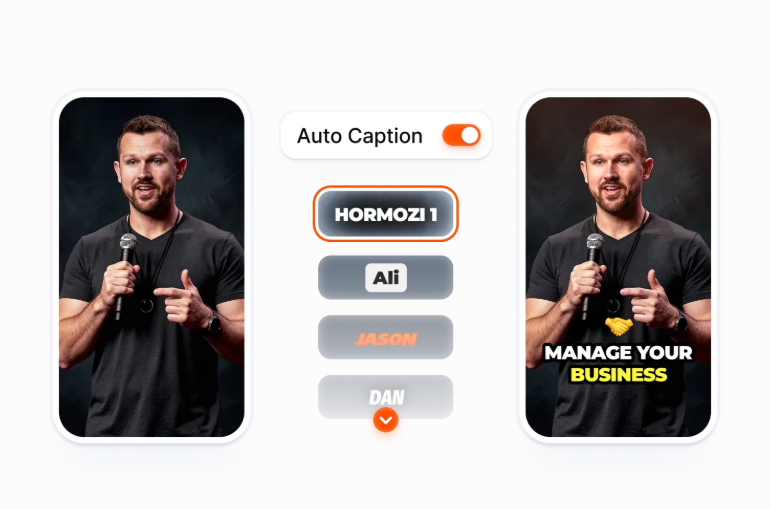
Submagic’s AI caption engine generates subtitles with 98.8% average accuracy on clear audio across 118 languages. Captions come with animated styles, custom fonts, colors, and emoji support. The formatting mirrors what performs on viral content: word-by-word highlighting, dynamic sizing, and bold emphasis on key phrases.
AI Video Editor & AI Auto Edit
The AI Video Editor is Submagic’s core editing workspace. You manually control every element of your video: trimming, auto-zoom, B-roll insertion, sound effects, background music, aspect ratio adjustments, and text-based editing.
AI Auto Edit is the one-click automation layer. Pick a style template, upload your footage, and Submagic automatically generates captions, inserts contextual B-roll, removes silences and filler words, adds zoom effects, cleans audio, and corrects eye contact.
Magic Clips
Magic Clips converts long-form content (podcast episodes, webinars, YouTube videos) into short-form clips. The AI identifies the most compelling moments and extracts them as standalone, caption-ready clips formatted for vertical platforms. Magic Clips is included in every paid plan, with a monthly cap on long videos: 5 on Starter, 15 on Pro, and 37 on Business. Source videos can run up to three hours.
B-Roll Generation & Auto-Zoom Effects
Submagic’s B-roll feature pulls contextually relevant footage and inserts it automatically based on what’s being said in your video. Rather than hunting through stock libraries, the AI matches keywords in your transcript to appropriate visual clips and drops them into your timeline.
Auto-Zoom syncs zoom-in and zoom-out effects to your transcript, highlighting key moments with 6 unique zoom styles to choose from. The feature can be applied to both your original footage and any B-roll generated within Submagic.

Music & Sound Effects
Submagic includes a built-in music library that lets you add background audio to your clips without leaving the platform. Tracks are licensed for use in your videos and can be filtered by mood and genre, so matching music to your content takes seconds rather than a separate trip to a stock audio site. Sound effects can also be added to punctuate key moments.
Social Media Scheduler
Submagic includes a built-in social media publishing scheduler that connects directly to TikTok, Instagram, and YouTube. Once your video is edited and exported, you can schedule it to post at optimal times without switching to a third-party scheduling app.
AI Actors Studio
The AI Actors Studio is one of Submagic’s more advanced features. It allows creators to generate AI avatar-based videos without filming anything. You can produce spokesperson-style content using AI-generated presenters, which is particularly useful for brands, marketers, or creators who want to scale content output without always being on camera.
Submagic Pricing
Free Trial
You can sign up without a credit card, upload a video, caption it, restyle it and download the SRT file. Exporting the finished video requires a paid plan.
Starter Plan at $19/month
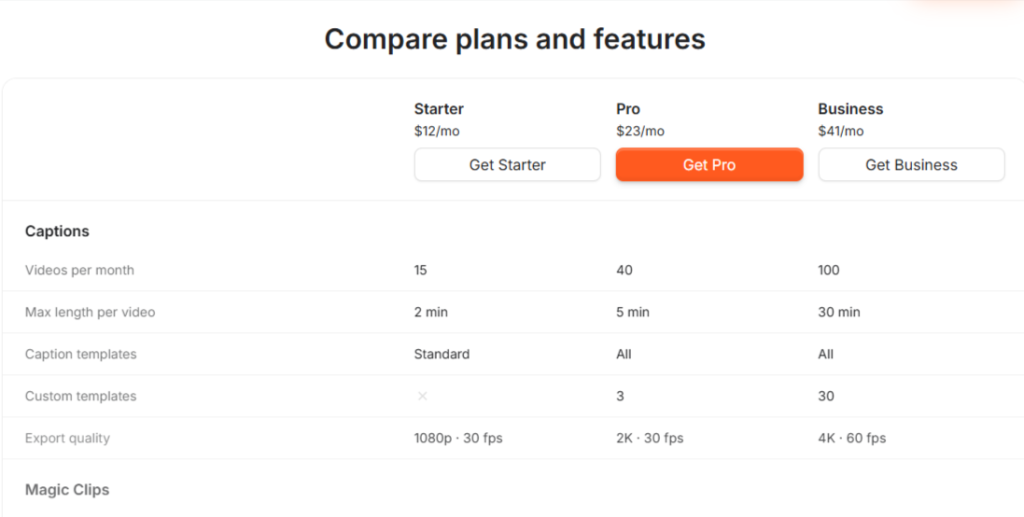
The Starter Plan is built for individual creators getting into AI-assisted editing. You get 15 videos per month at up to 2 minutes each, AI captions, basic B-roll, and text-based trimming. Export tops out at 1080p and 30 FPS, with no watermark.
Pro Plan at $39/month
You get 40 videos per month at up to 5 minutes each. It includes everything in Starter, plus Storyblocks premium B-roll and audio, AI hook titles, AI clean audio, and AI silence and bad take removal. You also get caption translation, Brand Kit, and direct publishing to TikTok, YouTube, and Instagram.
Business Plan at $69/month
You get 100 videos per month at up to 30 minutes each. It includes everything in Pro, plus 4K export at 60 FPS, 30 custom templates, logo and brand asset uploads, a custom words dictionary, priority support, and 100 minutes of API access per month.
Annual Billing
Switching to annual billing saves up to 41%. Starter drops to $12/month, Pro to $23/month, and Business + API to $41/month.
Submagic Pros & Cons
Where Submagic Excels
Submagic’s strongest suit is speed without sacrificing quality. The combination of accurate captions, automatic silence removal, and AI-driven B-roll insertion means you can take a raw talking-head clip from upload to a fully polished, caption-styled, platform-formatted short in a single pass. For creators publishing at volume, that time compression is the entire value proposition.
Where Submagic Falls Short
The per-video time limits are the most significant constraint. The Starter Plan caps videos at 2 minutes, and the Pro Plan caps at 5 minutes. To edit anything longer, you need the highest-tier plan. Submagic is built for short-form content, which is fine if that’s your focus, but limiting if you want one platform to handle both long and short-form editing.
The monthly video upload caps on lower-tier plans can also become a bottleneck for creators who publish daily. If you’re producing 30+ videos a month, you’ll likely need the Pro Plan at minimum. That pushes the monthly cost higher than the entry price suggests at first glance.
Go Beyond Short-Form Videos: Build Multi-Channel Traffic with AmpiFire
Submagic is a solid tool if your primary need is adding captions and polishing short-form videos for TikTok, Instagram, and YouTube. It does that job well, and the AI features save real editing time. But captions and clips only cover one format on a few platforms.
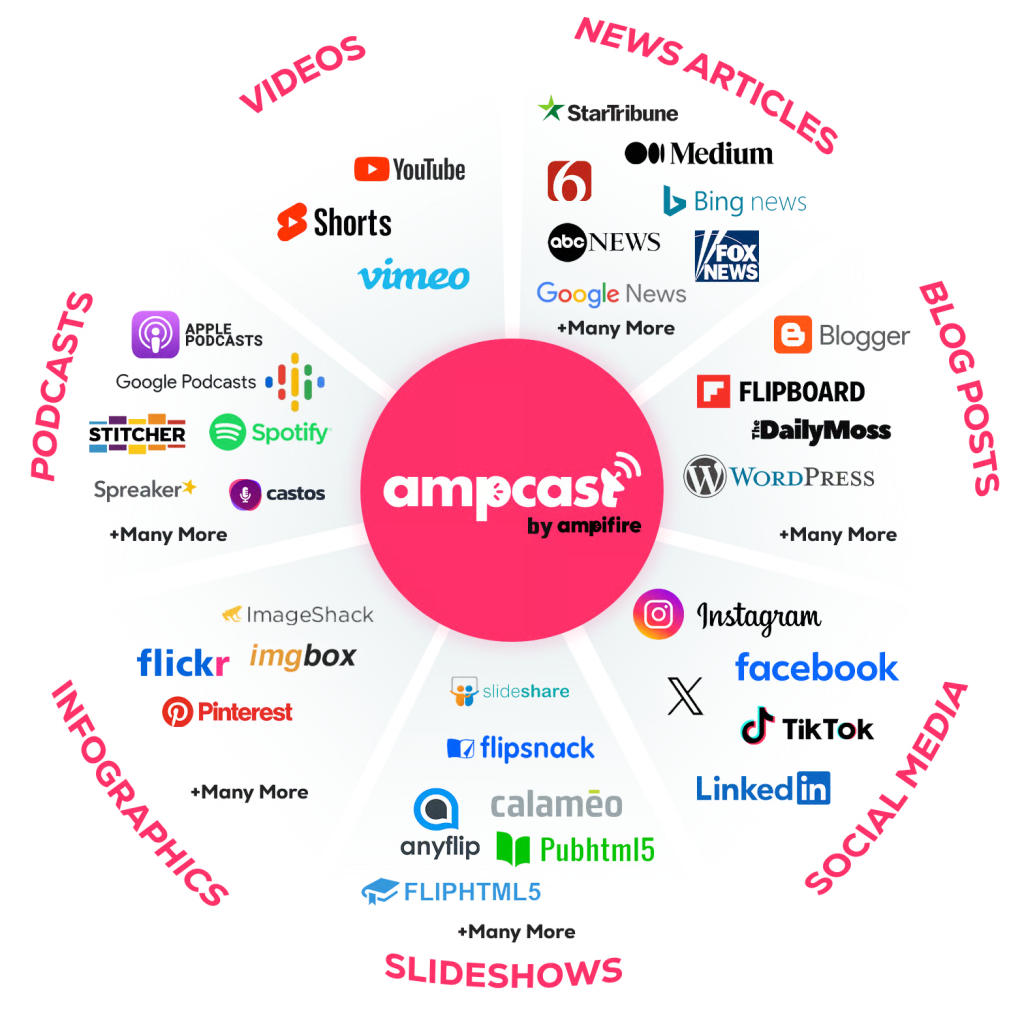
AmpCast AI takes one topic and turns it into eight content formats, including news articles, blog posts, interview podcasts, longer informational videos, reels/shorts, infographics, flipbooks/slideshows, and social posts, then publishes them across 300+ high-traffic sites like YouTube, Google News, Spotify, and more. That means your content reaches your target audience on search engines, social media, video, podcasts, and news outlets all at once. See how AmpiFire’s AmpCast AI can build your multi-channel traffic and grow your audience organically.
Frequently Asked Questions (FAQs)
Is Submagic free to use?
Yes, Submagic has a free plan that requires no credit card. The free tier includes three video uploads per month with AI-powered captions, a 200MB file limit, and a 1-minute 30-second max per video. It’s enough to test the core features and evaluate output quality before choosing a paid plan.
How accurate are Submagic’s AI captions?
Submagic says its AI caption engine averages 98.8% accuracy on clear audio across 118 languages. Submagic notes that music, overlapping speakers, and loud background noise lower that figure, and the editor flags low-confidence words in red so you can correct them. Captions are also formatted for engagement with word-by-word highlighting, animated transitions, and bold emphasis on key phrases.
Can Submagic edit long-form videos?
Submagic can process long-form videos through its Magic Clips feature, but it’s not a long-form editor in the traditional sense. The tool extracts short-form clips from longer content, not to edit a 45-minute video as a full-length piece. The AI identifies the strongest moments in your footage and outputs them as standalone short clips.
Does Submagic support team collaboration?
Submagic prices every plan per member, so you can add seats on any tier. The Business plan is the one built for teams: it adds 30 custom templates, brand asset uploads, three social accounts per platform, priority support and rendering, and API access for custom workflows. It’s built for agencies and content teams managing multiple creators or client accounts.
Does Submagic help with organic traffic?
Submagic helps you create better short-form videos, but it doesn’t generate organic traffic on its own. Our AmpCast AI handles that by researching the topics your buyers search for before purchasing, creating content around those topics, and distributing it across hundreds of sites automatically. Instead of relying on one format on a few platforms, your content reaches buyers everywhere they search, scroll, watch, and listen.
*Disclaimer: Results may vary based on individual circumstances, business type, and content strategy. The time savings and outcomes mentioned are based on typical user experiences and are not guaranteed. For specific pricing and service details, please visit AmpiFire.
Author
Related Posts


Vizard AI Features & Pricing: Is This AI Video Repurposing Tool Legit?
Find out if Vizard AI features and pricing justify the cost for creators who need automated video repurposing, AI captions,…


Riverside.fm Features & Pricing: Is This Editing & Repurposing Tool Worth It?
Learn how Riverside.fm helps creators record, edit, livestream, and publish podcasts and videos. Compare features, pricing, and find the best…


Klap Pricing & Features: Is This AI Video Repurposing Tool Worth It?
Compare Klap pricing, features, and plan limits for this AI video repurposing tool, and find out whether it is worth…

Exemplary AI Pricing & Features: Can This Tool Repurpose Audio & Video Into Quality Content?
Read Exemplary AI review covering features, pricing, content quality, and whether it's worth it. Compare it with AmpiFire for broader…


Elai.io Features & Pricing: Is This AI Avatar Video Generator Legit?
Compare Elai.io features, pricing, and user reviews for 2026, including avatar options, rendering minute limits, and where the tool falls…

Anyword Features & Pricing: Is This AI Copywriting & Content Tool Legit?
Anyword review covering features, pricing, and use cases. Learn how its AI copywriting and predictive scoring help marketers create higher-converting…