


Key Takeaways
- Riverside.fm combines recording, AI editing, live streaming, webinar hosting, and publishing in one platform for creators and businesses.
- Key features include local recording, separate tracks, AI editing, Magic Clips, Magic Audio, transcripts, captions, and podcast hosting.
- It also offers multistreaming, webinar tools, AI translation, direct publishing, and social media clip creation for easier content distribution.
- Pricing starts at $24/month for Pro, with Grow at $34/month, Webinar at $79/month, and Business plans available with custom pricing.
- For businesses that need more than recording and editing, AmpiFire’s AmpCast AI turns one topic into eight content formats and auto-publishes them across 300+ platforms.
Is Riverside Worth It? The Honest Verdict
Riverside is a strong choice for podcasters, creators, marketers, and businesses that regularly produce remote audio and video content. It combines high-quality local recording, AI-powered editing, live streaming, webinar tools, podcast hosting, and content repurposing in one platform, reducing the need for multiple apps.
However, recording and editing are only part of the content workflow. The bigger challenge for most creators and businesses is turning a single session into multiple formats, including blogs, news articles, slideshows, etc., and getting them in front of audiences across search, social, video, and podcast channels. AmpiFire adopts this approach by automating both content creation and multichannel distribution across 300+ sites, making it a stronger option for businesses focused on long-term organic reach.

How AmpiFire Works:
- Research & Target: Find high-demand topics your buyers search for.
- Create & Repurpose: AmpiFire’s AmpCast AI generates news articles, blog posts, interview podcasts, longer informational videos, reels/shorts, infographics, flipbooks/slideshows, and social posts.
- Distribute & Amplify: Auto-publish to 300+ sites, including Google News, YouTube, Spotify, and major news networks.
Get more traffic from people who want to buy your stuff, and powerful “As Seen On” trust badges for your site.
Do It Yourself (with AI), Done For You Content, & 100% Managed Organic Growth options available.
Grow Your Free Traffic From Everywhere
Core Recording Features That Set Riverside Apart
Local Recording Keeps Quality High Even on Bad Internet
Riverside records each participant directly on their own device instead of relying on the internet connection. Even if someone’s connection becomes unstable, the final recording remains clear and is uploaded to the cloud after the session.
Separate Audio & Video Tracks Per Participant
Each participant gets separate audio and video tracks, making editing much easier. You can adjust or replace one person’s recording without affecting the rest of the conversation.
Up to 4K Video & 48 kHz Uncompressed Audio
Riverside is built to deliver professional-quality recordings for podcasts, interviews, and videos. Its local recording approach helps creators produce clear content that’s ready for editing and publishing.
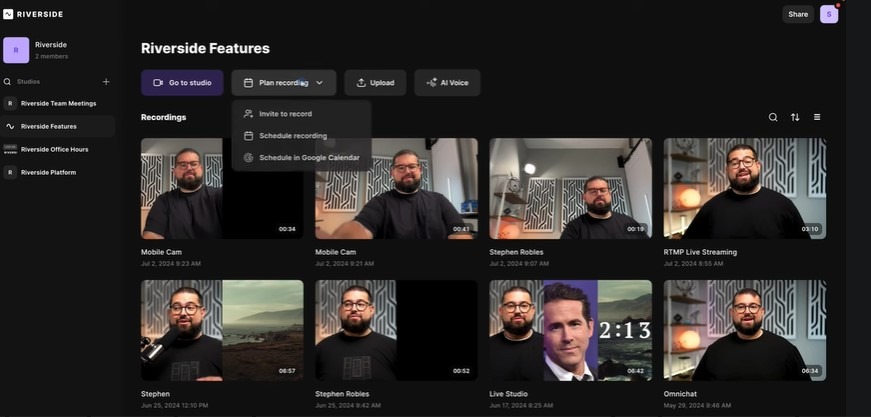
Riverside AI-Powered Editing Tools That Save Hours of Work
Text-Based Editing Lets You Cut by Editing a Transcript
Riverside automatically transcribes your recording, allowing you to edit the video by simply editing the transcript. You can quickly remove words, pauses, or entire sections without manually searching through the timeline.
Magic Clips Turns Long Recordings Into Short-Form Content
Magic Clips uses AI to find the best moments from your recording and turns them into ready-to-share highlight videos. It’s an easy way to create content for Instagram Reels, TikTok, YouTube Shorts, and other social platforms.
Magic Audio Cleans Up Sound With One Click
Magic Audio automatically enhances your recording by reducing background noise, balancing audio levels, and improving voice clarity. This helps creators produce more polished content without advanced editing skills.
AI Show Notes & Transcriptions Generated Automatically
After each recording, Riverside can generate transcripts, show notes, chapters, titles, descriptions, and even guest bios. These AI tools speed up publishing and make it easier to repurpose content across multiple platforms.
Auto-Captions & AI Translation for Wider Reach
Riverside automatically generates accurate captions from your transcript and lets you customize their style to match your brand. It also provides AI translation, making it easier to adapt videos for audiences who speak different languages.
Clip Creation & Publishing Directly to Social Platforms
You can create short clips automatically with AI or edit them manually using the built-in editor. Riverside also supports different aspect ratios, branding elements, and direct publishing, helping creators prepare content for YouTube, Instagram, TikTok, LinkedIn, Spotify, Apple Podcasts, and other platforms without leaving the app.
Live Streaming & Webinar Capabilities
Live Stream to Multiple Social Platforms Simultaneously
Riverside lets you multistream to platforms like YouTube, Facebook, LinkedIn, X, Twitch, and custom RTMP destinations from a single session. You can manage guests, customize layouts and branding, share screens or presentations, and interact with viewers using built-in chat while keeping a high-quality recording for later use.
Webinar Mode Scales to 10,000 Attendees
Riverside’s webinar tools support large virtual events with registration pages, automated email reminders, polls, Q&A, attendee analytics, and CRM integrations. After the event, you can edit the recording, create AI-powered clips, and repurpose the webinar into additional content, making it useful for businesses, marketers, and online educators.
Riverside.fm Pricing Breakdown
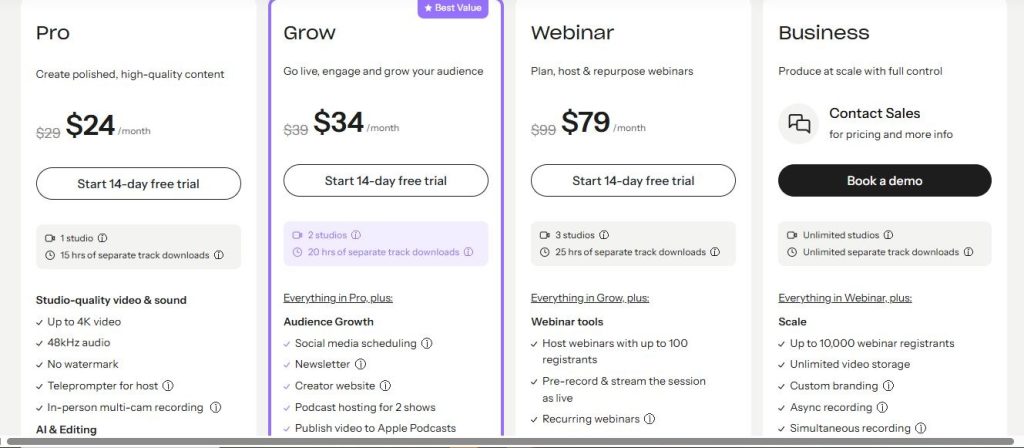
Pro Plan at $24/Month
The Pro plan starts at $24/month (billed annually). It includes one studio, 15 hours of separate-track downloads, unlimited text-based editing, AI editing tools, Magic Audio, Magic Clips, show notes, podcast hosting, and publishing to YouTube, Spotify, Apple Podcasts, and other podcast directories. It’s the best choice for solo creators and podcasters.
Grow Plan at $34/Month
The Grow plan costs $34/month (billed annually) and adds two studios, more recording hours, content scheduling for YouTube, AI-generated thumbnails, Full HD live streaming, multistreaming to multiple platforms, custom RTMP support, live call-ins, chat, and custom branding. It’s ideal for creators producing live content regularly.
Webinar Plan at $79/Month
The Webinar plan starts at $79/month (billed annually). It includes everything in Grow, plus webinar registration pages, automated email reminders, polls, Q&A, webinar analytics, CRM integration, and support for up to 100 webinar registrants, making it a strong choice for businesses and marketers.
Business Plan: Custom Pricing
The Business plan is designed for larger organizations that need unlimited studios, unlimited recording downloads, webinar support for up to 10,000 registrants, advanced production controls, collaborative editing, enterprise security, API access, CRM integrations, and dedicated onboarding. Pricing is available by contacting Riverside’s sales team.
Create & Distribute More Content With AmpiFire
Riverside is a capable recording and editing tool, but it leaves the heavy lifting of content repurposing and wide-scale distribution to the creator. For businesses that need their content working across search, social, video, podcasts, and news platforms simultaneously, AmpiFire offers a more complete solution. AmpCast AI researches buyer-intent topics, then transforms a single topic into eight content formats, including news articles, blog posts, podcasts, videos, reels, infographics, slideshows, and social posts.
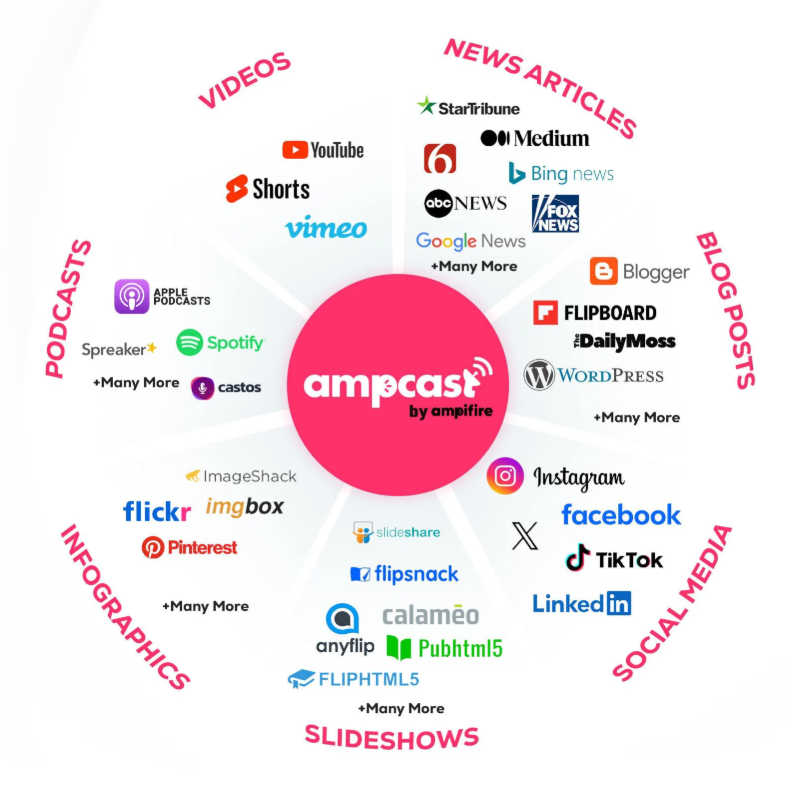
Those assets are automatically published to 300+ high-authority sites like YouTube, Google News, Spotify, Pinterest, and FOX affiliate sites. Rather than manually clipping and uploading to individual channels, AmpiFire handles creation and distribution in one workflow, building long-term organic traffic. With DIY, Done-For-You, and fully Managed options, AmpiFire fits any team ready to scale beyond what a recording tool alone can deliver. Try AmpCast AI and see how AmpiFire can help you reach more potential customers organically.
Frequently Asked Questions (FAQs)
Can You Use Riverside.fm for Free Without a Credit Card?
Yes. Riverside provides a free plan that doesn’t require a credit card. You can test the platform, invite guests through a browser link, and try its core recording features before deciding whether to upgrade. Most AI editing, live streaming, and advanced publishing tools are available on paid plans.
Does Riverside Work on Mobile Devices?
Yes. Riverside has a mobile app that lets you record and join sessions from compatible mobile devices. However, most editing, AI features, and content management tools are designed for the desktop version, making it the better choice for full production workflows.
Do Guests Need to Create a Riverside Account to Join a Recording?
No. Guests simply join through a shared invite link in their browser without creating an account or downloading software. This makes it quick and easy to invite interview guests or collaborators.
Does Riverside Store Your Recordings in the Cloud?
Yes. Riverside automatically saves recordings to the cloud after each session, making them easy to access, edit, and download later. Storage varies by plan, and you can also download your files for your own backup.
Does AmpiFire Offer More Value Than Riverside?
Riverside helps with recording and editing, but it still requires manual effort to repurpose and distribute content widely. AmpiFire offers a more powerful solution. AmpCast AI turns one topic into eight content formats and automatically distributes them across 300+ high-authority platforms, including YouTube, Spotify, Google News, and FOX affiliate sites, building long-term organic traffic without the extra work.
*Disclaimer: Results may vary based on individual circumstances, business type, and content strategy. The time savings and outcomes mentioned are based on typical user experiences and are not guaranteed. For specific pricing and service details, please visit AmpiFire.
Author
Related Posts

Wordtune Features & Pricing: Is This AI Writing Tool Worth It?
Learn Wordtune's core features and pricing, plus how AmpiFire's AmpCast AI takes your multi-format content further by distributing it across…

Synthesia AI Features, Pricing & Alternatives: Is This Text-to-Video Tool Worth It?
Learn Synthesia AI's core features, pricing tiers, and how it compares to alternatives like AmpCast AI, HeyGen, and Pictory so…


Hypotenuse AI Features & Pricing: Is This AI E-commerce Content Tool Worth It? [2026 Review]
Discover Hypotenuse AI's features, pricing, and reviews to see if this e-commerce content tool fits your store, then learn how…
SEOTesting Features, Reviews & Pricing: Is This SEO Tool Worth It?
Read our SEOTesting review to learn about features, pricing, and user feedback, then decide if this SEO testing and performance-tracking…
Surfer SEO Reviews, Pricing & Features: Is This AI Visibility Tool Worth It?
Discover Surfer SEO's features, pricing, and reviews in 2026, and learn how it stacks up for content optimization. Find out…
SiteGuru Reviews, Pricing & Features: Is This SEO Tool Worth It?
Read SiteGuru reviews, pricing, and key features. Find out if this SEO tool is worth your investment for boosting site…









