

Key Takeaways
- YouTube Shorts keep gaining views long after upload because titles, descriptions, thumbnails, and playlists can all be edited and optimized at any time.
- The first hours after posting carry the most weight, so replying during this window adds to the comment activity, which contributes to the engagement signals YouTube weighs.
- Custom thumbnails, themed playlists, and follow-up Shorts that reference earlier content create discovery loops that stack views across your whole channel.
- Embedding a Short on a blog or website sends referral traffic back to YouTube, and each external view counts toward the video’s performance signals.
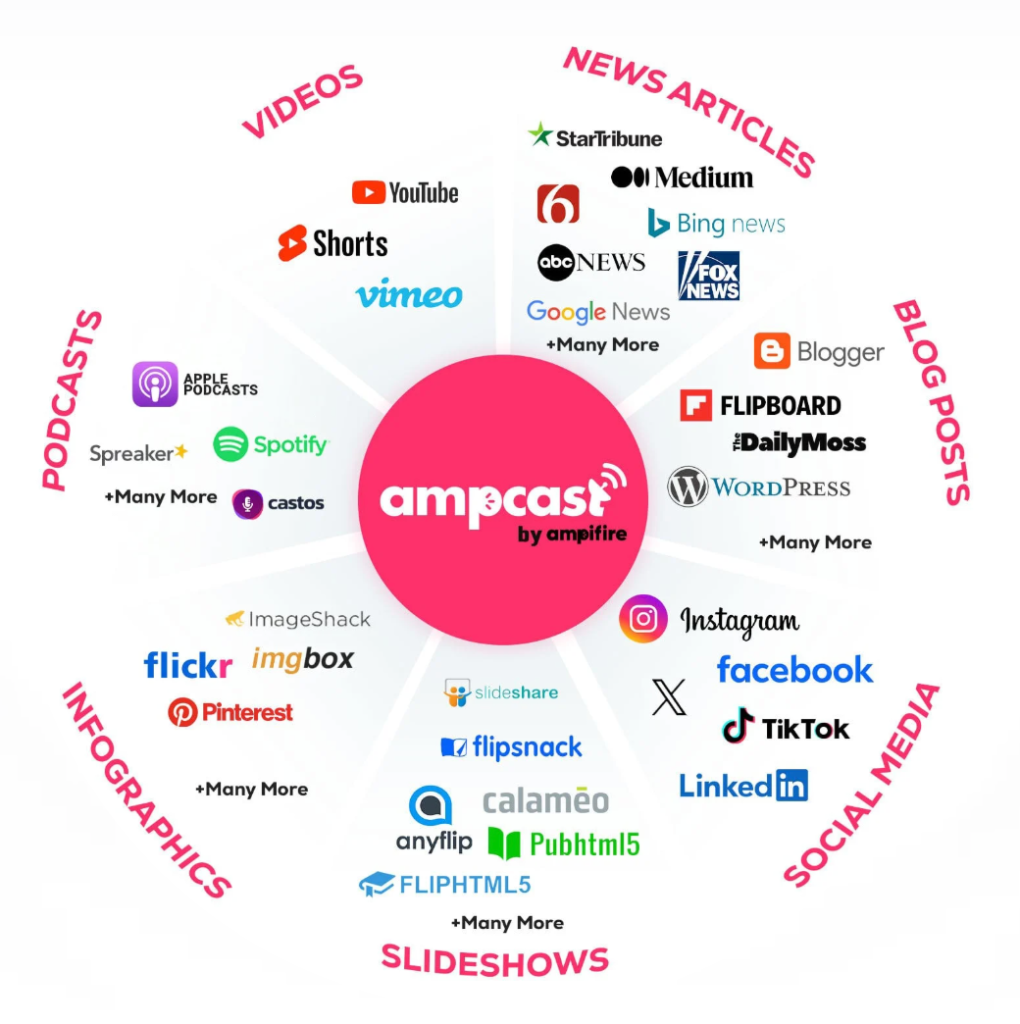
- AmpiFire’s AmpCast AI turns one Short idea into 8 content formats and distributes them across 300+ high-authority sites, turning one Short into steady, multi-platform traffic long after you hit publish.
Getting More YouTube Shorts Views: What You Need to Know
Boosting a Short’s views after posting comes down to tools you already have inside YouTube Studio. Titles, descriptions, and thumbnails can all be edited after upload, and each change gives the algorithm a fresh reason to resurface the video in search and suggested feeds. Most creators set these once and move on, which is exactly why the ones who revisit them keep pulling views weeks later.
The first few hours still carry the most weight. YouTube watches early engagement signals like comments, shares, and watch time to decide whether a Short deserves a wider push. Interacting with your audience during that window signals that the video is worth recommending to more people.
These moves keep your Short working inside YouTube, but your audience searches in more places than one feed. AmpiFire turns a single Short into 8 content formats, including Reels, articles, interview podcasts, etc., distributed across 300+ high-authority sites, so the same idea earns views everywhere your audience is already looking.

How AmpiFire Works:
- Research & Target: Find high-demand topics your buyers search for.
- Create & Repurpose: AmpiFire’s AmpCast AI generates news articles, blog posts, interview podcasts, longer informational videos, reels/shorts, infographics, flipbooks/slideshows, and social posts.
- Distribute & Amplify: Auto-publish to 300+ sites, including Google News, YouTube, Spotify, and major news networks.
Get more traffic from people who want to buy your stuff, and powerful “As Seen On” trust badges for your site.
Do It Yourself (with AI), Done For You Content, & 100% Managed Organic Growth options available.
Grow Your Free Traffic From Everywhere
8 Tips For Boosting Your YouTube Shorts Views After Posting
1. Keep Your Title & Description Optimized After Posting
Most creators treat the title and description as an afterthought, something to fill in quickly before hitting publish. But here’s what they’re missing: you can edit these fields at any time, and optimizing them after posting can directly increase how often your Short appears in YouTube search results and suggested feeds.
Go back to any Short you’ve already uploaded and ask yourself: does the title contain the exact phrase someone would type into the search bar? If your Short is about a quick breakfast recipe, a title like “60-Second Avocado Toast” will outperform something vague like “Morning Routine Hack” every time. Specificity wins in search.
2. Have a Custom Thumbnail for Your Short
While Shorts play automatically inside the Shorts feed, they also appear in regular YouTube search results, on your channel page, and in suggested video carousels. In all of those places, your thumbnail is the first thing a potential viewer sees. An auto-generated thumbnail rarely captures the best frame, while a custom one can dramatically increase your click-through rate.
To create an effective thumbnail for a Short, use a bold close-up image, ideally a face with a strong expression or a clear visual representation of the video’s payoff. Add short, high-contrast text that teases the content without giving it away.
3. Reply to Every Comment Early On
For Shorts, early engagement after posting plays a significant role in algorithmic distribution. YouTube’s algorithm evaluates early engagement signals (comments, likes, shares, and watch time) to decide whether to push the video to a broader audience. Replying to every comment during this window doubles the comment count and extends the engagement activity period, both of which are positive algorithmic signals.
4. Pin Your Short to Your Channel’s Featured Section
By pinning your best-performing or most recent Short to your channel’s featured section, you put that video in front of new visitors the moment they land. Go to YouTube Studio, open Customization → Home tab, and set your Short as the channel trailer for non-subscribers; then add a separate Spotlight video for returning subscribers, since the trailer only shows to people who aren’t subscribed and won’t be shown to the same viewer twice. This turns your channel page into an active funnel that continuously feeds views to your chosen Short.
5. Add Your Short to a Relevant Playlist
Playlists are one of YouTube’s most underrated discovery tools. A playlist is its own page with its own title, and it appears both on your channel and in YouTube search results. That means a viewer can land on your Short through the playlist instead of the Shorts feed.
Create playlists organized by theme or topic rather than just dumping all your Shorts into one generic collection. For example, if you post cooking Shorts, separate them into “Quick Breakfast Ideas,” “5-Minute Dinners,” and “Meal Prep Tips.” When a viewer opens that playlist, the next Short is queued up right behind the one they’re watching, giving them an easy path to two or three more of your videos in a single session.
6. Embed Your Short on a Blog or Website
Embedding your Short on an external website or blog is one of the most effective ways to drive consistent referral traffic over time. Every time someone visits that page and watches the embedded video, it registers as a view on YouTube. If those viewers actively engage, the resulting watch time and retention contribute to the video’s overall performance signals.
7. Post a Follow-Up Short That References the First
One of the smartest moves you can make after posting a Short is to create a follow-up that directly references it. This creates a content loop: new viewers who find the second Short are naturally curious about the first, and existing viewers who already watched the original are incentivized to engage with the sequel.
The follow-up doesn’t need to be a continuation of the same story. It can be a “Part 2,” a response to a comment you received, a behind-the-scenes look, or even a correction or update. Be sure to explicitly reference the original Short in the first three seconds of the new video.
8. Maximize Automation & Amplification Tools
Automation tools drastically expand the lifespan of your YouTube Shorts without requiring additional hours of manual work. Instead of leaving a video confined to one platform, automation and amplification software allows you to instantly repurpose that content for multiple audiences.
Platforms like AmpiFire’s AmpCast AI fit perfectly into this workflow by streamlining the entire amplification process. It can transform a single video topic into news articles, blog posts, interview podcasts, longer informational videos, reels/shorts, infographics, flipbooks/slideshows, and social posts, then automatically distribute these assets across hundreds of sites to help you gain traction beyond YouTube Shorts.
Amplify Your Reach Beyond YouTube with AmpiFire
Getting more views after posting is not about luck. It comes from working the tools you already have: editing titles and descriptions, adding custom thumbnails, building smart playlists, replying fast early on, and posting follow-ups. Each small move stacks, and together they keep your Shorts surfacing long after publishing.
The catch is that YouTube is only one platform. At AmpiFire, we turn a single Short into articles, interview podcasts, and 6 other content formats, then auto-distribute them across 300+ sites so your reach compounds everywhere your buyers search. If you want your content working harder without the extra hours, start growing your traffic with us today.
Frequently Asked Questions (FAQs)
Does Rewatching a YouTube Short Count as a View?
Yes, rewatching a YouTube Short does count as a view. However, the platform distinguishes between total views and “engaged views,” with only engaged views counting toward monetization and Partner Program eligibility.
Can YouTube Shorts Get Monetized?
Yes, YouTube Shorts can absolutely be monetized, but the mechanism is different from traditional long-form YouTube ads. Shorts revenue comes from a shared ad revenue pool that YouTube distributes to creators based on their share of total Shorts views during a given period. This is not the same as a direct pre-roll ad on each video.
What Size is a YouTube Short?
A YouTube Short should be filmed and uploaded in vertical format at 1080 x 1920 pixels, a 9:16 aspect ratio. The maximum length is 3 minutes. The file should be exported at the same frame rate it was recorded: 24, 25, 30, 50, and 60 fps are all supported, with H.264 encoding recommended for the best quality-to-file-size ratio.
Is There a Difference Between YouTube Shorts and Instagram Reels?
Yes, both are short-form vertical video formats capped at three minutes, but they run on separate algorithms. Shorts are distributed through YouTube’s search and recommendation engine, so an unknown creator can gain traction through watch time and retention alone. Reels have shifted toward interest-based discovery since 2025, and Instagram now routinely surfaces them to non-followers through Explore and the Reels feed.
How Can AmpiFire Help Me Grow My Business?
AmpiFire helps you grow by turning one piece of content into 8 formats, including articles, podcasts, videos, and social posts, then auto-distributing them across 300+ sites like Google News, YouTube, and Spotify.
This means your message reaches buyers wherever they already search, and it earns “As Seen On” trust badges that make your business look more credible. You can run it yourself with AI, hand it off as done-for-you content, or choose fully managed organic growth depending on how much time you want to spend.
*Disclaimer: Results may vary based on individual circumstances, business type, and content strategy. The time savings and outcomes mentioned are based on typical user experiences and are not guaranteed. For specific pricing and service details, please visit AmpiFire.
Author
Related Posts

Instagram Reels vs YouTube Shorts: Views, Reach & Content Strategy Compared
Compare Instagram Reels and YouTube Shorts on engagement rates, reach longevity, and content strategy, then learn how to grow visibility…

Where to Share YouTube Videos & Shorts to Get More Views
Discover the best places to share YouTube videos and shorts for more views. Learn effective promotion strategies to grow your…

How to Get More Views on TikTok After Posting: 5 Tips
Learn 5 proven ways to get more TikTok views after posting, from hashtag updates to cross-promotion with AmpiFire's AmpCast AI.

How to Get More Views on Instagram Reels After Posting: 6 Tips
Boost Instagram Reels views after posting with proven engagement tactics, Story strategies, and analytics insights to maximize reach and grow…

How to Repost YouTube Shorts to TikTok & Vice Versa
Learn how to repost YouTube Shorts to TikTok and vice versa with our step-by-step guide. Get optimization tips to double…

Where to Share Vimeo Videos to Get More Views
The best places to share Vimeo videos include your website, Facebook, LinkedIn, X, email newsletters, and niche communities. Here's how…








