

Key Takeaways
- Instagram ranks your Stories in each follower’s tray using their viewing and engagement history with you, so low interaction pushes you further back in the tray.
- Most accounts lose views because their opening frame fails to hook within three seconds and they post outside their audience’s peak hours.
- Posting at the right time, adding interactive stickers, staying consistent, and tracking your Insights turns casual viewers into regular engagers.
- Each Story only lives for 24 hours on one platform, which caps how far a single idea can travel on its own.
- AmpiFire’s AmpCast AI turns one Story idea into 8 content formats and distributes them across 300+ high-authority sites, building organic reach across multiple channels.
How Instagram Decides Who Sees Your Story
The Instagram algorithm decides where you land in each follower’s Story tray, using viewing history, engagement history, and closeness, so followers who regularly watch, react, or reply see you near the front, while followers you’ve lost touch with slide further back and often never scroll far enough to reach you. This is why when you post passive stories that do not garner engagement, your effective reach quietly shrinks, even if your follower count is growing.
That makes the first three seconds and your posting time the two biggest levers. A weak opening frame gets tapped past, and posting when your audience is offline means fewer of them are watching while your Story is still near the front of their tray. The six strategies below target both problems so each Story earns the reach it deserves.

How AmpiFire Works:
- Research & Target: Find high-demand topics your buyers search for.
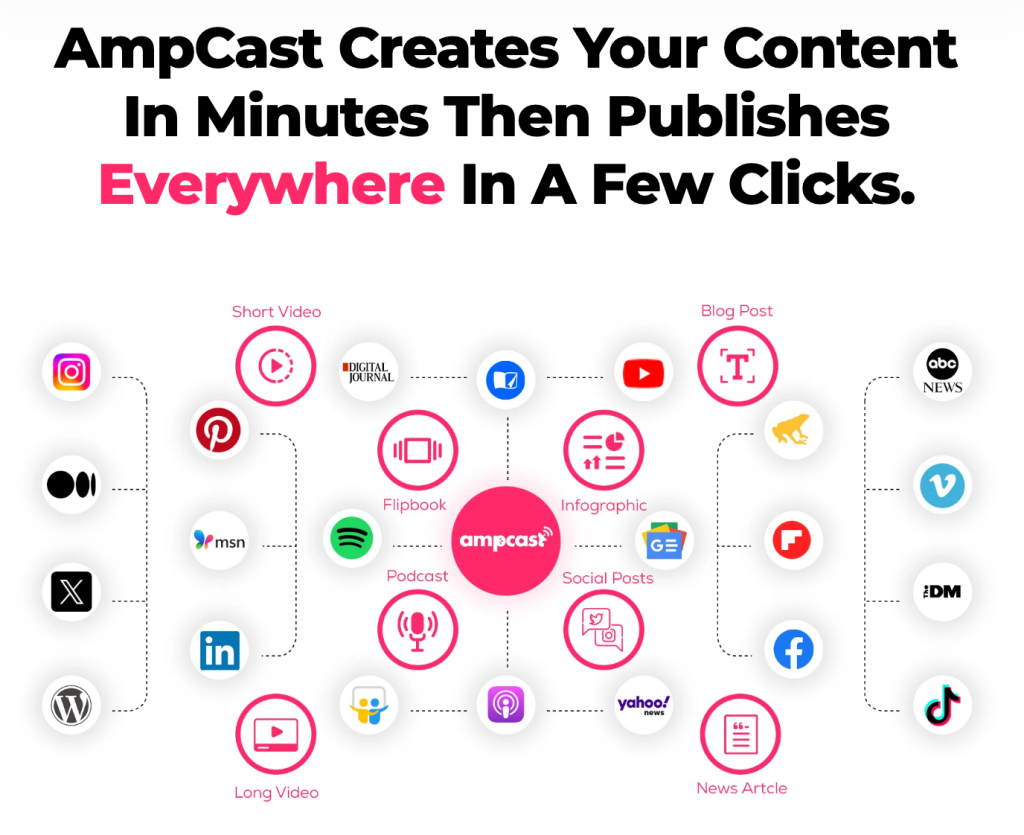
- Create & Repurpose: AmpiFire’s AmpCast AI generates news articles, blog posts, interview podcasts, longer informational videos, reels/shorts, infographics, flipbooks/slideshows, and social posts.
- Distribute & Amplify: Auto-publish to 300+ sites, including Google News, YouTube, Spotify, and major news networks.
Get more traffic from people who want to buy your stuff, and powerful “As Seen On” trust badges for your site.
Do It Yourself (with AI), Done For You Content, & 100% Managed Organic Growth options available.
Grow Your Free Traffic From Everywhere
6 Strategies for Boosting Your IG Story Views

1. Hook Viewers in the First Three Seconds
You’ve got maybe three seconds before someone taps past your Story. That first frame is everything. If it doesn’t immediately create curiosity, show value, or spark an emotion, the viewer is already gone.
The most effective opening frames tend to do one of three things: ask a bold question, show something visually unexpected, or tease a payoff that’s coming later in the Story. Think of it like a mini headline. Phrases like “You’re doing this wrong…” or “Watch before you post another Story” work because they open a loop in the viewer’s mind that they need to close.
Also, bold text overlays on a high-contrast background, motion in the first frame, or a close-up face with strong expression are all proven ways to stop the tap.
2. Post at the Right Time for Maximum Visibility
Posting while your followers are online means more of them open your Story while it’s still fresh, and recency is a real factor in where Stories sit in the tray. Those views and replies also feed the viewing- and engagement-history signals that decide your placement next time.
The best way to find your optimal posting window is through Instagram Insights. Navigate to your profile, tap the three-line menu in the top right, select Insights, then tap Total Followers and scroll down to Most Active Times. This shows you exactly which hours and days your specific followers are online. Most lifestyle and consumer accounts see peak activity between 7–9 AM and 6–9 PM in their audience’s local time zone, but you should trust your numbers over general advice.
3. Use Interactive Stickers to Boost Engagement
Interactive stickers are one of the most underused tools for growing Story views, and the mechanism behind why they work is simple: every tap, vote, and response on your Story is an engagement signal that tells Instagram to keep placing you near the front of that follower’s tray.
Instagram offers several sticker types that each serve a different purpose for driving interaction:
- Poll Sticker: Simple to engage with (one tap), which tends to drive strong participation. Use it to spark opinions or let your audience choose between two options.
- Quiz Sticker: Great for educational accounts or niche communities, and it keeps viewers on your Story longer as they think through the answer.
- Question Sticker: Opens a dialogue and gives you content for future Stories by reposting answers, creating a loop of engagement.
- Emoji Slider: Low-commitment interaction that still registers as an engagement signal. Works well for reaction-based content.
- Countdown Sticker: Builds anticipation for a launch, event, or reveal. Followers can subscribe to get notified when it hits zero.
Make the interaction feel natural. A poll that genuinely reflects something your audience cares about will always outperform one that feels like you’re just fishing for engagement. Tie your sticker to the content of the Story itself.
4. Post Consistently
Consistency is one of the biggest factors in maintaining strong Story views over time. When you post Stories regularly, you train both the algorithm and your audience. Your followers start expecting your content, which means they’re more likely to seek it out, and the algorithm rewards accounts that keep people coming back.
The sweet spot for most accounts is between 1 and 5 Stories per day. Drop below that, and you risk being forgotten in a crowded tray. Post too many in a row and you risk high exit rates from viewers who get fatigued mid-sequence.
Batch-creating your Stories ahead of time (spending one hour creating content for the next three days) is one of the most practical ways to stay consistent without the daily pressure of coming up with something new every single morning.
5. Design Stories That Are Worth Watching
Visual quality directly impacts how long people stay on your Story. You don’t need a professional camera setup, but you do need to be intentional about how your Stories look.
- Use the 9:16 aspect ratio at the recommended resolution of 1080 x 1920 pixels to avoid blurry or poorly cropped frames.
- Keep text in the center-safe zone (roughly between 250px from the top and bottom of the frame) so it doesn’t get cut off by the UI.
- Use high-contrast text, readable fonts, and a consistent color palette that matches your brand to make your Stories instantly recognizable in the feed tray.
6. Study Your Analytics & Double Down on What Works
Your Instagram Insights are the most honest feedback you’ll ever get. The specific metrics to watch for Stories are:
- Reach: How many unique accounts saw your Story.
- Views: How many times your Story was watched, including repeat views by the same person.
- Exits: How many people left the Stories interface altogether from that slide: closing the app, tapping the X, or swiping back to their feed. This is separate from Next Story swipes, which count viewers who skipped your whole sequence to another account. High exits on a specific slide = that slide is losing people
- Replies: Direct messages triggered by your Story. One of the strongest engagement signals possible.
- Link Taps: If you’ve added a link sticker, this tells you how effectively your Story drove action.
- Forward Taps: People skipping your slide. High forward taps mean that the frame isn’t delivering value fast enough.
Look at your last 10 Stories and identify which ones had the lowest exit rate and highest reach. That’s your template. What did those Stories have in common: the format, the topic, the sticker type, or the time posted? Double down on those patterns and ruthlessly cut what isn’t working.
Amplify Your Organic Reach Beyond Instagram Stories with AmpiFire
Growing your Story views comes down to a few consistent habits: hook viewers fast, post when your audience is online, invite interaction with stickers, stay regular, design for clarity, and let your analytics guide every decision. Apply these together and your engagement compounds, lifting your placement in more followers’ trays over time.
Instagram is one channel, though, and your audience searches in many places. At AmpiFire, we turn a single piece of content into news articles, blog posts, interview podcasts, longer informational videos, reels/shorts, infographics, flipbooks/slideshows, and social posts, and publish them across 300+ platforms, so people find you wherever they look. Start growing your reach today and put your brand everywhere at once.
Frequently Asked Questions (FAQs)
How Do I Increase My IG Story Views?
To increase your Instagram Story views, focus on these core levers: post consistently at your audience’s peak active times, hook viewers in the first three seconds with a strong opening frame, use interactive stickers like polls and quizzes to generate engagement signals, and study your Instagram Insights to identify which content formats your audience responds to most. The algorithm prioritizes Stories from accounts that followers actively engage with, so every interaction you generate pushes your content higher in the Story tray.
Why Do Some Stories on Instagram Get More Views?
Instagram orders Story trays based on an algorithm that weighs relationship signals, recency, and engagement history. Stories from accounts that a viewer frequently interacts with (through likes, DMs, replies, and profile visits) will almost always appear first in their tray. This means accounts that consistently generate strong engagement with their Stories get rewarded with more prominent placement, which in turn drives even more views.
Content quality also plays a role. Stories that keep viewers watching all the way through, generate replies, or prompt link taps send strong positive signals to Instagram’s algorithm. A single Story that generates a wave of direct replies will do more for your long-term Story placement than a run of passively viewed Stories with no interaction at all.
How Can I Make My Instagram Story Interactive and Engaging?
The simplest way to make your Stories interactive is to use Instagram’s built-in sticker tools intentionally. Add a poll sticker to get a quick opinion, use a question sticker to invite your audience to share their thoughts, or drop a quiz sticker to keep viewers mentally engaged.
Beyond stickers, structuring your Story as a multi-slide sequence with a clear beginning, middle, and payoff keeps people tapping through rather than exiting. End each Story with a clear next step: a link sticker, a DM call-to-action, or a prompt to check out your latest post.
When Should I Post an Instagram Story?
Post your Instagram Stories when your specific audience is most active online. Check your Instagram Insights by tapping the three-line menu on your profile, selecting Insights, then tapping Total Followers and scrolling down to Most Active Times to see your personalized data. As a general benchmark, the highest engagement windows for most accounts fall between 7–9 AM and 6–9 PM in your audience’s primary time zone, but your own analytics will always be more accurate than any general rule.
How Can AmpiFire Help My Brand Build Organic Traffic?
AmpiFire builds your organic traffic by turning one piece of content into 8 content formats, then publishing them across 300+ platforms, including Google News, YouTube, and Spotify. This puts your brand in front of people who are already searching for what you offer, while earning “As Seen On” trust signals that strengthen your credibility. You can run it yourself with AI, hand it off as done-for-you content, or choose fully managed organic growth, depending on how hands-on you want to be.
*Disclaimer: Results may vary based on individual circumstances, business type, and content strategy. The time savings and outcomes mentioned are based on typical user experiences and are not guaranteed. For specific pricing and service details, please visit AmpiFire.
Author
Related Posts


How to Get More Views on Instagram Reels After Posting: 6 Tips
Boost Instagram Reels views after posting with proven engagement tactics, Story strategies, and analytics insights to maximize reach and grow…


Instagram Reels vs YouTube Shorts: Views, Reach & Content Strategy Compared
Compare Instagram Reels and YouTube Shorts on engagement rates, reach longevity, and content strategy, then learn how to grow visibility…


How to Auto Post Vimeo Videos to Instagram [Post, Story & Reel]
Learn the best ways to share Vimeo videos on Instagram Posts, Stories, and Reels. Discover semi-automated tools that simplify the…

BigCommerce Instagram Integration Guide | Boost Your Instagram Shopping Revenue
Read how eCommerce brands can tap into Instagram's massive audience, leverage seamless shopping through BigCommerce Instashop integration, and utilize Instagram…

How to Get More Views on TikTok After Posting: 5 Tips
Learn 5 proven ways to get more TikTok views after posting, from hashtag updates to cross-promotion with AmpiFire's AmpCast AI.

Where to Share Vimeo Videos to Get More Views
The best places to share Vimeo videos include your website, Facebook, LinkedIn, X, email newsletters, and niche communities. Here's how…








