

Key Takeaways
- GetProspect is a legitimate business-to-business (B2B) email finder that pulls verified contact data from LinkedIn and its own database, backed by a credit-back guarantee on invalid emails.
- Core features include a LinkedIn Chrome extension, a database of 780 million contacts, contact enrichment, a standalone email verifier, and built-in cold email sequencing.
- Pricing starts free with 50 valid emails a month, then $49 monthly for Starter and $99 for Growth, with credits deducted only after an address passes verification.
- Reviews average 4.0 out of 5 on G2 and 4.8 on the Chrome Web Store, with the most common complaint being thin phone number credits on lower plans.
- AmpiFire’s AmpCast AI publishes your multi-format content across 300+ sites like LinkedIn, Google News, and Spotify, so the prospects on your GetProspect list already recognize your name before you email them.
Is GetProspect a Legit Email Finder?
GetProspect is a legitimate B2B email finder that pulls verified contact data from LinkedIn and its own database, so your outreach starts with accurate, actionable information instead of guesswork. Its credit-back guarantee on invalid emails signals a platform willing to stand behind its data quality.
For email-first prospecting teams that need reliable contact data at a reasonable price, GetProspect delivers. The LinkedIn Chrome extension alone justifies the tool for most sales workflows, and built-in cold email sequencing means smaller teams can run their whole outbound operation from one platform.
It is less suited to enterprise-scale sales intelligence or outreach that depends on phone data, since phone credits are capped at five on the plans where allocations are published.
Even the best email finder only reaches people once they’re already in your pipeline. AmpiFire’s AmpCast AI turns one demand-verified topic into 8 content formats and distributes them across 300+ sites your buyers already visit, so the name in your GetProspect email already looks familiar before it lands.

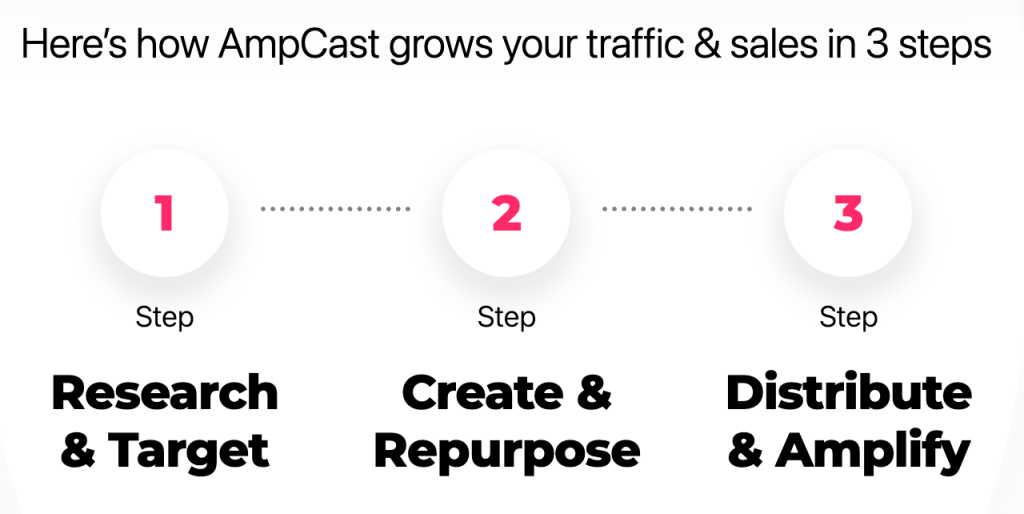
How AmpiFire Works:
- Research & Target: Find high-demand topics your buyers search for.
- Create & Repurpose: AmpiFire’s AmpCast AI generates news articles, blog posts, interview podcasts, longer informational videos, reels/shorts, infographics, flipbooks/slideshows, and social posts.
- Distribute & Amplify: Auto-publish to 300+ sites, including Google News, YouTube, Spotify, and major news networks.
Get more traffic from people who want to buy your stuff, and powerful “As Seen On” trust badges for your site.
Do It Yourself (with AI), Done For You Content, & 100% Managed Organic Growth options available.
Grow Your Free Traffic From Everywhere
What Is GetProspect?
GetProspect is a B2B prospecting platform centered on one core function: finding and verifying professional email addresses at scale. It serves sales teams, recruiters, marketers, and business developers who need to reach decision-makers directly.
The platform works through several interconnected tools. A LinkedIn Chrome extension extracts contact data while you browse, a searchable B2B database lets you build lists without LinkedIn, and an email verifier checks addresses before you send. Everything feeds into a central dashboard where you can manage lists, enrich existing contacts, and run cold email sequences without switching between tools.
What sets GetProspect apart is pairing scale with verification. Every result is checked for deliverability before a credit is deducted, so you pay for addresses that work while protecting your sender reputation.
GetProspect’s Key Features
Email Finder
The Email Finder is the core product. You input details like a person’s name and company domain, and GetProspect returns a verified email address. It works for both single lookups and bulk searches, making it viable for prospecting one key account or building a list of hundreds.
LinkedIn Chrome Extension
The Chrome extension runs inside LinkedIn and LinkedIn Sales Navigator, letting you extract contact data, including verified email addresses and mobile phone numbers, without leaving the platform.
The workflow is straightforward. Browse LinkedIn as you normally would, click the GetProspect extension, and the tool pulls the available contact data into your dashboard. You can export multiple leads at once from a search, a group, or a saved list, and the extension works on any website, not just LinkedIn.
B2B Database
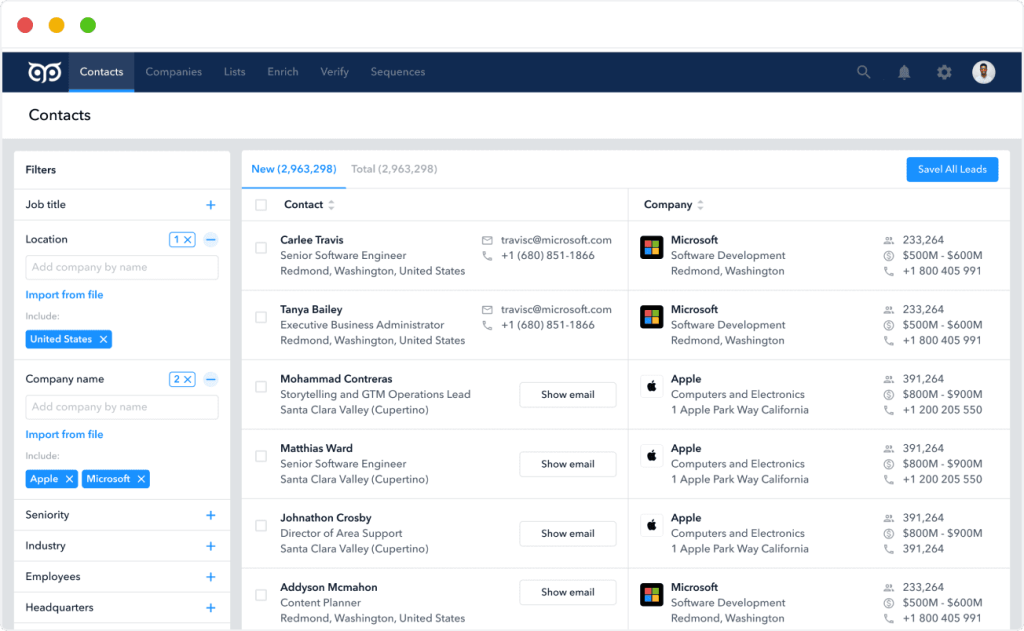
Beyond LinkedIn extraction, GetProspect gives you direct access to its own B2B database of over 780 million contacts, 90 million corporate emails, and 47 million companies, searchable by filters including job title, industry, company size, location, and more.
This matters when you need to prospect beyond your existing LinkedIn network or build lists based on specific firmographic and demographic criteria without manual sourcing.
Contact Enrichment
If you already have a lead list but the data is incomplete, enrichment fills in what’s missing. Upload a CSV and the platform appends 30+ data attributes, including verified emails, phone numbers, location, industry, and technologies used. You can also enrich from a LinkedIn URL, an email address, or a company name.
Email Verifier
GetProspect includes a standalone email verifier that checks whether an email address is valid and deliverable before you use it in a campaign.
High bounce rates damage sender reputation and can get your domain flagged or blacklisted. The verifier is the guardrail that prevents that. You can verify individual addresses or run bulk verification across an entire list.
Cold Email Software
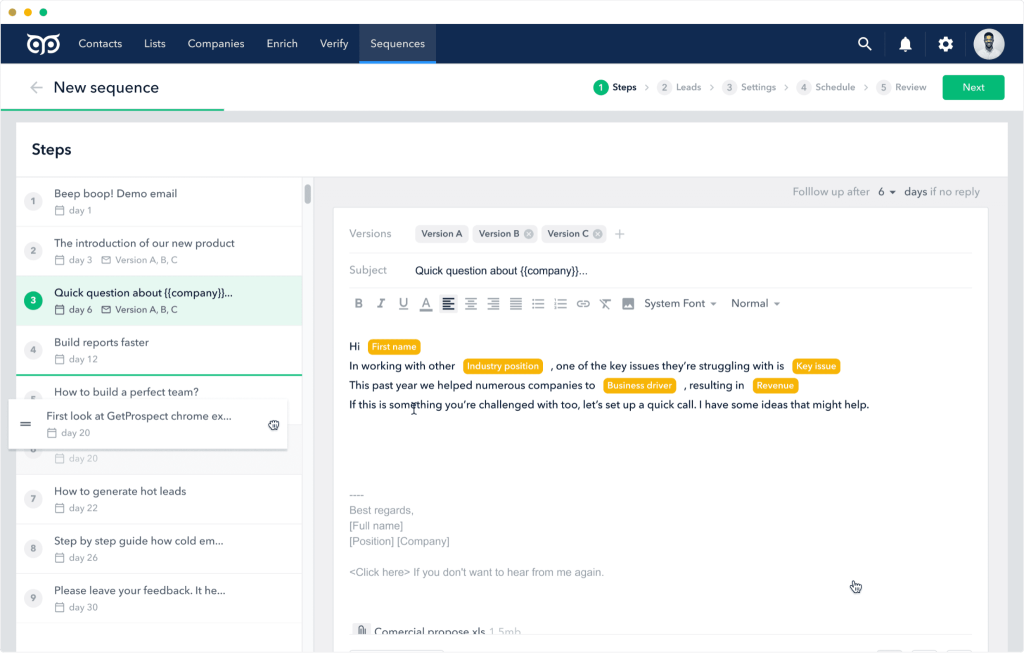
GetProspect extends past data collection into outreach with built-in cold email sequencing. You can create and edit templates, schedule sequences, run A/B tests, and track opens and replies, all within the same platform where you built your list. Sending pauses automatically once a prospect replies.
Google Sheets Add-On & API Access
GetProspect also offers a Google Sheets Add-on that lets you run email lookups directly in a spreadsheet, useful for teams that manage prospecting lists in Sheets without constantly exporting and importing files.
For developers and larger operations, API access lets you integrate GetProspect’s email-finding and verification capabilities directly into custom workflows or internal tools.
Integrations & CRM Capabilities
GetProspect connects with a solid range of third-party tools, covering the most common CRMs and outreach platforms used by B2B sales teams.
Native integrations include HubSpot, Salesforce, Pipedrive, and Zoho, allowing you to push enriched contact data straight into your CRM without manual exports. Leads can also go directly to sales engagement platforms like Outreach and Salesloft, and a Zapier connection opens up more than 5,000 additional tools depending on your stack.
GetProspect also includes its own built-in CRM, so teams without an external system can manage leads inside the platform. You can organize contacts into lists and folders, add notes, and track email quality as you work.
For teams already running a structured process elsewhere, GetProspect works as a clean top-of-funnel feed instead of a separate data pool you have to reconcile yourself.
GetProspect Pricing
GetProspect bills on valid emails found, so it deducts a credit only after an address passes a deliverability check. Contacts you have already found cost nothing to request again, and unused credits roll over into the next month.
There are three plans:
- Free: 50 valid emails and 100 verifications per month, no card required
- Starter, $49/month: 1,000 valid emails, 2,000 verifications, and 5 phone number credits
- Growth, from $99/month: 5,000 valid emails and 10,000 verifications, scaling to 20,000 emails at $199 and 50,000 at $399
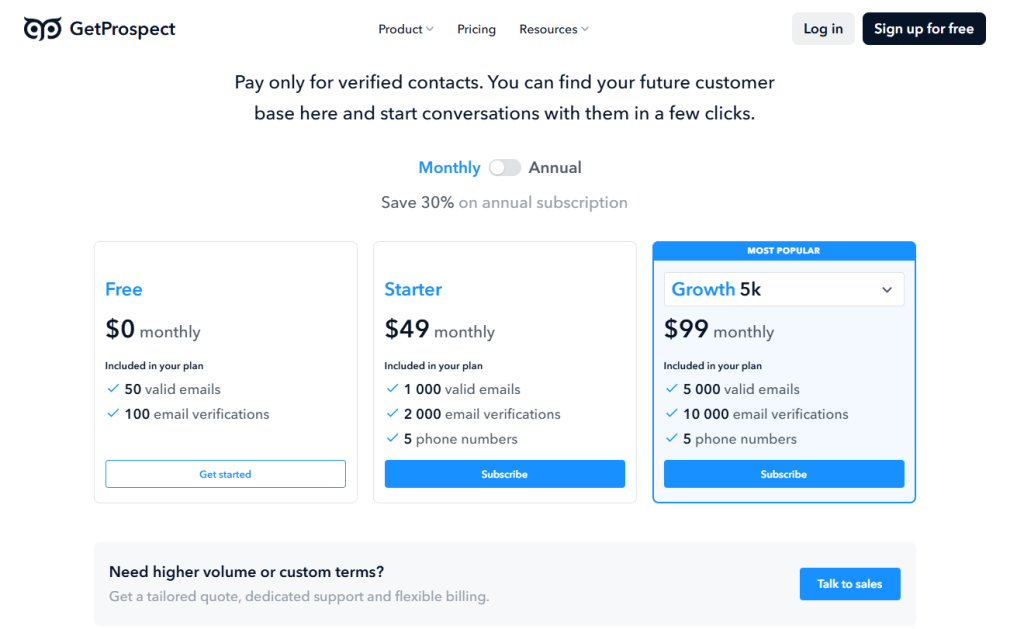
Annual billing saves 30%, which brings the Starter Plan down to $34 per month and the Growth Plan (5K) down to $69. You can buy extra verification credits separately, starting at $29 for 10,000. Teams that need more volume can stack the Growth 50k plan up to ten times or contact sales for custom terms.
The interesting part is what is not gated behind a tier. Every plan, including the free one, gets the LinkedIn extension, bulk email finder, CSV enrichment, advanced filters, native CRM integrations, reverse email lookup, API access, the Google Sheets add-on, team accounts, and custom properties. You are paying for volume alone.
GetProspect Customer Reviews
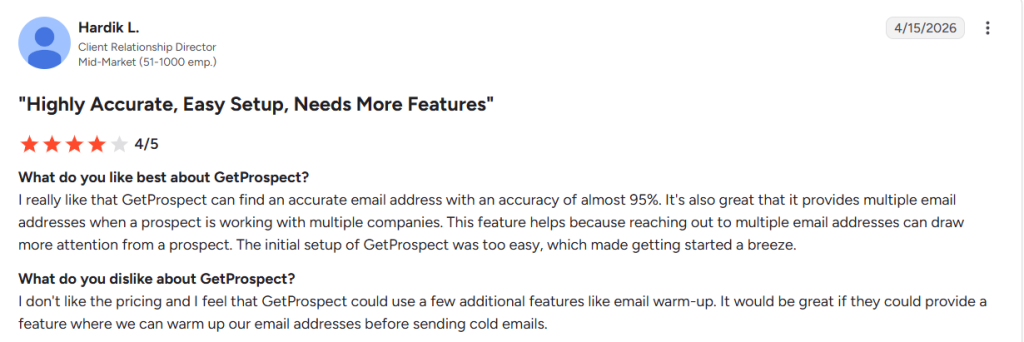
GetProspect holds 4.0 out of 5 on G2 from 40+ reviews, where users describe the platform as straightforward, quick to set up, and well supported. The Chrome extension rates higher, at 4.8 out of 5 from 1,300+ Chrome Web Store reviews, with users highlighting bulk email extraction from LinkedIn Sales Navigator search results.
Most of those reviews come from small to medium-sized businesses, which is where the platform’s fit is best evidenced. The clearest limitation is phone coverage, since Starter and Growth 5k each include only five phone number credits, making GetProspect an email-first tool in practice.
GetProspect Goes Out to Prospects, AmpiFire Brings Them In
GetProspect solves a specific problem well: getting verified contact data into your pipeline fast. Building a list there means naming exactly who your buyer is, by job title, seniority, and company size. Those same buyers are searching, watching, and listening long before anyone emails them.
AmpiFire’s AmpCast AI starts by researching the topics they actually search for at each stage of that journey, not just high-volume keywords. The platform then turns one topic into 8 content formats (news articles, blog posts, interview podcasts, longer informational videos, reels/shorts, infographics, flipbooks/slideshows, and social posts), then publishes them across 300+ high-authority sites like LinkedIn, Google News, MSN, Medium, YouTube, and Spotify. You reach those buyers twice, once in their inbox and once wherever they happen to be researching. Try our AmpCast AI now and let buyers find you between sends.
Frequently Asked Questions (FAQs)
How accurate is GetProspect’s email data?
GetProspect claims 98% accuracy on verified emails and backs it with a credits-back guarantee. Their billing works the same way, since they deduct a credit only after an address passes a deliverability check. Running a verification pass before any cold email campaign is still worth doing, whatever the data source.
Where does GetProspect source its contact data?
GetProspect draws on its own B2B database of 780 million business contacts across 47 million companies, plus LinkedIn data captured through the Chrome extension. The database is built from publicly available business information, with some records licensed from third-party providers.
Is it ethical to use an email finder like GetProspect?
Using an email finder for B2B outreach is common, but the legal position depends on your recipients’ location. In the US, CAN-SPAM allows cold outreach without prior consent, as long as every message includes accurate sender details, a valid physical postal address, and a working opt-out option. In the EU and UK, B2B outreach generally relies on a documented legitimate-interest basis under GDPR, while Canada’s CASL and Germany’s UWG normally require consent before the first send.
Does GetProspect work for finding phone numbers?
GetProspect is built primarily around email discovery and verification. Phone numbers are available, but the allowance is small: Starter and Growth each include 5k credits. If phone outreach matters to your workflow, budget for extra credits or pair GetProspect with a dedicated phone data tool.
Should I run outbound and content at the same time?
Outbound gets you in front of people immediately, but it only works while you keep sending; content keeps bringing in traffic long after it goes up. A prospect who already recognizes your name from a search result is more likely to answer your outbound email. AmpCast AI makes running both realistic without adding headcount by automatically producing content about your business and publishing it where buyers already look.
*Disclaimer: Results may vary based on individual circumstances, business type, and content strategy. The time savings and outcomes mentioned are based on typical user experiences and are not guaranteed. For specific pricing and service details, please visit AmpiFire.
Author
Related Posts


Hunter.io Reviews, Pricing & Features: Is this Email Finder and Verifier Legit?
Get honest Hunter.io reviews. Learn pricing, features, and if this email finder and verifier is legitimate for your lead generation…

ZeroBounce Reviews & Pricing: Is This Email Validation Tool Legit?
Looking for an email validation solution that actually delivers on its promises? Email bounces can devastate your sender reputation and…


Bouncer Reviews & Pricing: Is This Email Verification Tool Legit?
Bouncer email verification checks syntax, domain, MX records, and mailboxes to keep your list clean. See pricing, real G2 reviews,…


SalesIntel Reviews, Pricing Plans & Features: Is This B2B Sales Intelligence Platform Legit?
Dig into SalesIntel reviews, pricing plans, and features to see what users say about data accuracy, buying signals, integrations, and…


Kit (Formerly ConvertKit) Reviews, Pricing & Alternatives: Is This Email Marketing Tool Legit?
Learn all about Kit (formerly ConvertKit), an email marketing platform built for creators. Explore features, pricing, real user reviews, and…

Mailtrap Reviews, Pricing & Features: Is This the Best Email Testing Tool?
Learn Mailtrap's core features, pricing breakdown, and real user reviews. Find out if it's the best email testing tool for…








