

Key Takeaways
- Klap is an AI-powered video clipping tool that turns long-form videos into 10+ short-form clips in as little as 30 seconds, making it ideal for TikToks, Reels, and YouTube Shorts.
- Klap holds a 3.6/5 rating on Trustpilot, with users praising speed, ease of use, and language support, but noting occasional reframing errors and billing issues.
- The platform supports 52 languages, includes automatic captions, face-tracking reframing, and a virality score that ranks each clip’s potential to go viral.
- Pricing starts at $14–$29/month, with a free trial that lets you create one video at no cost and no credit card required.
- AmpCast AI by AmpiFire goes further than social clips. It finds the topics your buyers search for, builds them into eight formats, then publishes to 300+ sites like Pinterest, YouTube, Spotify, and Google News.
Is Klap AI Worth It for Short-Form Videos?
Klap is a web-based AI video editor, and for the right creator, it is worth it because it is one of the most efficient AI video tools at its price point. If you’re a podcaster, educator, or content strategist with hours of long-form video and you publish short-form content consistently, the time savings alone justify the subscription.
The platform takes long-form video content and automatically transforms it into short-form vertical clips optimized for TikTok, Instagram Reels, YouTube Shorts, and LinkedIn.
Klap requires no editing experience. It delivers on its core promise with impressive consistency for speech-driven content. The reframing occasionally needs a manual touch, but the clip selection, caption quality, and processing speed are best-in-class for a no-code tool at this tier.

How AmpiFire Works:
- Research & Target: Find high-demand topics your buyers search for.
- Create & Repurpose: AmpiFire’s AmpCast AI generates news articles, blog posts, interview podcasts, longer informational videos, reels/shorts, infographics, flipbooks/slideshows, and social posts.
- Distribute & Amplify: Auto-publish to 300+ sites, including Google News, YouTube, Spotify, and major news networks.
Get more traffic from people who want to buy your stuff, and powerful “As Seen On” trust badges for your site.
Do It Yourself (with AI), Done For You Content, & 100% Managed Organic Growth options available.
Grow Your Free Traffic From Everywhere
What Are Klap’s Features?
Virality Score
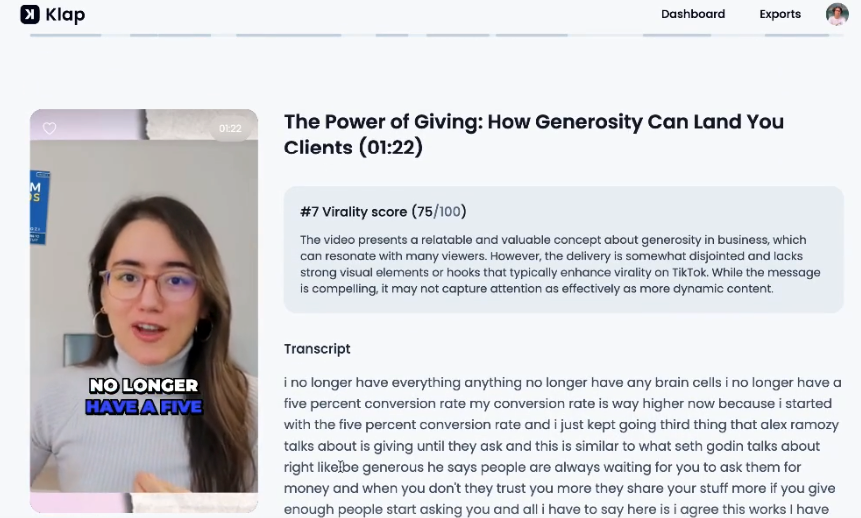
Every clip Klap generates comes with a virality score, a predictive rating that estimates how likely that specific segment is to perform well on social media. The AI evaluates factors like topic engagement, speech patterns, and content structure to rank clips from most to least viral.
Auto-Reframing
One of Klap’s most-used features is its automatic reframing engine, which detects and tracks faces in horizontal (16:9) footage and repositions the crop in real time to keep subjects centered in the vertical (9:16) frame. This is particularly useful for interview-style content, podcast recordings, and multi-speaker video.
Brand Kits
Klap includes brand kit functionality that lets agencies and larger creator teams apply consistent visual styling across all generated clips. This includes custom fonts, colors, and caption styles, ensuring that clips from the same channel or brand look unified when published across platforms.
Direct Social Publishing
Once clips are generated and edited, Klap allows direct publishing to TikTok, Instagram, LinkedIn, and YouTube without leaving the platform. This closes the loop and makes your workflow more efficient.
API Access
Klap offers a developer API, documented at docs.klap.app, that lets agencies and software teams integrate Klap’s clip generation directly into their workflows or products. Most consumer-facing AI video tools don’t offer this, positioning Klap as a viable backend solution for content production pipelines at scale.
Klap Pricing Breakdown
Klap AI has a straightforward subscription model with three main plans, plus custom options for teams and agencies with higher-volume needs. All plans include AI clipping, unlimited social account connections (TikTok, Instagram, LinkedIn), and analytics. A limited free trial is available (typically one video), but most core features require an active subscription.
- Basic: $14/month (billed yearly), $29/month (billed monthly). It includes 100 clips per month, which is enough for most casual creators posting a few clips per week across their social channels. All core features are included, from AI clipping and Virality Score to unlimited social account connections and analytics.
- Pro: $39/month (billed yearly), $79/month (billed monthly). It includes 300 clips per month, which supports higher-output workflows like weekly podcast episodes turned into multiple clips or agencies handling a small roster of clients. All Basic features are included, plus the expanded clip capacity.
- Pro+: $94/month (billed yearly), $189/month (billed monthly). It includes 1,000 clips per month, which suits marketing agencies managing multiple client accounts, media companies producing daily content, or high-output podcast networks turning long episodes into large volumes of short clips. All features from lower tiers are included.
- Custom Plans: For businesses that need more than 1,000 clips per month, Klap AI has custom plans available through their Discord community. This option is most relevant for large media companies, enterprise marketing teams, or API-heavy use cases where volume exceeds standard tier limits.
Klap User Reviews
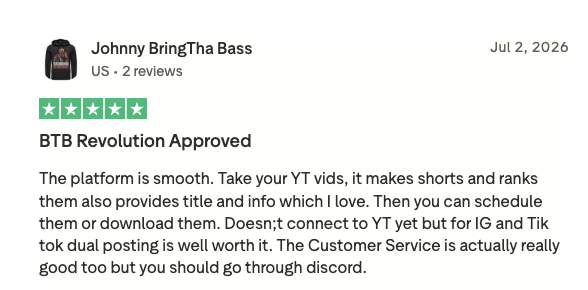
Klap is rated 3.6 out of 5 stars on Trustpilot based on 40 reviews as of September 2026. Overall, real-world users say Klap delivers on its core promise: fast, usable short-form clips from long-form content.
Positive Reviews
Users appreciate the ability to go from a raw YouTube link to 10+ captioned, reframed, virality-scored clips in under a minute. Creators who previously spent hours clipping content manually report cutting that down to a few minutes, including review and light editing time.
The 52-language caption support is a standout feature that competitors haven’t matched at the same price point. For international creators or brands targeting multilingual audiences, this is a significant operational advantage. Creators also appreciate the no-watermark policy across all plans.
Negative Reviews
Experienced video editors who’ve tested Klap note that the reframing engine, while impressive for an automated tool, still occasionally makes framing choices a human editor wouldn’t. The manual override options help, but plan for light editing passes on clips before publishing, especially for brand-sensitive content. A few users also report recurring billing issues.
Who Should Use Klap?
Klap is purpose-built for a specific type of creator: someone sitting on a library of long-form spoken content who doesn’t have the time, budget, or editing skills to clip it manually. Podcasters with weekly episodes, YouTube educators, business coaches recording webinars, and marketing teams repurposing recorded presentations are the ideal users.
If your content is dialogue-heavy and you’re publishing to TikTok, Reels, or Shorts, Klap fits naturally into your workflow. If your content is primarily music, animation, or visual-only, without substantial speech, the AI won’t have enough to work with, and you’ll likely be disappointed with the output.
How to Get More From Your Klap Clips With AmpiFire
Klap AI does its job well: it turns long-form spoken video into short clips that are ready to publish on TikTok, Reels, and Shorts. For podcasters, educators, and marketers sitting on hours of unused footage, the time savings are real. However, Klap doesn’t get your content in front of anyone outside social feeds.
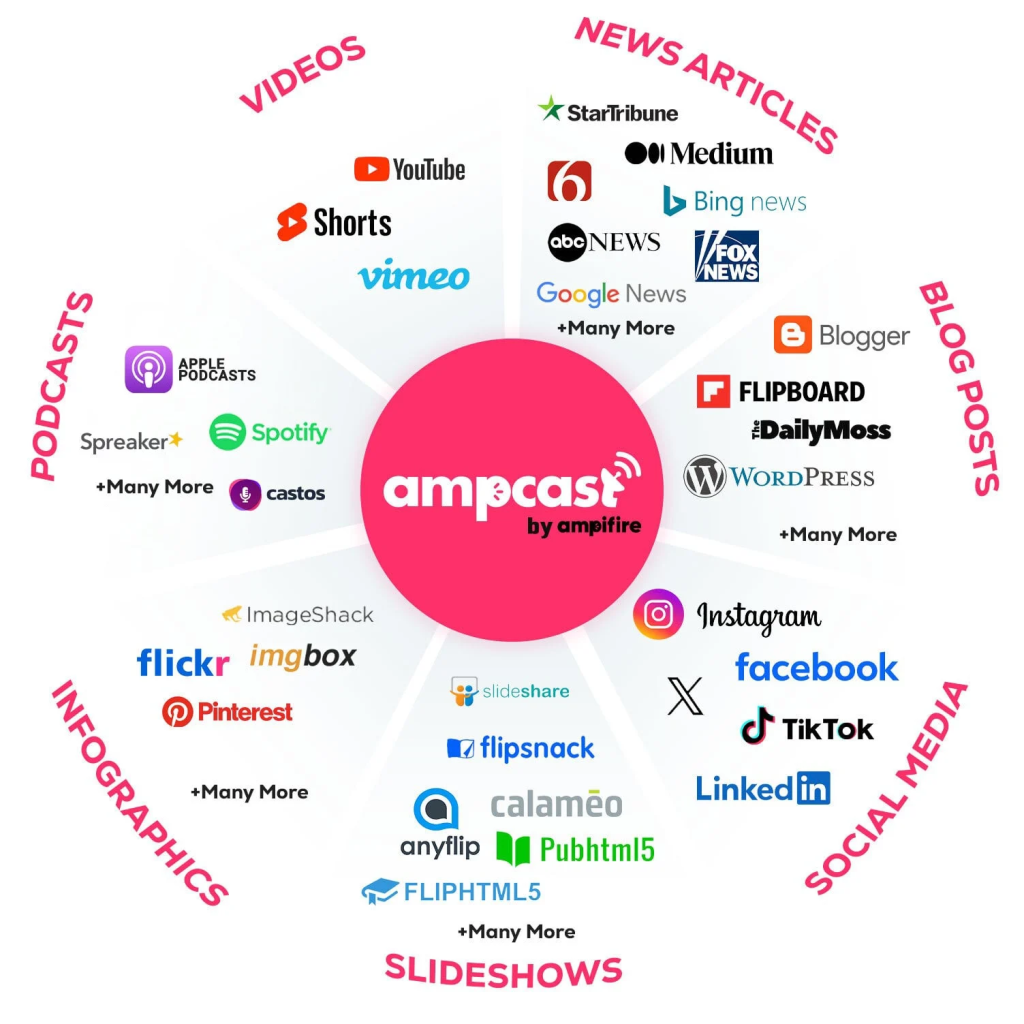
At AmpiFire, we developed AmpCast AI, a content amplification engine that takes one topic and turns it into eight formats: news articles, blog posts, interview podcasts, longer informational videos, reels/shorts, infographics, flipbooks/slideshows, and social posts, then publishes them across 300+ platforms including Pinterest, Google News, YouTube, Spotify, and major news networks. For creators building beyond short-form video, it puts the same content in front of Google searchers, Spotify listeners, and industry publication readers, turning a single piece of content into a multi-channel presence. Try AmpCast AI.
Frequently Asked Questions (FAQs)
Is Klap AI free?
Klap offers a free trial that lets you process one full video at no cost, with no credit card required to sign up. After the free trial, the paid plan starts at $14–$29/month, which unlocks a monthly clip allowance (100 to 1,000 clips depending on tier), brand kits, direct social publishing, and API access. There’s no permanent free tier beyond that first video.
What is Klap AI used for?
Klap AI is used to automatically convert long-form videos, including YouTube videos, podcasts, webinars, and Zoom recordings, into short-form vertical clips optimized for TikTok, Instagram Reels, YouTube Shorts, and LinkedIn. It handles clip selection, caption generation, face-tracking reframing, and virality scoring without requiring any manual editing knowledge.
Does Klap work with YouTube videos?
Yes, you can paste a YouTube link directly into Klap and the AI will process the video without requiring a file download or manual upload. It also supports Vimeo and Twitch links, plus direct file uploads for recordings that aren’t hosted on a public platform.
Does Klap have a mobile app?
Klap is currently a web-based platform and does not have a dedicated native mobile app for iOS or Android. You can access the platform through a mobile browser, but the experience is optimized for desktop use, particularly for reviewing and lightly editing the generated clips before publishing.
Can I use AmpiFire and Klap together in my content workflow?
Absolutely, and for most content creators, combining both platforms creates one of the most complete repurposing workflows available without a dedicated production team. AmpCast AI by AmpiFire covers the wider content strategy by generating articles, blog posts, podcasts, videos, infographics, and social posts from a single topic. It then automatically publishes that content across a broad network of sites including YouTube, Spotify, Google News, and major publications, extending reach far beyond what a social-only clipping tool can do on its own.
*Disclaimer: Results may vary based on individual circumstances, business type, and content strategy. The time savings and outcomes mentioned are based on typical user experiences and are not guaranteed. For specific pricing and service details, please visit AmpiFire.
Author
Related Posts


Tally Pricing, Reviews & Features: Is This Form Builder Worth It?
Find out if Tally is the right free form builder with unlimited submissions, robust integrations, and responsive support. Learn if…


Agility Writer Features & Pricing: Is This Long-Form AI Writing Tool Legit?
Learn how Agility Writer's features, pricing, and content quality stack up to see if this long-form AI writing tool is…


FlexClip AI Reviews, Pricing & Features: Is This the Best AI Video Maker & Editor?
Compare FlexClip AI's features, pricing plans, and verified user reviews to see if this browser-based AI video maker fits your…


ShortlyAI: Features, Benefits & Pricing – Writing Assistant & Long-Form Editor Alternatives Explored
Explore how ShortlyAI revolutionizes content creation through AI-powered writing assistance; uncover its features, benefits, and limitations.


Restream Reviews, Features & Pricing: Is This a Good Multistreaming Platform?
Read our Restream review to learn about key features, pricing plans, and pros and cons, and find out if this…

How to Repurpose YouTube Videos for TikTok
Learn how to repurpose YouTube videos for TikTok using AmpiFire's AmpCast AI and other tools, so you reach more people…









