

Key Takeaways
- Mailchimp offers more advanced automation features, while Constant Contact offers a superior user experience for beginners.
- Pricing structures also differ: Mailchimp uses a subscriber-based model with a free plan, while Constant Contact has no free option.
- Constant Contact excels in customer support with phone service and extensive learning resources.
- Mailchimp delivers more sophisticated reporting tools and A/B testing capabilities.
- AmpiFire’s AmpCast AI drives new traffic to your site and can automatically feed fresh content into Mailchimp or Constant Contact via RSS or Zapier, keeping your email campaigns consistently active.
Mailchimp vs Constant Contact: An Overview
Mailchimp is an all-in-one marketing platform that offers email campaigns, automation workflows, audience segmentation, landing pages, and e-commerce integrations. It offers a free limited plan and paid plans that start at $6.50 per month.
On the other hand, Constant Contact also provides comprehensive email marketing features, including an intuitive email editor, list management, event marketing tools, and reliable deliverability. While it doesn’t have a free plan, it provides a 14-day free trial for its paid plans, which start at $12 per month.
This guide compares their pricing, features, and limitations to help you choose the right platform for your needs.

How AmpiFire Works:
- Research & Target: Find high-demand topics your buyers search for.
- Create & Repurpose: AmpiFire’s AmpCast AI generates news articles, blog posts, interview podcasts, longer informational videos, reels/shorts, infographics, flipbooks/slideshows, and social posts.
- Distribute & Amplify: Auto-publish to 300+ sites, including Google News, YouTube, Spotify, and major news networks.
Get more traffic from people who want to buy your stuff, and powerful “As Seen On” trust badges for your site.
Do It Yourself (with AI), Done For You Content, & 100% Managed Organic Growth options available.
Grow Your Free Traffic From Everywhere
Key Email Marketing Features on Both Platforms
Email Design & Templates
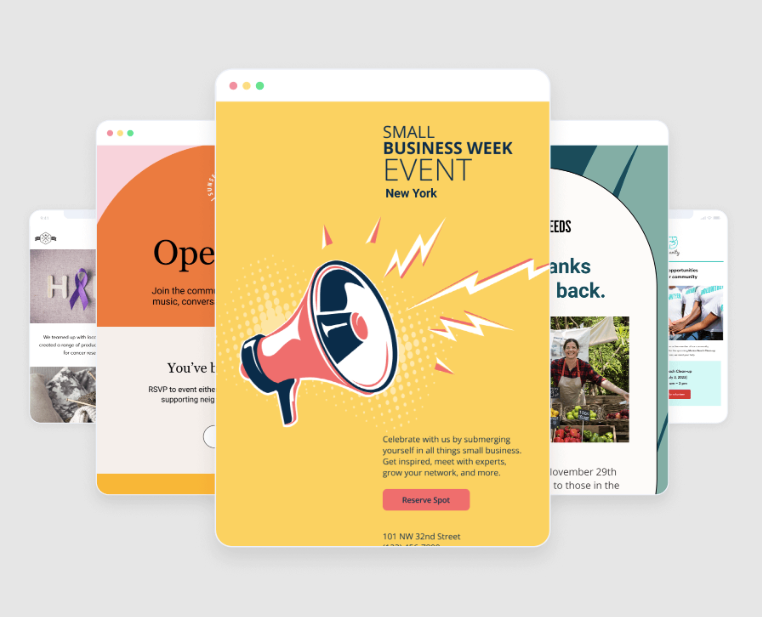
Mailchimp offers over 100 pre-designed templates covering a wide range of industries and campaign types. Its drag-and-drop editor allows users to create visually appealing campaigns with minimal effort.
Constant Contact’s email builder prioritizes simplicity and user-friendliness. It offers customizable templates, covering everything from newsletters and promotions to event invitations and holiday greetings.
Its editor uses a block-based approach that feels more structured than Mailchimp’s, which may limit creative freedom but ensures that even complete beginners can create professional-looking emails.
Automation Capabilities
Mailchimp’s journey builder provides a visual workflow interface for creating complex, multi-step campaigns triggered by multiple user actions or time-based conditions.
The platform’s predictive analytics can identify high-value customers, automatically segment your audience by purchase likelihood, and trigger campaigns at optimal times for each recipient.
Constant Contact takes a more streamlined approach to automation. Its system prioritizes accessibility over complexity, offering a straightforward set of trigger-based email sequences.
Where Constant Contact falls short is in behavioral targeting. Its automation relies primarily on list-based triggers rather than tracking individual user behaviors across channels. This limits your ability to create deeply personalized experiences that respond to customer actions in real time.
List Management & Segmentation
Mailchimp organizes contacts using a tag-based system that offers a good amount of flexibility. Rather than forcing rigid list structures, its approach allows a single contact to exist once in your database while belonging to multiple segments based on tags, custom fields, and behavioral data. Businesses exploring Mailchimp competitors for email marketing may find similar or even more advanced segmentation options tailored to different campaign needs.
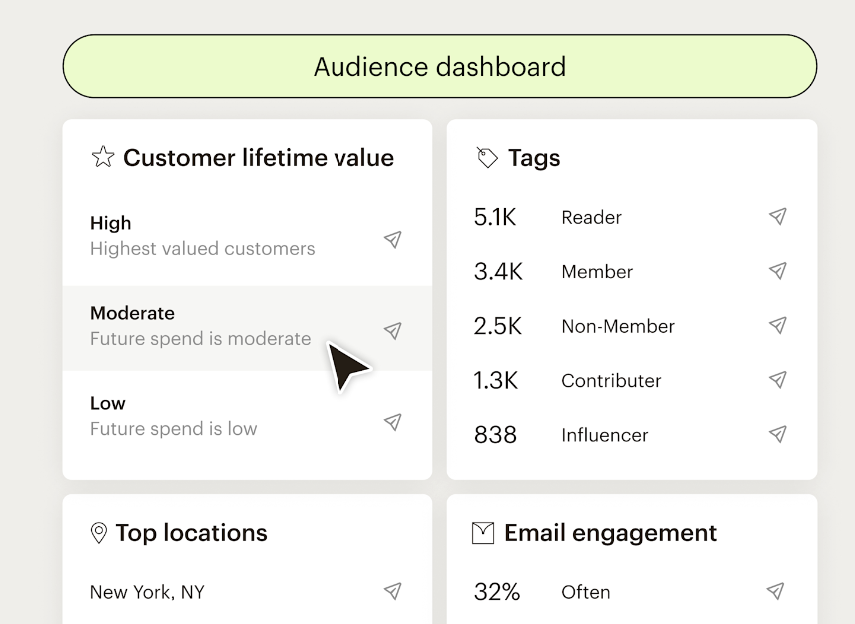
Constant Contact takes a more straightforward approach to list management. You can organize subscribers into multiple contact lists, apply tags for easy filtering, and use custom fields to store additional information like birthdays, preferences, or membership levels.
Mailchimp vs Constant Contact: Pricing Breakdown
Mailchimp’s Pricing Structure
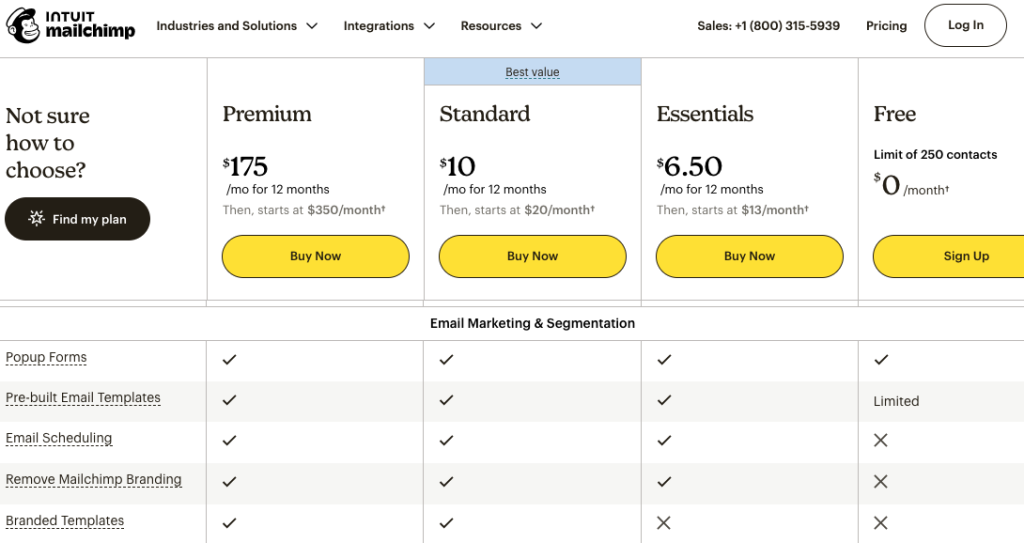
Mailchimp offers free plans and customizable paid plans. The cost increases as your subscriber list grows, creating a relatively predictable scaling model that aligns with your business growth.
- Free: Limited to 250 contacts and one user.
- Essentials: $6.50/mo for 12 months, then starts at $13/month (3 users, 4 marketing automation flow steps, 300+ integrations).
- Standard: $10/month for 12 months, then starts at $20/month (5 users, 200 marketing automation flows, creation & sending of custom-coded templates).
- Premium: $175/month for 12 months, then starts at $350/month (unlimited users, personalized onboarding, branded templates).
Constant Contact’s Pricing Structure
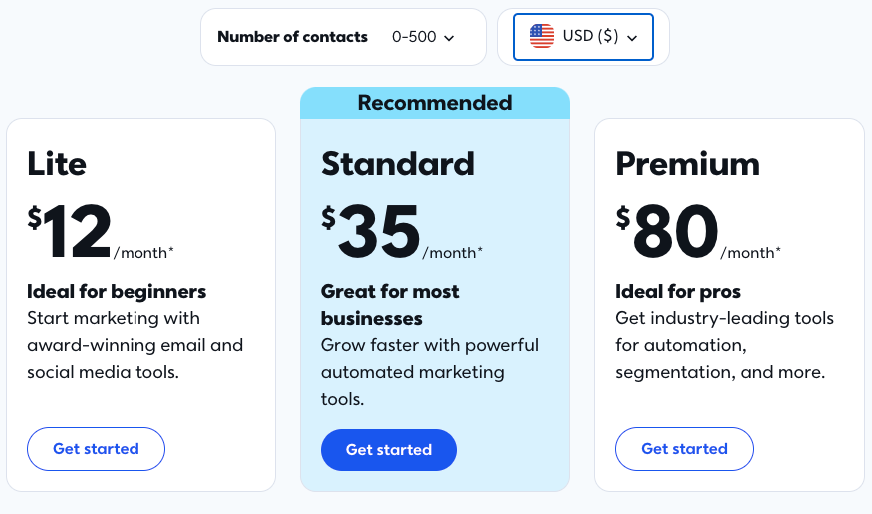
Constant Contact takes a different approach with three primary pricing tiers: Lite, Standard, & Premium.
Unlike Mailchimp, Constant Contact doesn’t offer a free plan, but it does provide a generous 14-day free trial that gives you ample time to test the platform. Its pricing also increases with subscriber count, but the jumps between tiers can be steeper.
- Lite: $12/month (1 automation template, basic reporting tools, drag-and-drop email editor).
- Standard: $35/month (3 automation templates, advanced reporting tools, social media ads manager, email scheduling, and subject line testing).
- Premium: $80/month (Unlimited automation templates, auto-send welcome emails, email engagement heat map, revenue reporting, SEO recommendations).
Pros & Cons of Mailchimp
Pros
- Generous free plan that makes it accessible to startups and small businesses testing email marketing.
- Advanced automation that allows users to build sophisticated multi-step workflows.
- Powerful segmentation to target specific audience groups using behavioral data.
- In-depth analytics and detailed reporting.
- All-in-one platform for managing email campaigns, landing pages, social media ads, and audience insights from a single dashboard.
Cons
- The extensive feature set can be overwhelming for beginners, who may need time to master the platform’s full capabilities.
- Phone support is available only with the Premium plan; lower tiers are limited to email and chat.
- Costs rise significantly as your subscriber list grows, making it expensive for businesses with large audiences.
- Advanced segmentation, comparative reporting, and multivariate testing require either a Standard or Premium plan.
Pros & Cons of Constant Contact
Pros
- The intuitive drag-and-drop editor and straightforward navigation make it easy for users with no technical experience.
- Phone, email, and chat support are available across all plans.
- Built-in features for event invitations, registrations, and ticket management make it ideal for hosting webinars or workshops.
- It connects with popular tools, including Shopify, WooCommerce, Etsy, WordPress, Salesforce, and social media platforms.
- You can schedule and publish social media content directly from the platform to maintain a consistent online presence.
Cons
- It only offers a 14-day free trial, requiring a paid commitment from the outset.
- Automation workflows are limited compared to competitors, restricting your ability to create complex, behavior-triggered sequences.
- Audience targeting tools are less sophisticated, making it harder to deliver highly personalized campaigns.
- Analytics cover the essentials, such as click and open rates, but lack the predictive insights and comparative reporting found in more advanced platforms.
Mailchimp vs Constant Contact: Comparison Table
| Feature | Mailchimp | Constant Contact |
| Free Plan | Yes (up to 250 contacts, 500 emails/month) | No (14-day free trial only) |
| Starting Price | $6.50/mo for 12 months, then starts at $13/month | $12/month (Lite) |
| Automation | Advanced multi-step workflows | Basic automation sequences |
| Segmentation | Advanced (behavioral, predictive) | Basic to intermediate |
| Analytics & Reporting | Advanced (predictive analytics, comparative reports) | Standard (open rates, click rates, heat maps) |
| Event Marketing | Limited | Strong (built-in event management tools) |
| Customer Support | Email & chat (phone on Premium only) | Phone, email & chat (all plans) |
| Ease of Use | Moderate learning curve | Beginner-friendly |
| Best For | Tech-savvy marketers, e-commerce, and scaling businesses | Small businesses, beginners, nonprofits, event-based businesses |
The Bottom Line: How to Choose Between Mailchimp & Constant Contact
Your final decision should align with your specific business requirements, technical capabilities, and growth trajectory. Choose Mailchimp if you value sophisticated automation, advanced analytics, and flexible design control.
Its generous free tier may also appeal to you if you’re a startup testing the waters before committing to a paid plan. However, the platform’s extensive feature set comes with a steeper learning curve, so be prepared to invest time in mastering its capabilities.
Choose Constant Contact if ease of use, accessible customer service, and straightforward implementation are your priorities.
It is better suited for beginners and organizations that prioritize simplicity over advanced functionality. While it may lack some of Mailchimp’s deeper automation features, it delivers reliable performance without overwhelming users with complexity.
How Can AmpiFire’s AmpCast AI Work Alongside Mailchimp & Constant Contact?
Email platforms like Mailchimp and Constant Contact are powerful for staying connected with your subscribers. But to grow that list consistently, your brand must show up where new audiences are already searching, watching, reading, and listening.
That’s where AmpiFire fits in. Our AmpCast AI tool turns one core message into eight distinct content formats (e.g., news articles, blog posts, interview podcasts, longer informational videos, reels/shorts, infographics, flipbooks/slideshows, and social posts) and distributes them across 300+ high-authority platforms, increasing your traffic across search, social media, news, video, podcasts, AI recommendations, and more.
You can nurture the traffic and leads captured using your Mailchimp or Constant Contact email automations. You can also set up RSS feeds or Zapier integrations to automatically send new content to your subscribers, keeping campaigns active without manual uploads.
AmpiFire helps you get found by new audiences, and your email platform turns that attention into lasting relationships.
Frequently Asked Questions (FAQs)
Is Mailchimp or Constant Contact better for beginners?
Constant Contact offers a more accessible entry point for complete beginners thanks to its intuitive interface, straightforward campaign creation, and exceptional customer support.
While Mailchimp also caters to beginners with its free plan and drag-and-drop editor, its interface contains more advanced options that may overwhelm new users.
How much can I expect to pay for Mailchimp as my subscriber list grows?
Mailchimp’s pricing increases progressively with subscriber count. For example, at 500 subscribers, you’ll pay approximately $6.60–$175 for the first 12 months, depending on your subscription plan. For 20,000 subscribers, expect to pay $135–$310 for the first 12 months.
Which platform offers better mobile responsiveness for emails between Mailchimp and Constant Contact?
Mailchimp has a slight edge in this area, with more advanced preview and testing tools that let you see exactly how your emails will appear across multiple devices and email clients.
Constant Contact’s templates are also mobile-friendly, though some older designs in its library may require manual adjustments to optimize for smaller screens.
Are there any significant limitations with the free version of Mailchimp?
With Mailchimp’s free plan, you’re limited to 250 contacts and 500 email sends per month, and all emails sent through the free plan include Mailchimp branding that cannot be removed.
Free users also receive limited customer support (email only for the first 30 days, then only self-service resources).
How can AmpiFire’s AmpCast complement my email marketing efforts with either Mailchimp or Constant Contact?
AmpiFire’s AmpCast AI transforms a single topic into 8 unique content formats (e.g., news articles, blog posts, interview podcasts, longer informational videos, reels/shorts, infographics, flipbooks/slideshows, and social posts) that you can link directly from your Mailchimp or Constant Contact campaigns to boost credibility and trust.
You can also automate content delivery to your subscribers using RSS feeds or Zapier integrations, eliminating the need for manual updates. This seamless integration ensures your email marketing and content amplification work together to maximize your reach.
*Disclaimer: Results may vary based on individual circumstances, business type, and content strategy. The time savings and outcomes mentioned are based on typical user experiences and are not guaranteed. For specific pricing and service details, please visit AmpiFire.
Author
Related Posts


Mailchimp Pricing: Pay as You Go Plan & Subscription Cost Explained
Compare Mailchimp’s free, Pay As You Go, and monthly plans. Learn how to save on email marketing and boost results…


How to Submit a Press Release on Nasdaq – The Cost for Publishing News Articles & Journalists’ Email Contact Methods
Learn how you can get any site, business or offer published on Bloomberg, Nasdaq, Yahoo! News and more.

AI Success Lab by Julian Goldie Pros & Cons: The Best Free AI Marketing Group?
Key Takeaways AI Success Lab offers free membership with 200+ ChatGPT prompts and 50+ AI tools to help entrepreneurs use…


iContact Reviews, Cost & Features: Is This Email Marketing Software Worth It?
Discover if iContact is right for your business. Learn about pricing from $9/month, key features, and user reviews for this…

3 Main Types of Business Models: Pros and Cons of Ecommerce, Affiliate & Local Marketing
Are you interested in learning about different types of business models? Consider this breakdown on using ecommerce, affiliate, and local…


SendX Pricing, Features & Reviews: Is This AI-Powered Email Marketing Software Worth the Cost?
See real SendX reviews covering pricing, AI-powered features, and deliverability tools. Learn if this email marketing software is worth it.








