

Key Takeaways
- Runway AI is a cloud-based video generation and editing platform suited for creators who prioritize production quality and are comfortable with a hands-on creative workflow.
- Core features include text-to-video, image-to-video, video-to-video editing, AI upscaling to 4K, and in-context editing through Aleph 2.0, with access to both Runway’s own models and third-party options like Seedance 2.0.
- Runway offers six tiers: Free, Standard at $15/month, Pro at $35/month, Max at $95/month, Team at $69 per seat/month, and custom-priced Enterprise, with annual billing saving 20% across all paid plans.
- Generation lengths top out at 5 to 10 seconds on Runway’s own models, so longer scenes require multiple clips stitched together, and the learning curve can be steep for beginners unfamiliar with prompt engineering.
- AmpiFire’s AmpCast AI creates long-form videos, short-form clips, and six other content formats from a single idea, then automatically publishes them to YouTube, Spotify, Pinterest , and hundreds of other high-traffic sites with minimal work required.
Is Runway AI Worth It?
Runway AI is worth it for creators who are precise about video production quality and willing to climb the platform’s learning curve to get there. The Gen-4 family of models produces impressive output, multi-scene character consistency is an advantage, and the browser-based workflow removes the hardware barrier that locks many creators out of professional video tools.
That said, the credit system punishes inconsistent users, the short generation lengths require stitching clips together for longer scenes, and pricing jumps steeply between tiers.
If you generate video regularly and need professional-grade output, the Pro plan at $35/month delivers strong value. If you’re still testing whether AI video fits your workflow at all, exhaust the free credits first, as they’ll tell you everything you need to know about whether Runway matches how you actually create.

How AmpiFire Works:
- Research & Target: Find high-demand topics your buyers search for.
- Create & Repurpose: AmpiFire’s AmpCast AI generates news articles, blog posts, interview podcasts, longer informational videos, reels/shorts, infographics, flipbooks/slideshows, and social posts.
- Distribute & Amplify: Auto-publish to 300+ sites, including Google News, YouTube, Spotify, and major news networks.
Get more traffic from people who want to buy your stuff, and powerful “As Seen On” trust badges for your site.
Do It Yourself (with AI), Done For You Content, & 100% Managed Organic Growth options available.
Grow Your Free Traffic From Everywhere
What Runway AI Actually Does
Runway AI is a cloud-based creative platform built around AI-powered video generation and editing. It started as a machine learning research project and evolved into one of the most feature-rich AI video tools available. The platform lets you generate video from text prompts, animate still images, transform existing footage, and edit video using a suite of AI-assisted tools, all without installing any software.
What separates Runway from simpler AI video tools is its depth. Every paid plan gives you access to a broad toolkit that goes well beyond basic video generation.
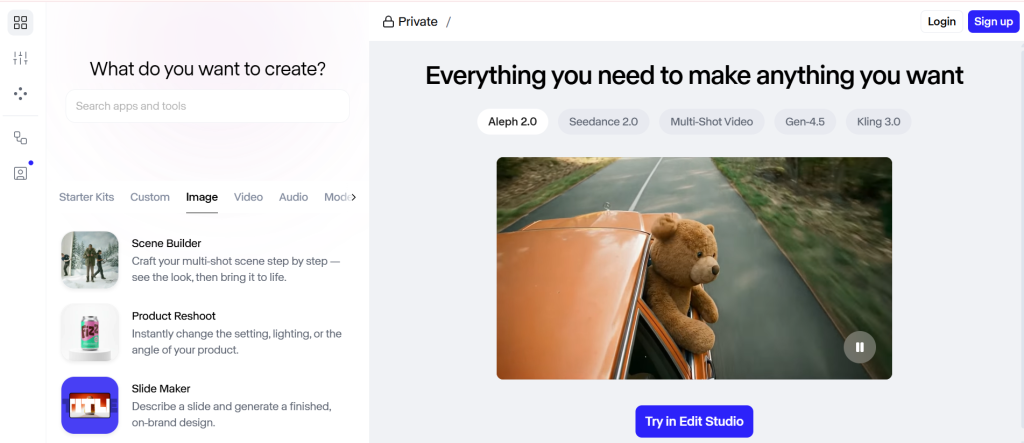
Runway also hosts third-party models like Seedance 2.0, Kling 3.0, and Veo 3.1 inside the same dashboard, so you can pick the best model for each shot without juggling separate subscriptions.
Runway AI Core Features
Text-to-Video
Using models like Runway’s Gen-4.5, you type a detailed text prompt, and the AI renders a short video clip in 5- or 10-second durations. The more specific your prompt, the better the output. Gen-4.5 supports six aspect ratios, including 21:9 cinematic widescreen.
Image-to-Video
Upload a still image, and Runway animates it into a video clip. This is one of the platform’s most practically useful features, especially for photographers, illustrators, and brand designers who already have strong visual assets. You can control the direction and intensity of motion and turn a product photo into a dynamic ad clip or breathe life into concept art.
Video-to-Video
Video-to-Video lets you modify existing footage using text prompts. Upload a clip and tell Runway what to change: swap the backdrop, relight the scene, change the time of day, add or remove objects, or apply a completely different visual style. It’s a great option for creators who want to repurpose or rework existing footage without reshooting.
Upscale & Extend
Runway’s upscaling tool uses AI to enhance the resolution and sharpness of lower-quality footage up to full 4K. The model actively restores detail, making it especially useful for finalizing clips for large-screen display or professional delivery. Extend lets you stretch a generated clip beyond its initial duration and chain multiple generations together to build longer sequences.
Aleph & Edit Studio
Aleph 2.0 is Runway’s in-context video editing model. You upload an existing video clip, describe what you want to change, and the AI edits only those parts while keeping everything else untouched.
You can also add up to 5 reference images at specific points in the video to guide the AI on exactly how the edits should look. Edit Studio is the built-in editing environment where you trim, arrange, and refine clips.
Runway AI Pricing Plans
Free Plan
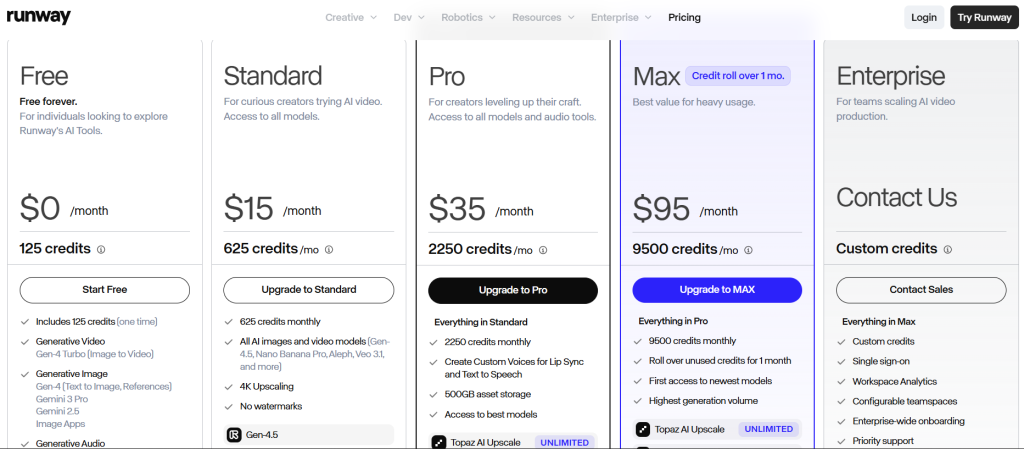
The Free plan gives you 125 one-time credits to experiment with the platform. You can access Gen-4 Turbo for image-to-video, Gen-4 for text-to-image, and basic audio tools. Output is capped at 720p with a watermark on all exports, and 5GB of asset storage.
Standard Plan
At $15/month, you get 625 credits per month with access to all AI image and video models, including Gen-4.5, Aleph, Veo 3.1, Kling 3.0, and more. The watermark is removed, and 4K upscaling is included. For casual creators who use AI video as an occasional tool rather than a core workflow, this tier provides enough output for a handful of polished clips each month.
Pro Plan
At $35/month, you get 2,250 credits per month with everything in Standard, plus custom voices for lip sync and text-to-speech, 100GB asset storage, access to the best models, and unlimited Topaz AI Upscale. This is where Runway starts making sense as a serious production tool for freelancers, small studios, and active content creators.
Max Plan
At $95/month, you get 9,500 credits per month with everything in Pro, plus unused credits roll over for one month, first access to the newest models, and the highest generation volume. Built for independent filmmakers, agencies, and production teams generating content at high volume.
Team Plan
At $69 per seat/month, Team covers workspaces of two to nine people. Each seat adds 6,900 credits to a shared pool, and unused credits roll over for one month, the same as Max. You get everything in Max plus shared projects, frame-accurate commenting, 1TB of storage, and priority support. For groups of ten and above, Runway points you to Enterprise.
Enterprise
The Enterprise tier is custom-priced for teams scaling AI video production. Includes everything in Max, plus custom credit packages, single sign-on, workspace analytics, configurable teamspaces, enterprise-wide onboarding, and priority support.
On Standard and Pro plans, unused credits reset at the end of each billing cycle. Max rolls credits over for one month, and any additional credits you purchase separately never expire. Annual billing saves 20% across all paid plans.
What Runway AI Does Well
Runway’s biggest strength is consistency of character and environment across scenes. Gen-4 introduced multi-scene coherence, meaning a character generated in one clip can maintain the same face, clothing, and general appearance in a follow-up clip.
This is a fundamental shift for anyone trying to produce narrative content rather than isolated visual moments. Combined with strong motion control, browser-based accessibility, and a wide toolset, Runway covers more of the AI video workflow in one platform.
Where Runway AI Falls Short
Generating high-quality videos burns credits faster than most new users expect, and on the Standard and Pro plans, unused credits reset at the end of each billing cycle. The Max plan rolls credits over for one month, but lower-tier users don’t get that flexibility.
The platform also has a learning curve. The interface is feature-rich to the point of being overwhelming for beginners, and mastering prompt engineering for Gen-4 takes practice.
Runway’s maximum single-generation video length is 10 seconds on its own Gen-4 and Gen-4.5 models, though third-party models like Seedance 2.0 on the platform support up to 15 seconds. Longer sequences require multiple generations stitched together in post. For short-form social content, this is workable, but for anyone producing scenes of 30 seconds or more, the process becomes repetitive and time-consuming.
Who Should Use Runway AI?
Runway is best suited for creators who already have a visual production mindset and are willing to invest time learning the platform. Runway is not the right tool for beginners expecting instant, hands-off results.
If you’re looking for a simple app where you type a sentence and get a ready-to-publish video, the platform’s depth will frustrate more than it helps. Nor is it ideal for podcast creators, educators, or anyone whose primary content format is talking-head video.
AmpCast AI: From AI Video Generation to Full-Scale Distribution
Runway AI gives you the tools to generate professional-quality video entirely with AI, from cinematic scenes to branded ad clips. But generating video is only half the challenge. Getting that video in front of the right audience, consistently and at scale, is where most creators hit a wall.
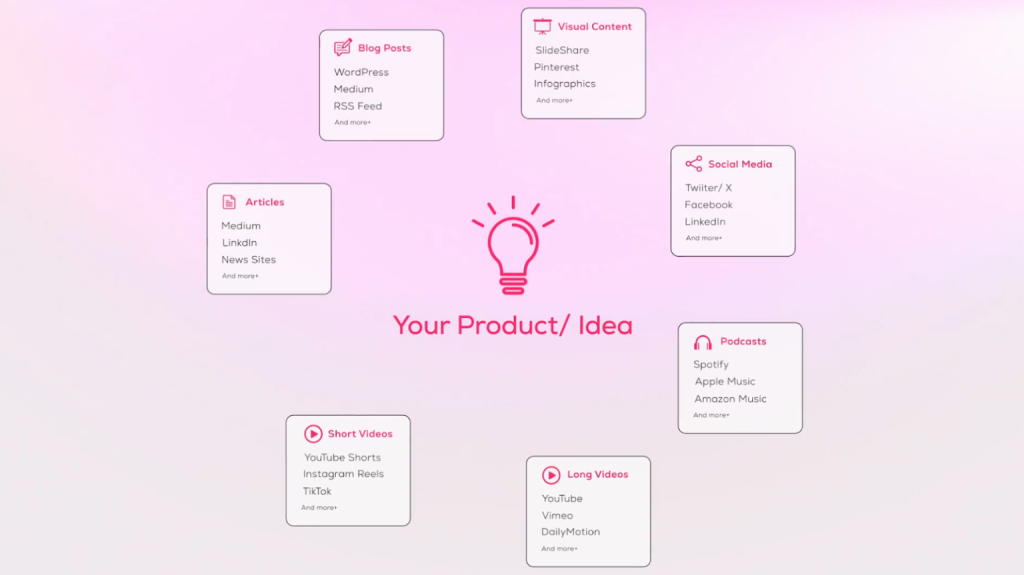
Our AmpCast AI creates both long-form videos and short-form clips plus 6 other content formats: news articles, blog posts, interview podcasts, infographics, flipbooks/slideshows, and social posts, then automatically publishes them to YouTube, Google News, TikTok, Instagram Reels, Facebook Video, Fox affiliate sites, and hundreds of other high-traffic sites, so your audience finds you no matter where they search, scroll, or watch. See how AmpiFire can get your content in front of buyers across every platform they use.
Frequently Asked Questions (FAQs)
Is Runway AI free to use?
Yes, but the 125 credits are a one-time allocation, not a monthly refresh. At 5 credits per second on Gen-4 Turbo (the video model included on the free plan), that’s roughly five 5-second clips.
What is the best Runway AI plan for individual creators?
For most independent creators, the Pro plan at $35/month offers the best balance of capability and cost. The 2,250 monthly credits are enough for regular content production, and you get custom voices and 100GB storage.
Does Runway AI work without a high-end computer?
Yes. All generation and rendering happens on Runway’s cloud servers, so a standard laptop with a modern browser and stable internet connection is all you need. This cloud-based setup is one of Runway’s most practical advantages for creators who don’t have high-end workstations.
Do unused credits roll over on paid Runway AI plans?
On Standard and Pro, unused credits reset at the end of each billing cycle with no rollover. Max and Team are the exceptions, as both allow unused credits to roll over for one month. Any additional credits you purchase separately never expire regardless of your plan.
What’s the difference between Runway AI and AmpCast AI?
Runway AI is a video generation tool that creates clips from text prompts, images, or existing footage. AmpCast AI is a content creation and distribution system that handles the full pipeline, from researching what your buyers are searching for to publishing finished content, including long-form videos and short-form clips, where they’ll actually see it.
*Disclaimer: Results may vary based on individual circumstances, business type, and content strategy. The time savings and outcomes mentioned are based on typical user experiences and are not guaranteed. For specific pricing and service details, please visit AmpiFire.
Author
Related Posts


HeyGen Features & Pricing: Is This AI Video Generator Worth It?
Learn about HeyGen features and pricing, compare plans, avatars, AI tools, and limitations, and decide if this video generator fits…


Kapwing AI Features & Pricing: Is This AI Video Generator & Editing Tool Worth It?
Kapwing AI features and pricing explained, from text to video and dubbing limits to what each credit tier really covers.…

D-ID Features & Pricing: Is This AI Video Generator Worth It?
Find out what D-ID features and pricing deliver at each tier, plus the credit limits, billing terms, and user complaints…

Tagshop AI Reviews, Features & Pricing: Is This Video Ad Generator Worth It?
Learn honest Tagshop AI reviews, top features like URL-to-Video and 1,000+ AI avatars, plus pricing from free to $99/mo. See…

VEED.IO Pricing & Reviews: Is This AI Text-to-Video Generator Worth It?
Get honest VEED.IO reviews and pricing details. Learn if this AI text-to-video generator is worth your investment for creating video…
Kling 2.0 Features & Pricing: Is This Really The ‘World’s Most Powerful’ AI Video Generator?
Explore Kling 2.0's advanced AI video features, pricing plans, and real performance tests. Discover if China's latest AI video generator…