
Key Takeaways
- Kapwing is a browser-based video editor with 30+ AI tools built into the timeline, and every generated video, image, or audio file stays editable instead of needing a fresh prompt.
- Text to Video builds an edited project from a prompt, script, or PDF, while auto-subtitling, translation into 60+ languages, and dubbing in over 40 languages handle localization.
- Paid plans bill per member: Pro is $16 per member monthly on annual billing, Business is $50, and Enterprise is custom, and the free tier watermarks every export.
- One Pro seat suits solo creators and small teams making short-form video, though every AI tool draws from one monthly credit pool that caps how much you can generate.
- AmpiFire’s AmpCast AI creates eight formats from one topic, including news articles, podcasts, and videos, then publishes them across 300+ sites like YouTube, Google News, and Spotify.
Is Kapwing AI Worth It for Video Editing Teams?
Kapwing AI is worth the money for small teams publishing short-form video weekly, since one browser tab covers generation, captioning, and export. The harder question is which tier, and that is where most people guess wrong.
Pro and Business have matching editing and export limits, both capped at 6 GB uploads, 120-minute 4K exports, and unlimited export time, so the money between them buys localization minutes, four times the storage, custom voice clones, a larger lip sync allowance, and the right to top up credits. That last item matters most in practice, because Business is the only self-serve plan that lets you buy extra credits mid-month, whereas Pro leaves a workspace that empties its pool and waits for the reset.
For a team weighing those seat and credit limits, AmpiFire’s AmpCast AI is the fuller option. It creates eight formats from one topic, including videos, podcasts, and news articles, then publishes them across 300+ sites, so a team turns a single idea into far more reach than one video editor produces.

How AmpiFire Works:
- Research & Target: Find high-demand topics your buyers search for.
- Create & Repurpose: AmpiFire’s AmpCast AI generates news articles, blog posts, interview podcasts, longer informational videos, reels/shorts, infographics, flipbooks/slideshows, and social posts.
- Distribute & Amplify: Auto-publish to 300+ sites, including Google News, YouTube, Spotify, and major news networks.
Get more traffic from people who want to buy your stuff, and powerful “As Seen On” trust badges for your site.
Do It Yourself (with AI), Done For You Content, & 100% Managed Organic Growth options available.
Grow Your Free Traffic From Everywhere
What Is Kapwing?
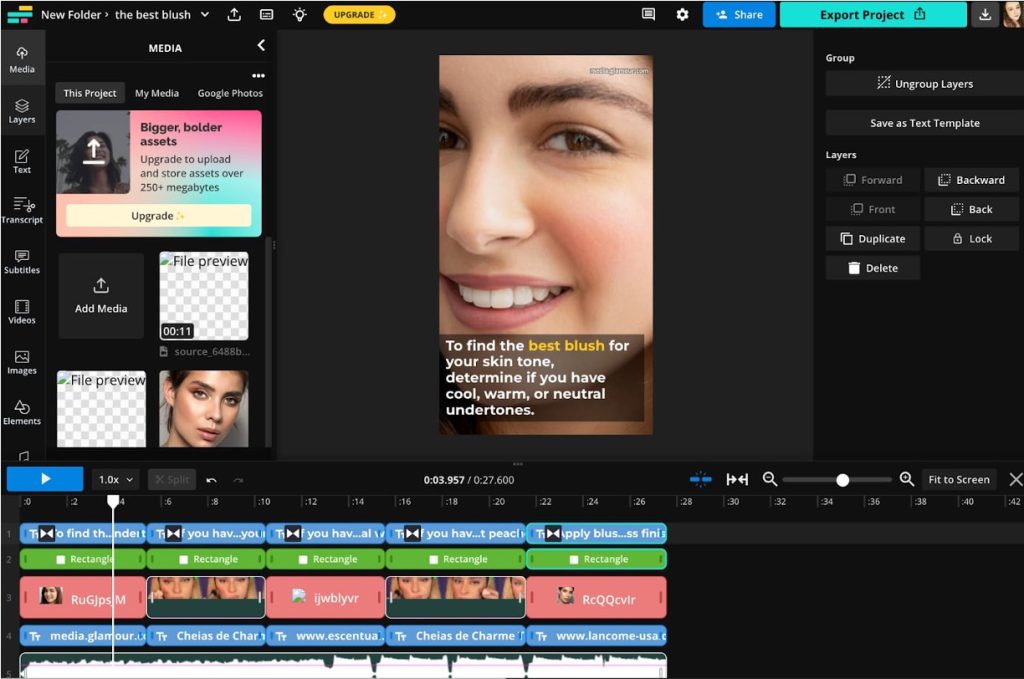
Kapwing is an online content creation platform used to edit, trim, resize, and combine video, images, and audio inside a web browser. Instead of installing software, you open kapwing.com, upload footage or paste a link to it, edit on a multi-track timeline, then export an MP4, GIF, image, or audio file. Teams use it to add captions, record their screens, apply effects, and review projects together in one shared workspace.
Kapwing reports 35 million creators on the platform and more than 100,000 videos created every day. The AI tools are built into the editor itself: Kapwing AI has a suite of 30+ tools opened from inside a project, and every video, image, and audio file it produces stays editable, so visuals, branding, and timing can be changed without regenerating from scratch.
Kapwing AI Features
AI Video Generation
Text to Video converts a short prompt, full script, article, or PDF into an edited project, producing anything between a 30-second clip and a video past the 10-minute mark. Image to Video animates a still instead, such as an uploaded product shot or a generated start frame.
Generation controls include start frames, end frames, multi-scene sequences, motion control, and character consistency, which keeps a recurring presenter or mascot looking the same across scenes. A storyboard step produces a time-stamped shot list of every scene before rendering begins.
Subtitles, Dubbing, & Voice
Auto-subtitling generates captions that can be restyled to match a brand, and auto-translate converts those subtitles into over 60 languages. Dubbing replaces the spoken audio in more than 40 languages, and lip sync adjusts mouth movement to match the new track.
Text-to-Speech reads a script using stock or cloned voices. Clean Audio removes background noise in one click, Split Vocals separates singing from instrumentals, and Smart Cut deletes silences and filler words automatically.
AI Avatars & Text-Based Editing
AI Avatars supply on-screen presenters that read a script without any filming, and the Script Generator drafts that script from a topic. Trim with Transcript works in the opposite direction, editing the video by editing its transcript text, and Transcribe converts spoken audio into a text file.
Repurpose Studio converts one long video into social-ready clips, and Speaker Focus auto-resizes footage to keep whoever is talking in frame. Clip Maker handles the same task automatically, splitting a recording into posts across several aspect ratios.
Automated Cleanup & Resizing
The B-Roll Generator adds matching images and footage to a script. AI Eye Contact corrects gaze direction, the stabilizer smooths shaky handheld footage, and the enhancer upscales low-resolution files to 1080p or 4K.
Background removers work on both video and images, Find Scenes splits clips at scene changes, and the resizer reformats a finished project for a different platform.
Recording, Stock Assets, & Exports
Recording happens inside the editor, including combined screen, camera, and audio capture. Content can also be imported by pasting a link rather than downloading files first, which works for video on TikTok, YouTube, and Twitter.
Paid plans include unlimited stock video, photos, audio, and GIFs; hundreds of transitions; free templates; chroma key; and Auto Level Audio to even out volume across multiple files. Projects export as MP4, PNG, JPG, MP3, or GIF, and subtitles download separately as SRT or VTT files alongside a full text transcript.
Images & Team Workflow
The image tools generate thumbnails, overlays, and start frames, then edit them with object removal, face swap, outfit change, and outpainting. Custom Kais save a reusable style so repeat generations stay on brand without rewriting prompts each time.
For teams, projects sit in one workspace with real-time co-editing, comments left directly on the video, version history, private folders, and a Brand Kit storing logos, fonts, and colors.
Kapwing Pricing Plans
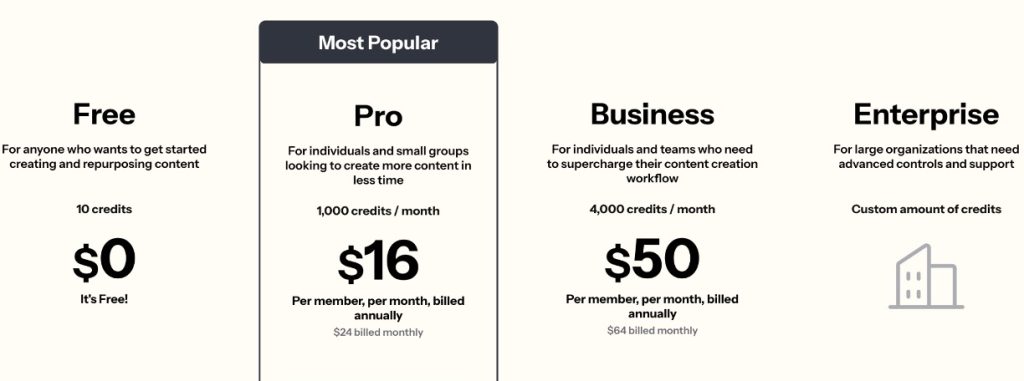
Kapwing has four tiers, and all paid plans bill per member. Annual billing lowers the monthly rate; there is no free trial of a paid plan; refunds are not issued after an upgrade, and all prices are listed in US dollars.
Free Plan
The free tier includes 10 credits and unlimited exports, but every export carries a Kapwing watermark, videos cap at four minutes and 720p, and monthly export time stops at 30 minutes. Uploads max out at 2 GB, one workspace folder is available, and stored projects are deleted after three days.
The included credits cover roughly 10 minutes of auto-subtitling and 1 minute of text-to-speech. Those limits place the free tier in evaluation territory rather than production.
Pro Plan
Pro costs $16 per member per month billed annually, which comes to $192 per year, or $24 per member billed monthly. It removes the watermark, raises uploads to 6 GB, allows 4K exports up to 120 minutes long, and includes unlimited projects plus 200 GB of cloud storage.
The plan also adds 1,000 monthly credits, the Brand Kit, custom fonts, and the collaborative shared workspace. Stored projects remain available for the length of the subscription instead of three days.
Business Plan
Business costs $50 per member per month billed annually, or $600 per year, and $64 per member billed monthly. Credits rise to 4,000 a month, and storage reaches 800 GB.
This tier adds custom voice clones, raises the lip sync allowance, and is the only self-serve plan that permits purchasing additional credits once the monthly pool runs out.
Enterprise Plan
Enterprise pricing is custom and arranged through the sales team. It adds SAML single sign-on, custom billing methods such as invoices and wire transfers, a dedicated account manager, priority support, onboarding and training sessions, plus custom storage and credit amounts.
Kapwing Edits One Video, AmpiFire Builds & Publishes Eight
Kapwing AI tier decision is arithmetic rather than features. Add up the minutes you expect to caption, translate, and dub in a typical month, then pick the plan that covers them with room to spare. Free suits testing, Pro suits weekly short-form, and Business earns its price once localization becomes routine. But every tier leaves the same gap: you finish with a polished video and still have to find an audience for it.
That is the half AmpiFire handles. We find the topics your buyers search for before they purchase, then AmpCast AI turns each one into eight formats: news articles, blog posts, interview podcasts, longer informational videos, reels/shorts, infographics, flipbooks/slideshows, and social posts. Those publish across 300+ sites, including YouTube, Spotify, Pinterest, Fox affiliate sites, MSN, and Google News, so one topic reaches people searching, scrolling, watching, and listening, instead of one video waiting on one channel. Get started with AmpCast AI →
Frequently Asked Questions (FAQs)
What file formats and aspect ratios does Kapwing support?
Kapwing works with MP4, AVI, MOV, and WebM video, JPG, PNG, and WebP images, and MP3 audio. Common aspect ratios are available as presets, including 16:9, 9:16, 1:1, 4:5, and 21:9. Most AI generation models top out around 1080p, while finished projects export at up to 4K on paid plans.
Can I use Kapwing on a phone, iPad, or Chromebook?
Kapwing runs entirely in a web browser, so there is no app to install. It works on Mac, Windows, Chromebook, iPad, or any device with a modern browser. Finished projects can be downloaded, shared through a Kapwing link, or published directly to social platforms from the editor.
Can I use Kapwing’s AI output commercially?
Kapwing states that its AI stock characters carry full commercial rights. On data handling, the company says it applies moderation guidelines, ethics policies, and security measures, and directs users to its terms of service and privacy policy for specifics. Confirm current terms before using generated output in paid advertising.
Does AmpiFire create the content, or do I use the software myself?
At AmpiFire, we run three service levels: a do-it-yourself tier where you operate our AmpCast AI software directly, a done-for-you tier where our editorial team writes and optimizes each campaign, and a fully managed tier where we handle topic research, creation, and account management.
*Disclaimer: Results may vary based on individual circumstances, business type, and content strategy. The time savings and outcomes mentioned are based on typical user experiences and are not guaranteed. For specific pricing and service details, please visit AmpiFire.
Author
Related Posts


Submagic Features & Pricing: Is This AI Caption & Video Editing Tool Legit?
Find out if Submagic features and pricing are worth it for short-form video creators who need AI captions, B-roll generation,…


Riverside.fm Features & Pricing: Is This Editing & Repurposing Tool Worth It?
Learn how Riverside.fm helps creators record, edit, livestream, and publish podcasts and videos. Compare features, pricing, and find the best…

HeyGen Features & Pricing: Is This AI Video Generator Worth It?
Learn about HeyGen features and pricing, compare plans, avatars, AI tools, and limitations, and decide if this video generator fits…

Tagshop AI Reviews, Features & Pricing: Is This Video Ad Generator Worth It?
Learn honest Tagshop AI reviews, top features like URL-to-Video and 1,000+ AI avatars, plus pricing from free to $99/mo. See…

D-ID Features & Pricing: Is This AI Video Generator Worth It?
Find out what D-ID features and pricing deliver at each tier, plus the credit limits, billing terms, and user complaints…


Lumen5 Features & Pricing: Is This AI Video Creation Tool Worth It?
Compare Lumen5 features and pricing across all five plans, see what each AI credit allowance really covers, and find out…