


Key Takeaways
- Better Proposals is a legitimate proposal management platform built for freelancers and service businesses that want to create, send, track, sign, and collect payment from one tool.
- Core features include a drag-and-drop editor, 260+ business document templates, a Content Library for reusable blocks, multi-currency support, real-time tracking with section-level analytics, legally binding e-signatures, and in-document payment collection.
- Pricing starts at $19/user/month for Starter, $29/user/month for Premium, and $49/user/month for Enterprise, with annual billing saving up to 35%.
- Users consistently praise the platform, with a 4.8/5 rating on Capterra, citing faster close times, more professional client impressions, and less time spent creating proposals as key benefits.
- AmpiFire’s AmpCast AI helps freelancers and agencies attract more qualified prospects by creating content in multiple formats from topics their buyers are searching for and publishing it across 300+ sites.
Is Better Proposals Worth It?
Better Proposals is worth it for freelancers and agencies that send proposals regularly and want fewer steps between a pitch and a signed deal. Most proposal software stops at formatting and sending, leaving e-signatures, payment, and tracking split across separate tools. That gap slows deals, since a client waits on a signature request in one inbox and an invoice in another.
The bigger risk isn’t an unpolished proposal. It’s the days that pass between a client agreeing to a project and actually paying the deposit, because that delay often kills momentum before work even starts. Software that closes that gap on one screen changes how fast a deal converts, not just how professional it looks.
The other question most freelancers face isn’t whether a proposal tool works; it’s whether enough qualified prospects reach the proposal stage in the first place. AmpiFire’s AmpCast AI addresses that side by turning one message into multiple content formats and publishing them across hundreds of sites, so a faster proposal tool actually has more deals to close.

How AmpiFire Works:
- Research & Target: Find high-demand topics your buyers search for.
- Create & Repurpose: AmpiFire’s AmpCast AI generates news articles, blog posts, interview podcasts, longer informational videos, reels/shorts, infographics, flipbooks/slideshows, and social posts.
- Distribute & Amplify: Auto-publish to 300+ sites, including Google News, YouTube, Spotify, and major news networks.
Get more traffic from people who want to buy your stuff, and powerful “As Seen On” trust badges for your site.
Do It Yourself (with AI), Done For You Content, & 100% Managed Organic Growth options available.
Grow Your Free Traffic From Everywhere
What Is Better Proposals Software?
Better Proposals is a cloud-based proposal management platform that replaces static PDF proposals with dynamic, web-based documents clients open in a browser. The core idea is simple: proposals that look professional, display perfectly on any device, and let clients sign and pay without leaving the document.
The platform is built for freelancers, agencies, and sales teams who send proposals regularly and need a faster, more trackable process. It is not a general document tool. Every feature is designed around getting proposals accepted and payments collected as quickly as possible.
The platform covers the full proposal lifecycle. You build a proposal using a drag-and-drop editor, send it via a tracked link, watch real-time analytics as your client reads through it, collect an e-signature, and take payment, all inside the same tool.
Core Features of Better Proposals
Drag-and-Drop Proposal Editor
The editor uses a block-based layout where you drag sections like text, images, pricing tables, and videos into place without code. You can access background colors, fonts (including 1,500+ Google Fonts, Adobe Fonts, and custom uploads), and layout panels from a single sidebar.
Every change renders immediately in a live preview, and the final document is responsive across mobile, tablet, and desktop.
Pre-Built Template Library
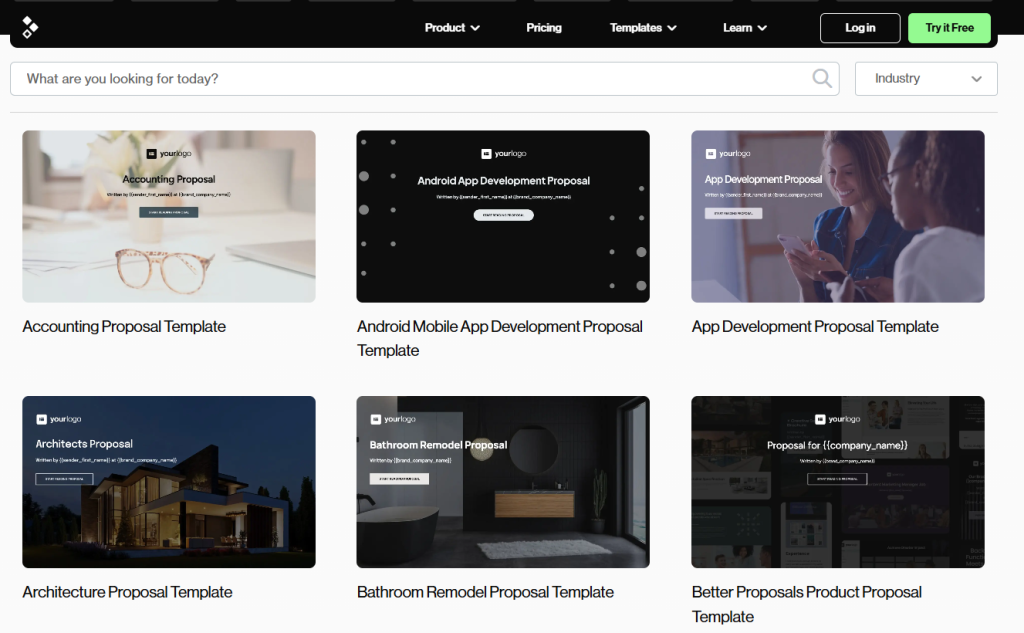
Better Proposals includes a library of 260+ business document templates, with proposal templates spanning industries like web design, marketing, consulting, and software development.
Each template is professionally designed and structured to follow proven proposal frameworks: introduction, about us, scope of work, pricing, and next steps. Templates are fully customizable through the drag-and-drop editor and reusable across projects.
Content Library
The Content Library lets you save reusable blocks like text sections, pricing tables, case studies, and team bios, then drop them into any new proposal with a single click.
For agencies or consultants who reuse the same service descriptions, terms, or testimonials across dozens of proposals each month, this significantly cuts production time.
Interactive Pricing Tables
Pricing tables in Better Proposals are interactive. Clients can select optional add-ons, adjust quantities, and see the total update in real time directly inside the proposal.
The platform supports multi-currency pricing and international tax settings, so agencies with clients across different countries can send proposals in the local currency without workarounds.
Real-Time Tracking, Notifications & Analytics
Once a proposal is sent, Better Proposals tracks when the client opens it, how long they spend on each section, and whether they forward it. You get instant email or in-app notifications when a proposal is opened, giving your sales team a precise follow-up window. Company, team, and individual user reports are also available for tracking overall proposal performance.
Built-In Electronic Signatures
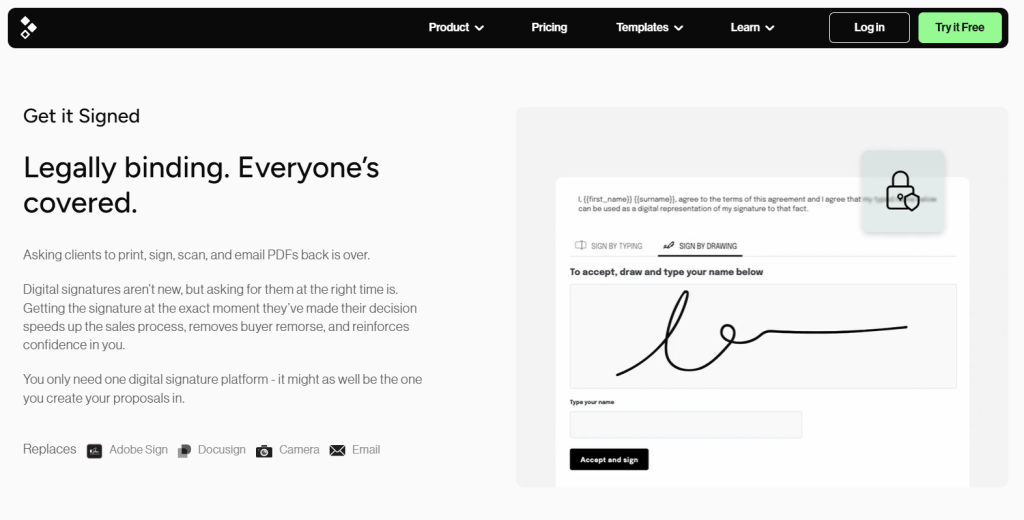
Clients can sign proposals directly in the browser without downloading software or using a third-party e-signature tool. Signatures are legally binding, timestamped, and compliant with both EU and US electronic signature legislation.
Multiple signers and custom signing order are supported for more complex deals.
Integrated Payment Collection
Better Proposals connects with Stripe, PayPal, and GoCardless, letting clients pay a deposit or the full invoice immediately after signing in the same browser window.
You can configure payment to trigger automatically upon signature or leave it optional depending on your sales process. For service businesses that struggle with late payments or lengthy gaps between acceptance and project kickoff, this can meaningfully improve cash flow.
Integrations
Better Proposals connects with a focused set of tools that cover the most common business workflows. CRM and automation integrations are available on the Premium plan and above. Here is what is currently supported:
- CRM: HubSpot, Salesforce, Pipedrive, Zoho CRM, Close CRM, Capsule, Insightly, and more
- Payments: Stripe, PayPal, GoCardless (available on all plans)
- Project Management: Trello, Asana, Teamwork
- Live Chat: Intercom, Tawk.to, JivoChat, PureChat, Zendesk Chat, Gist
- Communication: Slack
- Automation: Zapier (connects to 8,000+ additional apps) and API access
The HubSpot and Salesforce integrations are particularly useful for sales teams. You can pull contact and deal data directly into proposal templates, eliminating manual data entry.
The live chat integrations let clients ask questions while reading your proposal in real time, which can shorten the decision cycle. For tools not natively supported, Zapier and the API cover most custom workflows.
Better Proposals Pricing
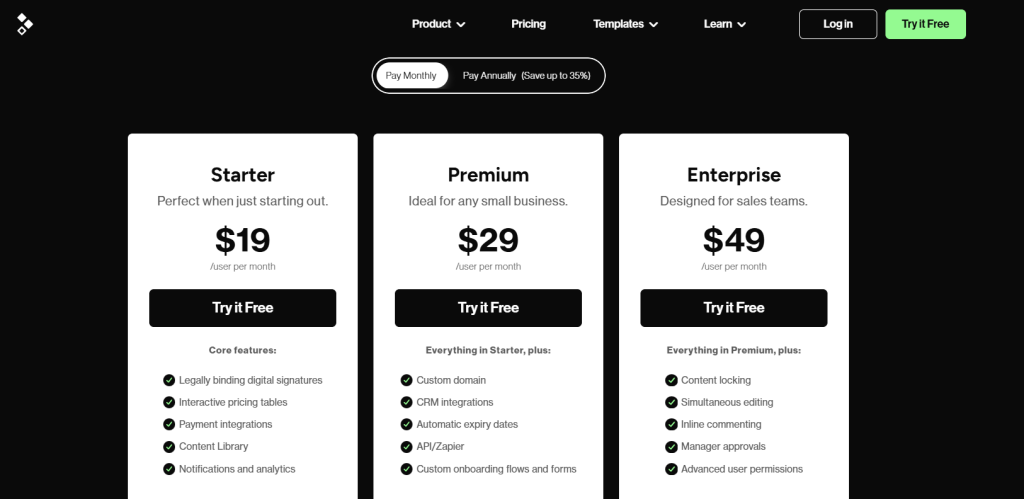
Better Proposals has three pricing tiers billed per user, monthly or annually. Annual billing saves up to 35%.
Starter
The Starter plan costs $19/user/month ($13/user/month annually). It includes all core editor features, digital signatures, interactive pricing tables, payment collection via Stripe, PayPal, and GoCardless, the Content Library, and proposal tracking with notifications and analytics.
The main constraints are a 10-document monthly send limit and a single user seat, which makes this plan practical for solo freelancers sending a handful of proposals per month.
Premium
The Premium plan costs $29/user/month ($21/user/month annually) with unlimited user seats and a 50-document monthly send limit. It includes everything in Starter plus a custom domain, CRM integrations with HubSpot and Salesforce, automatic expiry dates, and API and Zapier access.
Custom onboarding flows and forms are also included at this tier. This plan suits agencies and service businesses that need CRM integrations and a custom domain alongside unlimited user seats.
Enterprise
The Enterprise plan costs $49/user/month ($42/user/month annually) with unlimited user seats and unlimited monthly sends.
It adds everything in Premium plus content locking, simultaneous editing, inline commenting, manager approvals before proposals go out, and advanced user permissions. This plan is built for sales teams where proposal consistency and oversight matter as much as speed.
What Do Users Say About Better Proposals?
Better Proposals holds a 4.8 out of 5 on Capterra, based on over 165 verified reviews. Users highlight the professional design quality, fast setup, and the ability to track exactly when a client opens and reads a proposal.
Freelancers and small agency owners call the template library and Content Library genuine time-savers, with several reporting they cut proposal creation time from hours to minutes.
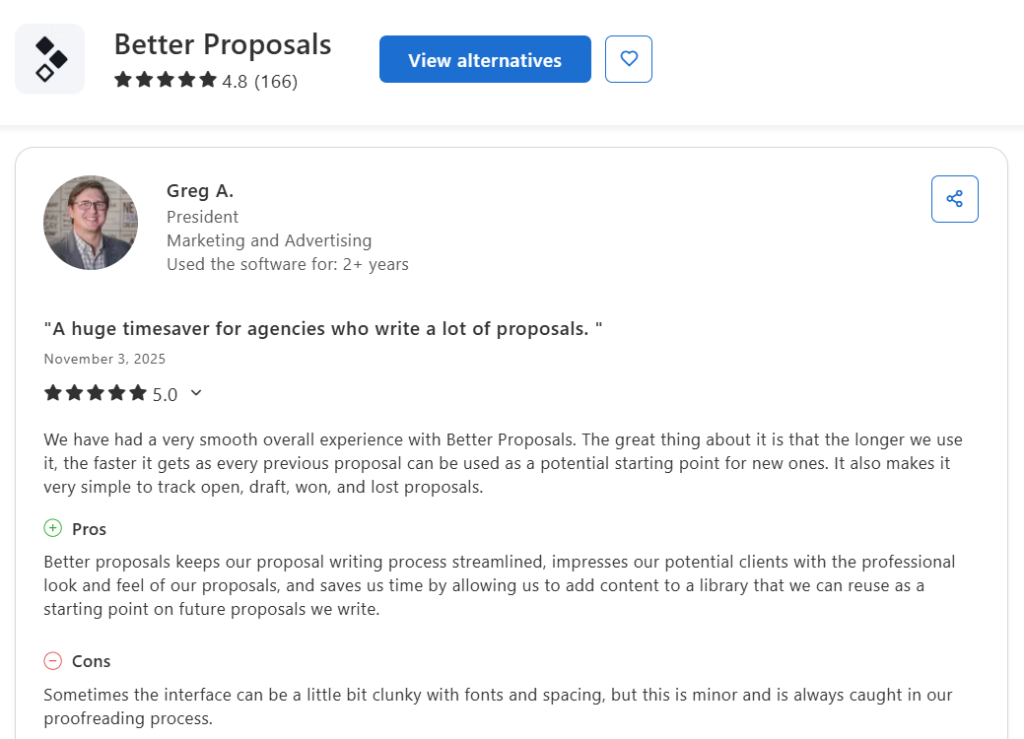
The most common criticism across reviews is that font, spacing, and layout controls can feel limited when you need precise brand customization. Multiple reviewers describe the editor as occasionally clunky when adjusting formatting details.
Customer support consistently receives strong marks, with users praising fast response times and helpful guidance during setup.
Better Proposals Closes Deals, AmpiFire Helps You Reach More of Them
Better Proposals turns every pitch into a polished, trackable document that clients can sign and pay from one screen. The next question most freelancers and agencies face is how to get in front of enough qualified prospects who are ready to buy. A great proposal tool only performs when you have enough leads to send proposals to, and building that pipeline in-house usually means hiring a content team or paying an agency retainer every month.
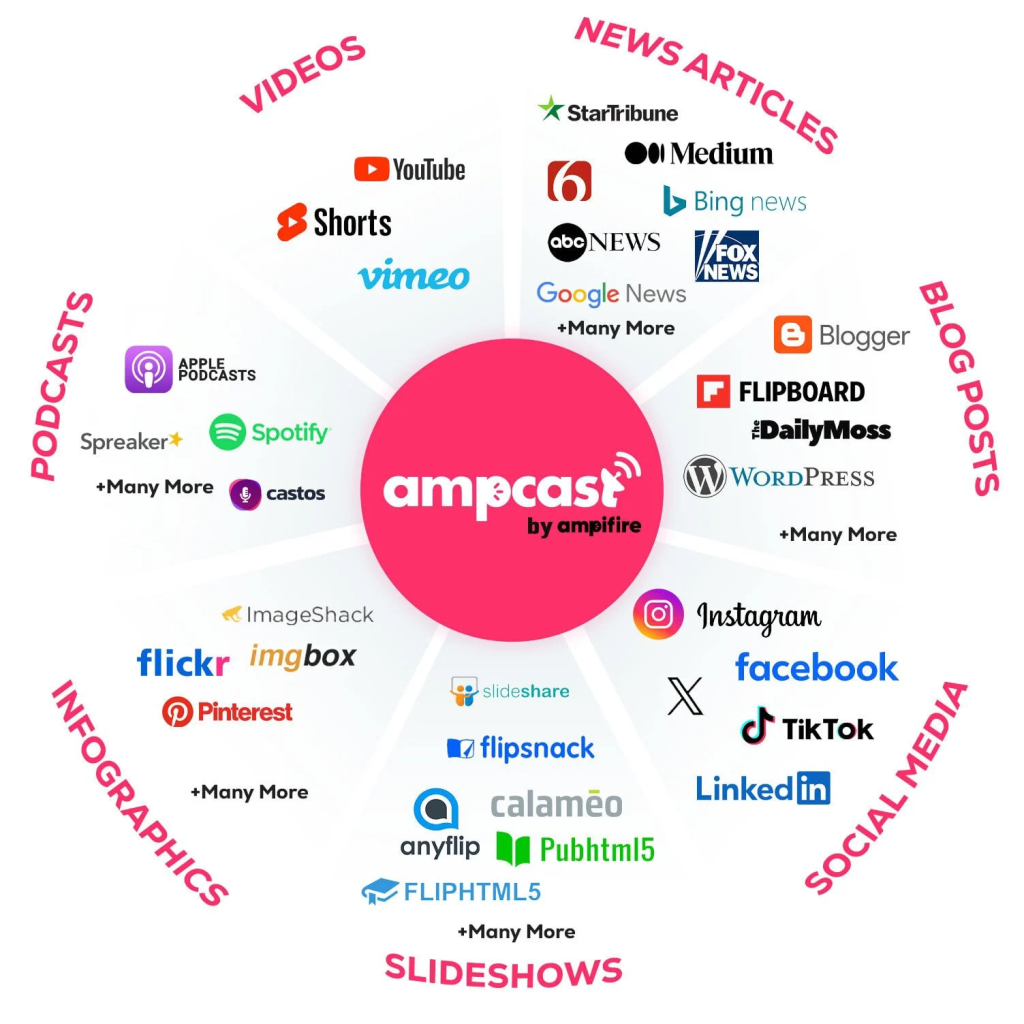
AmpiFire’s AmpCast AI brings those leads to you by creating news articles, blog posts, interview podcasts, longer informational videos, reels/shorts, infographics, flipbooks/slideshows, and social posts about your services and publishing them across 300+ high-traffic sites like Spotify, LinkedIn, YouTube, Pinterest, Google News, and more. Prospects find your brand through search, social, video, podcasts, AI recommendations, and news sites before you ever send a pitch. Try AmpCast AI to keep your Better Proposals inbox full of deals worth closing.
Frequently Asked Questions (FAQs)
Can clients sign proposals directly inside Better Proposals?
Absolutely. Clients can sign proposals directly in their browser without downloading software or using a third-party e-signature tool. The signature is legally binding, timestamped, and compliant with both EU and US electronic signature legislation.
Does Better Proposals work for large sales teams?
Yes, Better Proposals supports large sales teams through the Enterprise plan at $49/user/month. It includes role-based permissions, manager approval workflows, content locking, simultaneous editing, and inline commenting. These controls keep messaging on-brand and prevent unapproved changes from reaching clients.
Can you accept payments through Better Proposals?
Yes, you can accept payments through Stripe, PayPal, and GoCardless, with clients paying a deposit or full invoice immediately after signing inside the same browser window. Payment can trigger automatically on signature or be left as an optional step depending on your business model.
Is Better Proposals good for freelancers?
Better Proposals is a strong fit for freelancers, with the Starter plan at $19/user/month covering e-signatures, payment collection, the Content Library, interactive pricing tables, and access to 260+ document templates. The main constraint is a 10-document monthly send limit and a single user seat, which suits freelancers sending a handful of proposals per month. For higher volume, the Premium plan raises the limit to 50 documents per month and adds CRM integrations, while Enterprise removes the send cap entirely.
How do I get clients without cold outreach?
The most effective way to attract clients without cold outreach is to make sure your brand shows up where your ideal buyers are already searching and browsing. AmpiFire’s AmpCast AI automates this by creating multi-format content about your services and publishing it across hundreds of high-traffic sites. Prospects discover your brand through search, social, video, podcasts, and news, so inbound inquiries come to you instead of you chasing them.
*Disclaimer: Results may vary based on individual circumstances, business type, and content strategy. The time savings and outcomes mentioned are based on typical user experiences and are not guaranteed. For specific pricing and service details, please visit AmpiFire.
Author
Related Posts

ProofHub Reviews, Pricing & Features: Is This Project Management Software Worth It?
Discover ProofHub's pricing, features, and reviews to see if it's worth it for your team, then learn how AmpCast AI…


Birdeye Reputation Management Software Pricing & Reviews: Is This AI Tool Worth It?
Is Birdeye worth it? Comprehensive review of pricing plans, AI capabilities, and user experiences with this reputation management platform.


Filestage.io Pricing, Reviews & Features: Is This Online Proofing Software Worth It?
Learn all about Filestage.io, including pricing tiers, features, and real user reviews to find out if this online proofing software…

PR.co Pricing, Features & Reviews: Is This All-in-One PR Software Worth It?
Discover PR.co's features, pricing, and benefits in our comprehensive review. Learn if this all-in-one PR platform is right for your…
Synup Reviews, Features & Pricing: Is This a Legit Reputation Management Software?
Find out whether Synup is worth it with this full review of its key features, pricing plans, real user feedback,…


SendX Pricing, Features & Reviews: Is This AI-Powered Email Marketing Software Worth the Cost?
See real SendX reviews covering pricing, AI-powered features, and deliverability tools. Learn if this email marketing software is worth it.








