


Key Takeaways
- Leadpages is worth it if your main problem is converting paid traffic, with plans from $99/month to $399/month and a 7-day free trial that skips the credit card.
- The catch is that Leadpages only works on traffic you already have, so if your ad budget is tight or your organic reach is thin, a high-converting page still sits empty.
- The strongest setup pairs a conversion tool like Leadpages, Unbounce, Instapage, ClickFunnels, or Landingi with a traffic source like AmpiFire that feeds it, qualified visitors from search, social, video, and news.
- Reviewers consistently rate Leadpages 4.5+ stars for ease of use and conversion-tested templates, with the most common complaint being price, not performance.
- AmpiFire’s AmpCast AI turns one topic into 8 content formats including news articles, blog posts, videos, podcasts, infographics, slideshows, reels, and social posts, then publishes them across 300+ sites like Google News, YouTube, Spotify, and Fox affiliates.
What Does Leadpages Actually Do?
Leadpages is a conversion rate optimization platform that builds landing pages, full websites, blogs, popups, and alert bars without code. You describe your offer, and the AI generates a page using conversion-tested templates, then layers on tools like A/B testing, Smart Traffic visitor routing, heatmaps, and dynamic text replacement. The platform has been around since 2012 and was rebuilt for 2026, with AI page creation, A/B testing, and lead enrichment included on every plan.
Most marketers spend more on traffic than on the page that traffic lands on, which is why a 1% lift in conversion can be worth more than doubling ad spend. If you’re weighing Leadpages against Unbounce, Instapage, ClickFunnels, or Landingi, the breakdown below covers what each one costs, what each one does best, and how to decide which fits your setup.

How AmpiFire Works:
- Research & Target: Find high-demand topics your buyers search for.
- Create & Repurpose: AmpiFire’s AmpCast AI generates news articles, blog posts, interview podcasts, longer informational videos, reels/shorts, infographics, flipbooks/slideshows, and social posts.
- Distribute & Amplify: Auto-publish to 300+ sites, including Google News, YouTube, Spotify, and major news networks.
Get more traffic from people who want to buy your stuff, and powerful “As Seen On” trust badges for your site.
Do It Yourself (with AI), Done For You Content, & 100% Managed Organic Growth options available.
Grow Your Free Traffic From Everywhere
Leadpages Pricing
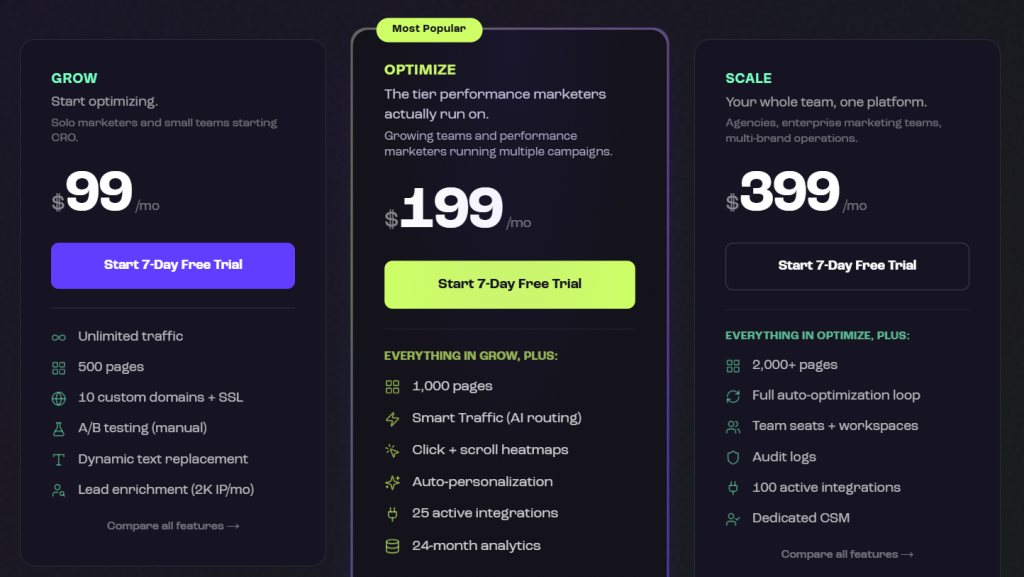
Leadpages has three plans, all of which include unlimited traffic, custom domains with SSL, AI page creation, and forms with webhooks. There are no traffic caps, overage fees, or per-visitor pricing. Annual billing saves 20% across all tiers.
Grow
The Grow plan costs $99/month, or $79/month when billed annually. It’s built for solo marketers and small teams just starting with CRO, and it includes 500 pages, 10 custom domains, 5 team seats, 40,000 AI credits, and 12 months of analytics retention.
Optimize
The Optimize plan is $199/month, and it’s the tier most performance marketers actually run on. You get 1,000 pages, 20 custom domains, 10 team seats, 80,000 AI credits, and 24-month analytics retention.
Scale
Scale is $399/month, and it’s built for agencies and enterprise teams. It unlocks 2,000+ pages, 30 custom domains, 25 team seats, workspaces, audit logs, 160,000 AI credits, 36-month analytics retention, and a dedicated customer success manager.
Core Leadpages Features
AI Page Creation & Templates
Leadpages includes AI page creation on every plan, which means you can describe your offer in a few sentences, and the AI will generate a complete landing page draft. It pulls from Leadpages’ library of conversion-tested templates and adapts the layout, copy, and design to your goal. The template library covers common page types: lead generation, sales pages, webinar registration, ecommerce checkout, and full websites.
A/B Testing & Smart Traffic (AI Visitor Routing)
A/B testing is where Leadpages separates itself from cheaper alternatives. Manual A/B testing is included on every plan. You can test up to 6 variants per page on Grow and Optimize, and 12 variants on Scale.
Smart Traffic, available on Optimize and Scale, routes each visitor to the page version most likely to convert them based on their attributes.
Heatmaps & Conversion Analytics
On the Optimize plan and above, Leadpages includes click, scroll, and attention heatmaps directly inside the editor. You can see exactly where visitors are clicking, how far they’re scrolling, and which sections are losing their attention.
Dynamic Text Replacement & Personalization
Dynamic text replacement is one of the most powerful tools for paid traffic. It automatically swaps headline copy on your landing page based on the keyword someone searched for or the ad they clicked. So if you’re running 20 ad variations, you can have 20 different headlines without building different pages.
Leadpages Reviews: Is This AI Landing Page Builder Worth It?
Reviewers consistently highlight the ease of use, the variety of conversion-tested templates, and the speed at which non-technical users can launch a working landing page. The Leadmeter feature, which scores your page in real time and flags weak CTAs or missing elements, comes up often as a feature people didn’t expect to rely on but ended up loving.
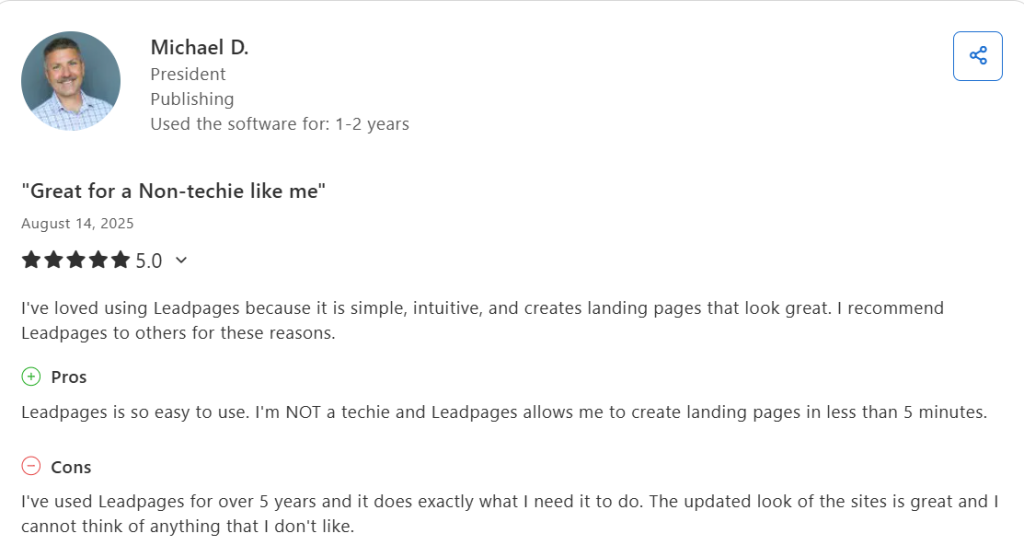
Users praise the drag-and-drop builder, the WordPress plugin integration, and the fact that A/B testing is now included on the entry-level plan. Common criticisms center on the price point feeling steep for solo users on tight budgets, and a few reviewers wish the template library had more variety, noting that pages can start to look similar across different Leadpages users.
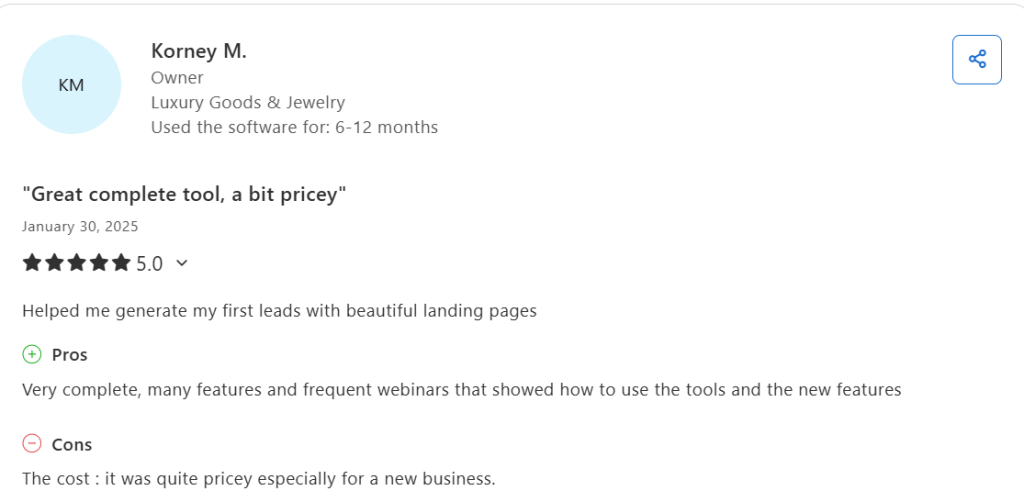
The recurring pattern across all three platforms is clear: people who use Leadpages for what it’s built for, like converting paid traffic into leads, are overwhelmingly happy. People who try to use it as a full design tool or general-purpose website builder tend to feel limited.
4 Leadpages Alternatives
Unbounce
Unbounce is one of Leadpages’ closest competitors, with a similar focus on landing page conversion and AI-powered optimization. Pricing starts at $99/month, but the entry plan caps traffic at 20,000 visitors, which can become a problem fast for paid ad campaigns.
Unbounce includes its Smart Builder AI and Smart Traffic features, but A/B testing is gated behind higher-tier plans. Best for marketers who want polished templates and don’t mind paying for traffic overages.
Instapage
Instapage is the more enterprise-focused alternative, built for large teams running personalization at scale across hundreds of ad campaigns. Plans start at $99/month with a 15,000 visitor cap on the entry tier, which is even tighter than Unbounce.
Instapage’s AdMap feature, which connects ads directly to matching landing pages, is outstanding. The downside is the price ramp once you scale, which gets expensive quickly for SMBs.
ClickFunnels
ClickFunnels focuses on full sales funnels instead of just individual landing pages. Plans start at $97/month, and the platform includes membership sites, email automation, and order forms alongside the page builder.
It’s the right choice if you sell digital products, courses, or coaching and need an end-to-end funnel. The trade-off is a steeper learning curve and fewer pure CRO features compared to Leadpages.
Landingi
Landingi is the budget-friendly alternative, offering a free plan and paid tiers from $29/month. It includes 400+ templates, A/B testing, basic analytics, and AI tools for content and SEO. The interface is approachable and the integrations cover most common tools. The downside is fewer advanced optimization features like AI visitor routing or auto-personalization, making it a better fit for small businesses than performance marketers running heavy paid traffic.
Pair Leadpages With a Traffic Engine That Keeps It Full
Leadpages is the right pick if your bottleneck is conversion. It turns paid clicks and existing organic visitors into leads using A/B testing, Smart Traffic, and dynamic text replacement, and the $99 entry plan now includes features that used to be locked behind enterprise tiers. The honest limit is that a great landing page still needs traffic, and Leadpages does not generate that traffic for you.
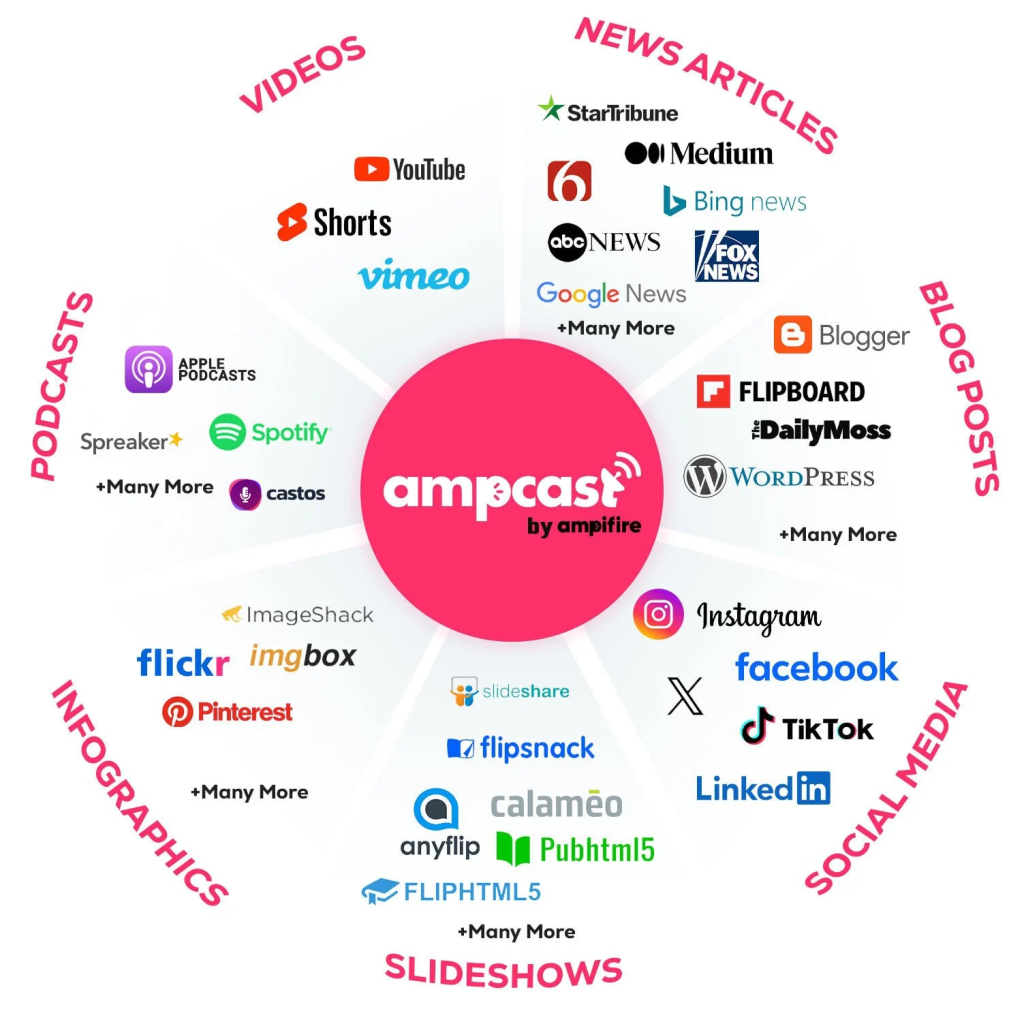
That is where AmpiFire’s AmpCast AI fits in. It takes one topic and turns it into 8 content formats, including news articles, blog posts, interview podcasts, longer informational videos, reels and shorts, infographics, flipbooks and slideshows, and social posts, then publishes them across 300+ sites like Google News, YouTube, Spotify, Pinterest, and Fox affiliates. Run Leadpages for the conversion side, run AmpCast AI for the organic traffic side, and the page stops sitting empty.
Frequently Asked Questions (FAQs)
Does Leadpages have a free plan?
Leadpages does not offer a permanently free plan. It does provide a 7-day free trial across all paid tiers, with no credit card required to start. The trial gives you full access to whatever plan you choose, so you can build and test real pages before committing.
Can I build a full website with Leadpages?
Yes, Leadpages now includes full website and blog functionality on every plan, so you can build and host your entire site on the platform with custom domains and SSL. That said, if you need deep customization, complex page hierarchies, or developer-level control, a tool like Webflow or WordPress will give you more flexibility.
Does Leadpages work with paid ads?
Leadpages is built specifically for paid traffic. Features like dynamic text replacement, Smart Traffic AI routing, and unlimited visitors on every plan are designed for marketers running Google Ads, Facebook Ads, and other paid campaigns at scale. The platform also includes an offline conversion pixel and direct integrations with Google Ads.
What integrations does Leadpages support?
Leadpages connects with HubSpot, Salesforce, Mailchimp, Google Ads, Stripe, Shopify, Slack, Zapier, and 200+ more tools through Paragon. Leads flow directly to your CRM or email tool via webhooks, and the new MCP server lets you connect AI tools directly to your account.
How can I use Leadpages and AmpiFire’s AmpCast AI?
Once your landing pages are built to convert, the next step is making sure the right people actually see them. Pairing Leadpages with AmpCast AI helps you do exactly that, by publishing 8 content formats across 300+ platforms like Google News, YouTube, Spotify, and Pinterest. This pulls in qualified visitors from search, social, video, podcast, and news channels, so your landing pages are filled with traffic from multiple sources rather than relying solely on paid ads.
*Disclaimer: Results may vary based on individual circumstances, business type, and content strategy. The time savings and outcomes mentioned are based on typical user experiences and are not guaranteed. For specific pricing and service details, please visit AmpiFire.
Author
Related Posts


ClickSites AI Pricing & Alternatives: Is This Website Builder Worth It?
Learn about ClickSites AI pricing, features, pros & cons, and top alternatives. Find out if this lifetime AI website builder…

OptiMonk Pricing & Reviews: Is This Popup Builder Worth It?
Discover OptiMonk pricing, features, and user reviews in our detailed analysis. Learn how this popup builder stacks up against other…


Tally Pricing, Reviews & Features: Is This Form Builder Worth It?
Find out if Tally is the right free form builder with unlimited submissions, robust integrations, and responsive support. Learn if…

OneStream Live Pricing, Reviews & Alternatives: Is This Multistreaming Platform Worth It?
OneStream Live review: compare pricing, features, and top alternatives to see if this multistreaming platform is worth it.


Stripo Reviews, Pricing & Features: Is This The Best Email Template Builder?
Explore Stripo’s email template builder, its free and paid pricing plans, and whether it’s the right fit for your email…

Kit (Formerly ConvertKit) Reviews, Pricing & Alternatives: Is This Email Marketing Tool Legit?
Learn all about Kit (formerly ConvertKit), an email marketing platform built for creators. Explore features, pricing, real user reviews, and…








