


Key Takeaways
- Pixpa is an all-in-one website builder for photographers, and it is worth it if you want a portfolio, client galleries, and a store in one affordable platform.
- Pixpa pricing starts at $5.40/month billed annually, with most photographers choosing the Creator ($9/month) or Professional ($12/month) plan.
- Pixpa earns a strong 4.6 out of 5 from 108 reviews on G2, with users praising its ease of use and support.
- Alternatives include Squarespace for premium design and bookings, SmugMug for unlimited photo storage and print sales, and Zenfolio for integrated print fulfillment and client workflow management.
- Once your Pixpa website is live, AmpiFire’s AmpCast AI helps you reach more potential clients by researching buyer-intent topics, turning them into 8 content formats, then publishing them across 300+ sites, including Pinterest, Flickr, Google News, YouTube, Spotify, and more to drive traffic back to your portfolio.
Is Pixpa Worth It for Photographers?
Pixpa is a website builder made for photographers, that offers a portfolio site, private client galleries, photo proofing, and an online store to sell prints, all in one place, starting at $5.40/month. You build your site with a simple drag-and-drop editor, send clients a private link to view and pick their favorite photos, and keep 100% of what you sell. Doing all that with alternatives like Squarespace or Pixieset, along with a separate store plugin, can cost roughly twice as much each month.
Your Pixpa portfolio can be worth much more once potential clients discover it, and AmpiFire can complement it by helping more people find your work. Our AmpCast AI researches the topics potential clients search before booking, creates 8 content formats (news articles, blog posts, interview podcasts, longer informational videos, reels/shorts, infographics, flipbooks/slideshows, and social posts), then publishes them across 300+ sites. This helps potential clients come across your photography business across search, video, podcasts, news, and social media instead of relying on your website alone.

How AmpiFire Works:
- Research & Target: Find high-demand topics your buyers search for.
- Create & Repurpose: AmpiFire’s AmpCast AI generates news articles, blog posts, interview podcasts, longer informational videos, reels/shorts, infographics, flipbooks/slideshows, and social posts.
- Distribute & Amplify: Auto-publish to 300+ sites, including Google News, YouTube, Spotify, and major news networks.
Get more traffic from people who want to buy your stuff, and powerful “As Seen On” trust badges for your site.
Do It Yourself (with AI), Done For You Content, & 100% Managed Organic Growth options available.
Grow Your Free Traffic From Everywhere
Pixpa’s Core Features
Drag-and-Drop Editor & Template Quality
Pixpa’s editor is clean, visual, and straightforward. You work with a drag-and-drop interface that lets you move sections, swap layouts, change fonts and colors, and preview your site in real time, no coding required.
The template library leans heavily toward visual, image-forward designs, which is exactly what photographers need. Templates are fully responsive, meaning they automatically adjust for mobile and tablet screens.
Client Galleries & Proofing Tools
This is where Pixpa genuinely earns its place as a photographer-first platform. Client galleries give each client their own private, password-protected page where you can deliver their photos. They can look through the images, pick their favorites, leave notes, and approve their final picks, without you sending huge files or using a separate app to share them.
The proofing workflow is intuitive from the client’s side, too, which reduces back-and-forth emails and speeds up the approval process. For wedding photographers, portrait photographers, or anyone doing volume client work, this feature alone can justify the subscription cost.
Built-In eCommerce for Selling Photos
Pixpa includes a fully integrated online store where you can sell prints, digital downloads, and physical products, with zero commission taken by Pixpa on your sales. Many platforms either charge a transaction fee or require a third-party integration to sell work online.
The store setup process follows the same no-code approach as the rest of the platform. You can add products, set pricing, manage orders, and customize your storefront without needing any eCommerce experience. Payment processing is handled through standard integrations, keeping the checkout experience smooth for buyers.
For photographers looking to monetize their work beyond client sessions, having a built-in, zero-commission store is a genuine business advantage rather than an afterthought feature.
Blogging & SEO Tools
Pixpa includes a built-in blog editor, which is more useful for photographers than it might seem at first. Blogging about your shoots, locations, and creative process is one of the most effective long-term strategies for making your website show up in search results. A behind-the-scenes post about a mountain engagement shoot, for example, can rank for location-specific search terms and bring in organic traffic for years.
The website builder gives you the basic tools to help your photos show up on Google, like writing the title and short summary that appear in search results, adding image descriptions, and making your site work well on phones.
It is not as powerful as WordPress with all its add-on tools. For most photographers, though, it has everything you need to get found online.
How Much Does Pixpa Cost?
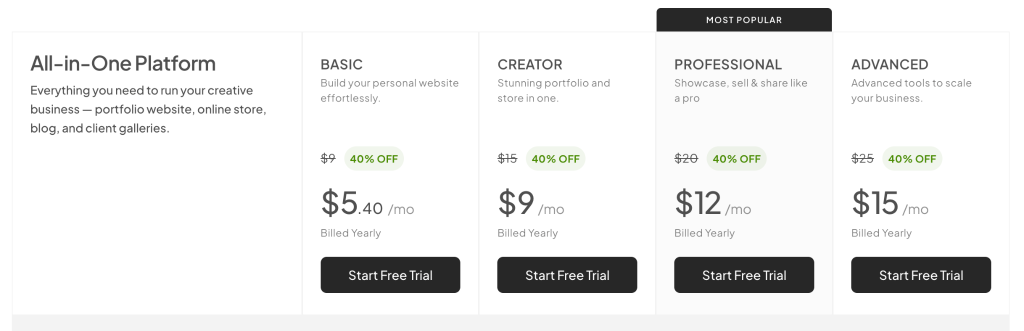
Pixpa pricing is structured as annual plans, and it’s genuinely competitive compared to what you’d pay to piece together similar functionality across multiple platforms. Plans start at $5.40/month (billed annually), which makes it one of the more affordable options for photographers at the entry level. A 15-day free trial is available with no credit card required, so you can test the full platform before committing.
For most working photographers, the Creator ($9/month) or Professional ($12/month) plan hits the sweet spot. You get client galleries, the zero-commission store, and enough page capacity to build a complete business website.
The Basic plan works if you only need a simple portfolio with no client delivery requirements. The Advanced plan ($15/month) makes sense for studios with multiple team members or photographers managing large volumes of client work simultaneously.
Pixpa Reviews
On G2, Pixpa holds a 4.6 out of 5 rating from 108 reviews, and the praise is consistent across photographers, artists, and other creatives. Users repeatedly point to how easy it is to set up and customize, the affordability compared to bigger builders, the polished template designs, and customer support that is fast, personal, and genuinely helpful.
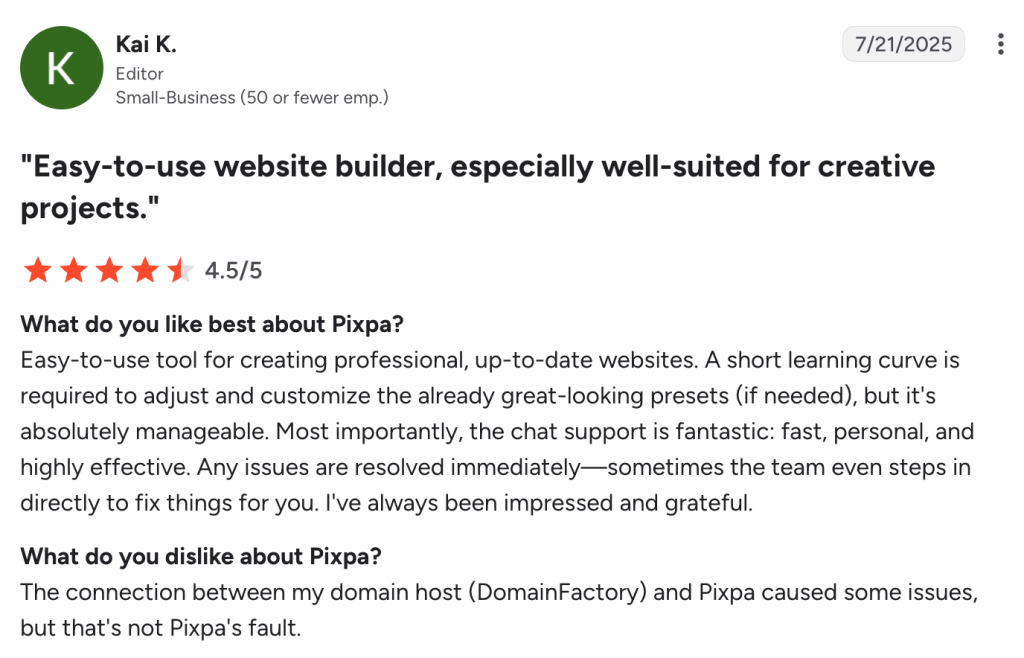
The criticism is fairly mild and worth knowing before you commit. Some reviewers mention a learning curve for the more advanced features, limited design options for gallery pages, no free tier, and the occasional glitch or slow update while editing. For most users, though, the value and support outweigh these minor gaps.
Pixpa Alternatives for Photographers
Pixpa is a strong choice, but it’s not the only option. Depending on your specific priorities, one of these alternatives might be a better fit.
1. Squarespace
Squarespace is a design-forward platform. Its templates are widely considered the most polished in the website builder category, and the platform has deep integration with Acuity Scheduling, making it a strong pick for photographers who rely heavily on online booking. If your brand aesthetics are a top priority and you’re willing to use a separate tool for client galleries, Squarespace delivers.
The trade-off is cost and complexity. Squarespace plans cost more than Pixpa, and you’ll still need separate tools like Pixieset or Pic-Time to deliver client galleries, which means extra cost and more apps to juggle.
2. SmugMug
SmugMug has built its reputation on reliable image hosting and print sales. It’s a favorite for photographers who shoot a lot, like wildlife, sports, and stock shooters, thanks to unlimited storage, strong print partners, and its ownership of Flickr.
Where SmugMug falls short is on the website design side. The template options feel dated compared to Pixpa or Squarespace, and the customization tools aren’t as intuitive. The pricing starts at $20/month (billed annually) for the Direct plan, rising to $37/month for the Pro tier, making it notably more expensive than Pixpa at comparable feature levels.
3. Zenfolio
Zenfolio is built for full-time photographers who want their website, client photo approvals, booking calendar, and print orders all working together in one place. It connects directly with major print labs, so when a client orders prints, the order goes straight to the lab without you having to forward it. That makes it a strong pick for photographers who sell prints regularly.
The platform is functional but not particularly exciting from a design standpoint. It gets the job done for client workflow management, but if you’re building a brand that competes visually in a crowded market, Zenfolio’s templates may not give you the edge you need.
Plans start at $7/month annually for the Basic tier, positioning it close to Pixpa’s mid-tier pricing.
Pixpa vs Alternatives: Comparison Table
| Feature | Pixpa | Squarespace | SmugMug | Zenfolio |
| Starting Price | $5.40/mo | Higher than Pixpa | $20/mo | $7/mo |
| Client Galleries | Built in | Needs add-on (Pixieset) | Built in | Built in |
| Zero-Commission Store | Yes | No | No (~15% on sale markup) | No (7% commerce fee) |
| Best For | All-in-one photographer site | Design-led brands, booking | High-volume shooters | Print-focused photographers |
Boost Your Online Site Presence with AmpiFire
Pixpa is worth it for photographers who want portfolio sites, client galleries, and a zero-commission store under one affordable subscription, with a 15-day free trial to test it first. But a beautiful website is only the starting point. Even the best photography portfolio can struggle to attract visitors if it depends only on people finding it through search results.
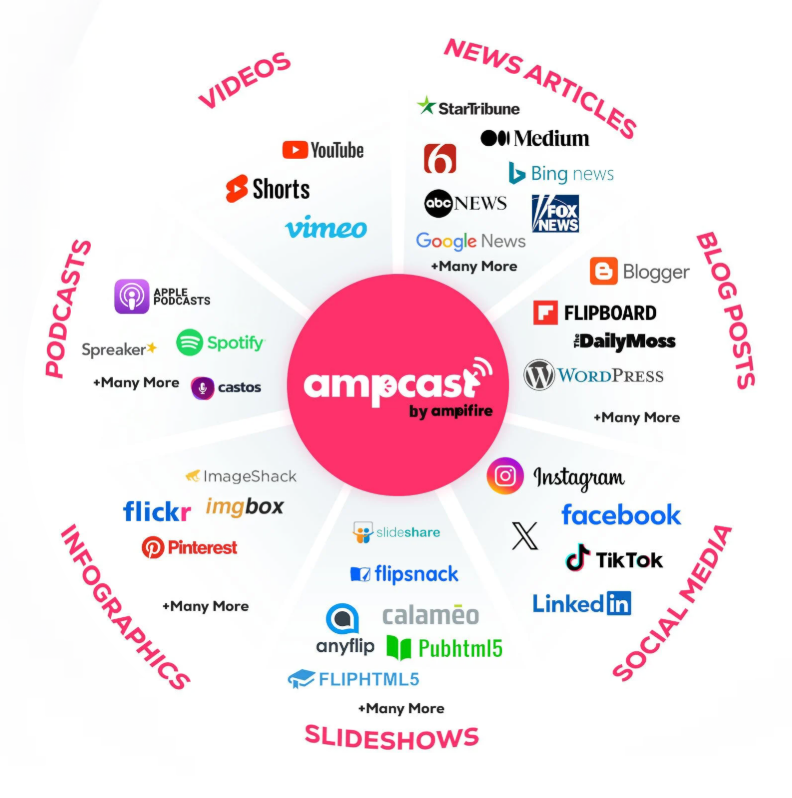
At AmpiFire, our AmpCast AI researches the topics potential clients search before hiring a photographer, creates multiple content formats, then publishes them across 300+ sites, including Google News, YouTube, Spotify, Pinterest, Flickr, and more. Instead of relying on a single website to attract visitors, you build a broader organic presence across multiple channels where people research photographers before booking. Try AmpiFire’s AmpCast AI today.
Frequently Asked Questions (FAQs)
What is Pixpa used for?
Pixpa is an all-in-one website builder for creatives. It lets you build a portfolio site, deliver private client galleries, proof photos, run a blog, and sell prints or downloads, all without any coding.
Can I sell prints on Pixpa?
Yes. Pixpa includes a built-in store where you can sell prints, digital downloads, and physical products, with zero commission taken on your sales. You set pricing, manage orders, and keep 100% of your revenue.
Is Pixpa good for artists?
Yes. Pixpa is built for visual creatives, with image-forward templates, customizable galleries, and a commission-free store. Artists, photographers, and designers can showcase work and sell it from one affordable platform.
Does Pixpa offer a free trial?
Yes, Pixpa provides a 15-day free trial that gives you full access to the platform’s features without requiring a credit card to get started.
How does AmpiFire work?
Pixpa gives you a professional website to showcase your photography. AmpiFire helps more people discover your brand by turning a single high-demand topic into flipbooks, slideshows, blog posts, news articles, interview podcasts, long-form videos, reels, infographics, and social posts. It then distributes that content across 300+ sites, including Pinterest, Flickr, YouTube, Spotify, and more, helping drive organic traffic back to your Pixpa website.
*Disclaimer: Results may vary based on individual circumstances, business type, and content strategy. The time savings and outcomes mentioned are based on typical user experiences and are not guaranteed. For specific pricing and service details, please visit AmpiFire.
Author
Related Posts


ClickSites AI Pricing & Alternatives: Is This Website Builder Worth It?
Learn about ClickSites AI pricing, features, pros & cons, and top alternatives. Find out if this lifetime AI website builder…


Leadpages Reviews, Pricing & Alternatives: Is This AI Landing Page Builder Worth It?
Leadpages reviews, pricing, and alternatives compared. See how this AI landing page builder stacks up and how AmpiFire fills the…

OptiMonk Pricing & Reviews: Is This Popup Builder Worth It?
Discover OptiMonk pricing, features, and user reviews in our detailed analysis. Learn how this popup builder stacks up against other…


Tally Pricing, Reviews & Features: Is This Form Builder Worth It?
Find out if Tally is the right free form builder with unlimited submissions, robust integrations, and responsive support. Learn if…


Common Ninja Reviews, Pricing & Alternatives: Is This the Best No-Code Website Plugin Platform?
Find out how Common Ninja's no-code widgets work across website builders, read real user reviews. Compare pricing plans and the…

Rankability Reviews, Pricing & Alternatives: Is This SEO Tool Worth It?
Read our Rankability review to compare features, pricing, alternatives, and user feedback, then see how AmpiFire extends content across 300+…








