


Key Takeaways
- AI shopping visibility is mostly driven by Google Shopping, so a clean Merchant Center feed, proper schema, and real reviews automatically improve performance across AI tools like ChatGPT, Gemini, and Perplexity.
- Only two Shopify tools are truly essential: the Google & YouTube app for product syncing and a schema app like JSON-LD for SEO. Everything else adds limited value compared to these.
- Core performance comes from product data quality, GTINs, clear titles, unique descriptions, accurate pricing, and real-time availability, which are the main ranking and approval signals.
- Reviews, schema, and Merchant Center health form the trust layer. Without them, products rarely get strong visibility in Google Shopping or AI-driven recommendations.
- At AmpiFire, we can audit your store and our AmpiFire’s AmpCast to create 8 unique content types and distribute them automatically across 300+ sites, ensuring products show up where customers actually research and decide.
What Actually Drives AI Shopping Visibility
Most e-commerce brands are being sold the wrong solution. Agencies position “AI SEO” or “AEO optimization” as a complex, ongoing service costing thousands per month. But the data tells a much simpler story:
83% of ChatGPT’s shopping carousel results come directly from Google Shopping’s top 40 organic listings, and 60% come from the top 10. [Peec AI / Search Engine Land, March 2026, analysis of 43,000 products.]
That means platforms like ChatGPT, Gemini, Perplexity, and Copilot are not finding products independently; they are pulling from the same underlying Google Shopping ecosystem.
This leads to a clear conclusion:
If your store is optimized for Google Merchant Center, you are automatically optimized for AI shopping surfaces. At a practical level, this comes down to three core elements:
- A clean and accurate product feed
- Complete and valid product schema
- Authentic product reviews
If your Google Merchant Center feed is clean, your product schema is correct, and you have real reviews on your products, you are 90% of the way there for every major AI shopping surface at once. No $10K consultant required. The rest of this guide is how to get that 90% done on Shopify (and Magento, WooCommerce, BigCommerce) without wasting months.

How AmpiFire Works:
- Research & Target: Find high-demand topics your buyers search for.
- Create & Repurpose: AmpiFire’s AmpCast AI generates news articles, blog posts, interview podcasts, longer informational videos, reels/shorts, infographics, flipbooks/slideshows, and social posts.
- Distribute & Amplify: Auto-publish to 300+ sites, including Google News, YouTube, Spotify, and major news networks.
Get more traffic from people who want to buy your stuff, and powerful “As Seen On” trust badges for your site.
Do It Yourself (with AI), Done For You Content, & 100% Managed Organic Growth options available.
Grow Your Free Traffic From Everywhere
2 Must-Have Shopify Apps You Actually Need
Instead of installing a stack of overlapping “SEO booster” apps, most Shopify stores only need two core tools to cover the technical foundation of SEO and product visibility.
1. Google & YouTube (Official Shopify App)
The Google & YouTube app is essential for syncing your Shopify store with Google Merchant Center. It automatically pushes your products, inventory, pricing, and availability into Google’s ecosystem.
This feed is what powers visibility across Google Shopping and also supports modern AI discovery systems like Google AI results, ChatGPT, Gemini, and Microsoft Copilot. If your data isn’t properly synced here, your products lose a major visibility channel.
2. JSON-LD for SEO
Most Shopify themes only generate very basic structured data; usually just product title, price, and image. That’s not enough for search engines or AI systems.
JSON-LD for SEO (Ilana Davis) enhances your product schema by adding key missing details like shipping details, return policy, aggregate ratings, GTIN/MPN, and price validity. This helps search engines better understand and rank your products. Risify is a newer premium option if you want a richer feature set.
How to Optimize Shopify for Google, AI Search & Conversions
This workflow is based on how modern Shopify SEO actually works today, where Google Shopping, AI systems, and conversion optimization all depend on structured product data, clean feeds, and scalable content quality.
Step 1: Set Up Google Merchant Center Properly
Google Merchant Center is the core layer of product visibility in the entire Shopify SEO system. If this setup is weak or incomplete, everything else in your optimization strategy loses impact.
Initial Setup and Sync
The setup process is fairly straightforward, but every step matters for proper indexing and approval.
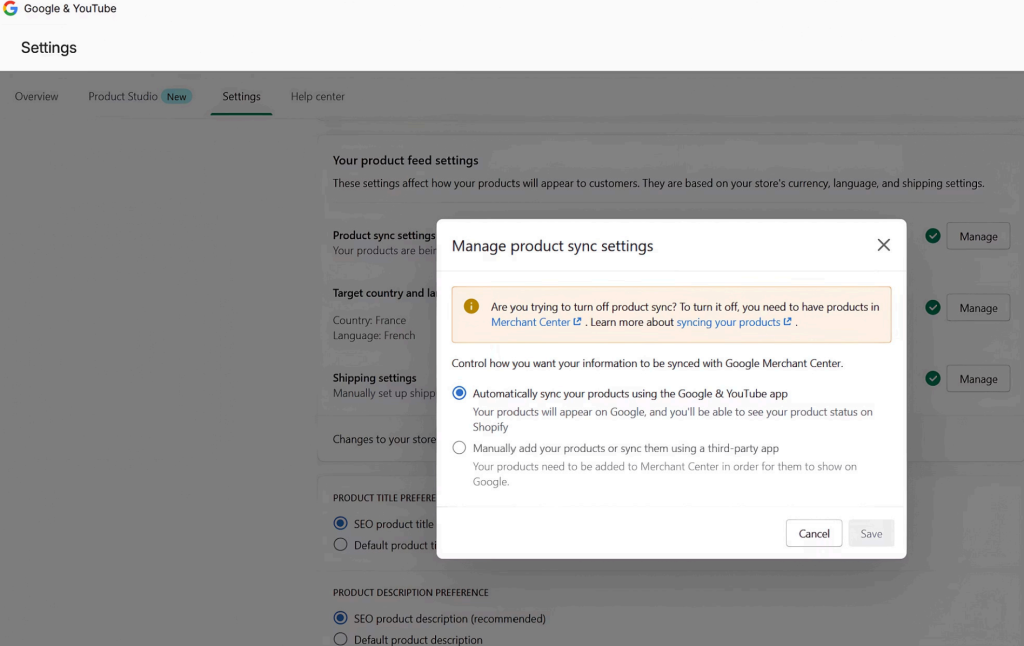
First, install the Google & YouTube app inside Shopify. This automatically generates your product feed and connects your store to Google Merchant Center.
Next, complete the account connection by authorizing the Google account that will own Merchant Center access. You can do this directly from:
- Shopify Admin → Sales Channels → Add Google & YouTube
Once connected and synced, Google begins reviewing your product catalog. This approval process typically takes 3 to 5 days, depending on catalog size and data quality.
After approval, your focus shifts from setup to monitoring. The Merchant Center dashboard should be checked regularly for feed errors, warnings, or disapprovals.
Product Data Fields That Influence Performance
Not all product fields carry equal weight. In priority order, these are the ones that directly impact approval, ranking, and AI-based product visibility:
| Priority | Field | What It Means | Key Requirements / Best Practices |
| 1 | GTIN (Barcode) | Unique product identifier used by platforms | Add in Shopify under Product → Inventory → Barcode. Products with GTINs can get up to 40% more clicks. If no barcode (custom products), set identifier_exists = false. Missing GTIN on branded items can cause disapproval. |
| 2 | Title Formula | How your product title is structured | Use: Brand + Product Type + Key Attributes (material, color, size, use-case). Keep it 70+ characters, front-loaded, no promotional terms. “SALE!” or “FREE SHIPPING” in the title will lead to rejection. Bad: Summer Sale – Great T-Shirt Good: Patagonia Men’s Capilene Cool Daily Short Sleeve T-Shirt, Heather Navy, Moisture-Wicking |
| 3 | Description | Product content shown to users and platforms | Write 150+ words of unique, original copy. Avoid duplicate supplier descriptions because Google detects duplicates across stores anddeprioritizes you. |
| 4 | Price Format | How pricing is displayed in feeds | Use format like 19.99 USD, not symbols like $19.99. Mismatches between the feed priceand store price (often caused by currency converter apps) is the #1 cause of account suspensions. |
| 5 | Availability | Product stock status | Must update in real-time. Out-of-stock items are quickly disapproved if not synced properly. |
| 6 | Brand, Condition, Image Link | Core required product data | All must be present. Missing any of these fields can lead to disapproval or reduced visibility. |
| 7 | Google Product Category | Category classification for products | Use the most specific taxonomy (e.g., Apparel & Accessories > Clothing > Shirts > T-Shirts instead of broad categories like Apparel & Accessories). |
| 8 | Product Reviews Feed | Separate feed for ratings & reviews | This is separate from the product feed and requires a review app that syncs with Google Merchant Center. Star ratings improve click-through rates and increase chances of AI citation. |
Shipping & Returns Configuration
Shipping and return policies must be set directly in Google Merchant Center and must exactly match your Shopify settings. These details are increasingly displayed in AI-driven shopping interfaces, making consistency critical.
Any mismatch or missing information reduces trust signals, which often results in fewer impressions and weaker visibility across Google Shopping and AI surfaces.
Step 2: Fix Your Product Schema
Your product feed controls eligibility, but your product schema controls how well your products are understood by Google and AI systems. This directly impacts visibility in organic Shopping results and AI-driven recommendations.
Why Shopify’s Default Schema Isn’t Enough
Most Shopify themes only generate basic Product schema, usually limited to title, price, and image. This is not enough for modern search systems that rely on richer, structured data.
Apps like JSON-LD for SEO or Risify help fill these gaps automatically by adding the missing fields and improving how your product data is structured.
Key Schema Elements to Include
| Field | What It Does |
| offers.priceValidUntil | Prevents “offer missing priceValidUntil” warnings and ensures pricing validity is clearly defined |
| offers.shippingDetails | Specifies shipping cost, destination, and handling time for accurate delivery information |
| hasMerchantReturnPolicy | Defines return window, return method, and any associated fees |
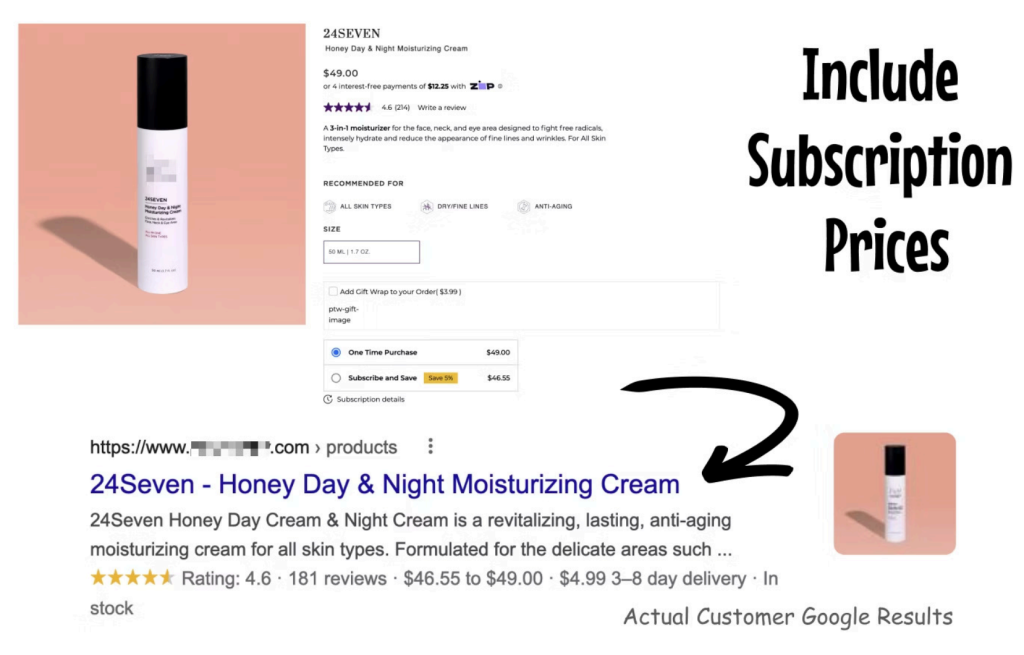
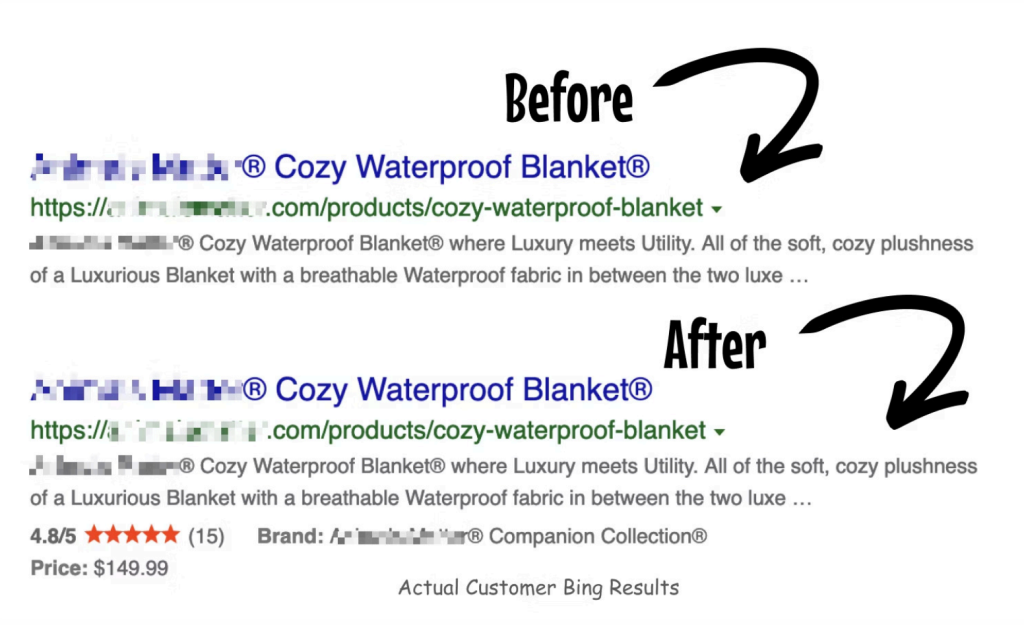
| aggregateRating + review | Highest-signal field for AI citation; improves trust, visibility, and click-through rates |
| brand, sku, mpn, gtin13 | Establishes clear product identity across platforms and systems |
| itemCondition | Indicates product state, typically set as “NewCondition” |
At a basic level, your schema should also include accurate product identifiers such as brand, SKU, MPN, and GTIN, along with the correct product condition.
Validate and Fix Errors
After implementation, every product page should pass tools like Google Rich Results Test without any Product-type errors. Also, check for duplicate schema using Schema Markup Validator.
Every product page should pass with zero Product-type errors. If you get a duplicate Product schema (theme + app both firing), kill one.
What You Can Skip
Not everything in structured data is worth your time; some elements add little to no real value and can safely be deprioritized.
- FAQPage schema on every product: dead in rich results, neutral for AI extraction.
- Extensive Organization / LocalBusiness stacking on product pages.
- Speakable, HowTo, Product-as-Service hacks.
- Custom “entity graphs” pretending to be structured data
Remember that agencies push these because they’re billable. They don’t move the needle.
Step 3: Get Real Reviews on Your Products
After a clean product feed, reviews are one of the highest-impact factors for both rankings and conversions. ChatGPT and Google AI Mode are aggressively biased toward products with high review scores. No reviews = no AI recommendation.
Why Reviews Matter
Reviews act as both a trust signal and a ranking factor. They influence click-through rates through visible star ratings and play a major role in how AI systems decide which products to surface. Simply put, more high-quality reviews increase both visibility and conversions.
Review Tools to Use
To make reviews effective, they need to integrate with your product schema and Google Merchant Center. Common options include:
- Judge.me → Best price/performance for stores under $5M GMV
- Okendo → Stronger for mid-market brands
- Yotpo → Enterprise-level solution
All three inject aggregateRating into your product schema and sync into Google Merchant Center’s Product Ratings program. That’s what puts stars on your Shopping listings.
What This Improves
Once set up, your products can display star ratings in Google Shopping results. This improves click-through rates and increases the chances of being featured in AI-generated recommendations.
Step 4: Write Product Pages for Humans
Modern SEO no longer rewards keyword stuffing. In fact, AI-driven search systems actively penalize unnatural keyword density. The goal now is simple: write like a knowledgeable salesperson explaining the product clearly to a real customer.
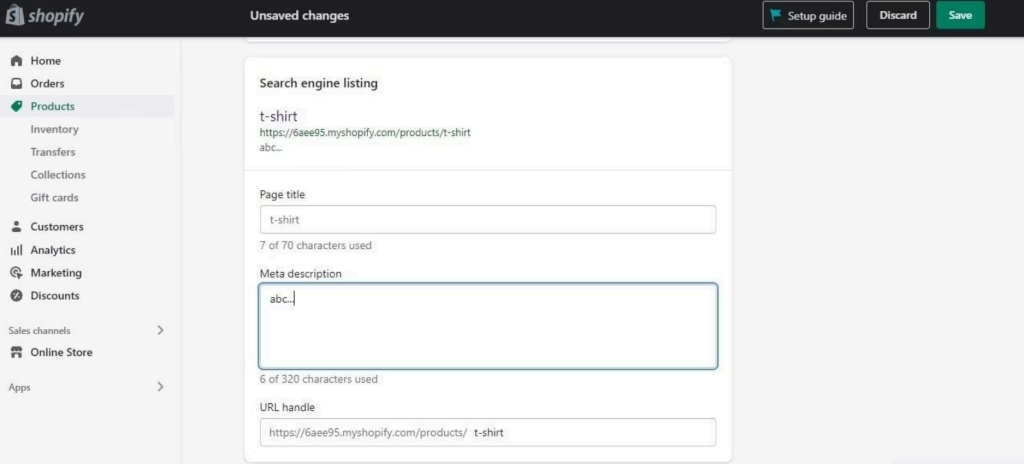
Write Clear, Structured Titles
Product titles should be descriptive and easy to understand, not keyword-heavy.
- Poor example: Blue Shoes Men’s Running Sneakers
- Better example: Men’s Blue Trail Running Sneakers – [Brand Name]
This structure is clearer for both users and search systems.
Keep Descriptions Natural & Useful
Avoid repetitive keyword phrases or forced sales language. Focus on explaining the product in a natural, helpful way.
- Poor example: Buy cheap blue running shoes. Best running shoes for men. Fast delivery of running shoes.
- Better example: These lightweight men’s running shoes feature a breathable mesh upper and a waterproof Gore-Tex lining, designed for comfortable trail running in wet conditions. Available in navy blue and sizes 8–13.
Simple Formatting That Works
Good product pages are easy to scan and understand. Keep formatting clean and intentional:
Use short paragraphs and a simple structure. Add bullet points only for key specs like materials, sizing, or care instructions. Include sizing guidance, use cases, and who the product is for. Also include a clear line near the top that briefly explains what the product is in plain language, so it can be easily understood by both customers and AI systems (e.g., “what is this product?”).
Step 5: Mass-Update Your Product Catalog with AI + Google Sheets
If you have 50, 500, or 5,000 products to fix, you are not doing this one-by-one in Shopify admin. You use CSV import.
The workflow:
- Export your catalog. Shopify Admin → Products → Export → choose “All products” → CSV for Excel, Numbers, or Google Sheets.
- Open the CSV in Google Sheets.
- Install an AI for Sheets extension. Two solid options:
- Claude for Sheets: via Google Apps Script setup, free with API credits.
- Gemini in Google Sheets: built into Google Workspace (paid plan), use =AI() directly in cells.
- Run your prompt across the title and description columns.
- Re-import the CSV back into Shopify.
This same workflow also works for Magento (System → Data Transfer → Export), WooCommerce (Product CSV Import Suite), and BigCommerce (Products → Export).
The Prompt To Use
Paste this into your AI-for-Sheets formula, pointing it at each product row. Adjust the cell references to match your sheet layout. Run it across your full catalog, then spot-check 10–20 outputs manually before re-importing.
You are a product copywriter who writes for Google Shopping, ChatGPT, Perplexity, and Google AI Mode.
For the product in this row, rewrite the TITLE and DESCRIPTION using these exact rules.
=== TITLE ===
Formula: Brand + Product Type + Key Attributes (material, color, size, use-case)
• Max 150 characters, front-load the most specific identifiers
• Write how a real buyer would search for it in natural language
• NO promo language. No “SALE”, “FREE SHIPPING”, “50% OFF”, “BEST”
• No emojis, no ALL CAPS marketing words, no special characters
=== DESCRIPTION ===
150–250 words. Write like a knowledgeable salesperson.
Structure:
1. First sentence: a clear, quotable definition of what the product is and who it’s for. Short and fact-based.
2. Next 2–3 short paragraphs: materials, construction, key specs, use cases, sizing guidance, care instructions.
3. A bulleted spec list at the end.
Rules:
• Use natural semantic variants of the product category
• NO hyped claims the reviews won’t back up
• NO keyword stuffing
• NO filler words like “high-quality”, “premium”, “best-in-class”
=== INPUT COLUMNS ===
Current Title: {{A2}}
Current Description: {{B2}}
Brand: {{C2}}
Category: {{D2}}
Key Specs: {{E2}}
Target Customer: {{F2}}
=== OUTPUT ===
Return a JSON object with exactly two fields:
{ “new_title”: “…”, “new_description”: “…” }
Adjust the cell references to match your sheet layout. Run it across your full catalog, then spot-check 10–20 outputs manually before re-importing. Always keep a backup of your original CSV. Always test on 5 products first before rolling out across thousands.
How to Apply This Across Different E-Commerce Platforms
The principles are identical across every ecommerce platform. Only the implementation changes. Here’s the same core setup, mapped to each major platform:
| Task | Shopify | Magento 2 | WooCommerce | BigCommerce |
| Product feed to GMC (Google Merchant Center) | Google & YouTube app (free, official) | Magmodules Google Shopping, or Mageplaza Google Shopping Feed | Google Listings & Ads plugin (official) | Native Channel Manager → Google Shopping |
| Complete Product schema | JSON-LD for SEO, or Risify (premium) | Magefan Schema Markup Pro, or Mageplaza Rich Snippets | RankMath Pro, or Schema Pro | Default schema + JSON-LD Schema app to fill gaps |
| Reviews synced to GMC | Judge.me, Okendo, or Yotpo | Yotpo for Magento, or native reviews + GMC Product Ratings | Judge.me for WooCommerce, or Yotpo | Yotpo, Stamped.io, or Okendo |
| Bulk CSV catalog updates | Products → Export → CSV | System → Data Transfer → Export | Built-in Product CSV Import Suite | Products → Export → Bulk Edit |
The Google Sheets + AI prompt workflow from Step 5 works identically on all four platforms: export catalog as CSV, run the rewrite prompt across title and description columns, re-import.
If your platform has no Google Merchant Center integration at all, build a custom feed manually from a database export, or change platforms. In 2026, being unable to submit a clean product feed to Google is a real commercial disadvantage.
For enterprise retailers with complex catalogs, custom data flows, or legacy commerce infrastructure, ecommerce software development can provide the integration layer needed to connect product data, inventory, payments, and other back-office systems with modern commerce platforms.
What to Ignore: The AEO Noise
A lot of what is currently sold as “advanced AI SEO” or “AEO optimization” is not actually driving measurable results. Many of these tactics are packaged as high-value services, but they rarely impact rankings, AI citations, or conversions in any meaningful way.
- $3K–$10K/month “AI SEO Consulting” retainers: If they’re not auditing your Merchant Center feed in week one, they likely don’t understand the real performance drivers.
- “Entity SEO” stacking: Building Organization, LocalBusiness, Person, Product graph relationships shows no proven lift in AI citation rates beyond solid Product + Offer schema.
- FAQPage schema on every product page: No longer triggers rich results and adds little to no value for AI systems. Not worth the implementation effort.
- “We tested your brand in 500 prompts!” reports: Expensive outputs with no actionable fixes for feed, schema, or review gaps underneath the performance issues.
- Generic “AI chatbot” Shopify apps: Claims of “training ChatGPT on your store” are misleading—product visibility still comes from Shopify Catalog + Google Shopping.
- Robots.txt “AI crawler configuration” services: Most platforms already allow AI crawlers by default. In most cases, it only takes a quick check to ensure nothing is broken.
- llms.txt / llms-full.txt consulting: Usually auto-generated for free in seconds. Most AI systems don’t even consistently rely on this standard yet.
- Keyword density targets: Old SEO thinking, like “2% keyword density,” is outdated and can actively hurt content quality and performance.
- Meta keywords tags: Completely ignored by search engines since 2009, and have no ranking impact today.
If an agency is selling you something that doesn’t start with “let’s look at your Merchant Center Diagnostics,” they’re billing you for noise.
The Essential Checklist for Shopify Visibility in 2026
Do these ten things. Skip everything else unless one of these is already perfect.
URL Structure
Keep clean format: /collections/category/products/item
Alt Text
Describe images factually; no keyword stuffing.
Breadcrumbs
Always enable. They improve both UX and schema signals.
GTINs on Every Product
Add for every product that has one. Can improve clicks by up to 40%.
Real Reviews
Use Judge.me / Okendo / Yotpo and sync to Google Merchant Center.
Clean Product Feed
Ensure zero errors in Merchant Center Diagnostics.
Complete Product Schema
Must pass validation in Google Rich Results Test.
Natural-Language Descriptions
Write 150+ words with no keyword stuffing.
Product Images
800×800 minimum, solid backgrounds on primary image, no promo overlays (“SALE”,”50% OFF”)
Shipping & Returns
Must be filled in both Merchant Center and your platform, and they must match exactly.
How AmpFire & AmpCast AI Complete the System
Even after optimizing your product feed, schema, reviews, and SEO structure, most stores still miss a key layer: multi-platform visibility and distribution. That’s where AmpFire and AmpCast AI fit in.
We Can Audit Your Store
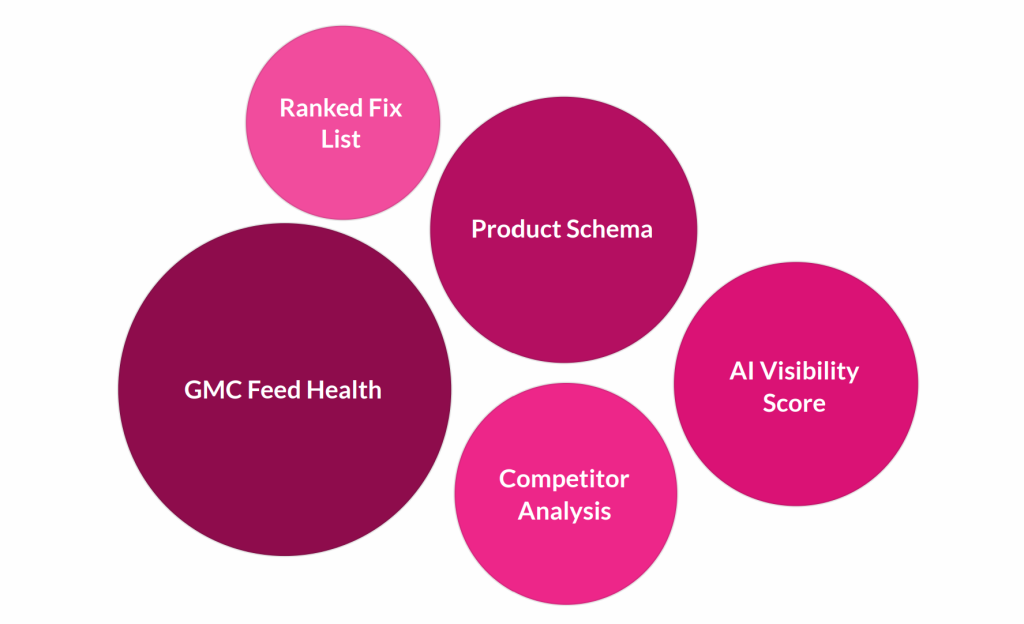
If you’d rather have us do the audit for you, AmpiFire runs full ecom AI visibility audits. You get:
- Google Merchant Center feed health check: disapprovals, warnings, GTIN coverage across your catalog
- Product schema completeness across every product page
- AI visibility scoring: how often your brand appears in ChatGPT, Google AI Mode, and Perplexity for your category
- Competitor analysis: which brands AI is recommending instead of yours, and why
- A ranked fix list with estimated impact, sorted by priority
Most stores have 200+ fixable issues and no idea which ones actually move the needle. The audit surfaces them and tells you what to tackle first, then we can handle the fixes and the ongoing content distribution if you want us to.
And Distribute Your Content for AI Visibility
You can have a perfect schema, a flawless Merchant Center feed, and zero errors across every validator. And you will still lose sales to competitors. Why? Because 93% of buyers research across multiple platforms before purchasing. They check Google. They check YouTube. They check Reddit, TikTok, podcasts, news sites, Pinterest, ChatGPT, Perplexity, and AI Overviews. They compare. They look for third-party validation.
If your store is the only place on the internet that talks about your products, you are invisible during that research phase. Your competitors, the ones showing up across search, social, video, podcasts, news sites, and AI recommendations, win the sale. Even when the customer finds you first. This is why content distribution matters more than ever in 2026.
AmpFire is our content marketing service. AmpCast AI is our in-house multicasting platform. For every topic, AmpCast AI creates 8 content formats and publishes them across 300+ sites, including:
- News articles published to real local news sites and for Google News
- Social posts for LinkedIn, TikTok, and Pinterest; all adapted per platform algorithm
- Reels/shorts for YouTube Shorts and TikTok video formats
- Interview podcasts on Spotify, Apple Podcasts, and podcast networks
- Infographics on Pinterest and image sites for visual discovery
- Blog posts and long-form videos for search and YouTube
Your brand and your products show up across every platform a buyer researches during the 93% research phase, rather than only on your own product page. Schema optimization gets your products eligible for Google Shopping and AI citation. Content distribution is what actually makes you the answer when a buyer asks. Try AmpiFire to fix your store visibility today.
Frequently Asked Questions (FAQs)
Do I need expensive SEO services to rank in AI shopping results?
No, expensive SEO services are not required to rank in AI shopping results. Most visibility comes from optimizing your Google Merchant Center feed, implementing complete product schema, and collecting real reviews rather than relying on complex or costly SEO strategies.
How important are product titles for Google Shopping rankings?
Product titles are one of the strongest ranking factors in Google Shopping. Clear, structured titles that include brand, product type, and key attributes help Google understand relevance, improving both visibility in results and click-through rates from shoppers.
Do I need different strategies for ChatGPT, Google, and Perplexity?
No, you do not need separate strategies for each platform. Most AI tools pull product data from Google Shopping, so optimizing your Merchant Center feed, schema, and reviews once can improve visibility across ChatGPT, Google AI, and similar systems.
Can AI-generated product descriptions hurt my rankings?
AI-generated descriptions can hurt rankings if they are generic, repetitive, or inaccurate. However, when used properly to create unique, natural, and detailed content, AI can significantly improve product pages without negatively impacting search performance or visibility.
Is content marketing really necessary if my product pages are optimized?
Yes, content marketing is still necessary even with optimized product pages. While optimization helps your products appear in search and AI results, content distribution ensures your brand is visible across multiple platforms where buyers research before making purchasing decisions.
With AmpFire, we don’t just optimize for visibility; we help distribute your multi-format content across multiple channels so your brand shows up wherever your customers are researching. This creates repeated exposure, builds trust, and ultimately drives more conversions.
*Disclaimer: Results may vary based on individual circumstances, business type, and content strategy. The time savings and outcomes mentioned are based on typical user experiences and are not guaranteed. For specific pricing and service details, please visit AmpiFire.
Author
Related Posts


17 BigCommerce Apps & Shopping Plugins for Unprecedented Online Store Growth
Boost your BigCommerce store's success with 17 powerful tools for SEO, multi-channel selling, fraud protection, product reviews, personalized recommendations, marketing…

BigCommerce vs Magento | Features, Pricing & Demo
Here's our detailed analysis of two leading e-commerce platforms known for their customization, scalability, integrations, and pricing.


Agentic Commerce Protocol for Shopify: Setup & Guide
Learn how to prepare your Shopify store for OpenAI's Agentic Commerce Protocol (ACP). Get AI-driven sales with structured content across…

Product Filtering for BigCommerce: Examples of Faceted Search
Check out how to create efficient product filtering with powerful examples of faceted search for your e-commerce business.

BigCommerce Instagram Integration Guide | Boost Your Instagram Shopping Revenue
Read how eCommerce brands can tap into Instagram's massive audience, leverage seamless shopping through BigCommerce Instashop integration, and utilize Instagram…
ProductDyno Features & Pricing: The Best App to Create & Sell Digital Products?
Heard about ProductDyno but not sure what it is? Learn about its features and pricing to see if it's the…








