

Key Takeaways
- If your e-commerce store isn’t showing up in search or AI results, the most common reason is poor site structure, and the fix is simpler than you think: group products into clear hierarchies and let Shopify’s built-in Collections and Navigation do the heavy lifting.
- Vague product titles like “Shirt – Blue – Large” are invisible to Google Shopping. Write factual, descriptive titles and sync them to Google Merchant Center through Shopify’s free Google & YouTube app to qualify for free Shopping listings.
- Choose filters that match how your customers actually shop, and make sure the page headline updates to reflect each selection.
- Focus your blog on answering specific buyer questions, not publishing generic content. Each answer becomes an entry point to your products.
- Use AmpiFire’s AmpCast AI to turn each blog post into 8 content formats and distribute them across 300+ platforms, so AI agents find your brand everywhere and recommend you over competitors.
Best Practices for E-Commerce SEO & AI Answers
If your e-commerce store is structured well for people, it’s already structured well for Google, ChatGPT, and AI Overviews. The golden rule is: high rankings in modern search and AI results are heavily correlated with “doing the right thing for people.” What helps a real person make a buying decision is exactly what search engines and AI models look for when ranking and recommending products.
Below, we outline how to structure an e-commerce site to rank in traditional search engines and appear in AI-generated answers (like ChatGPT or Google AI Overviews). We also include “Algo Jargon” sections throughout, because agencies love using technical terms to make SEO sound like a secret.
Most of it is common sense that you can see companies like Amazon applying every day. And most of it is already built into Shopify.

How AmpiFire Works:
- Research & Target: Find high-demand topics your buyers search for.
- Create & Repurpose: AmpiFire’s AmpCast AI generates news articles, blog posts, interview podcasts, longer informational videos, reels/shorts, infographics, flipbooks/slideshows, and social posts.
- Distribute & Amplify: Auto-publish to 300+ sites, including Google News, YouTube, Spotify, and major news networks.
Get more traffic from people who want to buy your stuff, and powerful “As Seen On” trust badges for your site.
Do It Yourself (with AI), Done For You Content, & 100% Managed Organic Growth options available.
Grow Your Free Traffic From Everywhere
1. Organize Content Like a Great Storefront
The Goal: Make it impossible for a user, a search engine, or an AI model to get lost.
Good store organization works the same way online as it does in person. If shoppers, search engines, or AI models can’t find what they’re looking for on your site, you lose a sale or a ranking. Group products into intuitive hierarchies that flow from broad to specific:
- “Home Office” -> “Ergonomic Chairs” -> “Mesh Task Chairs”
- “Skincare” -> “Moisturizers” -> “Lightweight Gel Moisturizers”
Then break your pages into clear visual blocks using H2/H3 headers and bulleted lists, as AI models scan for distinct sections that each answer one specific sub-topic (e.g., “Pros & Cons,” “Technical Specs”). Shopify handles much of this out of the box. By using the built-in “Collections” and “Navigation” features correctly, you’re already doing 80% of the work that expensive agencies charge for.
Algorithmic Jargon: This reduces the “Cost of Retrieval.” Neatly partitioned sections help bots identify the “Information Foraging Path” without wasting crawl budget.
2. Make Filtering “Talk” to the Search Engine
The Goal: Create specific “answers” for specific needs without building 1,000 separate pages.
Most store owners underuse their filters. A well-built filter system creates specific “answers” for specific needs without you having to build 1,000 separate pages. The key is choosing filters that match how your customers actually shop:
- Beauty site: “Skin Type” (Dry, Oily) or “Ingredients” (Vitamin C).
- Electronics store:“Use Case” (Gaming, Office, Travel) or “Connectivity” (Bluetooth, USB-C).
When a user selects a filter like “Oily Skin,” the page headline should ideally update to “Skincare for Oily Skin.” This confirms to both the shopper and the AI that the page is a perfect match for that query.
One warning: don’t over-filter a small catalog. If you only have 5–10 products, 20 filters creates “analysis paralysis” for shoppers, and search engines may penalize the site for “thin” pages with no meaningful differences.
Algorithmic Jargon: This is “Contextual Signal Generation.” Every filter click “verbalizes” a new intent, making the page eligible for highly specific “long-tail” AI answers.
3. Be the “Subject Matter Expert”
The Goal: Provide so much detail that AI models cite you as the source of truth.
AI models pull their recommendations from the most detailed, trustworthy sources they can find. If your product pages read like a knowledgeable friend explaining exactly what something is and who it’s for, you’re already ahead of most competitors. AmpiFire’s content approach is built around this exact principle: factual, buyer-focused content that earns citations from both search engines and AI.
- Factual & Straightforward Language: We recommend using simple, factual language. Overly abstract, “hypey,” or “creative” marketing speak is disliked by both customers and AI models. Clear explanations build trust and lead to better buying decisions.
- Comparison & Use-Cases: Don’t just list specs. Explain “Who is this for?” (e.g., “Best for small apartments” or “Ideal for professional photographers”).
- Shopify Tip: Use Metafields to store structured data (“Material,” “Care Instructions,” or “Warranty”) and display them as clean blocks on your product pages.
Algorithmic Jargon: This builds “Topical Authority” through “Natural Language Processing (NLP).” By using the specific names for parts and features, you help the AI “understand” your expertise.

4. How Do You Get Your Products Into Google Shopping for Free?
The Goal: Show up in the “Shopping” tab and the product carousels in search results for free.
You don’t need to pay for ads to appear in Google Shopping. Google offers free product listings, but your data has to be clean enough for their system to match your products to what people are searching for. Shopify makes this easy with a native Google & YouTube app that syncs your products to Google Merchant Center automatically.
If your product titles say “Shirt – Blue – Large,” you won’t appear. Titles like “Men’s 100% Cotton Button-Down Shirt, Navy Blue, Size Large” give Google what it needs to make the match.
A few things to get right:
- Global Trade Item Numbers (GTIN): If you sell other brands, include the barcode (GTIN/UPC). This is how Google matches your product to the right search.
- Free Listings: Once your Merchant Center is linked and your “Product Feed” is clean, you are eligible for “Free Listings” in the Shopping tab.
- Rich Info: The key is having rich titles, descriptions, and product information on your product pages. Expand on this in your blog and publish related content across the web, increasing both search engine and AI pickup (see section 6).
Algorithmic Jargon: This is called “Feed Optimization.” By providing high-quality “Product Schema,” you ensure your products have the correct “Attribute-Value Pairs” to match user queries.
5. Internal Linking & Automation
The Goal: Create a “web” of information that keeps users on your site and helps search engines find every page.
Internal links do two jobs at once: they keep shoppers browsing longer, and they help search engines understand how your pages relate to each other. The good news is that most of this can run on autopilot with correct setup.
- Automated Product Links: Use “You may also like” or “Frequently bought together” sections. These automatically create natural links between related products.
- Automated Blog Links: Use apps or Shopify theme features to display “Related Products” at the bottom of blog posts based on the post’s tags.
You don’t need a big, expensive audit to fix your internal links. Just make sure to have logical navigation and well-organized collections. If you’re running a large catalog, tools built around AI content workflows can help automate content structuring across hundreds of pages.
6. What Kind of Blog Content Actually Drives E-Commerce Traffic?
The Goal: Answer the questions your customers are actually asking.
Most blog advice tells you to publish often and cover broad topics, but that’s backward. Your blog should focus on answering specific buyer questions. Each answer becomes a direct entry point to your products and builds your standing in the space.
Publishing on your own site is step one. Step two is distribution, and it’s where most brands fall short. Use AmpCast AI to push each post across multiple formats — news articles, blog posts, interview podcasts, longer informational videos, reels/shorts, infographics, flipbooks/slideshows, and social posts — signaling relevance to search engines and reinforcing your factual data with AI models so they cite you as a source.

7. Practical Checklist for Shopify Owners
You don’t need to overthink your Shopify setup. Most of the technical foundation is already handled for you. The checklist below covers the handful of things worth double-checking before you move on to content and distribution.
- URL Structure: Keep it clean (/collections/category/products/item).
- Breadcrumbs: Always enable them; they act as a map for AI and users.
- Simplicity First: If a feature doesn’t help a human buy, don’t build it for a bot.
- Native Features: Trust Shopify’s core architecture. It’s built to be SEO-friendly by default.
- Post Everywhere: Create content that describes your products and answers buyers’ questions, and post it on your blog and in different formats across the internet.
Stop Overthinking Site Structure & Start Getting Real Traffic with AmpCast AI
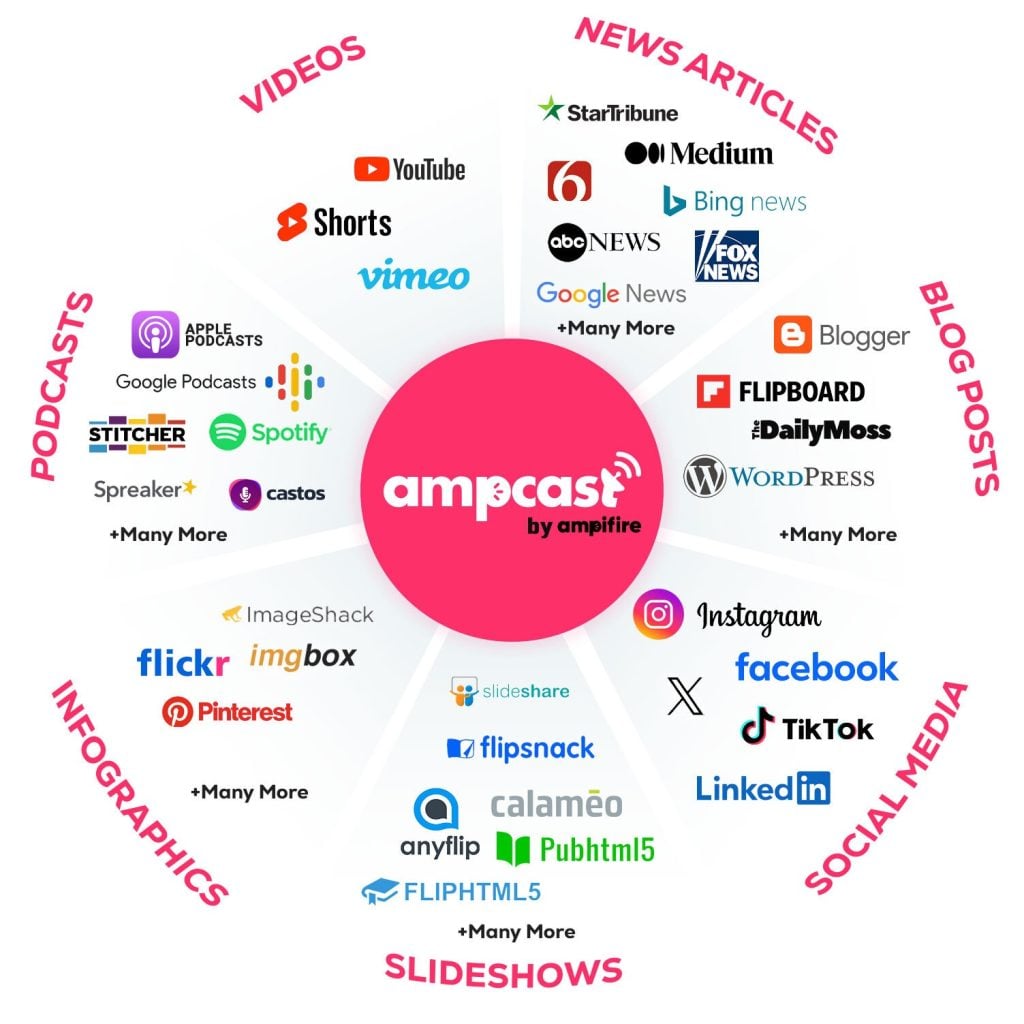
Your store provides the foundation with clean data and smart organization. We built AmpCast AI to handle the rest: transforming your product knowledge into 8 content formats and distributing them across 300+ platforms — including Google News, YouTube, Spotify, Pinterest, and FOX affiliate sites — where AI agents and search engines actually look.
The result is simple. When ChatGPT or Google AI Overviews research your product category, they find your content everywhere and recommend you over competitors. We turn your expertise into content that reaches everywhere, so you can focus on selling, not publishing.
Frequently Asked Questions (FAQs)
Do I need to hire an expert to optimize my Shopify store for search engines?
No. Shopify handles most optimization automatically through its built-in features: clean URLs, proper site structure, mobile responsiveness, and basic technical requirements. Your job is to use Collections logically, write clear product descriptions, and enable breadcrumbs in your theme settings.
How do I get my products to show up in Google Shopping without paying for ads?
Install Shopify’s free Google & YouTube app to sync your products to Google Merchant Center. Write factual, descriptive product titles like “Men’s 100% Cotton Button-Down Shirt, Navy Blue, Size Large” instead of vague titles like “Shirt – Blue.”
What’s the difference between product filters and creating separate category pages on Shopify?
Filters let users narrow results without you having to build hundreds of pages. Only create separate category pages when you have enough distinct products to make a meaningful collection. Avoid creating 20 filters for 10 products.
Should I focus on on-site blog content or distributing content to other platforms?
Both. Your blog should answer specific buyer questions that bring people to your products, but stopping there means only people who find your site see your content. AmpiFire’s AmpCast AI takes your blog posts, transforms them into 8 formats, and distributes across 300+ platforms, multiplying your reach without multiplying your workload.
*Disclaimer: Results may vary based on individual circumstances, business type, and content strategy. The time savings and outcomes mentioned are based on typical user experiences and are not guaranteed. For specific pricing and service details, please visit AmpiFire.
Author
Related Posts


How to Increase Organic Traffic to Your E-commerce Website
Learn how to increase organic traffic to your e-commerce website with proven strategies, content tips, and optimization techniques. Boost your…


How to Write BigCommerce Product Descriptions: Examples & Best Practices
Read our guide to learn the secrets to writing effective BigCommerce product descriptions plus examples that get results.

How to Promote Your Blog on Twitter or X: Best Practices & Examples
Learn how to promote your blog on X (formerly Twitter) with proven strategies. Increase blog traffic using threads, visuals, and…

Ecom Store CRO Checklist: Proven Techniques & Best Practices
Get more sales with our ecom store CRO checklist: find proven techniques for optimizing your website, product pages & omnichannel…

Agentic Commerce Protocol Setup Guide: How to Get AI-Driven Ecom Sales in 2026
OpenAI and Stripe’s Agentic Commerce Protocol (ACP) changes how 800 million people discover and buy products. Instead of searching Google…

5 Ways to Distribute Your Infographics: Best Practices
Learn proven strategies to distribute infographics across multiple platforms. Increase reach with AmpiFire's automated system.








