

Key Takeaways
- Weglot translates any website into 110+ languages without code, working on top of your existing site so you don’t need to duplicate or restructure anything.
- Multilingual SEO runs automatically, giving each language its own indexable URL, hreflang tags, translated metadata, and a sitemap that updates as you publish.
- Pricing climbs with both language count and word volume, from €15 monthly for one language to €699 for twenty, so calculate your word count first.
- Weglot scores 4.7 on Capterra and G2 and 4.9 on Trustpilot, with praise for minutes-long setup and support; word-count pricing draws the complaints.
- AmpiFire’s AmpCast AI turns one topic into 8 content formats and publishes them across 300+ sites, driving the traffic translated pages need to pay off.
Is Weglot Worth the Investment?
For most businesses reaching international audiences without heavy technical overhead, Weglot delivers measurable value. Setup takes minutes on most platforms, so a monolingual website becomes multilingual the same day. Add automated multilingual SEO, the Visual Editor, and built-in professional translation ordering, and you have a complete solution for most cases.
That said, it’s worth modeling the cost structure before you commit. Pricing rises with both your word count and your language count, so large product catalogs and wide language coverage compound quickly. Work out your actual numbers first, especially if you are considering anything above the Business tier.
The honest answer depends on which problem you are solving. If translation speed, SEO automation, and ease of use are your priorities, Weglot handles all three. If you need a highly customized setup or full control over the translation workflow, you’ll trade that for more setup work and ongoing maintenance elsewhere.
A translated site only pays off once people find it. AmpiFire’s AmpCast AI turns one topic into a multi-format content campaign and publishes it across hundreds of sites, giving newly translated pages an audience to actually reach.

How AmpiFire Works:
- Research & Target: Find high-demand topics your buyers search for.
- Create & Repurpose: AmpiFire’s AmpCast AI generates news articles, blog posts, interview podcasts, longer informational videos, reels/shorts, infographics, flipbooks/slideshows, and social posts.
- Distribute & Amplify: Auto-publish to 300+ sites, including Google News, YouTube, Spotify, and major news networks.
Get more traffic from people who want to buy your stuff, and powerful “As Seen On” trust badges for your site.
Do It Yourself (with AI), Done For You Content, & 100% Managed Organic Growth options available.
Grow Your Free Traffic From Everywhere
What Is Weglot & How Does It Work?
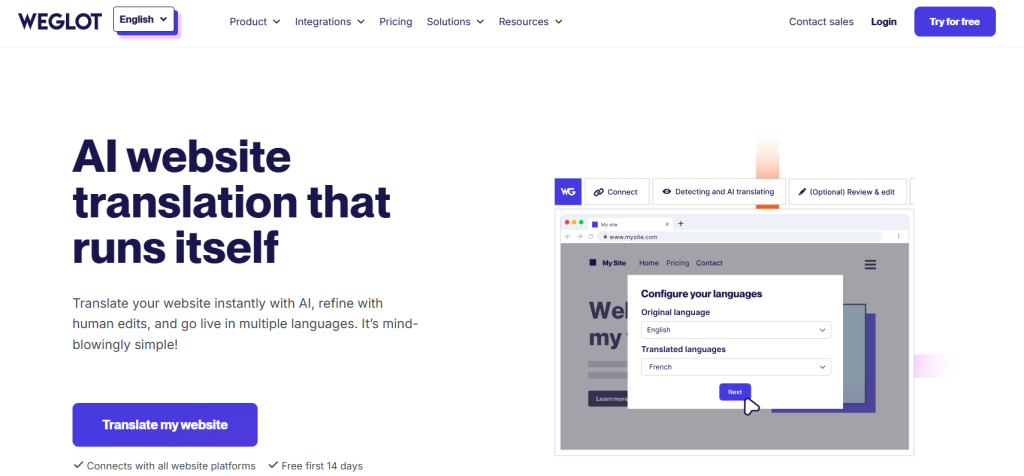
Weglot is a cloud-based website translation platform that automatically detects, translates, and displays your website content in multiple languages. It works on top of your existing website, so you don’t need to duplicate pages or manage separate content for each language.
You connect it to your site, select from 110+ languages, and within minutes your website is available in those languages with no code required.
What makes Weglot different from a simple translation widget is the infrastructure behind it. Every translated page gets its own URL, either a subdirectory like yoursite.com/fr/ or a subdomain, complete with hreflang tags and translated metadata.
How Weglot Integrates With Your Existing Website
Integration is one of Weglot’s strongest selling points. For most platforms, setup means installing a plugin or adding a JavaScript snippet to your site.
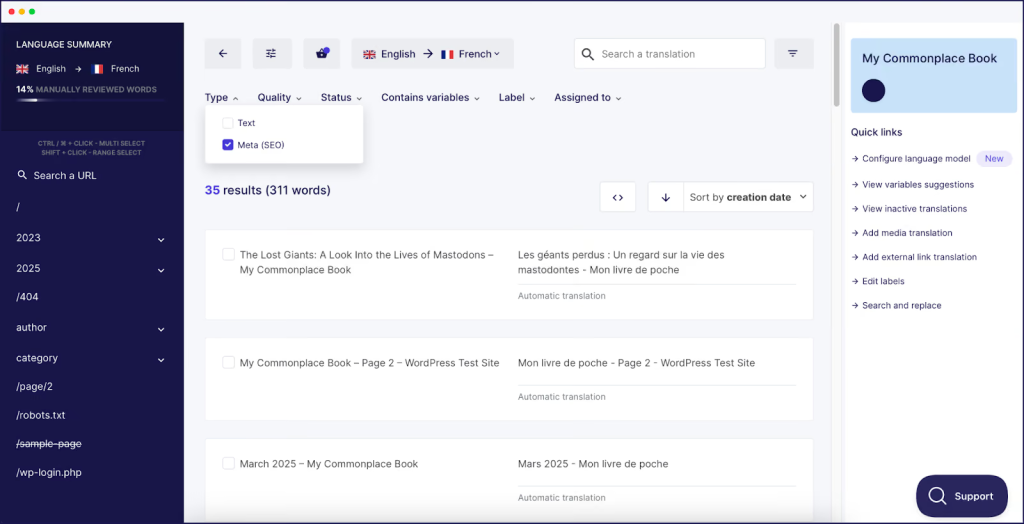
Once connected, Weglot automatically detects all the content on your website and adds it to your Translations List, including content not visible on the page such as metadata and image alt tags.
It also covers your conversion steps, from lead generation forms and pop-ups to email confirmations. You manage everything from one dashboard, and your translations live in Weglot rather than your CMS.
Weglot Features
AI Translation & Custom Language Model
The core translation layer generates initial translations as soon as you add a new language, drawing on leading engines including DeepL, Google Translate, and Microsoft Translator. Weglot reports that more than 80% of users rely solely on those AI translations without making any edits.
The Custom AI Language Model stands out for businesses with specific terminology needs. It learns from your brand guidelines and past manual edits, then applies that tone automatically across new content.
Automatic Content Detection
Weglot detects the content on your website at setup, including items not visible on the page such as metadata. After that, Weglot automatically detects and translates any new content you publish. You don’t have to flag what needs translating.
Visual Editor & Translation List
Weglot gives you two ways to edit. The Visual Editor lets you work directly inside your website’s design and structure, so you see exactly how the translated page will look.
The Translation List gives you every detected string in one view for faster bulk edits. Neither requires technical knowledge, so content managers can maintain quality without involving a developer.
Multilingual SEO & GEO
This is where Weglot earns its price for many businesses. Each language version lives under its own subdirectory or subdomain, so Google can index it. Weglot automatically adds hreflang tags and translates your metadata and image alt tags. It can also generate a multilingual sitemap that stays current as you publish.
Weglot extends this to GEO. A 2025 study they ran with Ellipsis, covering 1.3 million citations across Google AI Overviews and ChatGPT, found translated websites gained up to 327% more visibility in AI search.
Glossary Management
Brand consistency across languages is one of the hardest parts of multilingual content. The Glossary lets you define terms, phrases, brand names, and product names once, and Weglot keeps them consistent everywhere. That saves you from editing the same term repeatedly.
Auto-Redirection
Weglot can automatically serve visitors your pages in their own language, based on their browser settings. A French-speaking visitor arriving on your English homepage gets the French version without touching a switcher. Weglot positions this as a way to improve your bounce rate.
Team Collaboration & Professional Translation Orders
You can add teammates or your own translators to the dashboard, so everyone edits in one place instead of trading files. For content that demands more precision, Weglot lets you order professional translation from inside the dashboard. You can choose AI translation, human editing, or a combination of both.
Universal Integrations
Weglot says it works with all major content management systems, web technologies, and tools, with named integrations for WordPress, Shopify, Wix, Webflow, Squarespace, BigCommerce, Drupal, WooCommerce, Framer, Bubble, and custom code or JavaScript. The dashboard also handles content coming from third-party apps and plugins.
How Much Does Weglot Cost?
Free Plan
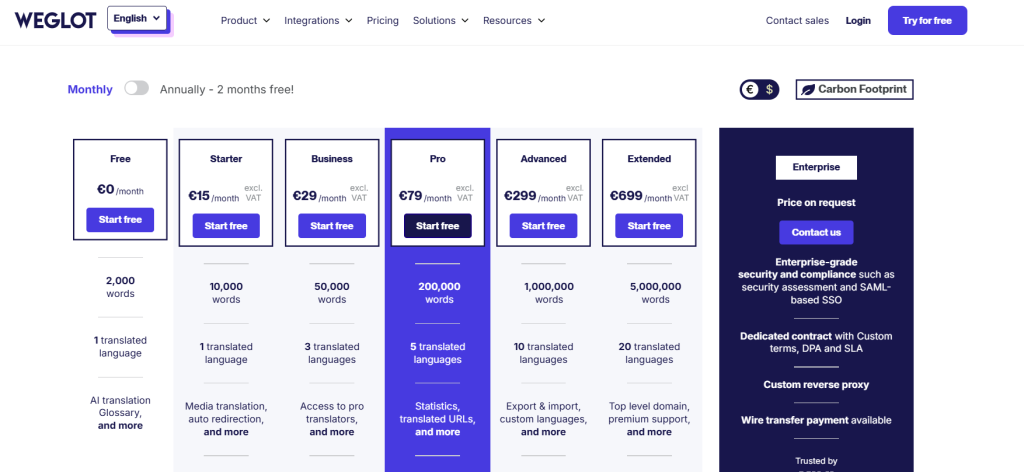
The free plan covers 1 language and 2,000 translated words, with AI translation and the glossary included. That is enough for a landing page, not an active website. Use it to confirm Weglot works cleanly with your platform before paying.
Paid Plan Tiers
Weglot’s paid plans cover a wide range of business sizes, from small blogs to enterprise deployments. Prices are billed in euros and exclude VAT, so the dollar equivalent depends on the exchange rate at the time you subscribe.
| Plan | Languages | Words | Price (monthly) |
| Free | 1 | 2,000 | €0 |
| Starter | 1 | 10,000 | €15 |
| Business | 3 | 50,000 | €29 |
| Pro | 5 | 200,000 | €79 |
| Advanced | 10 | 1,000,000 | €299 |
| Extended | 20 | 5,000,000 | €699 |
| Enterprise | Custom | Custom | On request |
Higher tiers add capability and volume.
- The Starter plan provides image translation and sends visitors straight to their language version.
- The Business plan lets you order professional translators for pages that need a human.
- The Pro plan adds translated URLs, so a French page’s slug becomes /fr/a-propos rather than /fr/about.
- The Advanced and Extended plans add export and import, custom languages, and the option of a separate domain per language.
- The Enterprise plan includes security assessments, SAML single sign-on, and custom contracts.
Weglot User Reviews
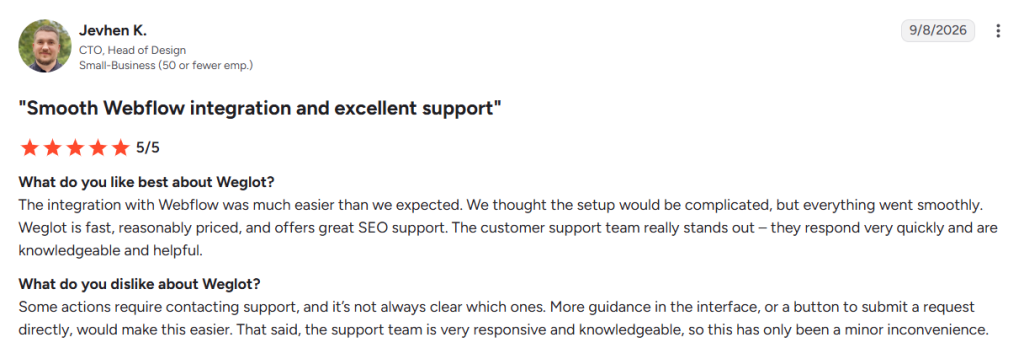
Weglot holds 4.7 out of 5 on Capterra, 4.7 on G2, and 4.9 from over 1,700 Trustpilot reviews. Reviewers return to the same points: setup measured in minutes, a Visual Editor that puts translation edits within reach of non-technical staff, and support that answers with specific, useful detail.
The multilingual SEO automation draws consistent praise too, particularly from marketing teams who would otherwise manage hreflang tags and translated URLs themselves. Word-count pricing is the most common complaint, with some reviewers finding the model confusing and upgrades costly as languages are added.
Weglot Translates Your Site, AmpiFire Brings the Visitors
Weglot removes the language barrier on your site, from automatic content detection to translated URLs and editor control over every string. It doesn’t, however, send people to those pages. A translated site only pays off once traffic reaches it.
AmpiFire’s AmpCast AI starts by researching the topics your buyers are actually searching for at every stage of their journey, then turns that one topic into 8 content formats, including news articles, blog posts, podcasts, and videos, before publishing them across 300+ high-authority sites such as YouTube, Spotify, Pinterest, and Google News. This gives your translated pages more opportunities to reach potential customers across search, social, video, podcasts, and news channels. Try AmpCast AI so your translated pages have visitors.
Frequently Asked Questions (FAQs)
Is Weglot free to use?
Weglot offers a free plan supporting one language and up to 2,000 translated words. That is enough to test the integration on your platform, though most active websites exceed it quickly. Paid plans start at €15 per month for Starter and scale with your language count and total word count.
Does Weglot work with WordPress?
Weglot has a dedicated WordPress plugin that installs in minutes, and it works with every WordPress theme, plugin, and add-on, including Elementor, Divi, and Yoast SEO. It also covers WooCommerce, translating your product catalog and checkout pages.
Can I edit translations manually in Weglot?
You can edit translations manually in Weglot, one of its most useful features. You can edit every automatic translation through the Visual Editor, which lets you work inside your live site’s design, or the Translation List, which shows original and translated strings together. You can also add teammates, bring your own translators, or order professional translation inside the dashboard.
Does Weglot use AI for translations?
Weglot uses AI for translations. Base translations come from leading engines including DeepL, Google Translate, and Microsoft Translator. On top of that, the Custom AI Language Model, powered by OpenAI and Gemini, learns from your brand guidelines and your past edits so output matches your tone.
How do I increase website traffic without paid ads?
To increase organic website traffic, your brand must show up where buyers already research: search results, YouTube, podcast apps, news sites, social feeds, and AI assistants like ChatGPT. The difficulty is production, since covering all of those means writing, filming, recording, and designing for each one.
AmpiFire’s AmpCast AI removes that workload by automatically producing multi-format content about your business and publishing it where those buyers are looking, and every piece stays live and keeps sending visitors long after it goes out. This organic presence also strengthens any paid ad campaigns you run, since buyers who see your brand across multiple channels are more likely to trust and click on your ads too.
*Disclaimer: Results may vary based on individual circumstances, business type, and content strategy. The time savings and outcomes mentioned are based on typical user experiences and are not guaranteed. For specific pricing and service details, please visit AmpiFire.
Author
Related Posts


Pixpa Reviews, Cost & Alternatives: Is This Website Builder Worth It for Photographers?
Is Pixpa worth it for photographers? Explore its features, pricing, and the best alternatives, plus how AmpiFire can help drive…


iContact Reviews, Cost & Features: Is This Email Marketing Software Worth It?
Discover if iContact is right for your business. Learn about pricing from $9/month, key features, and user reviews for this…


SendX Pricing, Features & Reviews: Is This AI-Powered Email Marketing Software Worth the Cost?
See real SendX reviews covering pricing, AI-powered features, and deliverability tools. Learn if this email marketing software is worth it.

Albacross Pricing & Reviews: Is This B2B Website Visitor Identification Platform Worth It?
Discover Albacross pricing, features, and G2 reviews to find out if this B2B visitor identification platform fits your traffic and…

SiteGuru Reviews, Pricing & Features: Is This SEO Tool Worth It?
Read SiteGuru reviews, pricing, and key features. Find out if this SEO tool is worth your investment for boosting site…


Icecat: Features, Benefits & Pricing – E-commerce Data Management Solution Breakdown
If you’re an e-commerce business owner, you know how important it is to provide accurate and detailed information about your…









